hub / github.com/IonRh/TGBot_RSS
github.com/IonRh/TGBot_RSS @v1.0.3
Chat with this repo
86 symbols
268 edges
2 files
56 documented · 65%
What it actually does AI analysis from the code graph — generated when you open this
loading…
README
TGBot RSS
    _    _     ____            _
   / \  | |__ | __ ) _   _  __(_)
  / _ \ | '_ \|  _ \| | | |/ _| |
 / ___ \| |_) | |_) | |_| | (_| |
/_/   \_\_.__/|____/ \__,_|\__,_|
TGBot RSS 是一个基于 Telegram Bot 的 RSS 订阅工具,支持关键词过滤、多用户订阅和自定义推送格式。通过 TGBot RSS,你可以轻松获取感兴趣的 RSS 内容,并通过 Telegram 接收实时推送。
长期维护推送Bot:https://t.me/JK_550w_bot
交流群:https://t.me/IonMagic
全推送频道:https://t.me/Push_Forum
功能特点
- 🔍 关键词过滤:支持添加多个关键词,只推送包含关键词的内容
- 🚫 屏蔽功能:支持使用
-关键词格式屏蔽不想看到的内容 - 🔄 定时更新:自动定期检查 RSS 源的更新
- 👥 多用户支持:支持多个用户订阅同一个 RSS 源
- 📊 推送统计:记录并显示每日推送数据
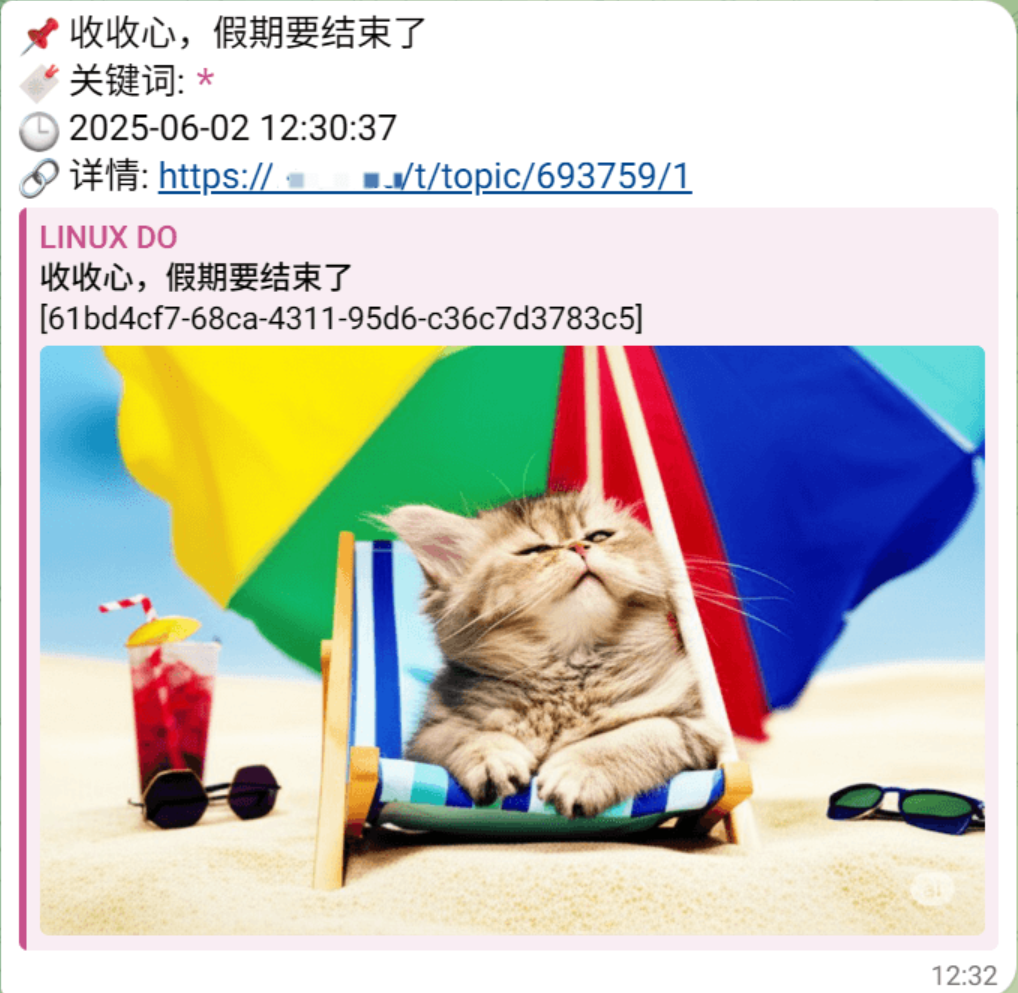
- 🖼️ 图片支持:自动提取 RSS 内容中的图片并发送
- 🔗 HTML 支持:保留 Telegram 支持的 HTML 标签格式
- 🔒 代理支持:可配置代理服务器访问被墙的 RSS 源
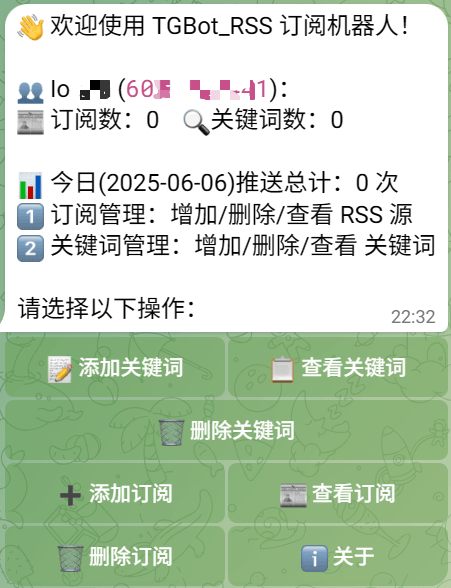
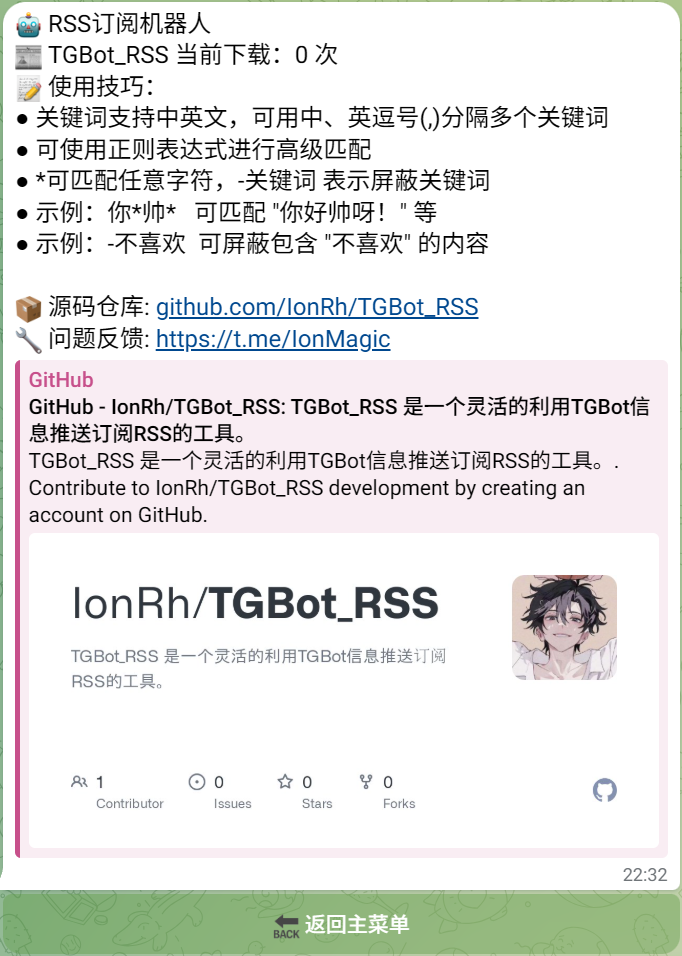
| 主面板 | 推送样式 | 关于 |
|---|---|---|
 |
 |
 |
Docker运行
BotToken: Telegram Bot 的 API 令牌,从 @BotFather 获取ADMINIDS: 管理员用户 ID,设置为 0 表示所有用户可用,自用建议设置为自己UID如:60xxxxxxxxCycletime: RSS 检查周期,单位为分钟,建议为1Debug: 是否开启调试模式ProxyURL: 代理服务器 URL,例如http://127.0.0.1:7890,默认为空则不使用代理Pushinfo: 额外推送接口 URL,可设置为微信机器人之类的消息推送接口如此格式https://xxxx.xxxxx.xxx/send_msg?access_token=xxxxxxx&msgtype=xxxx&touser=xxxxx&content=此接口将与TGBot收到同等消息,可实现TG控制Bot关键词,其他链接,接收识别到关键词的帖子
docker run -d \
  --name TGBot_RSS \
  -e BotToken="57xxxxxxxxxx:xxxxxxxxxxxxxxxxsvjM" \
  -e ADMINIDS="602xxxxxxx" \
  -e Cycletime="1" \
  -e Debug="false" \
  -e ProxyURL="http://127.0.0.1:7890" \
  -e Pushinfo="https://xxxx.xxxxx.xxx/send_msg?access_token=xxxxxxx&msgtype=xxxx&touser=xxxxx&content=" \
  -e TZ="Asia/Shanghai" \
  -v "$(pwd)/TGBot_RSS:/root/" \
  kwxos/tgbot-rss:latest
免费云平台也可运行,镜像kwxos/tgbot-rss:latest,只需要在环境变量中,填写上面的变量即可执行,如环境变量BotToken对应的值57xxxxxxxxxx:xxxxxxxxxxxxxxxxsvjM
VPS直接运行
安装步骤
- 执行:
curl -sL https://ghproxy.badking.pp.ua/https://raw.githubusercontent.com/IonRh/TGBot_RSS/main/TGBot_RSS.sh | bash
- 根据自己的需求修改
config.json配置文件 - 测试可执行文件
./TGBot_RSS - 后台运行可执行文件
nohup ./TGBot_RSS > /dev/null 2>&1 &
配置说明:
BotToken: Telegram Bot 的 API 令牌,从 @BotFather 获取ADMINIDS: 管理员用户 ID,设置为 0 表示所有用户可用,自用建议设置为自己UID如:60xxxxxxxxCycletime: RSS 检查周期,单位为分钟,建议为1Debug: 是否开启调试模式ProxyURL: 代理服务器 URL,例如http://127.0.0.1:7890,默认为空则不使用代理Pushinfo: 额外推送接口 URL,可设置为微信机器人之类的消息推送接口如此格式https://xxxx.xxxxx.xxx/send_msg?access_token=xxxxxxx&msgtype=xxxx&touser=xxxxx&content=此接口将与TGBot收到同等消息,可实现TG控制Bot关键词,其他链接,接收识别到关键词的帖子
{
  "BotToken": "57xxxxxxxxxx:xxxxxxxxxxxxxxxxsvjM",
  "ADMINIDS": 602xxxxxxx,
  "Cycletime": 1,
  "Debug": false,
  "ProxyURL": "http://127.0.0.1:7890",
  "Pushinfo": "https://xxxx.xxxxx.xxx/send_msg?access_token=xxxxxxx&msgtype=xxxx&touser=xxxxx&content="
}
使用指南
基本命令
/start- 显示主菜单/help- 显示帮助信息
添加订阅
- 在主菜单中点击 "➕ 添加订阅"
- 按照格式输入 RSS 信息:
URL 名称 TG频道用0常规用1 - 例如:
https://example.com/feed 科技新闻 0
添加关键词
- 在主菜单中点击 "📝 添加关键词"
- 输入关键词,多个关键词可用空格或逗号分隔
- 支持以下格式:
- 普通关键词:
科技 - 通配符匹配:
科技*新闻(匹配"科技最新新闻"等) - 屏蔽关键词:
-广告(屏蔽包含"广告"的内容) -
t 关键词 - 只匹配标题
-
c 关键词 - 只匹配描述内容
-
a 关键词 - 匹配标题和描述
- 示例:#t技术 只在标题中匹配"技术"
- 示例:#c新闻 只在描述中匹配"新闻"
- 示例:#a科技 在标题和描述中都匹配"科技"
- 示例:技术+科技新闻 只匹配名为"科技新闻"的RSS源
查看和删除
- 点击 "📋 查看关键词" 或 "📰 查看订阅" 可以查看已添加的内容
- 点击 "🗑️ 删除关键词" 或 "🗑️ 删除订阅" 可以删除不需要的内容
数据库结构
TGBot RSS 使用 SQLite 数据库存储数据,包含以下表:
subscriptions: 存储 RSS 订阅信息user_keywords: 存储用户关键词feed_data: 存储 RSS 源的最后更新时间和最新标题
高级功能
关键词匹配规则
- 支持普通文本匹配
- 支持通配符
*匹配任意字符 - 支持使用
-前缀屏蔽特定内容
常见问题
- 如存在问题,打开debug,再issue中反馈
- 源码已公开
联系方式
- 问题反馈:https://t.me/IonMagic
- 项目仓库:https://github.com/IonRh/TGBot_RSS
<img alt="Star History Chart" src="https://api.star-history.com/svg?repos=IonRh/TGBot_RSS&type=Timeline" />
Core symbols most depended-on inside this repo
logMessagecalled by 63
TGRSSBot/main.go
SendError
called by 20
TGRSSBot/main.go
CreateBackButton
called by 12
TGRSSBot/main.go
SendResponse
called by 11
TGRSSBot/main.go
withDB
called by 10
TGRSSBot/main.go
HandleAction
called by 10
TGRSSBot/main.go
getKeywordsForUser
called by 6
TGRSSBot/main.go
createHTTPClient
called by 5
TGRSSBot/main.go
Shape
Languages
Go100%
Modules by API surface
TGRSSBot/main.go73 symbols
TGRSSBot/rss.go13 symbols
For agents
$ claude mcp add TGBot_RSS \
  -- python -m otcore.mcp_server <graph>