github.com/Impact-I/reFlutter @main
Chat with this repoBrowse by type
What it actually does AI analysis from the code graph — generated when you open this
README


Read more on the blog: https://swarm.ptsecurity.com/fork-bomb-for-flutter/
This framework helps with Flutter apps reverse engineering using the patched version of the Flutter library which is already compiled and ready for app repacking. This library has snapshot deserialization process modified to allow you perform dynamic analysis in a convenient way.
Key features:
socket.ccis patched for traffic monitoring and interception;dart.ccis modified to print classes, functions and some fields;- display absolute code offset for functions;
- contains minor changes for successful compilation;
- if you would like to implement your own patches, manual Flutter code changes are supported using a specially crafted
Dockerfile.
Supported engines
- Android: arm64, arm32;
- iOS: arm64;
- Release: Stable, Beta
Install
# Linux, Windows, MacOS
pip3 install reflutter==0.8.6
Usage
impact@f:~$ reflutter main.apk

Please enter your Burp Suite IP: <input_ip>

SnapshotHash: 8ee4ef7a67df9845fba331734198a953
The resulting apk file: ./release.RE.apk
Please sign the apk file

impact@f:~$ reflutter main.ipa
Traffic interception
You need to specify the IP of your Burp Suite Proxy Server located in the same network where the device with the Flutter application is. Then configure the Proxy in BurpSuite -> Listener Proxy -> Options tab:
- Add port:
8083 - Bind to address:
All interfaces - Request handling: Support invisible proxying =
True

No certificate installation or root access is required for Android. reFlutter also allows bypassing some of the Flutter certificate pinning implementations.
⚠️ Note: Starting from Flutter version 3.24.0 (snapshot hash:
80a49c7111088100a233b2ae788e1f48), the hardcoded proxy IP and port have been removed. You now need to configure your proxy directly on the device.
On Android
Use ADB to configure the device’s proxy:
adb -s <device> shell "settings put global http_proxy <proxy_ip:port>"
Sign, align, and install the APK. Optionally configure TunProxy to route traffic through Burp Suite.
On iOS
Sign and install the IPA. Configure Potatso to use your Burp Suite proxy server.
Usage on Android
The resulting apk must be aligned and signed. A recommended tool is uber-apk-signer:
java -jar uber-apk-signer.jar --allowResign -a release.RE.apk
Run the app on a device. Determine _kDartIsolateSnapshotInstructions via binary search. reFlutter writes the dump file to the app's root folder and sets 777 permissions. Retrieve it using:
adb -d shell "cat /data/data/<PACKAGE_NAME>/dump.dart" > dump.dart
file contents
Library:'package:anyapp/navigation/DeepLinkImpl.dart' Class: Navigation extends Object {
String* DeepUrl = anyapp://evil.com/ ;
...
Usage on iOS
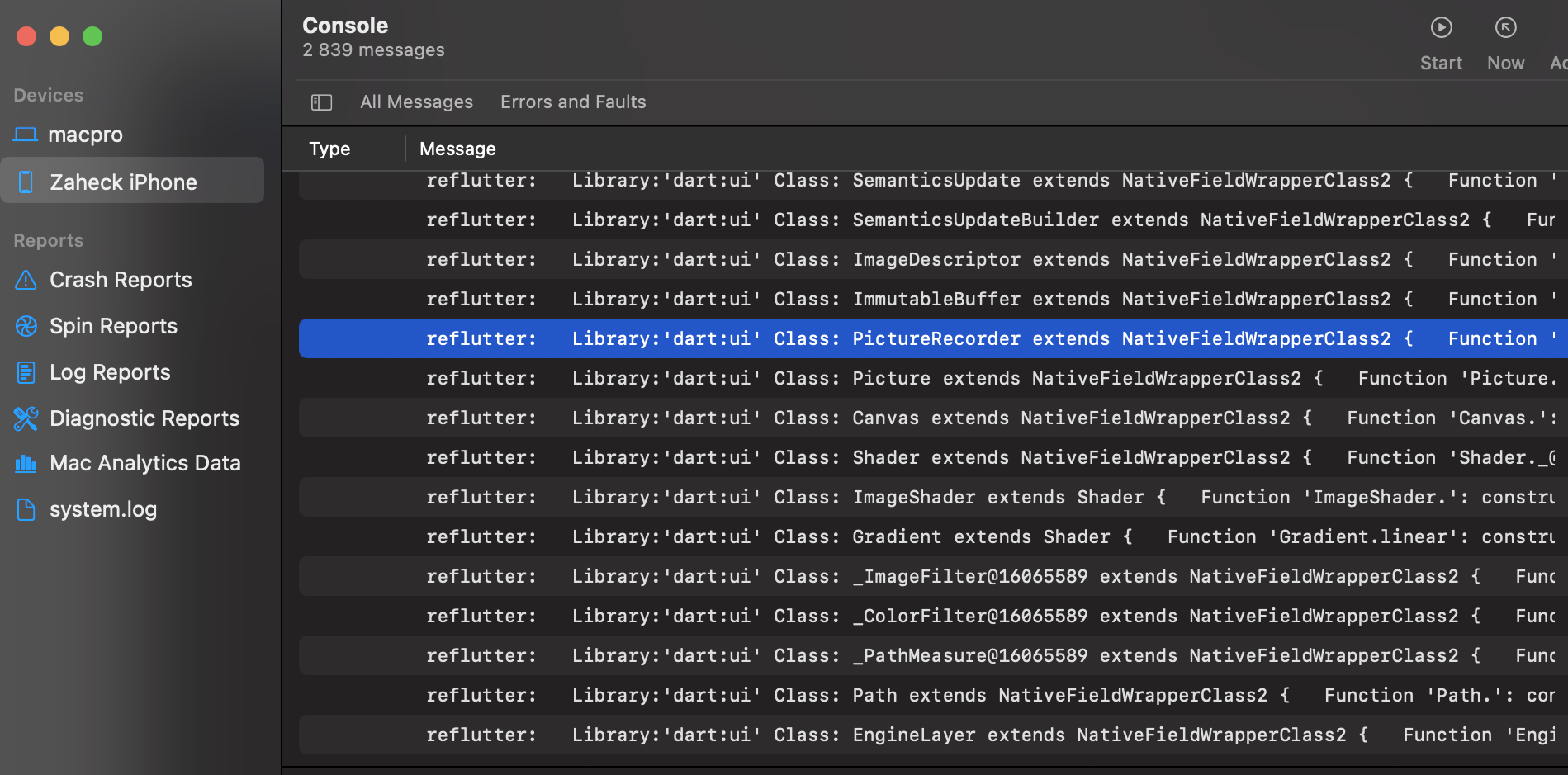
After running reflutter main.ipa, execute the app on device. The dump file path is printed to Xcode console logs:
Current working dir: /private/var/mobile/Containers/Data/Application/<UUID>/dump.dart
Retrieve the file from the device.
Frida
frida-tools==13.7.1
frida==16.7.19
Use dump offsets in the Frida script:
frida -U -f <package> -l frida.js
To find _kDartIsolateSnapshotInstructions:
readelf -Ws libapp.so
Look for the Value field.
To Do
- [x] Display absolute code offset for functions;
- [ ] Extract more strings and fields;
- [x] Add socket patch;
- [ ] Extend engine support to Debug using Fork and Github Actions;
- [ ] Improve detection of
App.frameworkandlibapp.soinside zip archive
Build Engine
Engines are built using GitHub Actions based on data in enginehash.csv. Snapshot hash is retrieved from:
https://storage.googleapis.com/flutter_infra_release/flutter/<hash>/android-arm64-release/linux-x64.zip
release

Custom Build
Manual Flutter code patching is supported using Docker:
git clone https://github.com/Impact-I/reFlutter && cd reFlutter
docker build -t reflutter -f Dockerfile .
Run with:
docker run -it -v "$(pwd):/t" -e HASH_PATCH=<Snapshot_Hash> -e COMMIT=<Engine_commit> reflutter
Example:
docker run -it -v "$(pwd):/t" -e HASH_PATCH=aa64af18e7d086041ac127cc4bc50c5e -e COMMIT=d44b5a94c976fbb65815374f61ab5392a220b084 reflutter
Example: Build Android ARM64 (Linux/Windows)
docker run -e WAIT=300 -e x64=0 -e arm=0 -e HASH_PATCH=<Snapshot_Hash> -e COMMIT=<Engine_commit> --rm -iv${PWD}:/t reflutter
Flags:
-e x64=0: disables x64 build-e arm64=0: disables arm64 build-e arm=0: disables arm32 build-e WAIT=300: time in seconds to modify source before build-e HASH_PATCH: snapshot hash fromenginehash.csv-e COMMIT: engine commit hash
Core symbols most depended-on inside this repo
Shape
Languages
Modules by API surface
For agents
$ claude mcp add reFlutter \
  -- python -m otcore.mcp_server <graph>