github.com/IENT/YUView @v2.14
Chat with this repoBrowse by type
What it actually does AI analysis from the code graph — generated when you open this
README
YUView 
YUView is a QT based, cross-platform YUV player with an advanced analytic toolset.
Build Status

Description
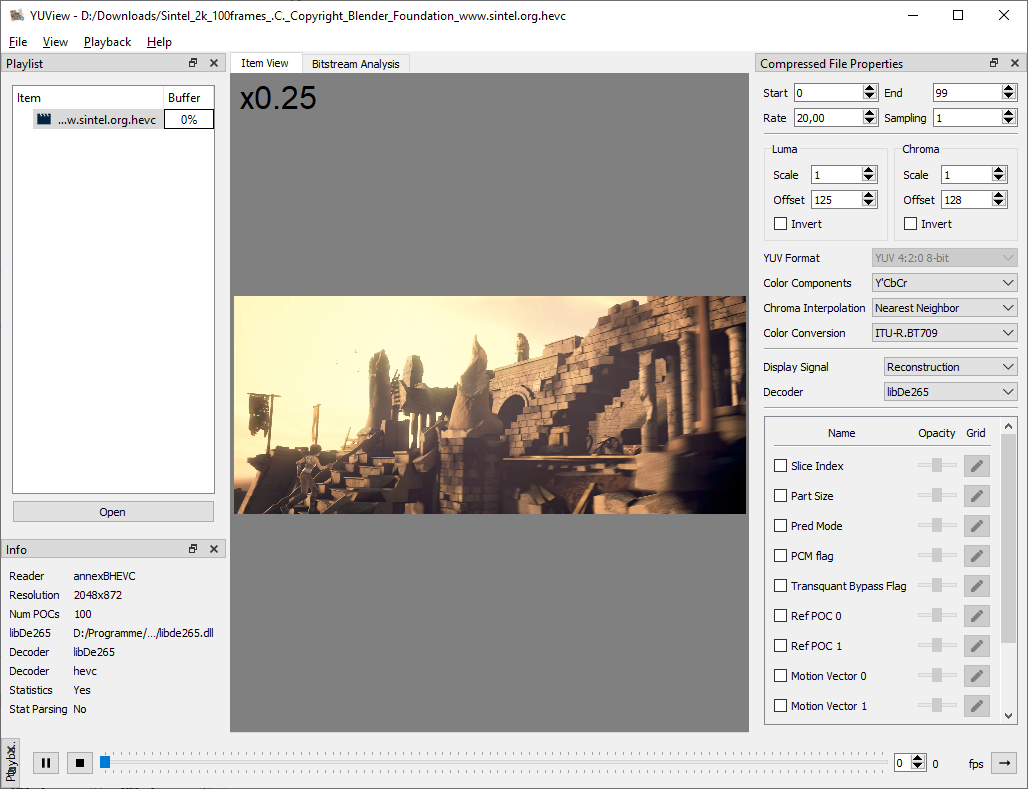
At its core, YUView is a YUV player and analysis tool. However, it can do so much more: * simple navigation/zooming in the video * support for a wide variety of YUV formats using various subsamplings and bit depts * support for raw RGB files, image files and image sequences * direct decoding of raw h.265/HEVC bitstreams with visualization of internals like prediction modes and motion vectors and many more * interface with visualization for the reference software decoders HM and JEM * support for opening almost any file using FFmpeg * image comparison using side-by-side and comparison view * calculation and display of differences (in YUV or RGB colorspace) * save and load playlists * overlay the video with statistics data * ... and many more
Further details of the features can be found either here or in the wiki.
Screenshot of YUView:
Download
You can download precompiled binaries for Windows and MAC from the release site which are all compiled on travis CI. On the release page you can find:
- Windows installer
- Windows zip
- Mac OS Application
- Linux Appimage
If you have Ubuntu 22.04 or newer, you can get YUView from the official repo: sudo apt install yuview. For other Linux based platforms we are also on flathub. More information on YUView on Linux can be found in out wiki page "YUView on Linux".
If none of these apply to you, you can easily build YUView yourself.
Building
Compiling YUView from source is easy! We use qmake for the project so on all supported platforms you just have to install qt and run qmake and make to build YUView. There are no further dependent libraries. Alternatively, you can use the QTCreator if you prefer a GUI. More help on building YUView can be found in the wiki.
Core symbols most depended-on inside this repo
Shape
Languages
Modules by API surface
For agents
$ claude mcp add YUView \
  -- python -m otcore.mcp_server <graph>