github.com/IDEA-Research/GroundingDINO @main
Chat with this repoBrowse by type
What it actually does AI analysis from the code graph — generated when you open this
README

:sauropod: Grounding DINO

 \
\


Shilong Liu, Zhaoyang Zeng, Tianhe Ren, Feng Li, Hao Zhang, Jie Yang, Chunyuan Li, Jianwei Yang, Hang Su, Jun Zhu, Lei Zhang:email:.
PyTorch implementation and pretrained models for Grounding DINO. For details, see the paper Grounding DINO: Marrying DINO with Grounded Pre-Training for Open-Set Object Detection.
- 🔥 Grounded SAM 2 is released now, which combines Grounding DINO with SAM 2 for any object tracking in open-world scenarios.
- 🔥 Grounding DINO 1.5 is released now, which is IDEA Research's Most Capable Open-World Object Detection Model!
- 🔥 Grounding DINO and Grounded SAM are now supported in Huggingface. For more convenient use, you can refer to this documentation
:sun_with_face: Helpful Tutorial
- :grapes: [Read our arXiv Paper]
- :apple: [Watch our simple introduction video on YouTube]
- :blossom: [Try the Colab Demo]
- :sunflower: [Try our Official Huggingface Demo]
- :maple_leaf: [Watch the Step by Step Tutorial about GroundingDINO by Roboflow AI]
- :mushroom: [GroundingDINO: Automated Dataset Annotation and Evaluation by Roboflow AI]
- :hibiscus: [Accelerate Image Annotation with SAM and GroundingDINO by Roboflow AI]
- :white_flower: [Autodistill: Train YOLOv8 with ZERO Annotations based on Grounding-DINO and Grounded-SAM by Roboflow AI]
:sparkles: Highlight Projects
- Semantic-SAM: a universal image segmentation model to enable segment and recognize anything at any desired granularity.,
- DetGPT: Detect What You Need via Reasoning
- Grounded-SAM: Marrying Grounding DINO with Segment Anything
- Grounding DINO with Stable Diffusion
- Grounding DINO with GLIGEN for Controllable Image Editing
- OpenSeeD: A Simple and Strong Openset Segmentation Model
- SEEM: Segment Everything Everywhere All at Once
- X-GPT: Conversational Visual Agent supported by X-Decoder
- GLIGEN: Open-Set Grounded Text-to-Image Generation
- LLaVA: Large Language and Vision Assistant
:bulb: Highlight
- Open-Set Detection. Detect everything with language!
- High Performance. COCO zero-shot 52.5 AP (training without COCO data!). COCO fine-tune 63.0 AP.
- Flexible. Collaboration with Stable Diffusion for Image Editting.
:fire: News
2023/07/18: We release Semantic-SAM, a universal image segmentation model to enable segment and recognize anything at any desired granularity. Code and checkpoint are available!2023/06/17: We provide an example to evaluate Grounding DINO on COCO zero-shot performance.2023/04/15: Refer to CV in the Wild Readings for those who are interested in open-set recognition!2023/04/08: We release demos to combine Grounding DINO with GLIGEN for more controllable image editings.2023/04/08: We release demos to combine Grounding DINO with Stable Diffusion for image editings.2023/04/06: We build a new demo by marrying GroundingDINO with Segment-Anything named Grounded-Segment-Anything aims to support segmentation in GroundingDINO.2023/03/28: A YouTube video about Grounding DINO and basic object detection prompt engineering. [SkalskiP]2023/03/28: Add a demo on Hugging Face Space!2023/03/27: Support CPU-only mode. Now the model can run on machines without GPUs.2023/03/25: A demo for Grounding DINO is available at Colab. [SkalskiP]2023/03/22: Code is available Now!
Description
Paper introduction.
 Marrying Grounding DINO and GLIGEN
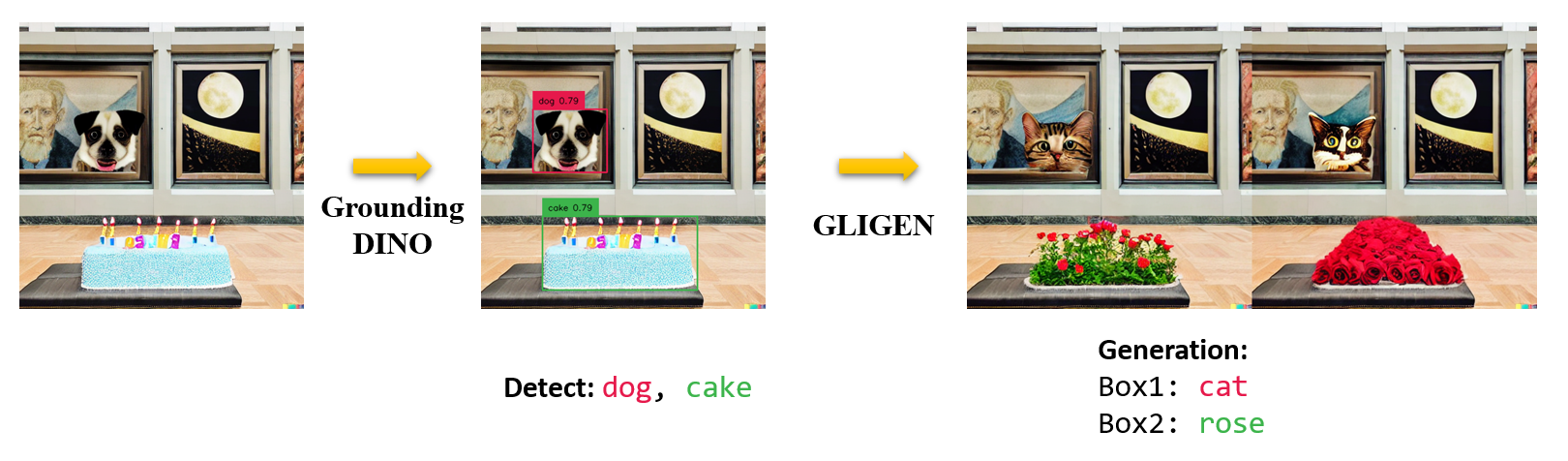
:star: Explanations/Tips for Grounding DINO Inputs and Outputs
- Grounding DINO accepts an
(image, text)pair as inputs. - It outputs
900(by default) object boxes. Each box has similarity scores across all input words. (as shown in Figures below.) - We defaultly choose the boxes whose highest similarities are higher than a
box_threshold. - We extract the words whose similarities are higher than the
text_thresholdas predicted labels. - If you want to obtain objects of specific phrases, like the
dogsin the sentencetwo dogs with a stick., you can select the boxes with highest text similarities withdogsas final outputs. - Note that each word can be split to more than one tokens with different tokenlizers. The number of words in a sentence may not equal to the number of text tokens.
- We suggest separating different category names with
.for Grounding DINO.

:label: TODO
- [x] Release inference code and demo.
- [x] Release checkpoints.
- [x] Grounding DINO with Stable Diffusion and GLIGEN demos.
- [ ] Release training codes.
:hammer_and_wrench: Install
Note:
- If you have a CUDA environment, please make sure the environment variable
CUDA_HOMEis set. It will be compiled under CPU-only mode if no CUDA available.
Please make sure following the installation steps strictly, otherwise the program may produce:
NameError: name '_C' is not defined
If this happened, please reinstalled the groundingDINO by reclone the git and do all the installation steps again.
how to check cuda:
echo $CUDA_HOME
If it print nothing, then it means you haven't set up the path/
Run this so the environment variable will be set under current shell.
export CUDA_HOME=/path/to/cuda-11.3
Notice the version of cuda should be aligned with your CUDA runtime, for there might exists multiple cuda at the same time.
If you want to set the CUDA_HOME permanently, store it using:
echo 'export CUDA_HOME=/path/to/cuda' >> ~/.bashrc
after that, source the bashrc file and check CUDA_HOME:
source ~/.bashrc
echo $CUDA_HOME
In this example, /path/to/cuda-11.3 should be replaced with the path where your CUDA toolkit is installed. You can find this by typing which nvcc in your terminal:
For instance, if the output is /usr/local/cuda/bin/nvcc, then:
export CUDA_HOME=/usr/local/cuda
Installation:
1.Clone the GroundingDINO repository from GitHub.
git clone https://github.com/IDEA-Research/GroundingDINO.git
- Change the current directory to the GroundingDINO folder.
cd GroundingDINO/
- Install the required dependencies in the current directory.
pip install -e .
- Download pre-trained model weights.
mkdir weights
cd weights
wget -q https://github.com/IDEA-Research/GroundingDINO/releases/download/v0.1.0-alpha/groundingdino_swint_ogc.pth
cd ..
:arrow_forward: Demo
Check your GPU ID (only if you're using a GPU)
nvidia-smi
Replace {GPU ID}, image_you_want_to_detect.jpg, and "dir you want to save the output" with appropriate values in the following command
CUDA_VISIBLE_DEVICES={GPU ID} python demo/inference_on_a_image.py \
-c groundingdino/config/GroundingDINO_SwinT_OGC.py \
-p weights/groundingdino_swint_ogc.pth \
-i image_you_want_to_detect.jpg \
-o "dir you want to save the output" \
-t "chair"
 [--cpu-only] # open it for cpu mode
If you would like to specify the phrases to detect, here is a demo:
CUDA_VISIBLE_DEVICES={GPU ID} python demo/inference_on_a_image.py \
-c groundingdino/config/GroundingDINO_SwinT_OGC.py \
-p ./groundingdino_swint_ogc.pth \
-i .asset/cat_dog.jpeg \
-o logs/1111 \
-t "There is a cat and a dog in the image ." \
--token_spans "[[[9, 10], [11, 14]], [[19, 20], [21, 24]]]"
 [--cpu-only] # open it for cpu mode
The token_spans specify the start and end positions of a phrases. For example, the first phrase is [[9, 10], [11, 14]]. "There is a cat and a dog in the image ."[9:10] = 'a', "There is a cat and a dog in the image ."[11:14] = 'cat'. Hence it refers to the phrase a cat . Similarly, the [[19, 20], [21, 24]] refers to the phrase a dog.
See the demo/inference_on_a_image.py for more details.
Running with Python:
```python from groundingdino.util.inference import load_model, load_image, predict, annotate import cv2
model = load_model("groundingdino/config/GroundingDINO_SwinT_OGC.py", "weights/groundingdino_swint_ogc.pth") IMAGE_PATH = "weights/dog-3.jpeg" TEXT_PROMPT = "c
Core symbols most depended-on inside this repo
Shape
Languages
Modules by API surface
Dependencies from manifests, versioned
For agents
$ claude mcp add GroundingDINO \
  -- python -m otcore.mcp_server <graph>