github.com/Hotakus/opencode-subagent-magazine @v1.2.1
Chat with this repoWhat it actually does AI analysis from the code graph — generated when you open this
README
OpenCode SubAgent Magazine
Load up like a magazine! Fire!Real-time Sub-Agent Monitoring · TUI Sidebar Visualization
Adaptive Theme Colors · Low-Saturation Design Language · EN/ZH Bilingual · Data Persistence
If you find this plugin useful, consider giving it a star ⭐ — thank you!



Interested in token cache visualization? Check out opencode-visual-cache!
1. Screenshots
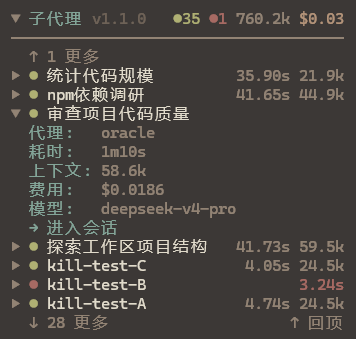
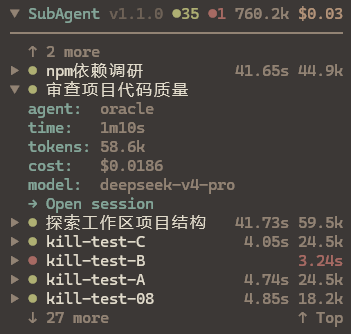
Collapsed · Quick Overview 👇


Expanded · Detailed Info 👇
2. Features
- Real-time Status: Running (breathing animation), done, error — color-coded dots at a glance
- Token & Cost Tracking: Per-sub-agent token consumption and cost summary, displayed globally in the title bar
- Expandable Details: Click to expand and view agent type, status, elapsed time, tokens, cost, model, and todo progress, with right-aligned values
- One-click Session Jump:
→ Open sessionlink in expanded view to navigate to the sub-agent's full conversation - Manual Dismiss:
- dismissbutton on the right side of expanded view to manually terminate stuck/zombie entries;/subagent-clear-runningfor batch cleanup - Status Field:
status: running/done/errorin expanded view, color-coded to match the status dot - Collapsible Panel: Click title bar to collapse/expand; state persists across restarts
- Scroll to Newest:
↑ Top/↓ Bottombutton jumps to the newest entries; direction adapts to sort order - Configurable Sort Order:
/subagent-ordersupports descending (newest first) and ascending (oldest first) ordering - Scroll Mode Toggle:
/subagent-scrollswitches between wheel scroll and click-to-scroll (click↑ more/↓ moreto page), resolving sidebar/global scroll conflicts - TTL Auto Cleanup: Data older than 3 days is automatically purged from KV storage
- Language Support: Runtime language switch via
/subagent-lang(Chinese / English), preference persisted - Slash Commands:
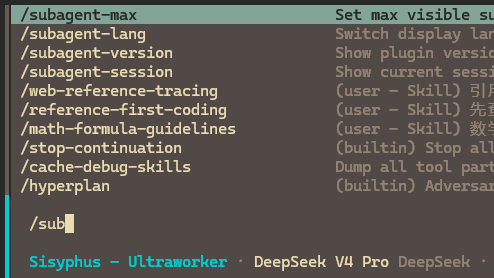
/subagent-lang,/subagent-max,/subagent-order,/subagent-scroll,/subagent-session,/subagent-version,/subagent-clear-runningfor dynamic configuration
3. Installation
3.1 Method 1: OpenCode Command Install (Recommended)
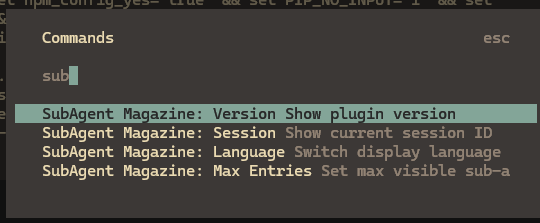
Press Ctrl + P in OpenCode to open the command palette, search for install plugin, and enter:
opencode-subagent-magazine@latest
Press Enter to complete installation and configuration.
3.2 Method 2: Manual Install
1. Install the plugin
npm install -g opencode-subagent-magazine@latest
2. Configure the TUI plugin
Create or edit ~/.config/opencode/tui.jsonc:
{
  "$schema": "https://opencode.ai/tui.json",
  "plugin": ["opencode-subagent-magazine@latest"]
}
3.3 Restart OpenCode
Open any session — the SubAgent Magazine panel will appear in the sidebar.
4. Usage Guide
4.1 Slash Commands
The plugin supports dynamic configuration via slash commands or the command palette (Ctrl + P). All settings take effect immediately and are persisted:
| Command | Function | Usage |
|---|---|---|
/subagent-lang |
Switch display language | Select Chinese or English from the list; takes effect instantly without restart |
/subagent-max |
Adjust max visible entries | Enter a number (default 10) to control how many sub-agent entries are shown |
/subagent-order |
Switch sort order | Choose descending (newest first) or ascending (oldest first); list re-sorts and jumps to newest |
/subagent-scroll |
Switch scroll mode | Choose wheel scroll or click-to-scroll (click ↑ more / ↓ more to page) |
/subagent-session |
View current session ID | Displays the current OpenCode session ID |
/subagent-version |
View plugin version | Displays the current plugin version |
/subagent-clear-running |
Batch cleanup stuck entries | Marks all running entries as done in one click, cleaning up stale data |
4.2 Keyboard & Mouse
| Action | Description |
|---|---|
| Click title bar | Collapse / Expand the panel |
| Click entry row | Expand / Collapse details |
Scroll / Click ↑ more ↓ more |
Page through entries (/subagent-scroll to toggle mode) |
Click ↑ Top / ↓ Bottom |
Jump to the newest entries (direction adapts to sort order) |
Click → Open session |
Navigate to the sub-agent's session |
Click - dismiss |
Manually terminate the entry (only shown for running entries) |
4.3 Status Colors
| Color | Meaning |
|---|---|
| 🟢 Green | Done |
| 🟡 Yellow (breathing) | Running |
| 🔴 Red | Error |
5. Updating
Due to OpenCode issue #6774, the plugin cache locks to the version at first install and won't auto-detect newer versions on npm.
Update steps:
1. Clear the OpenCode plugin cache
# Windows
Remove-Item -Recurse -Force "$env:USERPROFILE\.cache\opencode\packages\opencode-subagent-magazine@latest"
# macOS / Linux
rm -rf ~/.cache/opencode/packages/opencode-subagent-magazine@latest
2. Reinstall the plugin
In OpenCode, press Ctrl + P → install plugin → opencode-subagent-magazine@latest → Enter
3. Restart OpenCode
6. Language Settings
6.1 Runtime Switching (Recommended)
Type /subagent-lang in the TUI and select "中文" or "English" to switch instantly without restart. The preference is persisted and restored on next launch.
6.2 Auto Detection
By default, the plugin auto-detects the system language. If it doesn't match your preference, switch once using /subagent-lang — the choice will be remembered.
7. Compatibility
The plugin is fully model-agnostic and works with all OpenCode-compatible AI models (DeepSeek / Claude / GPT, etc.). Token data and sub-agent information are obtained through the OpenCode SDK standard interfaces.
8. License
MIT
Extension points exported contracts — how you extend this code
SubEntry (Interface)Core symbols most depended-on inside this repo
tShape
Languages
Modules by API surface
For agents
$ claude mcp add opencode-subagent-magazine \
  -- python -m otcore.mcp_server <graph>