github.com/HorlogeSkynet/archey4 @v4.15.0.0
Chat with this repoBrowse by type
What it actually does AI analysis from the code graph — generated when you open this
README
Archey 4
Archey is a simple system information tool written in Python
<img src="https://github.com/HorlogeSkynet/archey4/raw/v4.15.0.0/github/archey4.png" alt="Archey logo" title="CC-BY Brume Archey logo" longdesc="https://brume.ink/">


<a href="https://pypi.org/project/archey4/"><img src="https://img.shields.io/pypi/pyversions/archey4.svg?style=for-the-badge"></a>


<a href="https://github.com/HorlogeSkynet/archey4/releases/latest"><img src="https://img.shields.io/github/release/HorlogeSkynet/archey4.svg?style=for-the-badge&label=github"></a>

<a href="https://pypi.org/project/archey4/"><img src="https://img.shields.io/pypi/v/archey4.svg?style=for-the-badge"></a>

<a href="https://aur.archlinux.org/packages/archey4/"><img src="https://img.shields.io/aur/version/archey4.svg?style=for-the-badge"></a>

<a href="https://formulae.brew.sh/formula/archey4"><img src="https://img.shields.io/homebrew/v/archey4.svg?style=for-the-badge"></a>


<a href="https://github.com/HorlogeSkynet/archey4/releases/latest"><img src="https://img.shields.io/github/downloads/HorlogeSkynet/archey4/total?style=for-the-badge&label=downloads"></a>

<a href="https://pypi.org/project/archey4/"><img src="https://img.shields.io/pypi/dm/archey4?style=for-the-badge"></a>

<a href="https://aur.archlinux.org/packages/archey4/"><img src="https://img.shields.io/aur/votes/archey4.svg?style=for-the-badge"></a>

<a href="https://formulae.brew.sh/formula/archey4"><img src="https://img.shields.io/homebrew/installs/dm/archey4.svg?style=for-the-badge"></a>
Why (again) a f*cking new Archey fork ?
The answer is here.
Note : Since the 21st September of 2017, you may notice that this repository no longer has the official status of fork.
Actually, the maintainer decided to separate it from the original one's "network" with the help of GitHub's staff.
Nevertheless, this piece of software is still a fork of djmelik's Archey project.
Features
- Run as quickly as possible
- Stay as light as possible
- Keep entries ordered despite parallelism
- Extensive local and public IP addresses detection
- General temperature detection
- JSON output
- Screen capture ("best effort")
- Custom entries
Supported platforms
- BSD and derivatives
- Darwin (macOS)
- GNU/Linux distributions
- WSL
Details here.
What does it look like ?
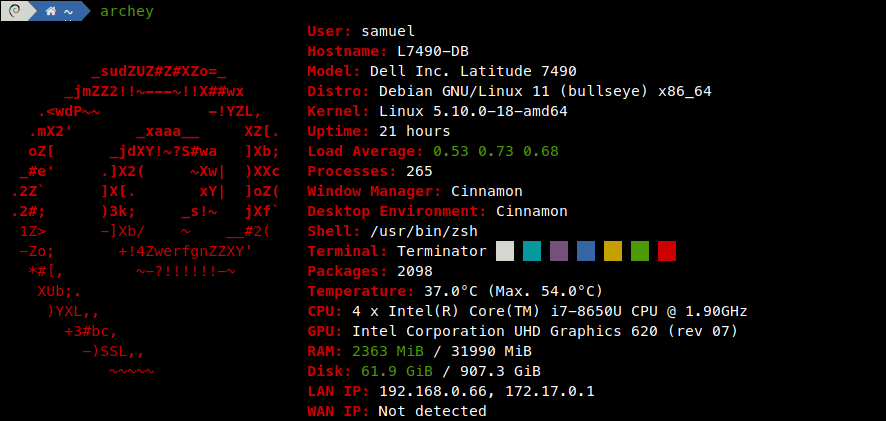
Which packages do I need to run this project ?
Required packages
python3(>= 3.6)python3-distro(python-distroon Arch Linux)python3-netifaces(python-netifaceson Arch Linux)
PyPy is supported and may replace CPython.
Looking for Python 3.4 support ? Please refer to the latest v4.9 release.
Looking for Python 3.5 support ? Please refer to the latest v4.10 release.
Highly recommended packages
| Environments | Packages | Reasons | Notes |
|---|---|---|---|
| All | procps (maybe procps-ng) |
Many entries would not work as expected | Would provide ps |
| All | dnsutils (maybe bind-tools) |
WAN_IP would be detected faster | Would provide dig |
| All | lm-sensors (maybe lm_sensors) |
Temperature would be more accurate | N/A |
| macOS (Darwin) | [iStats] or [osx-cpu-temp] |
Temperature wouldn't be detected without it | N/A |
| Graphical (desktop) | pciutils or pciconf |
GPU wouldn't be detected without it | Would provide lspci/pciconf |
| Graphical (desktop) | wmctrl |
WindowManager would be more accurate | N/A |
Virtual w/o systemd |
virt-what |
Model would contain details about the hypervisor | root privileges required |
Installation
Install from package
First, grab a package for your distribution from the latest release here.
Now, it's time to use your favorite package manager. Some examples :
- Arch-based distributions :
pacman -U ./archey4-4.X.Y.Z-R-any.pkg.tar.zst - Debian-based distributions :
apt install ./archey4_4.X.Y.Z-R_all.deb - RPM-based distributions :
dnf install ./archey4-4.X.Y.Z-R.py??.noarch.rpm
Further information about packaging are available here.
Install from PyPI
pip3 install archey4
Install from AUR
yay -S archey4
Install from Homebrew
brew install archey4
Install from FreeBSD ports
pkg install archey4
Install from source
Step 1 : Fetch sources
# If you want the latest release :
wget -qO archey4.tar.gz "https://github.com/HorlogeSkynet/archey4/archive/v4.15.0.0.tar.gz"
tar xvzf archey4.tar.gz
cd archey4-*/

# If you want the latest revision :
git clone https://github.com/HorlogeSkynet/archey4.git
cd archey4/
Step 2 : Installation
# If you have PIP installed on your system :
pip3 install .

# But if you don't have PIP, no worries :
python3 setup.py install
Step 3 (optional) : Configuration
# System-wide configuration file (privileges required) :
install -D -m0644 config.json /etc/archey4/config.json

# User-specific configuration file :
install -D -m0644 config.json ~/.config/archey4/config.json
Step 4 (optional) : Standalone building
Some years ago, Archey was a simple and unique Python file.
Project evolved, and now it's a Python package.
Some procedures below walk you through several ways of building Archey as a standalone program.
# Using Nuitka (recommended) :
apt install -y patchelf
pip3 install nuitka
python3 -m nuitka \
    --onefile \
    --include-package=archey.logos \
    --output-filename=archey \
    --output-dir=dist \
    --quiet \
    archey/__main__.py

# Using PEX (recommended) :
pip3 install pex
pex \
    -o dist/archey \
    -m archey \
    .

# Since v4.10 logos are dynamically imported for performance purposes.
# This means that we have to explicitly make Stickytape and PyInstaller include them.
# Please **replace** `debian` identifier below by yours (multiple flags allowed).

# Using Stickytape :
pip3 install stickytape
stickytape \
    --copy-shebang \
    --add-python-path . \
    --output-file dist/archey \
    --add-python-module archey.logos.debian \
    archey/__main__.py
chmod +x dist/archey

# Using PyInstaller :
pip3 install pyinstaller
pyinstaller \
    --distpath dist \
    --specpath dist \
    --name archey \
    --onefile archey/__main__.py \
    --hidden-import archey.logos.debian \
    --log-level WARN
Resulting program may now be installed system-wide (privileges required).
# Standalone execution.
./dist/archey

# System-wide install.
install -D -m0755 dist/archey /usr/local/bin/archey
Usage
archey --help
or if you only want to try this out (for instance, from source) :
python3 -m archey --help
Configuration (optional)
Since v4.3.0, Archey 4 may be "tweaked" a bit with external configuration.
You can place a config.json file in these locations :
/etc/archey4/config.json(system preferences)~/.config/archey4/config.json(user preferences)./config.json(local preferences)
If an option is defined in multiple places, it will be overridden according to the order above (local preferences > user preferences > system preferences).
Alternatively, you may specify your own configuration file with the -c command-line option.
The example file provided in this repository lists exhaustively the parameters you can set.
Below stand further descriptions for each available (default) option :
``javascript
{
// If set tofalse, configurations defined afterwards won't be loaded.
// Developers running Archey from the original project may keep in there the originalconfig.json,
// while having their own external configuration set elsewhere.
"allow_overriding": true,
// Set tofalseto disable multi-threaded loading of entries.
"parallel_loading": true,
// If set totrue, any execution warning or error would be hidden.
// Configuration parsing warnings **would** still be shown.
"suppress_warnings": false,
// Use this option to specify a custom color for entries (logo won't be affected).
// Value should be a string suitable for inclusion in the ANSI/ECMA-48 escape code for setting graphical rendition
//
// For instance "5;31;47" would result in red text blinking on white background.
// See <https://wiki.bash-hackers.org/scripting/terminalcodes> for more information.
"entries_color": "",
// Set this option tofalseto force Archey to use its own colors palettes.
//trueby default to honor os-release(5)ANSI_COLORoption.
"honor_ansi_color": true,
// Set this option to an alternative logo style identifier instead of the default one for your distro.
// For example, "retro" would show the retro styled Apple's logo on Darwin platforms.
// You can set it to "none" to completely hide distribution logo.
// Note that the--logo-styleargument overrides this setting.
"logo_style": "",
// Enable icons for entries.
// A terminal "nerd font" is required to display the icons. Otherwise, these are simply missing and a placeholder will be seen.
// You can also refer to : <https://github.com/ryanoasis/nerd-fonts>.
// Make sure that your system locale supports UTF-8.
"entries_icon": false,
// Entries list.
// Add adisabledoption set totrueto temporary hide one.
// You may change entry displayed name by adding anameoption.
// You may change entry displayed icon by adding aniconoption.
// You may re-order the entries list as you wish.
"entries": [
{ "type": "User" },
{ "type": "Hostname" },
{ "type": "Model" },
{ "type": "Distro" },
{
"type": "Kernel",
// Set totrueto enable kernel release check against <www.kernel.org>.
// /!\DO_NOT_TRACKenvironment variable may affect this feature behavior ! /!\
"check_version": false
},
{ "type": "Uptime" },
{
"type": "LoadAverage",
// Number of decimal places to display for the load average.
"decimal_places": 2,
// Some thresholds you can adjust to customize warning/danger colors.
"warning_threshold": 1.0,
"danger_threshold": 2.0
},
{ "type": "Processes" },
{ "type": "WindowManager" },
{ "type": "DesktopEnvironment" },
{ "type": "Shell" },
{
"type": "Terminal",
// Leave this option set totrueto display a beautiful colors palette.
// Set it tofalseto allow compatibility with non-Unicode locales.
"use_unicode": true
},
{
"type": "Packages",
// Set totrueto sum up all installed package counts.
"combine_total": false,
// Set tofalsenot to join all packages tool counts on the same line.
"one_line": true,
// Set totrueto include tools with no installed package.
"show_zeros": false
},
{
"type": "Temperature",
// The character to display between the temperature value and the unit (as '°' in 53.2°C).
"char_before_unit": " ",
"sensors_chipsets": [
// Whitelist of chipset identifiers (strings) passed to LM-SENSORS when computing the average temperature.
// Leaving empty (the default) would make Archey process input data from **all** available chipsets.
// Use this option if one of your sensors happens to return irrelevant values, or if you want to process only a subset of them.
//
// You may want to runsensors -Ato list the available chipsets on your system (e.g.coretemp-isa-0000,acpitz-acpi-0, ...).
// Then, you will be able to add them once double-quoted in this list, for instance :
//"coretemp-isa-0000",
//"acpitz-acpi-0"
],
"sensors_excluded_subfeatures": [
// Blacklist of chipset "subfeature" (in LM-SENSORS terms) identifiers (strings) to exclude from average computation.
// Leaving empty (the default) would make Archey process input data from **all** available subfeatures providing valid temperatures.
//
// For instance, AMD Ryzen X series CPUs include a thermal bias sensor, appearing as a subfeature namedTctl.
// Excluding it can be achieved this way :
//"Tctl"
],
// Display temperature values in Fahrenheit instead of Celsius.
"use_fahrenheit": false
},
{
"type": "CPU",
// Set totrueto join all CPUs on the same line.
"one_line": false,
// Set tofalse` to hide the number of cores.
"show_cores": true,
//
// As explained above, you may rename entries as you wish.
"name": "Processor"
},
{
"type": "GPU",
// Set
Core symbols most depended-on inside this repo
Shape
Languages
Modules by API surface
For agents
$ claude mcp add archey4 \
  -- python -m otcore.mcp_server <graph>