github.com/Hari-Nagarajan/fairgame @0.6.9
Chat with this repoBrowse by type
What it actually does AI analysis from the code graph — generated when you open this
README
FairGame README
Table of Contents:
Quick Links
- Discord DO NOT ASK QUESTIONS IN DISCORD BEFORE READING THIS DOCUMENT
- Python Download (3.8.9)
About FairGame
We built this in response to the severe tech scalping situation that's happening right now. Almost every tech product that's coming out right now is being instantly brought out by scalping groups and then resold at at insane prices. $699 GPUs are being listed for $1700 on eBay, and these scalpers are buying 40 cards while normal consumers can't get a single one. Preorders for the PS5 are being resold for nearly $1000. Our take on this is that if we release a bot that anyone can use, for free, then the number of items that scalpers can buy goes down and normal consumers can buy items for MSRP.
If everyone is botting, then no one is botting.
Current Functionality
FairGame only works on Amazon and can automatically place an order.
Other Notes on Functionality
- By default, FairGame will only purchase new items with free shipping. This can be changed with options on the command line, see Configuration.
- FairGame is designed to check if each product is in stock sequentially, not concurrently (by choice). While more than one instance of the program can be run concurrently, we do not encourage nor support this and will not provide help in doing so.
- There is no functionality to stop and confirm information with your bank during checkout (sorry EU). If someone from EU wants to figure this out and submit a pull request, that would be great.
- FairGame organizes the products being checked into lists, and each list is subject to a minimum and maximum purchase price range. Once an item is purchased from a list, that list is removed, and it will no longer purchase an item from that list.
- If you want to set purchase price ranges for several different products, but only want FairGame to purchase
one of any of the products you've included in the configuration file, use the
--single-shotoption, see Running the program
Disclaimer
WARNING: The use of this software can result in a Amazon restricting access to your account and make it difficult for you to purchase products, with or without the bot. By using this software, you acknowledge these risks. These restrictions cannot and will not be resolved by the developer(s), nor can they be detected/resolved by the standard Amazon Customer Support, as far as we are aware. If this happens, the only resolution is to stop all Amazon monitors (e.g., FairGame, Distill.io, or other bots, etc.), wait, and hope the limits are lifted within a few days. If this is a major issue you should consider avoiding use of this software.
Account restrictions may be triggered by any of the following: 1) running multiple instances on one device, 2) running multiple instances on different devices, using the same account, regardless of their IP, proxy, or location, 3) configuring an instance to check stock too frequently/aggressively (default settings not guaranteed to be safe).
Symptoms of account restrictions include: 1) Fly-out (offers) window is missing/completely blank, even if there are listings for the ASIN, 2) frequent CAPTCHA checks, 3) inability to access the My Account page, add items to your cart, or complete purchases; usually displayed as a 503 error (Amazon Dogs & “SORRY we couldn’t find that page” message). You’ll likely have to sit-out a few days of drops to resolve the throttle.
Installation
Requirements
!!! YOU WILL NEED TO USE THE 3.8 BRANCH OF PYTHON, ANY OTHER BRANCH/VERSION (Anaconda, 2.7, 3.9.x, 3.10, 4.0, toaster, etc.) BREAKS DEPENDENCIES !!!
It is best if you use the newest version of 3.8 (at this time, 3.8.9) but 3.8.5, 3.8.6, 3.8.7, and 3.8.8 should also work.
It also requires a working Chrome installation. Running it on a potato (<2GB of RAM) is not suggested.
Quick Start
Here are the very simple steps for running the bot on Windows, however most of these instructions should be followed regardless of your OS (obviously you aren't running .bat files if you aren't on Windows, or using GitHub Desktop if not available on your OS). See Platform Specific instructions for help installing Python and dependencies in other operating systems: 1. Turn on your computer 2. Install Python 3.8.9. Install to some location that does not include spaces in the path (we suggest C:\Python38). Click the checkbox that says Add Python 3.8 to PATH (or something similar) during the installation.

- Download GitHub Desktop and Open the FairGame Repository with GitHub Desktop (or download the zip file). Again, make sure this installs to a location without spaces in the path, but it is STRONGLY suggested that you install to the root of the drive (e.g., C:\fairgame). If you need help with GitHub Desktop, look at the Wiki.
- Open the FairGame folder in File Explorer. Double click __INSTALL (RUN FIRST).bat DON'T USE ADMINISTRATIVE MODE.

- After this finishes (it could take a few minutes or longer), open the
configfolder in the FairGame folder, make a copy of the amazon_config.template_json file and rename it to amazon_config.json. If you don't know how to rename file extensions, look it up on Google.

Ignore extra files in this folder. Screenshot is based on development files. Just follow instructions as written!

- Edit the amazon_config.json, this assumes US using smile.amazon.com. Using Amazon Smile requires that you select a charity. If you do not know how to do this, use Google. Find a product, like a USB stick that is in stock, and put the ASIN for that product in place of the B07JH53M4T listed below (or use that if it is in stock). Change the reserve_min_1 and reserve_max_1 to be below and above the price of the item, respectively:
{
  "asin_groups": 1,
  "asin_list_1": ["B07JH53M4T"],
  "reserve_min_1": 5,
  "reserve_max_1": 15,
  "amazon_website": "smile.amazon.com"
}

- In File Explorer, double click the
_Amazon.batfile in the FairGame folder. DON'T USE ADMINISTRATIVE MODE. Type in your amazon email address when asked for your amazon login ID. Type in your amazon account password when asked for your amazon password. Type in a password for your credentials (this can be whatever you want, it just encrypts your account email/password file)

- Verify that the bot successfully makes it to the place an order screen with the item you put in the config file. If it does not, then:
- You messed something up above, and need to fix it; or,
- If it is asking you for your address and payment info, you need to do all of the following in a separate
tab within the bots browser:
- Make sure one-click purchasing is set up for your account,
- Verify there is a default payment method and default address associated with that payment method,
- And then make a purchase manually in that separate tab of the bot's browser and verify that it correctly sets your defaults for the browser.
- See #faq on our Discord for additional information.
- ALSO see notes regarding EU and current functionality
- Edit the
amazon_config.jsonfile with the item(s) you want to look for. See Configuration and Configuration Examples for additional information - Remove
--testfrom_Amazon.bat. How do I edit .bat files?

- Run
_Amazon.batand wait
Note: If the terminal indicates that it attempts to add to cart and proceed to checkout, but it can't find the button to proceed to checkout and there are no items in your cart, or it has reached its maximum add to cart attempts, that means that it tried to add the product to cart, and it failed. This is exactly what happens if you were to try and and attempt to do this manually.
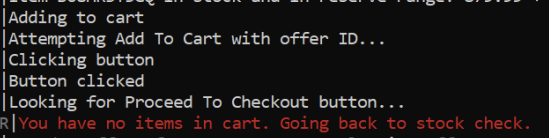
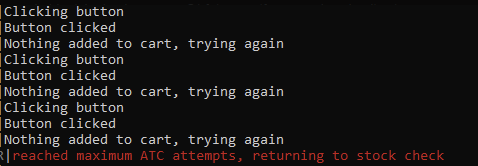
Furthermore, if the terminal indicates something about picking your address, and you did Step 8 above correctly (i.e., tested the bot and it does not normally ask you for your address when checking out), then it is VERY LIKELY the product was already out of stock and Amazon is sending you to a garbage page.
Additional information about running FairGame can be found in the rest of the documentation.
Detailed Directions
Python
This project uses Python 3.8.X and uses Pipenv to manage dependencies.
Downloading FairGame
To get started, there are two options:
Releases
To get the latest release as a convenient package, download it directly from the Releases page on GitHub. The "Source code" zip or tar file are what you'll want. This can be downloaded and extracted into a directory of your choice, it is STRONGLY suggested that you install to the root of the drive (e.g., C:\fairgame).
Git
If you want to manage the code via Git, you'll first need to clone this repository. If you are unfamiliar with Git, follow the guide on how to do that on our Wiki. You can use the "Download Zip" button on the GitHub repository's homepage but this makes receiving updates more difficult. If you can get setup with the GitHub Desktop app, updating to the latest version of the bot takes 1 click. Regardless, it is STRONGLY suggested that you install to the root of the drive (e.g., C:\fairgame)
Installing Dependencies
If you are on Windows, use INSTALL (RUN FIRST).bat. Do NOT use administrative mode
If you are not on Windows, do the following:
pip install pipenv
pipenv install
pipenv install must be run in the project's folder.
NOTE: YOU SHOULD RUN pipenv install ANY TIME YOU UPDATE, IN CASE THE DEPENDENCIES HAVE CHANGED!
Configuration
In the config folder, make a copy of amazon_config.template_json and
rename it to amazon_config.json. Edit it
according to the
ASINs you are
interested in purchasing. You can find a list of ASINs for some common products people are looking for on our
Discord #asins. If it's not in there, you have to look it up yourself.
asin_groupsindicates the number of ASIN groups (or lists) you want to use.asin_list_xlist of ASINs for products you want to purchase. You must locate these for the products you want, use the links above to get started.- The first time an item from list "x" is in stock and under its associated reserve, it will purchase it. FairGame
will continue to loop through the other lists until it purchases one item from each (unless the
--single-shotoption is enabled, in which case it stops after the first purchase). - If the purchase is successf
- The first time an item from list "x" is in stock and under its associated reserve, it will purchase it. FairGame
will continue to loop through the other lists until it purchases one item from each (unless the
Core symbols most depended-on inside this repo
Shape
Languages
Modules by API surface
For agents
$ claude mcp add fairgame \
  -- python -m otcore.mcp_server <graph>