github.com/HKUDS/OpenOPC @main
Chat with this repoBrowse by type
What it actually does AI analysis from the code graph — generated when you open this
README
OpenOPC: Build Your Personal AI-Native Company — Self-Built, Self-Run, Self-Grown
English | 简体中文
🏗️ Self-Built — Fully automated to recruit role-specific AI employees and build the org.
⚙️ Self-Run — Fully automated to assign tasks, drive handoffs, and keep moving toward your goal.
🌱 Self-Grown — Learns from every task, builds organizational memory, always delivers smarter.







News
- Jul 14, 2026 — More resilient company runs: Company-mode sessions now recover and resume more seamlessly while preserving agent identity, shared role context, delegation, and review progress.
- Jul 13, 2026 — Smoother Office UI: Faster live updates and chat scrolling improve long-running projects.
- Jul 8, 2026 — Smarter approvals: Session grants persist, low-risk actions flow automatically, and deferred decisions stay available.
Table Of Contents
- When To Use OpenOPC
- Demos
- How OpenOPC Works
- Quick Start
- Office UI Guide
- CLI Guide
- Configuration
- Ecosystem And Sharing
- Roadmap
- Acknowledgements
When to Use OpenOPC
OpenOPC covers nine core verticals — from AI development and software engineering to finance, sales, media, e-commerce, and education. Whatever the industry, OpenOPC assembles the right team and delivers end-to-end.
| 🤖 AI Tech & Research Model training & evaluation, Agent development, LLM apps & AI infrastructure | 💻 Software Development Android apps, SaaS MVPs, websites, mini programs & game development | 📈 Financial Investment Investment memos, market maps, due diligence & IC decision packages |
| 🚀 Sales Growth Outbound sales, deal strategy, proposals & channel expansion | 🎬 Content & Media Video production, short-form content, scripts, storyboards & multi-platform cuts | 🤝 Industry Assistants Copilots for support, real estate, legal intake, HR onboarding, retail |
| 🧾 Accounting & Finance Bookkeeping, financial reporting, tax compliance, budgeting & risk review | 🛍️ Brand & E-commerce Brand planning, product selection, store ops, user growth & retention | 🎓 Education & Training Curriculum design, knowledge base, learner management & content production |
Demos
 🎬 Video Production
|
 📈 Investment Research
|
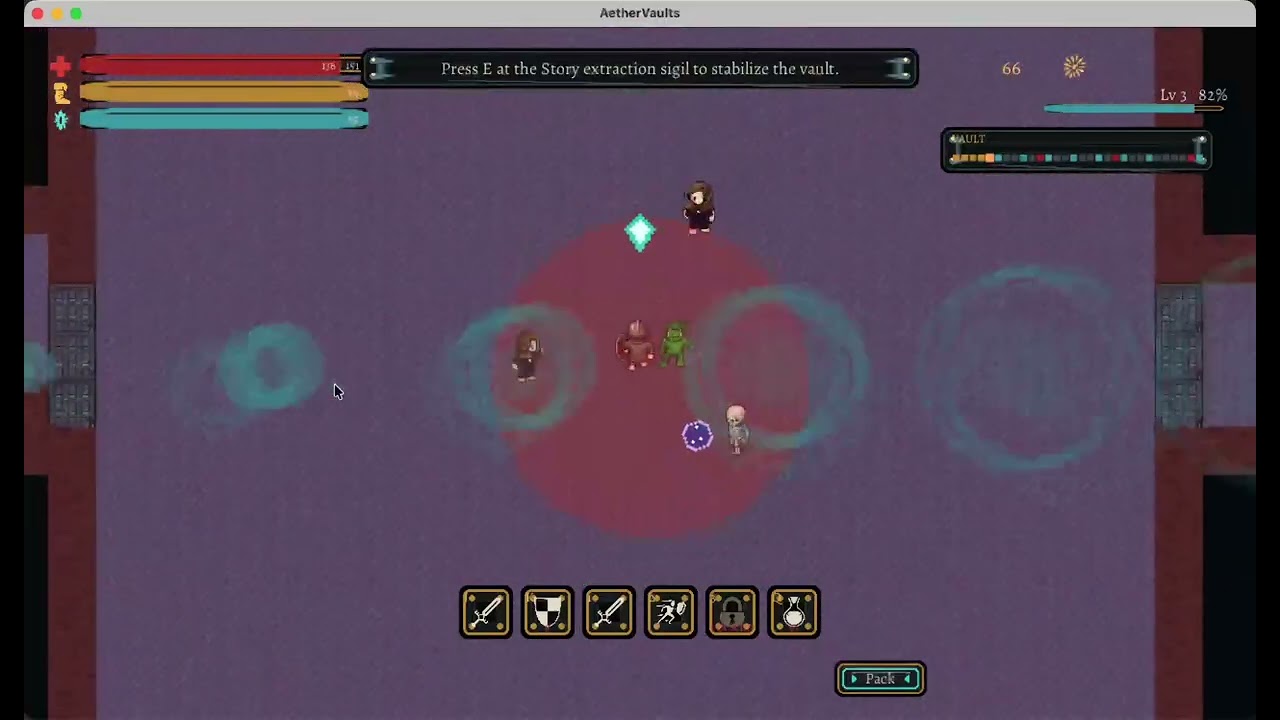 🎮 Game Prototype
|
How OpenOPC Works
OpenOPC assembles a AI company around complex, real-world tasks — through three tightly coupled mechanisms: Self-Built staffs the organisation, Self-Run executes the work, and Self-Grown learns from the outcome.

1. Self-Built — Staffing the Organisation
Before any work begins, the right people must be in place. Given a goal, OpenOPC:
- 🌿 Drafts the org chart — deriving the roles and reporting structure the task demands.
- 🎯 Fills each role — a recruiter agent chooses between reusing an existing employee (shaped by prior projects) and onboarding a fresh hire from the talent pool.
💡 Experienced employees carry accumulated context; fresh hires offer a clean slate when a role demands it.
⚙️ 2. Self-Run — Executing the Work
With the team assembled, Self-Run orchestrates its members toward a finished deliverable. The central challenge is not raw execution but efficient collaboration under uncertainty, which manifests in two distinct problems.
🔀 Dynamic collaboration orchestration. Real work cannot be fully planned upfront. OpenOPC addresses this through a work-item state machine, where each item's phase determines:
- 📋 Its kanban column — where it stands in the workflow.
- 👑 Its owner — the role responsible at that phase.
- ✅ Its runnability — whether it is ready to proceed.
A manager decomposes items, assigns, and reviews results — accepting, reworking, or escalating — across five modes: execute, delegate, review, integrate, and rework. Decomposition defines a dependency DAG, so:
- ⚡ Independent items proceed in parallel.
- ⏳ Dependent items wait until prerequisites are resolved.
🔗 Dependency resolution and rejection propagate as structured phase transitions, eliminating ad-hoc coordination.
🛡️ Handling blockers surfacing mid-run. Not all obstacles are visible upfront. OpenOPC resolves them at two levels:
- 💬 Within the team — a blocking message pauses the sender, activating the role best positioned to resolve it.
- 📡 Beyond the team — when a blocker exceeds the team's authority, the runtime escalates to the human owner, invoking human judgment precisely when needed.
🖥️ The kanban and office views render this orchestration in real time.
🌱 3. Self-Grown — Learning from the Run
Execution generates raw experience; Self-Grown turns it into lasting improvement, guided by two principles.
🏅 Attributing outcomes to the right roles. Crediting the whole company teaches nothing. Instead, OpenOPC:
- 🔍 Resolves user feedback into per-employee evaluations.
- 🎯 Updates only roles that owned the relevant work items — credit and blame land where they were earned.
📖 Distilling trajectories into knowledge. Execution traces are too noisy to learn from. OpenOPC therefore: - 💡 Distils each role's tasks into high-signal lessons, stored in its private experience profile. - 📚 Promotes recurring lessons into shared playbooks, which new hires inherit from the outset — compounding organisational knowledge over time.
How this maps to the UI
Org -> Teamedits the company architecture and roles.Org -> Employeeshires talent into vacant roles.Team Roster -> Deployturns a hired employee into a visible office agent.- The Workspace composer selects the Task Mode execution agent.
- The role inspector can set runtime policy and preferred external agent for Company Mode roles.
- During execution, Workspace
Agentsand the Execution Progress panel show which role is active, which work item it owns, and which execution agent is doing the concrete work.
Quick Start
uv is the recommended setup path for OpenOPC. It can install/manage Python, create the project virtualenv, and run commands against that environment without mixing OpenOPC dependencies into your global Python.
OpenOPC requires Python >=3.10; the examples below use Python 3.12.
For direct one-off work, OpenOPC also includes Task Mode, a LobeChat-like single-agent workspace using OpenOPC Native, Codex, Claude Code, Cursor, or OpenCode.
Recommended: uv environment setup
macOS
# Install uv with Homebrew, or use the official standalone installer.
brew install uv
# curl -LsSf https://astral.sh/uv/install.sh | sh

cd /path/to/OpenOPC
uv python install 3.12
uv venv --python 3.12
source .venv/bin/activate
Linux
curl -LsSf https://astral.sh/uv/install.sh | sh
source "$HOME/.local/bin/env"

cd /path/to/OpenOPC
uv python install 3.12
uv venv --python 3.12
source .venv/bin/activate
Windows PowerShell
powershell -ExecutionPolicy ByPass -c "irm https://astral.sh/uv/install.ps1 | iex"

cd C:\path\to\OpenOPC
uv python install 3.12
uv venv --python 3.12
.\.venv\Scripts\Activate.ps1
Windows Command Prompt
winget install --id=astral-sh.uv -e
:: Or run the standalone installer from cmd:
:: powershell -ExecutionPolicy ByPass -c "irm https://astral.sh/uv/install.ps1 | iex"

cd C:\path\to\OpenOPC
uv python install 3.12
uv venv --python 3.12
.venv\Scripts\activate.bat
# Install OpenOPC into the uv-managed environment
uv pip install -e .

# Optional but recommended for browser tools
uv run python -m playwright install chromium

# Initialize local config, memory, skills, projects, and workspace folders
uv run opc init

# Add an API key in .opc/config/llm_config.yaml
# or configure the env var named by llm.api_key_env.

# Launch the browser UI
uv run opc ui
Open http://localhost:8765 by default.
# Interactive CLI
uv run opc chat -p demo

# One-shot task mode
uv run opc chat -p demo --mode task --agent codex "Refactor this module and run focused tests"

# Company mode with the built-in Corporate architecture
uv run opc chat -p demo --mode company --company-profile corporate "Plan, implement, review, and document this feature"

# Non-interactive scripting / CI style usage
uv run opc exec -p demo --mode task --agent native --json "Summarize the current repo status"
Install notes
- Python:
>=3.10. Current required dependencies do not all publish Python 3.9-compatible releases. uvis recommended for local development and release testing. If you prefer classic pip, create and activate a Python>=3.10virtualenv, then runpython -m pip install -e ..- If virtualenv activation is blocked, stay unactivated and run commands with
uv run .... - See the official
uvinstallation and Python management docs for alternative package managers and managed Python details. - Node.js:
>=18is needed when the Office UI frontend must be built. opc uiauto-installs missingaiohttp/aiosqliteand auto-builds the frontend if needed.- If you have not installed external agent CLIs yet, run
opc init --no-external-agent-preflightto skip the first-run external-agent checks. - Browser tools are native Playwright tools. Install Chromium with
python -m playwright install chromiumbefore asking agents to browse pages.
Development setup (build from source)
python -m pip install -e .
python -m pytest

cd opc/plugins/office_ui/frontend_src
npm install
npm run typecheck
npm run build
The frontend build output is served from opc/plugins/office_ui/frontend_dist/.
Office UI Guide
Expand the Office UI guide — visual tour, workspace, company mode, kanban, office, org
Start it with:
opc ui
opc ui --port 9000 --project demo
opc ui --rebuild
Visual Tour
Scroll horizontally to browse the Office UI walkthrough. Each screenshot keeps its short guide text attached.
<figure style="flex:0 0 900px; width:900px; margin:0;">
  <img src="https://github.com/HKUDS/OpenOPC/raw/main/docs/assets/fig1.png" alt="Workspace project, chat, mode, organization, and agent controls" width="900">
  <figcaption><strong>Workspace And Setup.</strong> Choose or create a project, start <code>New Chat</code>, then select <code>Company</code> or <code>Task</code> plus the matching organization or agent. In Company Mode, pick role employees and execution agents, or let OpenOPC auto-recruit.</figcaption>
</figure>
<figure style="flex:0 0 900px; width:900px; margin:0;">
  <img src="https://github.com/HKUDS/OpenOPC/raw/main/docs/assets/fig2.png" alt="Execution Progress panel showing role status and execution records" width="900">
  <figcaption><stron
Extension points exported contracts — how you extend this code
browse all types & interfaces →
Core symbols most depended-on inside this repo
Shape
Languages
Modules by API surface
For agents
$ claude mcp add OpenOPC \
  -- python -m otcore.mcp_server <graph>