github.com/Graphify-Labs/graphify @v0.9.7
Chat with this repoWhat it actually does AI analysis from the code graph — generated when you open this
README

🇺🇸 English | 🇨🇳 简体中文 | 🇯🇵 日本語 | 🇰🇷 한국어 | 🇩🇪 Deutsch | 🇫🇷 Français | 🇪🇸 Español | 🇮🇳 हिन्दी | 🇧🇷 Português | 🇷🇺 Русский | 🇸🇦 العربية | 🇮🇷 فارسی | 🇮🇹 Italiano | 🇵🇱 Polski | 🇳🇱 Nederlands | 🇹🇷 Türkçe | 🇺🇦 Українська | 🇻🇳 Tiếng Việt | 🇮🇩 Bahasa Indonesia | 🇸🇪 Svenska | 🇬🇷 Ελληνικά | 🇷🇴 Română | 🇨🇿 Čeština | 🇫🇮 Suomi | 🇩🇰 Dansk | 🇳🇴 Norsk | 🇭🇺 Magyar | 🇹🇭 ภาษาไทย | 🇺🇿 Oʻzbekcha | 🇹🇼 繁體中文 | 🇵🇭 Filipino








Type /graphify in your AI coding assistant and it maps your entire project — code, docs, PDFs, images, videos — into a knowledge graph you can query instead of grepping through files.
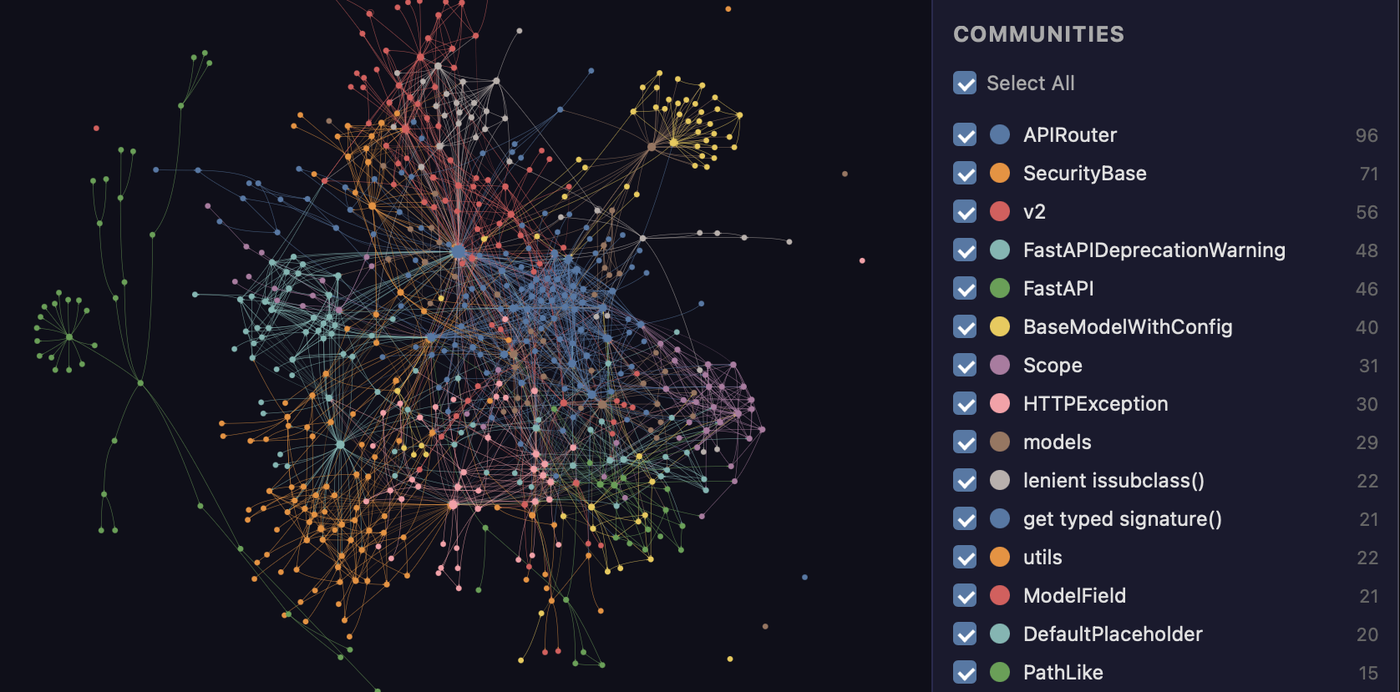
The FastAPI codebase mapped by graphify. Every node is a concept, colors are detected communities, and the whole thing is clickable in graph.html.
Works in Claude Code, Codex, OpenCode, Kilo Code, Cursor, Gemini CLI, GitHub Copilot CLI, VS Code Copilot Chat, Aider, Amp, OpenClaw, Factory Droid, Trae, Hermes, Kimi Code, Kiro, Pi, Devin CLI, and Google Antigravity.
/graphify .
That's it. You get three files:
graphify-out/
├── graph.html       open in any browser — click nodes, filter, search
├── GRAPH_REPORT.md  the highlights: key concepts, surprising connections, suggested questions
└── graph.json       the full graph — query it anytime without re-reading your files
For a readable architecture page with Mermaid call-flow diagrams, run:
graphify export callflow-html
Benchmarks
| Benchmark | Metric | graphify | Field |
|---|---|---|---|
| LOCOMO (n=300) | recall@10 | 0.497 | mem0 0.048, supermemory 0.149 |
| LOCOMO (n=300) | QA accuracy | 45.3% | supermemory 49.7%, mem0 27.3% |
| LongMemEval-S (n=50) | QA accuracy | 76% | tied best |
| Graph build | LLM credits | 0 | per-token for most systems |
Every system ran on the same harness with the same model and budgets, scored by a judge blind-validated against a second judge (90.6% agreement, Cohen's kappa 0.81). Full per-system tables, the code-intelligence result, and reproduction commands: BENCHMARKS.md.
Prerequisites
| Requirement | Minimum | Check | Install |
|---|---|---|---|
| Python | 3.10+ | python --version |
python.org |
| uv (recommended) | any | uv --version |
curl -LsSf https://astral.sh/uv/install.sh \| sh |
| pipx (alternative) | any | pipx --version |
pip install pipx |
macOS quick install (Homebrew):
brew install python@3.12 uv
Windows quick install:
winget install astral-sh.uv
Ubuntu/Debian:
sudo apt install python3.12 python3-pip pipx
# or install uv:
curl -LsSf https://astral.sh/uv/install.sh | sh
Install
Official package: The PyPI package is
graphifyy(double-y). Othergraphify*packages on PyPI are not affiliated. The CLI command is stillgraphify.
Step 1 — install the package:
# Recommended (isolated env; if 'graphify' isn't found after, run: uv tool update-shell):
uv tool install graphifyy

# Alternatives:
pipx install graphifyy
pip install graphifyy  # may need PATH setup — see note below
Step 2 — register the skill with your AI assistant:
graphify install
That's it. Open your AI assistant and type /graphify .
To install the assistant skill into the current repository instead of your user
profile, add --project:
graphify install --project
graphify install --project --platform codex
Project-scoped installs write under the current directory, for example
.claude/skills/graphify/SKILL.md or .agents/skills/graphify/SKILL.md (plus a
references/ sidecar the skill loads on demand), and
print a git add hint for files that can be committed.
Per-platform commands that support project-scoped installs accept the same flag,
for example graphify claude install --project or graphify codex install --project.
PowerShell note: Use
graphify .not/graphify .— the leading slash is a path separator in PowerShell.
graphify: command not found?uv tool install/pipx installput thegraphifycommand in their tool bin dir (~/.local/bin). If your shell can't find it right after install — common on a fresh macOS + zsh setup — that dir isn't on yourPATHyet: runuv tool update-shell(orpipx ensurepath), then open a new terminal. With plainpip, add~/.local/bin(Linux) or~/Library/Python/3.x/bin(Mac) to your PATH, or runpython -m graphify.Running with
uvx/uv tool runinstead of installing? Name the package, not the command:uvx --from graphifyy graphify install. Plainuvx graphify …fails (No solution found … no versions of graphify) becauseuv tool runreads the first word as a package, and the package isgraphifyy— thegraphifycommand lives inside it.Avoid
pip installon Mac/Windows if possible. The skill resolves Python at runtime fromgraphify-out/.graphify_python; if that points to a different environment than wherepipinstalled the package, you'll getModuleNotFoundError: No module named 'graphify'.uv tool installandpipx installisolate the package in their own env and avoid this entirely.Git hooks and uv tool / pipx:
graphify hook installembeds the current interpreter path directly into the hook scripts at install time, so the post-commit hook fires correctly even in GUI git clients and CI runners where~/.local/binis not on PATH. If you reinstall or upgrade graphify, re-rungraphify hook installto refresh the embedded path.
Pick your platform (20+ assistants, click to expand)
| Platform | Install command |
|---|---|
| Claude Code (Linux/Mac) | graphify install |
| Claude Code (Windows) | graphify install (auto-detected) or graphify install --platform windows |
| CodeBuddy | graphify install --platform codebuddy |
| Codex | graphify install --platform codex |
| OpenCode | graphify install --platform opencode |
| Kilo Code | graphify install --platform kilo |
| GitHub Copilot CLI | graphify install --platform copilot |
| VS Code Copilot Chat | graphify vscode install |
| Aider | graphify install --platform aider |
| OpenClaw | graphify install --platform claw |
| Factory Droid | graphify install --platform droid |
| Trae | graphify install --platform trae |
| Trae CN | graphify install --platform trae-cn |
| Gemini CLI | graphify install --platform gemini |
| Hermes | graphify install --platform hermes |
| Kimi Code | graphify install --platform kimi |
| Amp | graphify amp install |
| Agent Skills (cross-framework) | graphify install --platform agents (alias --platform skills) |
| Kiro IDE/CLI | graphify kiro install |
| Pi coding agent | graphify install --platform pi |
| Cursor | graphify cursor install |
| Devin CLI | graphify devin install |
| Google Antigravity | graphify antigravity install |
Codex users also need multi_agent = true under [features] in ~/.codex/config.toml for parallel extraction. CodeBuddy uses the same Agent tool and PreToolUse hook mechanism as Claude Code. Factory Droid uses the Task tool for parallel subagent dispatch. OpenClaw and Aider use sequential extraction (parallel agent support is still early on those platforms). Trae uses the Agent tool for parallel subagent dispatch and does not support PreToolUse hooks — AGENTS.md is the always-on mechanism.
--platform agents (alias --platform skills) targets the generic cross-framework Agent-Skills locations: the spec's user-global ~/.agents/skills/ (read by npx skills and spec-compliant frameworks) for a global install, and ./.agents/skills/ for a project (--project) install. The bare graphify install stays single-platform (Claude Code) by design — use the named agents platform when you want the skill discoverable by any framework that reads .agents/skills.
Codex uses
$graphifyinstead of/graphify.
Optional extras (install only what you need)
| Extra | What it adds | Install |
|---|---|---|
pdf |
PDF extraction | uv tool install "graphifyy[pdf]" |
office |
.docx and .xlsx support |
uv tool install "graphifyy[office]" |
google |
Google Sheets rendering | uv tool install "graphifyy[google]" |
video |
Video/audio transcription (faster-whisper + yt-dlp) | uv tool install "graphifyy[video]" |
mcp |
MCP stdio server | uv tool install "graphifyy[mcp]" |
neo4j |
Neo4j push support | uv tool install "graphifyy[neo4j]" |
falkordb |
FalkorDB push support | uv tool install "graphifyy[falkordb]" |
svg |
SVG graph export | uv tool install "graphifyy[svg]" |
leiden |
Leiden community detection (Python < 3.13 only) | uv tool install "graphifyy[leiden]" |
ollama |
Ollama local inference | uv tool install "graphifyy[ollama]" |
openai |
OpenAI / OpenAI-compatible APIs | uv tool install "graphifyy[openai]" |
gemini |
Google Gemini API | uv tool install "graphifyy[gemini]" |
anthropic |
Anthropic Claude API (--backend claude, uses ANTHROPIC_API_KEY) |
uv tool install "graphifyy[anthropic]" |
bedrock |
AWS Bedrock (uses IAM, no API key) | uv tool install "graphifyy[bedrock]" |
azure |
Azure OpenAI Service (--backend azure, uses AZURE_OPENAI_API_KEY + AZURE_OPENAI_ENDPOINT) |
uv tool install "graphifyy[openai]" |
sql |
SQL schema extraction | uv tool install "graphifyy[sql]" |
postgres |
Live PostgreSQL introspection (--postgres DSN) |
uv tool install "graphifyy[postgres]" |
dm |
BYOND DreamMaker .dm/.dme AST extraction (may need a C compiler + python3-dev if no wheel matches your platform) |
uv tool install "graphifyy[dm]" |
terraform |
Terraform / HCL .tf/.tfvars/.hcl AST extraction |
uv tool install "graphifyy[terraform]" |
pascal |
Pascal / Delphi .pas/.dpr/.dpk/.inc AST extraction (more accurate calls/inherits edges; falls back to a regex extractor when absent) |
uv tool install "graphifyy[pascal]" |
chinese |
Chinese query segmentation (jieba) | uv tool install "graphifyy[chinese]" |
all |
Everything above | uv tool install "graphifyy[all]" |
Make your assistant always use the graph
Run this once in your project after building a graph:
| Platform | Command |
|---|---|
| Claude Code | graphify claude install |
Extension points exported contracts — how you extend this code
Core symbols most depended-on inside this repo
Shape
Languages
Modules by API surface
Datastores touched
For agents
$ claude mcp add graphify \
  -- python -m otcore.mcp_server <graph>