github.com/Genivia/ugrep @v7.8.2
Chat with this repoBrowse by type
What it actually does AI analysis from the code graph — generated when you open this
README


The ugrep file pattern searcher
[ README | User Guide | Indexing | Benchmarks | Q&A ]
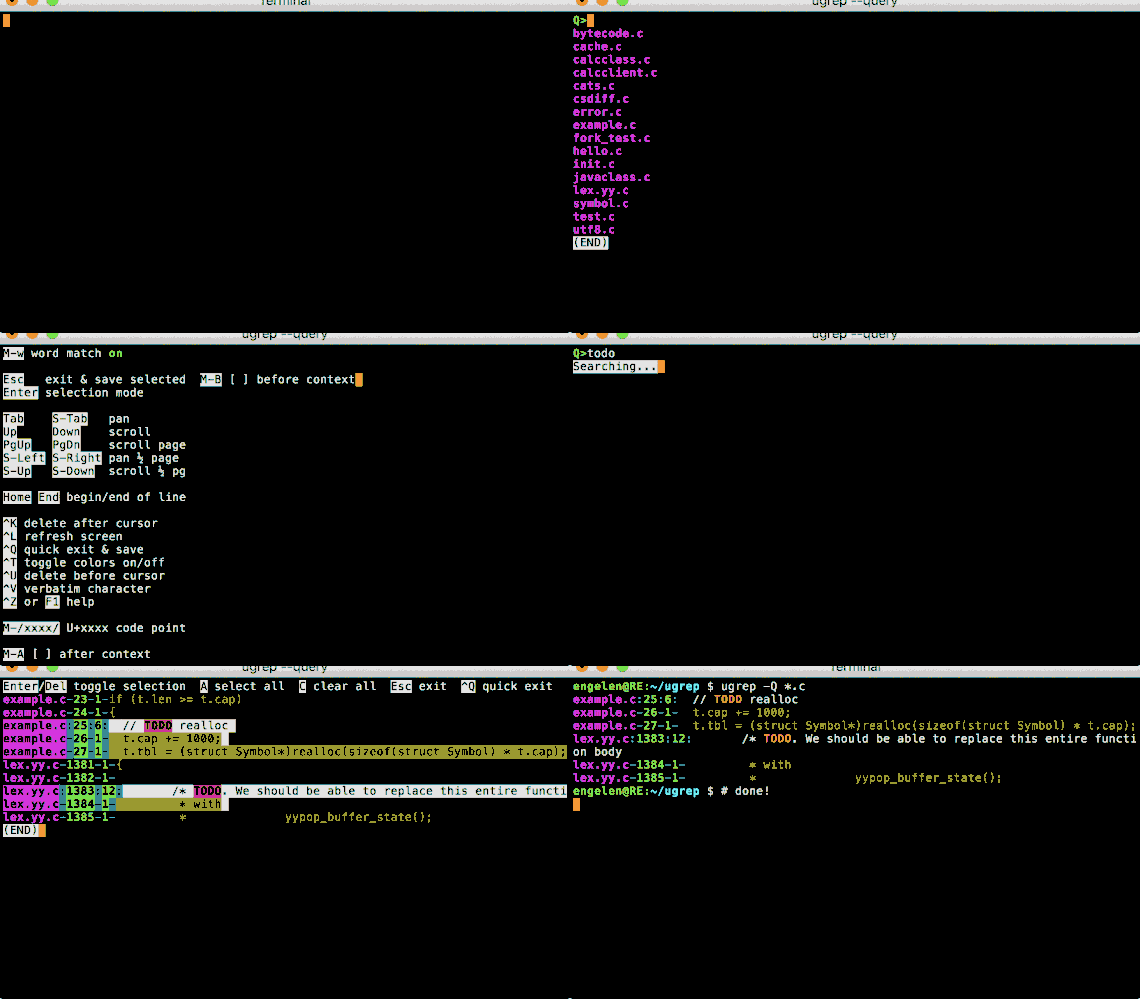
option -Q opens a query TUI to search files as you type!
Why use ugrep?
-
ugrep is compatible to GNU/BSD grep, but much faster and with a ton of new features
-
ugrep is a drop-in replacement for BSD and GNU grep (copy or symlink
ugtogrep, and toegrepand tofgrep), unlike other popular grep claiming to be "grep alternatives" or "replacements" when those actually implement incompatible command-line options and use an incompatible regex matcher, i.e. Perl regex only versus POSIX BRE (grep) and ERE (egrep) when ugrep supports all regex modes -
ugrep is typically faster than rg, ag, and GNU grep
-
full Unicode extended regex pattern syntax with multi-line pattern matching without any special command-line options
-
includes an interactive TUI with built-in help, Google-like search with AND/OR/NOT patterns, fuzzy search, search (nested) zip/7z/tar/pax/cpio archives, tarballs and compressed files gz/Z/bz/bz2/lzma/xz/lz4/zstd/brotli, search and hexdump binary files, search documents such as PDF, doc, docx, and output in JSON, XML, CSV or your own customized format
-
includes a file indexer to speed up searching slow and cold file systems
Development roadmap
-
quality assurance by testing and validation to make sure ugrep is reliable
-
make ugrep run even faster with future updates and post reproducible performance results
-
consider new features requested by users when useful to support a broad use case
Overview
Commands
-
ugis for interactive use, which loads an optional .ugrep configuration file with your preferences located in the working directory or home directory,ug+also searches pdfs, documents, e-books, image metadata -
ugrepfor batch use like GNU grep without a .ugrep configuration file,ugrep+also searches pdfs, documents, e-books, image metadata
What does ugrep add that GNU grep does not support?
-
Matches Unicode patterns by default and automatically searches UTF-8, UTF-16 and UTF-32 encoded files
-
Matches multiple lines with
\nor\Rin regex patterns, no special options are required to do so! -
Built-in help:
ug --help, whereug --help WHATdisplays options related toWHATyou are looking for
💡 ug --help regex, ug --help globs, ug --help fuzzy, ug --help format.
-
User-friendly with customizable configuration files used by the
ugcommand intended for interactive use that loads a .ugrep configuration file with your preferencesug PATTERN ... ugrep --config PATTERN ...
💡 ug --save-config ...options-you-want-to-save... saves a .ugrep config file in the working directory so that the next time you run ug there it uses these options. Do this in your home directory to save a .ugrep config file with options you generally want to use.
-
Interactive query TUI, press F1 or CTRL-Z for help and TAB/SHIFT-TAB to navigate to dirs and files
ug -Q ug -Q -e PATTERN
💡 -Q replaces PATTERN on the command line to let you enter patterns interactively in the TUI. In the TUI use ALT+letter keys to toggle short "letter options" on/off, for example ALT-n (option -n) to show/hide line numbers.
-
Search the contents of archives (zip, tar, pax, jar, cpio, 7z) and compressed files (gz, Z, bz, bz2, lzma, xz, lz4, zstd, brotli)
ug -z PATTERN ... ug -z --zmax=2 PATTERN ...
💡 specify -z --zmax=2 to search compressed files and archives nested within archives. The --zmax argument may range from 1 (default) to 99 for up to 99 decompression and de-archiving steps to search nested archives
-
Search with Google-like Boolean query patterns using
-%patterns withAND(or just space),OR(or a bar|),NOT(or a dash-), using quotes to match exactly, and grouping with( )(shown on the left side below); or with options-e(as an "or"),--and,--andnot, and--notregex patterns (shown on the right side below):ug -% 'A B C' ... ug -e 'A' --and 'B' --and 'C' ... ug -% 'A|B C' ... ug -e 'A' -e 'B' --and 'C' ... ug -% 'A -B -C' ... ug -e 'A' --andnot 'B' --andnot 'C' ... ug -% 'A -(B|C)'... ug -e 'A' --andnot 'B' --andnot 'C' ... ug -% '"abc" "def"' ... ug -e '\Qabc\E' --and '\Qdef\E' ...
where A, B and C are arbitrary regex patterns (use option -F to search strings)
💡 specify option -%% (--bool --files) to apply the Boolean query to files as a whole: a file matches if all Boolean conditions are satisfied by matching patterns file-wide. Otherwise, Boolean conditions apply to single lines by default, since grep utilities are generally line-based pattern matchers. Option --stats displays the query in human-readable form after the search completes.
-
Search pdf, doc, docx, e-book, and more with
ug+using filters associated with filename extensions:ug+ PATTERN ...
or specify --filter with a file type to use a filter utility:
  ug --filter='pdf:pdftotext % -' PATTERN ...
  ug --filter='doc:antiword %' PATTERN ...
  ug --filter='odt,docx,epub,rtf:pandoc --wrap=preserve -t plain % -o -' PATTERN ...
  ug --filter='odt,doc,docx,rtf,xls,xlsx,ppt,pptx:soffice --headless --cat %' PATTERN ...
  ug --filter='pem:openssl x509 -text,cer,crt,der:openssl x509 -text -inform der' PATTERN ...
  ug --filter='latin1:iconv -f LATIN1 -t UTF-8' PATTERN ...
💡 the ug+ command is the same as the ug command, but also uses filters to search PDFs, documents, and image metadata
-
Display horizontal context with option
-o(--only-matching) and context options-ABC, e.g. to find matches in very long lines, such as Javascript and JSON sources:ug -o -C20 -nk PATTERN longlines.js
💡 -o -C20 fits all matches with context in 20 characters before and 20 charactess after a match (i.e. 40 Unicode characters total), -nk outputs line and column numbers.
-
Find approximate pattern matches with fuzzy search, within the specified Levenshtein distance
ug -Z PATTERN ... ug -Z3 PATTTERN ...
💡 -Zn matches up to n extra, missing or replaced characters, -Z+n matches up to n extra characters, -Z-n matches with up to n missing characters and -Z~n matches up to n replaced characters. -Z defaults to -Z1.
-
Fzf-like search with regex (or fixed strings with
-F), fuzzy matching with up to 4 extra characters with-Z+4and words only with-w, using-%%for file-wide Boolean searchesug -Q -%% -l -w -Z+4 --sort=best
💡 -l lists the matching files in the TUI, press TAB then ALT-y to view a file, SHIFT-TAB and Alt-l to go back to view the list of matching files ordered by best match
-
Search binary files and display hexdumps with binary pattern matches (Unicode text or
-Ufor byte patterns)ug --hexdump -U BYTEPATTERN ... ug --hexdump TEXTPATTERN ... ug -X -U BYTEPATTERN ... ug -X TEXTPATTERN ... ug -W -U BYTEPATTERN ... ug -W TEXTPATTERN ...
💡 --hexdump=4chC1 displays 4 columns of hex without a character column c, no hex spacing h, and with one extra hex line C1 before and after a match.
-
Include files to search by file types or file "magic bytes" or exclude them with
^ug -t TYPE PATTERN ... ug -t ^TYPE PATTERN ... ug -M 'MAGIC' PATTERN ... ug -M '^MAGIC' PATTERN ...
-
Include files and directories to search that match gitignore-style globs or exclude them with
^ug -g 'FILEGLOB' PATTERN ... ug -g '^FILEGLOB' PATTERN ... ug -g 'DIRGLOB/' PATTERN ... ug -g '^DIRGLOB/' PATTERN ... ug -g 'PATH/FILEGLOB' PATTERN ... ug -g '^PATH/FILEGLOB' PATTERN ... ug -g 'PATH/DIRGLOB/' PATTERN ... ug -g '^PATH/DIRGLOB/' PATTERN ...
-
Include files to search by filename extensions (suffix) or exclude them with
^, a shorthand for-g"*.EXT"ug -O EXT PATTERN ... ug -O ^EXT PATTERN ...
-
Include hidden files (dotfiles) and directories to search (omitted by default)
ug -. PATTERN ... ug -g'.,./' PATTERN ...
💡 specify hidden in your .ugrep to always search hidden files with ug.
-
Exclude files specified by .gitignore etc.
ug --ignore-files PATTERN ... ug --ignore-files=.ignore PATTERN ...
💡 specify ignore-files in your .ugrep to always ignore them with ug. Add additional ignore-files=... as desired.
-
Search patterns excluding negative patterns ("match this but not that")
ug -e PATTERN -N NOTPATTERN ... ug -e '[0-9]+' -N 123 ...
-
Use predefined regex patterns to search source code, javascript, XML, JSON, HTML, PHP, markdown, etc.
ug PATTERN -f c++/zap_comments -f c++/zap_strings ... ug PATTERN -f php/zap_html ... ug -f js/functions ... | ug PATTERN ...
-
Sort matching files by name, best match, size, and time
ug --sort PATTERN ... ug --sort=size PATTERN ... ug --sort=changed PATTERN ... ug --sort=created PATTERN ... ug -Z --sort=best PATTERN ... ug --no-sort PATTERN ...
-
Output results in CSV, JSON, XML, and user-specified formats
ug --csv PATTERN ... ug --json PATTERN ... ug --xml PATTERN ... ug --format='file=%f line=%n match=%O%~' PATTERN ...
💡 ug --help format displays help on format % fields for customized output.
-
Search with PCRE's Perl-compatible regex patterns and display or replace subpattern matches
ug -P PATTERN ... ug -P --format='%1 and %2%~' 'PATTERN(SUB1)(SUB2)' ...
-
Replace patterns in the output with -P and --replace replacement text, optionally containing
%formatting fields, using-yto pass the rest of the file through:ug --replace='TEXT' PATTERN ... ug -y --replace='TEXT' PATTERN ... ug --replace='(%m:%o)' PATTERN ... ug -y --replace='(%m:%o)' PATTERN ... ug -P --replace='%1' PATTERN ... ug -y -P --replace='%1' PATTERN ...
💡 ug --help format displays help on format % fields to optionally use with --replace.
-
Search files with a specific encoding format such as ISO-8859-1 thru 16, CP 437, CP 850, MACROMAN, KOI8, etc.
ug --encoding=LATIN1 PATTERN ...
Table of contents
- How to install
- Performance comparisons
- Using ugrep within Vim
- Using ugrep within Emacs
- Using ugrep to replace GNU/BSD grep
- Equivalence to GNU/BSD grep
- Short and quick command aliases
- Notable improvements over grep
- Tutorial
- Examples
- Advanced examples
- Displaying helpful info
- Configuration files
- Interactive search with -Q
- Recursively list matching files with -l, -R, -r, --depth, -g, -O, and -t
- Boolean query patterns with -%, -%%, --and, --not
- Search this but not that with -v, -e, -N, -f, -L, -w, -x
- Search non-Unicode files with --encoding
- Matching multiple lines of text
- Displaying match context with -A, -B, -C, and -y
- Searching source code using -f, -O, and -t
- Searching compressed files and archives with -z
- Find files by file signature and shebang "magic bytes" with -M, -O and -t
- Fuzzy search with -Z
- Search hidden files with -.
- Using filter utilities to search documents with --filter
- Searching and displaying binary files with -U, -W, and -X
- Ignore binary files with -I
- Ignoring .gitignore-specified files with --ignore-files
- Using gitignore-style globs to select directories and files to search
- Including or excluding mounted file systems from searches
- Counting the number of matches with -c and -co
- Displaying file, line, column, and byte offset info with -H, -n, -k, -b, and -T
- Displaying colors with --color and paging the output with --pager
- Output matches in JSON, XML, CSV, C++
- Customize output with --format
- Replacing matches with -P --replace and --format using backreferences
- Limiting the number of matches with -1,-2...-9, -K, -m, and --max-files
- Matching empty patterns with -Y
- Case-insensitive matching with -i and -j
- [Sort files by name, best match, size, and time
Core symbols most depended-on inside this repo
Shape
Languages
Modules by API surface
For agents
$ claude mcp add ugrep \
  -- python -m otcore.mcp_server <graph>