github.com/FluxGarage/RoboEyes @v1.1.2
Chat with this repoBrowse by type
What it actually does AI analysis from the code graph — generated when you open this
README
FluxGarage RoboEyes Library
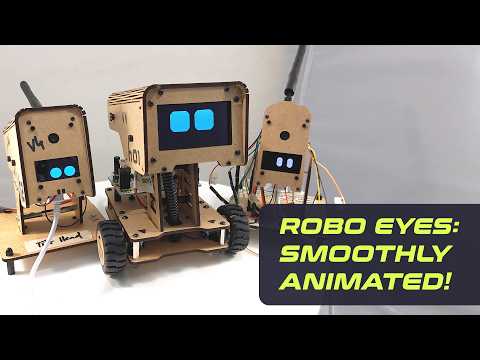
Draws smoothly animated robot eyes on OLED displays, using the Adafruit GFX library. Robot eye shapes are configurable in terms of width, height, border radius and space between. Several different mood expressions (happy, tired, angry, default) and animations (autoblinker, idle, laughing, confused) are available. All state changes have smooth transitions and thus, complex animation sequences are easily feasible.
Developing this library was the first step of a larger project: the creation of my own DIY robot from the design perspective. Check out the FluxGarage Youtube Channel.
Watch the Demo and Getting Started Videos on Youtube

Installation
- Navigate to github.com/FluxGarage/RoboEyes.
- Choose "Code > Download Zip"
- In the Arduino IDE, navigate to "Sketch > Include Library > Add .ZIP Library" and select the downloaded file
Functions
General
- begin() (screen-width, screen-height, max framerate)
- update() update eyes drawings in the main loop, limited by max framerate as defined in begin()
- drawEyes() same as update(), but without the framerate limitation
- setDisplayColors() (uint8_t background, uint8_t main) -> background: background and overlays, choose 0 for monochrome displays and 0x00 for grayscale displays such as SSD1322 -> main: drawings, choose 1 for monochrome displays and 0x0F for grayscale displays such as SSD1322 (0x0F = maximum brightness)
Define Eye Shapes, all values in pixels
- setWidth() (byte leftEye, byte rightEye)
- setHeight() (byte leftEye, byte rightEye)
- setBorderradius() (byte leftEye, byte rightEye)
- setSpacebetween() (int space) -> can also be negative
- setCyclops() (bool ON/OFF) -> if turned ON, robot has only on eye
Define Face Expressions (Mood, Curiosity, Eye-Position, Open/Close)
- setMood() mood expression, can be TIRED, ANGRY, HAPPY, DEFAULT
- setPosition() cardinal directions, can be N, NE, E, SE, S, SW, W, NW, DEFAULT (default = horizontally and vertically centered)
- setCuriosity() (bool ON/OFF) -> when turned on, height of the outer eyes increases when moving to the very left or very right
- setSweat() (bool ON/OFF) -> when turned on, animated sweat drops appear in the upper screen area
- open() open both eyes -> open(1,0) opens left eye only
- close() close both eyes -> close(1,0) closes left eye only
Set Horizontal and/or Vertical Flicker
Alternately displaces the eyes in the defined amplitude in pixels: - setHFlicker() (bool ON/OFF, byte amplitude) - setVFlicker() (bool ON/OFF, byte amplitude)
Play Prebuilt Oneshot Animations
- anim_confused() confused -> eyes shaking left and right
- anim_laugh() laughing -> eyes shaking up and down
- blink() close and open both eyes
- blink(0,1) close and open right eye
Macro Animators
Blinks both eyes randomly: - setAutoblinker() (bool ON/OFF, int interval, int variation) -> turn on/off, set interval between each blink in full seconds, set range for additional random interval variation in full seconds
Repositions both eyes randomly: - setIdleMode() (bool ON/OFF, int interval, int variation) -> turn on/off, set interval between each eye repositioning in full seconds, set range for additional random interval variation in full seconds
Further (Inofficial) Resources by Other Users
- micropython-roboeyes by mchobby: https://github.com/mchobby/micropython-roboeyes
- RoboEyes Micropython Edition by Youssef Tech: https://github.com/yousseftechdev/RoboEyes-Micropython
- RoboEyes for TFT displays by Youssef Tech: https://github.com/yousseftechdev/RoboEyesTFT
- MQTT control system by teletoby-swctv: https://github.com/teletoby-swctv/FluxGarage-RoboEyes-MQTT
Core symbols most depended-on inside this repo
Shape
Languages
Modules by API surface
For agents
$ claude mcp add RoboEyes \
  -- python -m otcore.mcp_server <graph>