github.com/FlatIO/embed-client @v2.12.1
Chat with this repoWhat it actually does AI analysis from the code graph — generated when you open this
README
Flat Sheet Music Embed Client


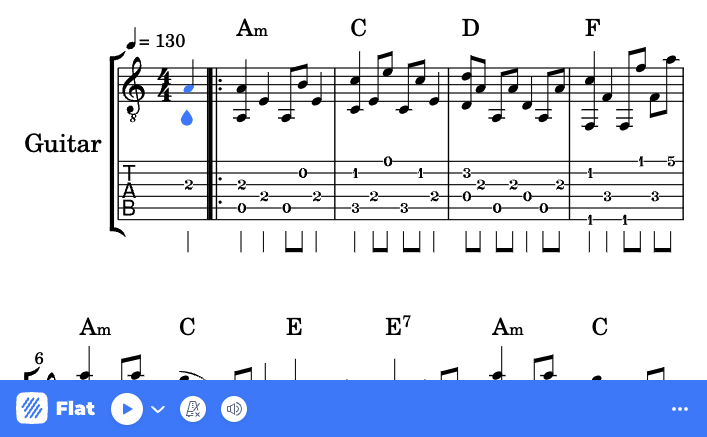
JavaScript/TypeScript SDK to interact and receive events from our Sheet Music Embed.
If you have any feedback or questions regarding this product, please feel free to contact our developers' support.
Installation
You can install our ES/TypeScript Embed Client using npm, pnpm, or yarn:
npm install flat-embed
pnpm add flat-embed
yarn add flat-embed
Or use the latest UMD version hosted on our CDN:
<script src="https://prod.flat-cdn.com/embed-js/v2.12.1/embed.min.js"></script>
Getting Started
The simplest way to get started is to pass a DOM element to our embed that will be used as container. By default, this one will completely fit its container:
<script src="https://prod.flat-cdn.com/embed-js/v2.12.1/embed.min.js"></script>
<script>
  var container = document.getElementById('embed-container');
  var embed = new Flat.Embed(container, {
    score: '<score-id-you-want-to-load>',
    embedParams: {
      appId: '<your-app-id>',
      controlsPosition: 'bottom',
    },
  });
</script>
Otherwise, if you are using our embed in an ES6 project:
import Embed from 'flat-embed';

const container = document.getElementById('embed-container');
const embed = new Embed(container, {
  score: '<score-id-you-want-to-load>',
  embedParams: {
    appId: '<your-app-id>',
    controlsPosition: 'bottom',
  },
});
✨ Demos
Some demos of this Embed API are available in a dedicated repository: https://github.com/FlatIO/embed-examples.
App ID
Our Embed JS API requires an App ID (appId) to use it:
- In development, you can try and use this client without limits on
localhost/*.localhost. - To use it in production or with a custom domain, create a new app on our website, then go to the Embed > Settings and add your domains to the whitelist. Your app ID will also be displayed on this page.
Unique users
By default, analytics and billing of unique users is done using the visitor IPs. To improve accuracy and avoid counting the same user multiple times, you can pass a unique identifier for the user using the embedParams.userId option.
This identifier must be a unique identifier for the user. For example, you can use the user ID of your application. Please don't use any personal information (e.g. email address).
import Embed from 'flat-embed';

const container = document.getElementById('embed-container');
const embed = new Embed(container, {
  score: '<score-id-you-want-to-load>',
  embedParams: {
    appId: '<your-app-id>',
    userId: '<your-end-user-id>',
  },
});
Embed construction
DOM element or existing iframe
When instantiating Flat.Embed, the first argument will always refer to a DOM element. It can take:
- A DOM element (e.g. selected using
document.getElementById('embed-container')). - The string identifier of the element (e.g.
"embed-container"). - An existing embed iframe element. In this case, this one will need to have our JS API loaded using the query string
jsapi=true.
If you instance a different Flat.Embed for the same element, you will always get the same instance of the object.
Options and URL parameters
When instantiating Flat.Embed, you can pass options in the second parameter. To use the different methods available and events subscriptions, you will need to pass at least embedParams.appId.
| Option | Description | Values | Default |
|---|---|---|---|
score |
The score identifier that will load initially | Unique score id | blank |
width |
The width of your embed | A width of the embed | 100% |
height |
The height of your embed | A height of the embed | 100% |
embedParams |
Object containing the loading options for the embed | Any URL parameters | {} |
lazy |
Add a loading="lazy" attribute to the iframe |
A boolean to enable the lazy-loading | false |
JavaScript API
The full JavaScript API documentation is available at https://flat.io/developers/docs/embed/javascript.
Quick Examples
// Wait for the embed to be ready
await embed.ready();

// Load a score
await embed.loadFlatScore('SCORE_ID');

// Control playback
await embed.play();
await embed.pause();
await embed.stop();

// Listen to events
embed.on('play', () => {
  console.log('Playback started');
});

embed.on('cursorPosition', position => {
  console.log('Cursor moved:', position);
});
Full API Reference
Our SDK provides 60+ methods to control and interact with embedded scores:
- Core Methods - Initialization and configuration
- Events System - Subscribe to score and playback events
- Score Management - Load and export scores
- Playback Control - Control audio playback
- Parts & Instruments - Manage score parts
- Navigation & Cursor - Navigate through scores
- Display & View - Control visual presentation
- Score Data & Structure - Query score structure
- Audio/Video Tracks - Synchronize external media
📚 View the complete API documentation →
Editor API
You can enable the editor mode by setting the mode to edit when creating the embed:
var embed = new Flat.Embed(container, {
  embedParams: {
    appId: '<your-app-id>',
    mode: 'edit',
  },
});
Learn more about the editor mode →
TypeScript Support
This SDK includes TypeScript definitions out of the box. All methods and events are fully typed for better development experience.
import Embed from 'flat-embed';

const embed = new Embed(container, {
  score: 'SCORE_ID',
  embedParams: {
    appId: 'YOUR_APP_ID',
    mode: 'view', // TypeScript knows valid modes
  },
});

// Full type checking and autocompletion
const parts = await embed.getParts();
Support
License
Apache-2.0 - see LICENSE for details.
Extension points exported contracts — how you extend this code
FlatInstrumentTemplate (Interface)Core symbols most depended-on inside this repo
callShape
Languages
Modules by API surface
For agents
$ claude mcp add embed-client \
  -- python -m otcore.mcp_server <graph>