github.com/Feur-Inc/BetterX @v2.1.0
Chat with this repoWhat it actually does AI analysis from the code graph — generated when you open this
README
BetterX Desktop
Enhance your X (formerly Twitter) experience with BetterX Desktop!
Installation
Windows
Download the latest Windows installer: betterx-desktop.Setup.2.0.0-beta.exe
Portable Version
For users who prefer not to install software, we also offer a portable version: BetterX-Desktop-2.0.0-beta-portable.exe
The portable version: - Requires no installation - Can be run from any location, including USB drives - Stores all data in its own directory - Perfect for restricted environments or frequent travelers
[!CAUTION] ⚠️IMPORTANT NOTE:
Upgrading from previous version to v2.0?
Potential issues:
1️⃣Right-click on BetterX tray icon
2️⃣Select "Reset BetterX"
Still having issues?
Delete BetterX config folder:
Linux: ~/.config/BetterX/
Windows: %appdata%/BetterX
And restart BetterX for a fresh start
[!WARNING] The file might be flagged as a virus, but you can safely ignore this warning.
Windows Installation Notes
When installing on Windows, you may encounter security warnings:
File Blocking: Some systems may require right-clicking the installer > Properties > "Unblock" before installation
These warnings appear because the app is not signed with a paid certificate. They are normal and the application is safe to use.
Linux
Choose your preferred package format: - AppImage: betterx-desktop-2.0.0-beta.AppImage - Snap: betterx-desktop_2.0.0-beta_amd64.snap - DEB: betterx-desktop_2.0.0-beta_amd64.deb - AUR: https://aur.archlinux.org/packages/betterx-desktop-bin
macOS
- Arm (Mac M1,M2...): betterx-desktop-2.0.0-beta-arm64.dmg
- X64: betterx-desktop-2.0.0-beta-x64.dmg
Screenshots
X Settings Integration
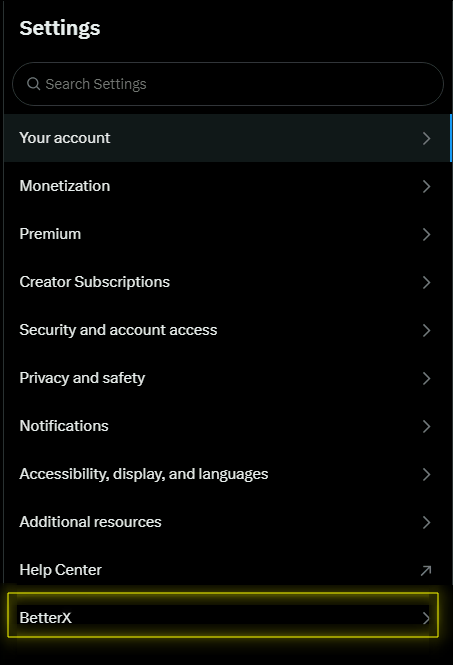
Description: This image demonstrates how BetterX integrates seamlessly into the X (formerly Twitter) settings menu, providing easy access to its features.
BetterX Settings Panel
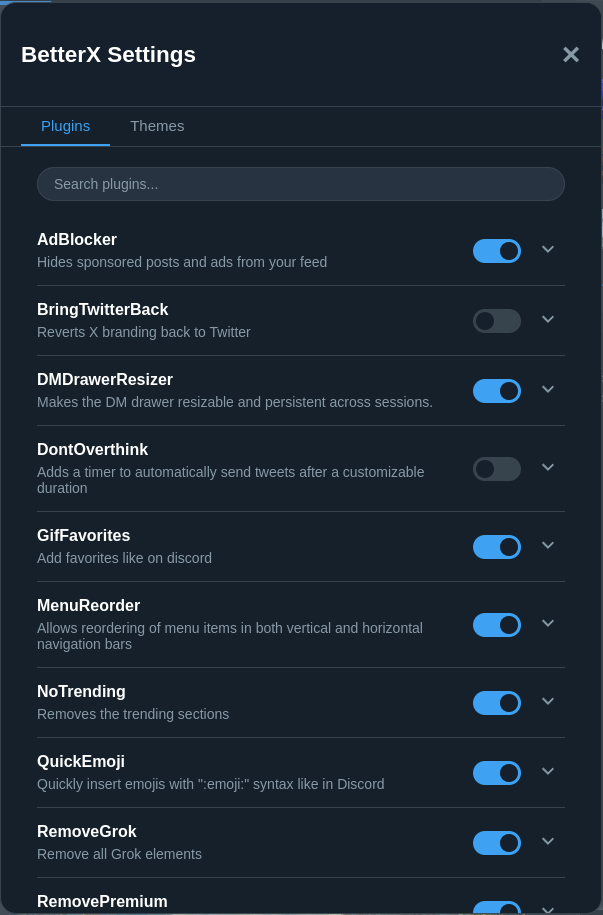
Description: The BetterX Settings panel showcases various customization options available to users, including AdBlocker, BringTwitterBack, DMDrawerResizer, and more.
Features
BetterX offers a range of powerful features to customize and improve your X experience:
🆕 New in v2.0 BETA
🔍 ImageMagnifier
- Zoom into images with a magnifying glass feature
- Perfect for examining tiny details in photos
🐱 Oneko
- A cute cat companion follows your cursor
- Makes browsing more playful and entertaining
😺 MeowAd
- Replaces advertisements with adorable cat pictures
- A more pleasant browsing experience
📸 TweetScreenshot
- Capture tweets with a dedicated screenshot button
- Easy sharing and preservation of memorable tweets
🟢 UsersStatus
- See BetterX users' status and badges on their profiles
- Better community integration
🎨 Themes
- Customize your X experience with various themes
- Make the interface truly yours
🪟 WindowTransparency
- Adjust window transparency
- Create a modern, sleek appearance
- Perfect for multitasking
Classic Features
AdBlocker
- Removes ads and sponsored content from X
- Enjoy a cleaner, distraction-free timeline
BringTwitterBack
- Restores the classic Twitter logo
- Replaces the X branding with the familiar Twitter bird
DMDrawerResizer
- Resize the Direct Message drawer with ease
- Simply drag the edges to adjust the size to your preference
DontOverthink
- Adds a 10-second timer to your tweet composition
- Automatically posts your tweet if not sent within the time limit
- Encourages spontaneity and reduces overthinking
GifFavorites
- Add your favorite GIFs for quick access
- Create a personalized GIF collection
[!IMPORTANT]
Note: To see newly added GIFs in the "★ Favorites" category, refresh the page (CTRL + R). This limitation is due to how the platform updates content.
MenuReorder
- Customize the left sidebar menu
- Drag and drop icons to reorder them according to your preference
NoTrending
- Removes the trending topics section
- Declutter your right sidebar for a more focused experience
[!WARNING] This is a beta release - you might encounter some bugs. Please report any issues you find! Pro tip: Many issues can be fixed with a simple CTRL+R refresh! 🔄
Support
If you encounter any issues or have questions, please open an issue on our GitHub repository.
License
BetterX Desktop is released under the GNU General Public License 3.0.
Core symbols most depended-on inside this repo
saveSettingsShape
Languages
Modules by API surface
For agents
$ claude mcp add BetterX \
  -- python -m otcore.mcp_server <graph>