github.com/ElyaConrad/zoompinch @main
Chat with this repoBrowse by type
What it actually does AI analysis from the code graph — generated when you open this
README
@zoompinch
Apply a pinch-and-zoom experience that feels native and communicates the transform reactively and lets you project any layer on top of the transformed canvas. Framework-agnostic core with official bindings for Vue 3 and Web Components.
Play with the demo: https://zoompinch.pages.dev
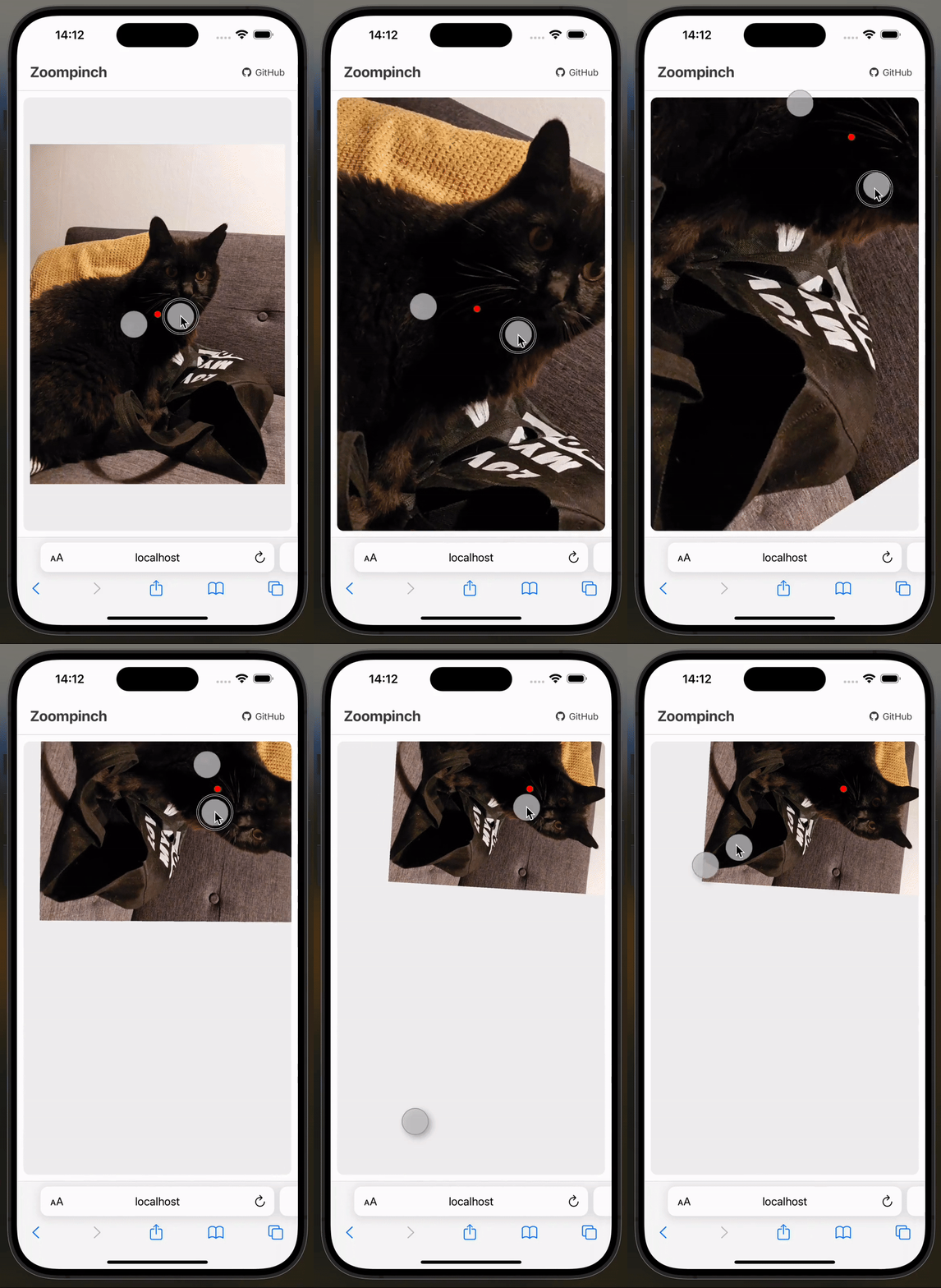
Mathematical correct pinch on touch
Unlike other libraries, Zoompinch does not just uses the center point between two fingers as projection center. The fingers get correctly projected on the virtual canvas. This makes pinching on touch devices feel native-like.
Touch, Wheel, Mouse and Trackpad Gestures!
Adside of touch, mouse and wheel events, gesture events (Safari Desktop) are supported as well! Try it out on the demo
Key Features
- ✨ Mathematically correct pinch-to-zoom on touch devices
- 🖱️ Full input support - Mouse, wheel, trackpad, touch, and gesture events
- 🔄 Rotation around anchor points
- 📊 Reactive transforms -
translateX,translateY,scale,rotate - 🖼️ Dynamic content - Works with lazy-loaded images
- 🎯 Matrix overlays - Project elements onto the canvas
- 🎨 Framework-agnostic - Vue, Web Components or vanilla JS
Quick Start
Vue 3
npm install @zoompinch/vue
<template>
    <zoompinch
        ref="zoompinchRef"
        v-model:transform="transform"
        :offset="{ top: 0, right: 0, bottom: 0, left: 0 }"
        :min-scale="0.5"
        :max-scale="4"
        :clamp-bounds="false"
        :rotation="true"
        :zoom-speed="1"
        :translate-speed="1"
        :zoom-speed-apple-trackpad="1"
        :translate-speed-apple-trackpad="1"
        :mouse="false"
        :wheel="true"
        :touch="true"
        :gesture="true"
        @init="handleInit"
        @click="handleClick"
    >
        <img width="1536" height="2048"  src="https://imagedelivery.net/mudX-CmAqIANL8bxoNCToA/489df5b2-38ce-46e7-32e0-d50170e8d800/public" />
        <template #matrix="{ composePoint, normalizeClientCoords, canvasWidth, canvasHeight }">
            <svg width="100%" height="100%">

                <circle  :cx="composePoint(canvasWidth / 2, canvasHeight / 2)[0]" :cy="composePoint(canvasWidth / 2, canvasHeight / 2)[1]" r="8" fill="red" />
            </svg>
        </template>
    </zoompinch>
</template>

<script setup lang="ts">
import { ref } from 'vue';
import { Zoompinch } from '@zoompinch/vue';
import '@zoompinch/vue/style.css';

const zoompinchRef = ref<InstanceType<typeof Zoompinch>>();
const transform = ref({
  translateX: 0,
  translateY: 0,
  scale: 1,
  rotate: 0
});

function handleInit() {
  // Center canvas on initialization
  zoompinchRef.value?.applyTransform(1, [0.5, 0.5], [0.5, 0.5], 0);
}

function handleTransformUpdate(newTransform) {
  console.log('Transform updated:', newTransform);
}

function handleClick(event: MouseEvent) {
  if (!zoompinchRef.value) return;
  const [x, y] = zoompinchRef.value.normalizeClientCoords(event.clientX, event.clientY);
  console.log('Cliked at', x, y);
}
</script>

<style scoped>
.zoompinch {
    width: 800px;
    height: 600px;
    border: 1px solid #f00;
}
</style>
React
npm install @zoompinch/react
import React, { useRef, useState } from 'react';
import { Zoompinch, ZoompinchRef } from '@zoompinch/react';

function App() {
  const zoompinchRef = useRef<ZoompinchRef>(null);
  const [transform, setTransform] = useState({
    translateX: 0,
    translateY: 0,
    scale: 1,
    rotate: 0
  });

  function handleInit() {
    // Center canvas on initialization
    zoompinchRef.current?.applyTransform(1, [0.5, 0.5], [0.5, 0.5], 0);
  }

  function handleTransformChange(newTransform) {
    console.log('Transform updated:', newTransform);
  }

  function handleClick(event: React.MouseEvent) {
    if (!zoompinchRef.current) return;
    const [x, y] = zoompinchRef.current.normalizeClientCoords(event.clientX, event.clientY);
    console.log('Clicked at canvas position:', x, y);
  }

  return (
    <Zoompinch
      ref={zoompinchRef}
      style={{ width: '800px', height: '600px', border: '1px solid #ccc' }}
      transform={transform}
      onTransformChange={handleTransformChange}
      offset={{ top: 0, right: 0, bottom: 0, left: 0 }}
      minScale={0.5}
      maxScale={4}
      clampBounds={false}
      rotation={true}
      zoomSpeed={1}
      translateSpeed={1}
      zoomSpeedAppleTrackpad={1}
      translateSpeedAppleTrackpad={1}
      mouse={true}
      wheel={true}
      touch={true}
      gesture={true}
      onInit={handleInit}
      onClick={handleClick}
      matrix={({ composePoint, normalizeClientCoords, canvasWidth, canvasHeight }) => {
        const [x, y] = composePoint(100, 100);

        return (
          <svg xmlns="http://www.w3.org/2000/svg" width="100%" height="100%">
            <circle cx={x} cy={y} r="5" fill="#f00" />
          </svg>
        );
      }}
    >
      <img
        width="1536"
        height="2048"
        src="https://imagedelivery.net/mudX-CmAqIANL8bxoNCToA/489df5b2-38ce-46e7-32e0-d50170e8d800/public"
        draggable={false}
        style={{ userSelect: 'none' }}
      />
    </Zoompinch>
  );
}

export default App;
Web Components
npm install @zoompinch/elements
<!DOCTYPE html>
<html>
<head>
  <script type="module">
    import '@zoompinch/elements';
  </script>
  <style>
    zoom-pinch {
      display: block;
      width: 800px;
      height: 600px;
    }
  </style>
</head>
<body>
  <zoom-pinch id="zoomPinch" clamp-bounds="true">
    <img width="1536" height="2048" src="https://imagedelivery.net/mudX-CmAqIANL8bxoNCToA/489df5b2-38ce-46e7-32e0-d50170e8d800/public" />

    <svg slot="matrix" width="100%" height="100%">
      <circle id="marker" r="8" fill="red" />
    </svg>
  </zoom-pinch>

  <script type="module">
    const zoomPinch = document.getElementById('zoomPinch');

    zoomPinch.addEventListener('init', () => {
      zoomPinch.applyTransform(1, [0.5, 0.5], [0.5, 0.5]);
    });

    zoomPinch.addEventListener('update', () => {
      const [cx, cy] = zoomPinch.composePoint(
        zoomPinch.canvasWidth / 2,
        zoomPinch.canvasHeight / 2
      );
      document.getElementById('marker').setAttribute('cx', cx);
      document.getElementById('marker').setAttribute('cy', cy);
    });
  </script>
</body>
</html>
→ Full Web Components Documentation
Packages
| Package | Description | Links |
|---|---|---|
| @zoompinch/core | Core engine (framework-agnostic) | README · npm |
| @zoompinch/vue | Vue 3 | README · npm |
| @zoompinch/react | React | README · npm |
| @zoompinch/elements | Web Components | README · npm |
Core API
All implementations share the same core API:
Methods
// Apply transform by anchoring points
applyTransform(scale, wrapperCoords, canvasCoords, rotate?)

// Convert client coordinates to canvas coordinates
normalizeClientCoords(clientX, clientY)

// Convert canvas coordinates to wrapper coordinates
composePoint(x, y)

// Rotate canvas around a point
rotateCanvas(x, y, radians)
Transform State
{
  translateX: number,  // X translation in pixels
  translateY: number,  // Y translation in pixels
  scale: number,       // Scale factor (1 = 100%)
  rotate: number       // Rotation in radians
}
Events
init- Fired when canvas dimensions are availableupdate- Fired when transform changes
Design Philosophy
@zoompinch uses transform-origin: 0,0 (top-left corner) internally. This avoids assumptions about canvas size, which can be dynamic or lazy-loaded.
To center content, wait for the init event and call applyTransform():
// Center canvas at scale 1
applyTransform(1, [0.5, 0.5], [0.5, 0.5]);
This ensures the engine stays predictable and doesn't make layout decisions on your behalf.
Coordinate Systems
The library uses three coordinate systems:
1. Canvas Coordinates (Absolute)
Absolute pixels within canvas content.
- Range: 0 to canvasWidth, 0 to canvasHeight
2. Wrapper Coordinates (Absolute)
Absolute pixels within viewport/wrapper.
- Range: 0 to wrapperWidth, 0 to wrapperHeight
3. Relative Coordinates (0-1)
Normalized coordinates for applyTransform.
- 0.5 = center, 1.0 = bottom-right
Conversion:
Client → normalizeClientCoords() → Canvas → composePoint() → Wrapper
Browser Support
- ✅ Chrome/Edge (latest)
- ✅ Firefox (latest)
- ✅ Safari (latest, including iOS)
- ✅ Mobile browsers (iOS Safari, Chrome Mobile)
Advanced: Core Engine
For custom integrations, use the core engine directly:
npm install @zoompinch/core
→ Full Core Engine Documentation
License
MIT
Contributing
Contributions welcome! Please open an issue or PR on GitHub.
Credits
Built with ❤️ by Elya Maurice Conrad
Extension points exported contracts — how you extend this code
browse all types & interfaces →
Core symbols most depended-on inside this repo
Shape
Languages
Modules by API surface
For agents
$ claude mcp add zoompinch \
  -- python -m otcore.mcp_server <graph>