github.com/Drakkar-Software/OctoBot @2.1.1 sqlite
README
OctoBot - Free Open Source Crypto Trading Bot











Open source crypto trading bot with a visual user interface
OctoBot is an open source cryptocurrency trading robot designed for crypto investors who want to automate their investment strategies. The bot can automate strategies using built-in: - Strategies such as grids, DCA strategies, crypto baskets and much more, which can all be configured - AI connectors to trade using any OpenAI or Ollama model such as ChatGPT, llama or any custom model running on an Ollama server - TradingView connectors to automate trades from TradingView indicators or strategies - Social indicators to analyze social data such as Google trends or Reddit - Technical analysis indicators such as RSI, Moving Averages or MACD - 15+ exchange integrations including Binance, Coinbase, MEXC and Hyperliquid

The trading bot is written in Python being built and improved as a free open source software since 2018. It can be installed on your system or executed on a cloud provider.
An easy to use trading bot with a Mobile App, Web and Telegram user interfaces
Are you looking for a bot you can setup from the peaceful environment of your home computer and that you can follow from anywhere using your phone?
OctoBot is designed for crypto investors who want to automate their trading strategies in a simple way, using a graphic interface to: - Configure the details of their strategy and its traded markets and exchange(s) - Test and optimize the strategy using backtesting - Live test it with paper money - Execute it on a real exchange account, by automatically sending orders to the exchange
Once started, an OctoBot can be followed using its web interface, making it reachable when running on a cloud server.
OctoBot can also be connected to a Telegram bot, therefore turning OctoBot into a Telegram trading bot.
You can also follow your trading bot from the OctoBot mobile app, which is designed to automate octobot.cloud strategies, the app can also be used to follow your open source OctoBot's profits, portfolio, open orders and trades.


<a href='https://apps.apple.com/us/app/octobot-crypto-investment/id6502774175?utm_source=octobot-github&utm_media=readme&utm_content=mobile-app-img'><img alt='Get it on the Apple Play Store' src='../assets/apple_store.png' height="50px"/></a>
<a href='https://play.google.com/store/apps/details?id=com.drakkarsoftware.octobotapp&utm_source=octobot-github&utm_media=readme&utm_content=mobile-app-img'><img alt='Get it on Google Play' src='https://play.google.com/intl/en_us/badges/images/generic/en_badge_web_generic.png' height="50px"/></a>
Live and backtesting trading strategies automation
OctoBot is more than just a strategy execution engine, it can also simulate investments using risk-free paper trading.
Even better, the trading robot comes with its built-in backtesting engine to help you test and optimize your strategy over a long period of time with a simulated portfolio and historical exchange data.

Backtesting your trading strategy and portfolio will give you accurate insights on the past performance and behavior of your trading strategy starting from its initial portfolio. This analysis tool gives you all the metrics to create the best version of your strategy before automating it with your real funds, on your exchange account.
Your trading bot for Binance, Coinbase, Hyperliquid and 15+ other exchanges
OctoBot supports the vast majority of crypto exchanges thanks to the great CCXT library.

This wide range of supported exchanges makes it easy to create investment strategies on any crypto, from Bitcoin, Ethereum or Solana to altcoins from the darkest depths of the altcoin forest.
Supported exchanges notably include: - Binance spot and futures trading using the REST and websocket APIs - Coinbase spot trading using the REST and websocket APIs - Bybit spot and futures trading using the REST and websocket APIs Note: due to a recent update, the Bybit API will soon be available again on OctoBot - Hyperliquid spot trading (with API Keys) using the REST and websocket APIs - MEXC spot trading using the REST and websocket APIs - Kucoin spot and futures trading using the REST and websocket APIs - All HollaEx-Powered exchanges. Learn more on HollaEx, the open source white label exchange - Many other such as OKX, Binance US, Crypto.com, HTX, Bitget, BingX, CoinEx, BitMart, Phemex, Gate.io, Ascendex and more on the full list of supported exchanges.
Automate your trading strategies
OctoBot is designed as a one-stop-shop for crypto trading strategies. If you think of a crypto trading strategy, it can most likely be automated by OctoBot, unless it requires very complex custom mechanisms.
AI trading bot
OctoBot can be an AI trading bot using OpenAI model such as ChatGPT. The ChatGPT trading mode is the dedicated OctoBot configuration to give market context to a LLM model, ask for its opinion and trade accordingly.
Local LLM models, such as Ollama llama or any custom model running on your Ollama server can also be used by the bot for deeper customization and cost management.
Grid trading bot
Grid trading is a strategy that extracts value from volatility. Unlike most strategies, it relies on pure math and no statistics. It will "simply" create and maintain many buy and sell orders at regular intervals and generate profits every time both buy and sell orders are executed. The OctoBot grid trading bot can be heavily customized and optimized to be perfectly adapted to your market and exchange.
DCA trading bot
Dollar Cost Averaging (DCA) is a well known investment strategy where you buy on a regular basis in order to profit from local price drops. It allows investors to reduce their overall buying costs. As a DCA trading bot, OctoBot can optimize your investment strategies for short or long term gains with heavy customization and backtesting capabilities.
TradingView trading bot
Use OctoBot as your TradingView trading bot and simply emit alerts from your TradingView indicators or strategies. Use these alerts to trade any crypto market, on any exchange from your TradingView native strategy.
Whether it's from a visual TradingView indicator or a heavily optimized Pine Script strategy, your trades can be automated.
Crypto basket trading bot
Crypto baskets are similar to stock indexes or ETFs. They enable you to invest into many cryptocurrencies, all at once, in a simple way. A crypto basket is a simple way to invest in the whole crypto market at once, or follow coin categories, such as AI or RWA coins.
OctoBot can be used as a crypto basket trading bot and make it simple to invest in customized crypto indexes or follow baskets from the wide range of OctoBot cloud's crypto baskets.
Market Making trading bot
OctoBot can also automate market making strategies to help token creators provide liquidity to their markets.
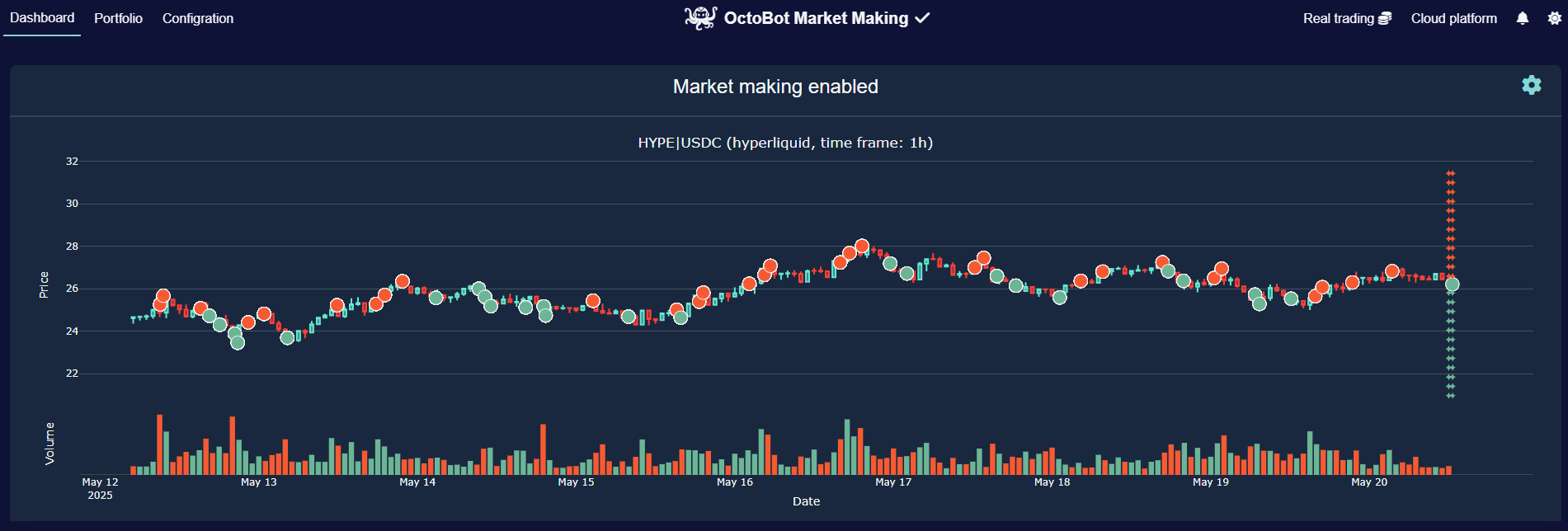
Advanced market making strategies can be automated on market-making.octobot.cloud, the self-service market making platform based on OctoBot. Feel free to contact us if you have any questions about it.
Institutional custom strategies
If you represent an institution that is interested in a commercial license or custom development to suit your specific needs or strategy please contact us at contact@drakkar.software.
Installing OctoBot, open source crypto trading bot
<img src="../assets/a-man-relaxing-in-his-couch-whi
Extension points exported contracts — how you extend this code
ImportMetaEnv (Interface)Core symbols most depended-on inside this repo
getShape
Languages
Modules by API surface
Dependencies from manifests, versioned
Datastores touched
For agents
$ claude mcp add OctoBot \
  -- python -m otcore.mcp_server <graph>