hub / github.com/Drakkar-Software/OctoBot-Script
github.com/Drakkar-Software/OctoBot-Script @0.1.1
Chat with this repo
323 symbols
758 edges
66 files
13 documented · 4%
What it actually does AI analysis from the code graph — generated when you open this
loading…
README
OctoBot-Script 0.1.1




OctoBot-Script Community



OctoBot Script is the Quant framework by OctoBot
OctoBot Script is in alpha version
Documentation available at octobot.cloud/en/guides/octobot-script
Install OctoBot Script from pip
OctoBot Script requires Python 3.13
python3 -m pip install OctoBot wheel appdirs==1.4.4
python3 -m pip install octobot-script
Example of a backtesting script
Script
import asyncio
import tulipy    # Can be any TA library.
import octobot_script as obs


async def rsi_test():
    async def strategy(ctx):
        # Will be called at each candle.
        if run_data["entries"] is None:
            # Compute entries only once per backtest.
            closes = await obs.Close(ctx, max_history=True)
            times = await obs.Time(ctx, max_history=True, use_close_time=True)
            rsi_v = tulipy.rsi(closes, period=ctx.tentacle.trading_config["period"])
            delta = len(closes) - len(rsi_v)
            # Populate entries with timestamps of candles where RSI is
            # bellow the "rsi_value_buy_threshold" configuration.
            run_data["entries"] = {
                times[index + delta]
                for index, rsi_val in enumerate(rsi_v)
                if rsi_val < ctx.tentacle.trading_config["rsi_value_buy_threshold"]
            }
            await obs.plot_indicator(ctx, "RSI", times[delta:], rsi_v, run_data["entries"])
        if obs.current_live_time(ctx) in run_data["entries"]:
            # Uses pre-computed entries times to enter positions when relevant.
            # Also, instantly set take profits and stop losses.
            # Position exists could also be set separately.
            await obs.market(ctx, "buy", amount="10%", stop_loss_offset="-15%", take_profit_offset="25%")

    # Configuration that will be passed to each run.
    # It will be accessible under "ctx.tentacle.trading_config".
    config = {
        "period": 10,
        "rsi_value_buy_threshold": 28,
    }

    # Read and cache candle data to make subsequent backtesting runs faster.
    data = await obs.get_data("BTC/USDT", "1d", start_timestamp=1505606400)
    run_data = {
        "entries": None,
    }
    # Run a backtest using the above data, strategy and configuration.
    res = await obs.run(data, strategy, config)
    print(res.describe())
    # Generate and open report including indicators plots
    await res.plot(show=True)
    # Stop data to release local databases.
    await data.stop()


# Call the execution of the script inside "asyncio.run" as
# OctoBot-Script runs using the python asyncio framework.
asyncio.run(rsi_test())
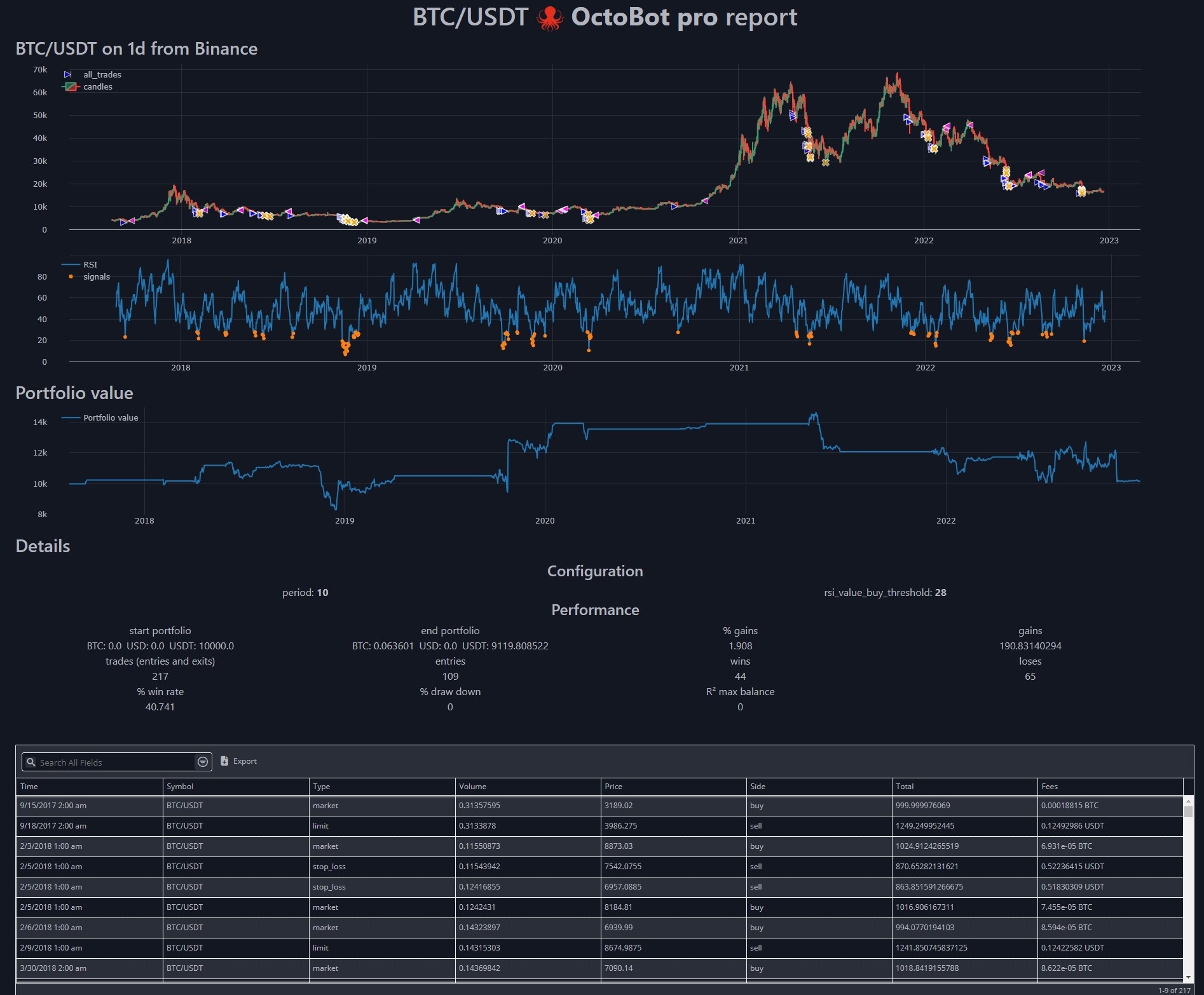
Generated report
Join the community
We recently created a telegram channel dedicated to OctoBot Script.

Developers
To build report from sources:
npm install
npm run build
Extension points exported contracts — how you extend this code
AppProps (Interface)(no doc)
octobot_script/resources/report/src/App.tsx
ChartElement (Interface)
(no doc)
octobot_script/resources/report/src/types.ts
TableColumn (Interface)
(no doc)
octobot_script/resources/report/src/types.ts
TableSearch (Interface)
(no doc)
octobot_script/resources/report/src/types.ts
TableElement (Interface)
(no doc)
octobot_script/resources/report/src/types.ts
Core symbols most depended-on inside this repo
cncalled by 112
octobot_script/resources/report/src/lib/utils.ts
run
called by 19
setup.py
isValidNumber
called by 5
octobot_script/resources/report/src/components/TradingChart.tsx
findByName
called by 4
octobot_script/resources/report/src/App.tsx
parseDistribution
called by 4
octobot_script/resources/report/src/components/DataTable.tsx
useSidebar
called by 4
octobot_script/resources/report/src/components/ui/sidebar.tsx
getChartElements
called by 3
octobot_script/resources/report/src/App.tsx
toTime
called by 3
octobot_script/resources/report/src/components/TradingChart.tsx
Shape
Languages
TypeScript64%
Python36%
Modules by API surface
octobot_script/resources/report/src/components/ui/sidebar.tsx25 symbols
octobot_script/resources/report/src/components/TradingChart.tsx21 symbols
octobot_script/model/backtest_report_server.py17 symbols
octobot_script/internal/octobot_mocks.py16 symbols
octobot_script/resources/report/src/components/ui/dropdown-menu.tsx15 symbols
octobot_script/model/backtest_plot.py13 symbols
octobot_script/resources/report/src/components/MetricCards.tsx12 symbols
octobot_script/resources/report/src/components/TradesTable.tsx11 symbols
octobot_script/resources/report/src/types.ts10 symbols
octobot_script/resources/report/src/components/ui/sheet.tsx10 symbols
octobot_script/resources/report/src/components/ui/select.tsx10 symbols
octobot_script/resources/report/src/components/ui/drawer.tsx10 symbols
For agents
$ claude mcp add OctoBot-Script \
  -- python -m otcore.mcp_server <graph>