github.com/Dovyski/cvui @v2.7.0
Chat with this repoBrowse by type
What it actually does AI analysis from the code graph — generated when you open this
README
cvui
A (very) simple UI lib built on top of OpenCV drawing primitives. Other UI libs, such as imgui, require a graphical backend (e.g. OpenGL) to work, so if you want to use imgui in a OpenCV app, you must make it OpenGL enabled, for instance. It is not the case with cvui, which uses only OpenCV drawing primitives to do all the rendering (no OpenGL or Qt required).
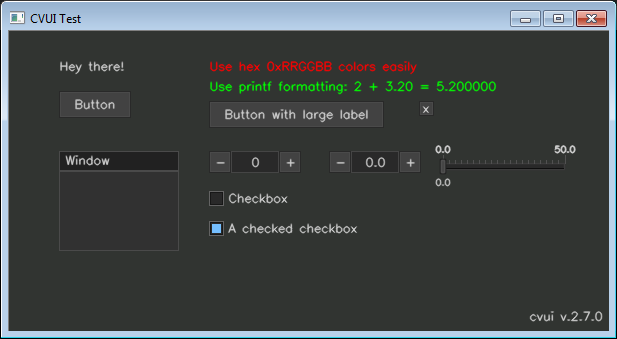
Features
- Lightweight and simple to use user interface;
- Header-only with no external dependencies (except OpenCV);
- Based on OpenCV drawing primitives only (OpenGL or Qt are not required);
- Friendly and C-like API (no classes/objects, etc);
- Easily render components without worrying about their position (using rows/columns);
- Simple (yet powerful) mouse API;
- Modest number of UI components (11 in total);
- Available in C++ and Python (pure implementation, no bindings).
Build
cvui is a header-only lib that does not require a build. Just add cvui.h (or cvui.py) to your project and you are ready to go. The only dependency is OpenCV (version 2.x or 3.x), which you are probably using already.
Usage
Check the online documentation or the examples folder to learn how to use cvui. The general usage in C++ and Python is shown below.
Usage in C++:
#include <opencv2/opencv.hpp>

// One (and only one) of your C++ files must define CVUI_IMPLEMENTATION
// before the inclusion of cvui.h to ensure its implementaiton is compiled.
#define CVUI_IMPLEMENTATION
#include "cvui.h"

#define WINDOW_NAME "CVUI Hello World!"

int main(int argc, const char *argv[])
{
    // Create a frame where components will be rendered to.
    cv::Mat frame = cv::Mat(200, 500, CV_8UC3);

    // Init cvui and tell it to create a OpenCV window, i.e. cv::namedWindow(WINDOW_NAME).
    cvui::init(WINDOW_NAME);

    while (true) {
        // Fill the frame with a nice color
        frame = cv::Scalar(49, 52, 49);

        // Render UI components to the frame
        cvui::text(frame, 110, 80, "Hello, world!");
        cvui::text(frame, 110, 120, "cvui is awesome!");

        // Update cvui stuff and show everything on the screen
        cvui::imshow(WINDOW_NAME, frame);

        if (cv::waitKey(20) == 27) {
            break;
        }
    }

    return 0;
}
Usage in Python:
import numpy as np
import cv2
import cvui

WINDOW_NAME = 'CVUI Hello World!'

# Create a frame where components will be rendered to.
frame = np.zeros((200, 500, 3), np.uint8)

# Init cvui and tell it to create a OpenCV window, i.e. cv2.namedWindow(WINDOW_NAME).
cvui.init(WINDOW_NAME)

while True:
    # Fill the frame with a nice color
    frame[:] = (49, 52, 49)

    # Render UI components to the frame
    cvui.text(frame, 110, 80, 'Hello, world!')
    cvui.text(frame, 110, 120, 'cvui is awesome!')

    # Update cvui stuff and show everything on the screen
    cvui.imshow(WINDOW_NAME, frame)

    if cv2.waitKey(20) == 27:
        break
License
Copyright (c) 2016 Fernando Bevilacqua. Licensed under the MIT license.
Change log
See all changes in the CHANGELOG file.