github.com/DavidWells/analytics
Chat with this repoBrowse by type
What it actually does AI analysis from the code graph — generated when you open this
README




A lightweight analytics abstraction library for tracking page views, custom events, & identify visitors.
Designed to work with any third-party analytics tool or your own backend.
Read the docs or view the live demo app
Table of Contents
Click to expand
- Features
- Why
- Install
- Usage
- Demo
- API
- Configuration
- analytics.identify
- analytics.track
- analytics.page
- analytics.user
- analytics.reset
- analytics.ready
- analytics.on
- analytics.once
- analytics.getState
- analytics.storage
- analytics.storage.getItem
- analytics.storage.setItem
- analytics.storage.removeItem
- analytics.plugins
- analytics.plugins.enable
- analytics.plugins.disable
- Events
- Analytic plugins
- Community Plugins
- Creating analytics plugins
- React to any event
- Custom methods
- Plugin Naming Conventions
- Debugging analytics
- TypeScript support
- Contributing
- Setup & Install dependencies
- Development
Features
- [x] Extendable - Bring your own third-party tool & plugins
- [x] Test & debug analytics integrations with time travel & offline mode
- [x] Add functionality/modify tracking calls with baked in lifecycle hooks
- [x] Isomorphic. Works in browser & on server
- [x] Queues events to send when analytic libraries are loaded
- [x] Conditionally load third party scripts
- [x] Works offline
- [x] TypeScript support
Why
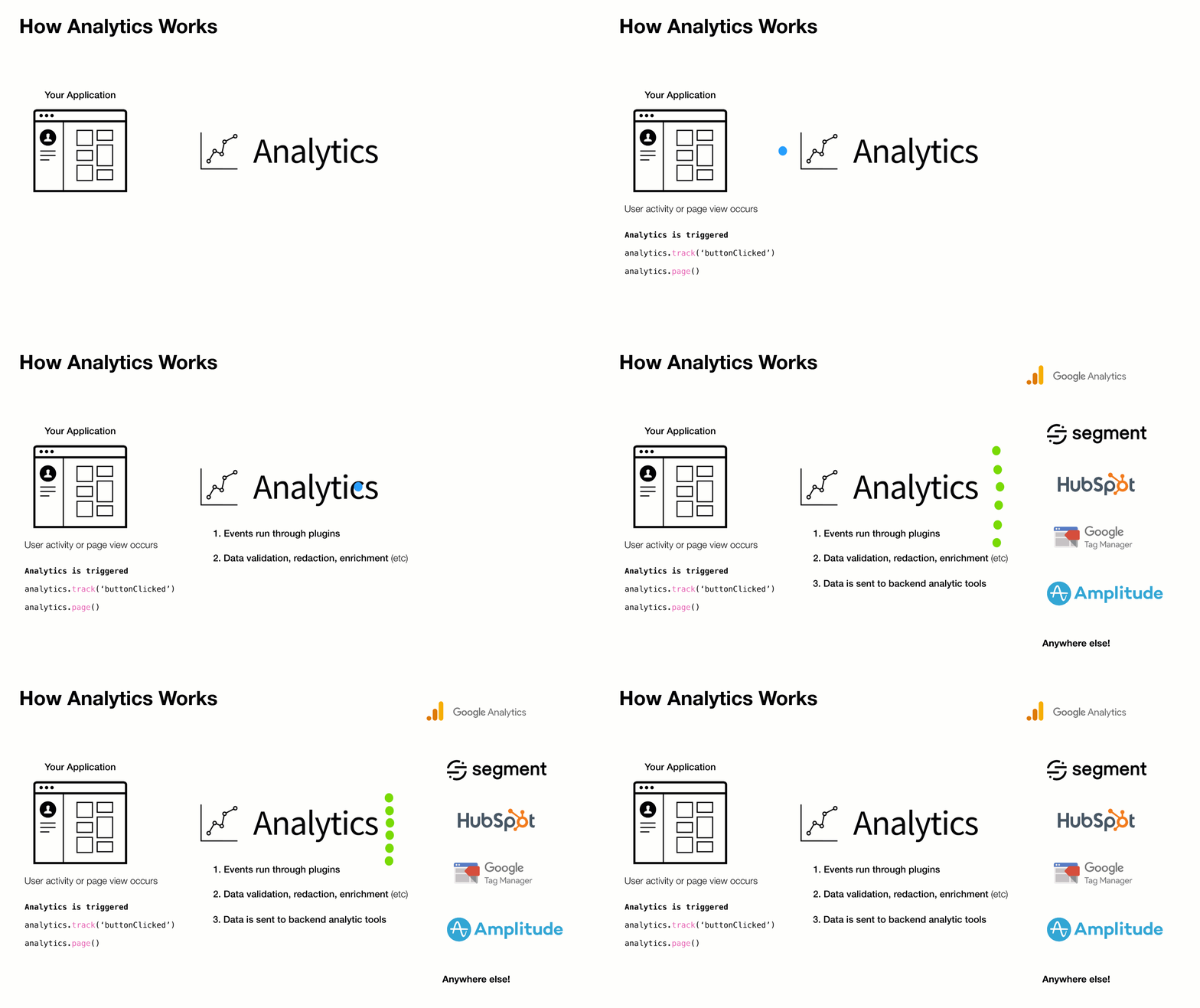
Companies frequently change analytics requirements based on evolving needs. This results in a lot of complexity, maintenance, & extra code when adding/removing analytic services to a site or application.
This library aims to solves that with a simple pluggable abstraction layer.
Driving philosophy:
- You should never be locked into an analytics tool
- DX is paramount. Adding & removing analytic tools from your application should be easy
- Respecting visitor privacy settings & allowing for opt-out mechanisms is crucial
- A pluggable API makes adding new business requests easy
To add or remove an analytics provider, adjust the plugins you load into analytics during initialization.
Install
This module is distributed via npm, which is bundled with node and should be installed as one of your project's dependencies.
npm install analytics --save
Or as a script tag:
<script src="https://unpkg.com/analytics/dist/analytics.min.js"></script>
Usage
import Analytics from 'analytics'
import googleAnalytics from '@analytics/google-analytics'
import customerIo from '@analytics/customerio'

/* Initialize analytics */
const analytics = Analytics({
  app: 'my-app-name',
  version: 100,
  plugins: [
    googleAnalytics({
      trackingId: 'UA-121991291',
    }),
    customerIo({
      siteId: '123-xyz'
    })
  ]
})

/* Track a page view */
analytics.page()

/* Track a custom event */
analytics.track('userPurchase', {
  price: 20,
  item: 'pink socks'
})

/* Identify a visitor */
analytics.identify('user-id-xyz', {
  firstName: 'bill',
  lastName: 'murray',
  email: 'da-coolest@aol.com'
})
Node.js usage
For ES6/7 javascript you can import Analytics from 'analytics' for normal node.js usage you can import like so:
```js const { Analytics } = require('analytics') // or const Analytics = require('analytics').default const googleAnalytics = require('@analytics/google-analytics') const customerIo = require('@analytics/customerio')
const analytics = Analytics({ app: 'my-app-name', version: 100, plugins: [ googleAnalytics({ trackingId: 'UA-121991291', }), customerIo({ siteId: '123-xyz' }) ] })
/ Track a page view / analytics.page()
/ Track a custom event / analytics.track('userPurchase', { price: 20, item: 'pink socks' })
/ Identify a visitor / analytics.identify('user-id-xyz', { firstName: 'bill', lastName: 'murray', email: 'da-coolest@aol.com' }) ```
Browser usage
When importing global analytics into your project from a CDN, the library exposes via a global _analytics variable.
Call _analytics.init to create an analytics instance.
```html
```
Demo
See Analytics Demo for a site example.
API
The core analytics API is exposed once the library is initialized with configuration.
Typical usage:
- Initialize with configuration
- Export the analytics instance with third-party providers (Google Analytics, HubSpot, etc)
- Use
page,identify,trackin your app - Plugin custom business logic
Configuration
Analytics library configuration
After the library is initialized with config, the core API is exposed & ready for use in the application.
Arguments
- config
object- analytics core config - [config.app] (optional)
string- Name of site / app - [config.version] (optional)
string- Version of your app - [config.debug] (optional)
boolean- Should analytics run in debug mode - [config.plugins] (optional)
Array.<AnalyticsPlugin> - Array of analytics plugins
Example
import Analytics from 'analytics'
import pluginABC from 'analytics-plugin-abc'
import pluginXYZ from 'analytics-plugin-xyz'

// initialize analytics
const analytics = Analytics({
  app: 'my-awesome-app',
  plugins: [
    pluginABC,
    pluginXYZ
  ]
})
analytics.identify
Identify a user. This will trigger identify calls in any installed plugins and will set user data in localStorage
Arguments
- userId
String- Unique ID of user - [traits] (optional)
Object- Object of user traits - [options] (optional)
Object- Options to pass to identify call - [callback] (optional)
Function- Callback function after identify completes
Example
// Basic user id identify
analytics.identify('xyz-123')

// Identify with additional traits
analytics.identify('xyz-123', {
  name: 'steve',
  company: 'hello-clicky'
})

// Fire callback with 2nd or 3rd argument
analytics.identify('xyz-123', () => {
  console.log('do this after identify')
})

// Disable sending user data to specific analytic tools
analytics.identify('xyz-123', {}, {
  plugins: {
    // disable sending this identify call to segment
    segment: false
  }
})

// Send user data to only to specific analytic tools
analytics.identify('xyz-123', {}, {
  plugins: {
    // disable this specific identify in all plugins except customerio
    all: false,
    customerio: true
  }
})
analytics.track
Track an analytics event. This will trigger track calls in any installed plugins
Arguments
- eventName
String- Event name - [payload] (optional)
Object- Event payload - [options] (optional)
Object- Event options - [callback] (optional)
Function- Callback to fire after tracking completes
Example
// Basic event tracking
analytics.track('buttonClicked')

// Event tracking with payload
analytics.track('itemPurchased', {
  price: 11,
  sku: '1234'
})

// Fire callback with 2nd or 3rd argument
analytics.track('newsletterSubscribed', () => {
  console.log('do this after track')
})

// Disable sending this event to specific analytic tools
analytics.track('cartAbandoned', {
  items: ['xyz', 'abc']
}, {
  plugins: {
    // disable track event for segment
    segment: false
  }
})

// Send event to only to specific analytic tools
analytics.track('customerIoOnlyEventExample', {
  price: 11,
  sku: '1234'
}, {
  plugins: {
    // disable this specific track call all plugins except customerio
    all: false,
    customerio: true
  }
})
analytics.page
Trigger page view. This will trigger page calls in any installed plugins
Arguments
- [data] (optional) PageData - Page data overrides.
- [options] (optional)
Object- Page tracking options - [callback] (optional)
Function- Callback to fire after page view call completes
Example
// Basic page tracking
analytics.page()

// Page tracking with page data overrides
analytics.page({
  url: 'https://google.com'
})

// Fire callback with 1st, 2nd or 3rd argument
analytics.page(() => {
  console.log('do this after page')
})

// Disable sending this pageview to specific analytic tools
analytics.page({}, {
  plugins: {
    // disable page tracking event for segment
    segment: false
  }
})

// Send pageview to only to specific analytic tools
analytics.page({}, {
  plugins: {
    // disable this specific page in all plugins except customerio
    all: false,
    customerio: true
  }
})
analytics.user
Get user data
Arguments
- [key] (optional)
string- dot.prop.path of user data. Example: 'traits.company.name'
Example
// Get all user data
const userData = analytics.user()

// Get user id
const userId = analytics.user('userId')

// Get user company name
const companyName = analytics.user('traits.company.name')
analytics.reset
Clear all information about the visitor & reset analytic state.
Arguments
- [callback] (optional)
Function- Handler to run after reset
Example
// Reset current visitor
analytics.reset()
analytics.ready
Fire callback on analytics ready event
Arguments
- callback
Function- function to trigger when all providers have loaded
Example
analytics.ready((payload) => {
  console.log('all plugins have loaded or were skipped', payload);
})
analytics.on
Attach an event handler function for analytics lifecycle events.
Arguments
- name
String- Name of event to listen to - callback
Function- function to fire on event
Example
// Fire function when 'track' calls happen
analytics.on('track', ({ payload }) => {
  console.log('track call just happened. Do stuff')
})

// Remove listener before it is called
const removeListener = analytics.on('track', ({ payload }) => {
  console.log('This will never get called')
})

// cleanup .on listener
removeListener()
analytics.once
Attach a handler function to an event and only trigger it once.
Arguments
- name
String- Name of event to listen to - callback
Function- function to fire on event
Example
// Fire function only once per 'track'
analytics.once('track', ({ payload }) => {
  console.log('This is only triggered once when analytics.track() fires')
})

// Remove listener before it is called
const listener = analytics.once('track', ({ payload }) => {
  console.log('This will never get called b/c listener() is called')
})

// cleanup .once listener before it fires
listener()
analytics.getState
Get data about user, activity, or context. Access sub-keys of state with dot.prop syntax.
Arguments
- [key] (optional)
string- dot.prop.path value of state
Example
// Get the current state of analytics
analytics.getState()

// Get a subpath of state
analytics.getState('context.offline')
analytics.storage
Storage utilities for persisting data. These methods will allow you to save data in localStorage, cookies, or to the window.
Example
```js // Pull storage off
Core symbols most depended-on inside this repo
Shape
Languages
Modules by API surface
Dependencies from manifests, versioned
For agents
$ claude mcp add analytics \
  -- python -m otcore.mcp_server <graph>