github.com/David-OConnor/pyflow @0.3.1
Chat with this repoWhat it actually does AI analysis from the code graph — generated when you open this
README

Pyflow
Simple is better than complex - The Zen of Python
Pyflow streamlines working with Python projects and files. It's an easy-to-use CLI app with a minimalist API. Never worry about having the right version of Python or dependencies.
Example use, including setting up a project and switching Py versions:
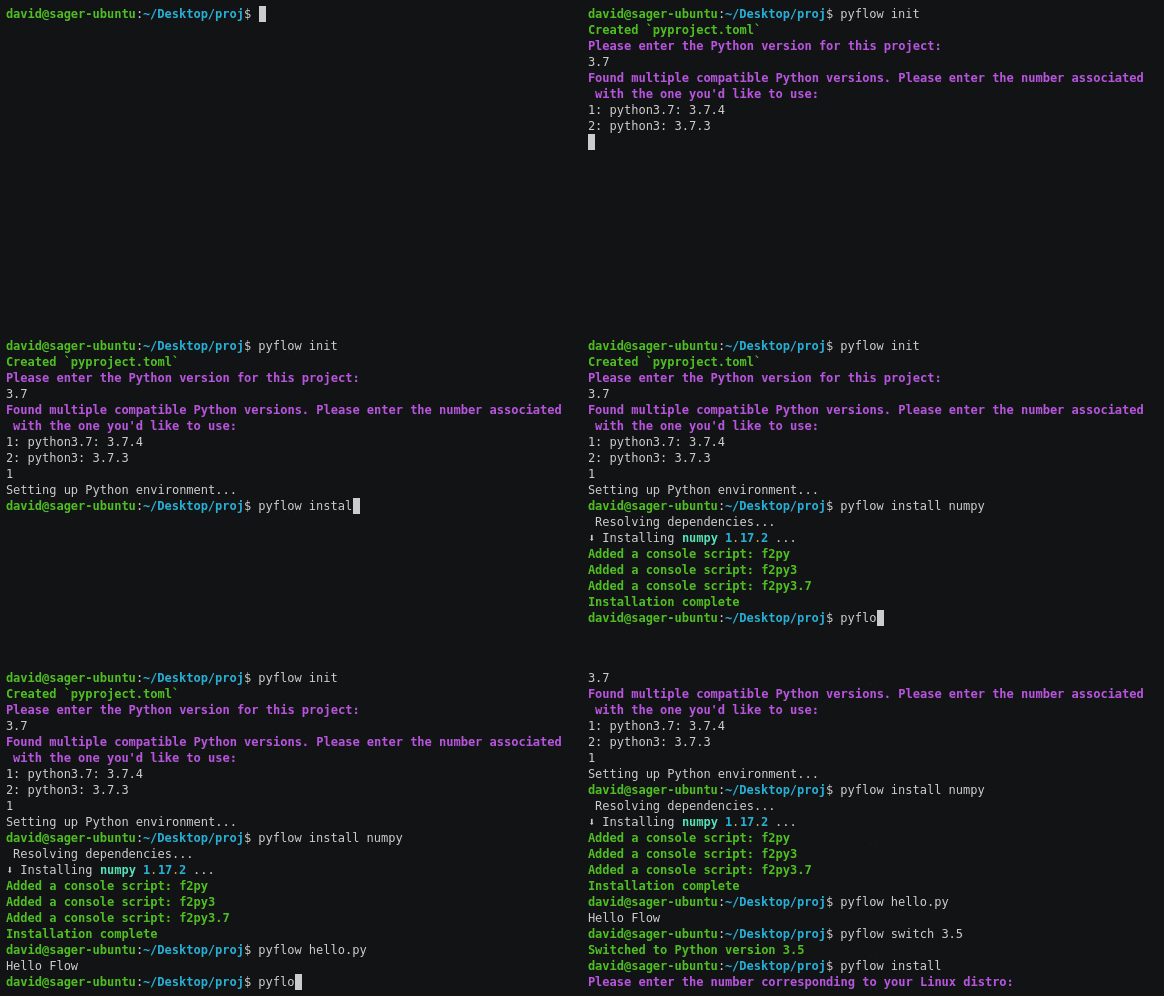
If your project's already configured, the only command you need is pyflow,
or pyflow myscript.py; setting up Python and its dependencies are automatic.
Goals: Make using and publishing Python projects as simple as possible. Actively managing Python environments shouldn't be required to use dependencies safely. We're attempting to fix each stumbling block in the Python workflow, so that it's as elegant as the language itself.
You don't need Python or any other tools installed to use Pyflow.
It runs standalone scripts in their own environments with no config, and project functions directly from the CLI.
It implements PEP 582 -- Python local packages directory and Pep 518 (pyproject.toml).
Installation
-
Windows - Download and run this installer. Or, if you have Scoop installed, run
scoop install pyflow. -
Ubuntu, or another Os that uses Snap - Run
snap install pyflow --classic. -
Ubuntu or Debian without Snap - Download and run this deb.
-
Fedora, CentOs, RedHat, or older versions of SUSE - Download and run this rpm.
-
A different Linux distro - Download this standalone binary and place it somewhere accessible by the PATH. For example,
/usr/bin. -
Mac - Run
brew install pyflow -
With Pip - Run
pip install pyflow. The linux install using this method is much larger than with the above ones, and it doesn't yet work with Mac. This method will likely not work with Red Hat, CentOs, or Fedora. -
If you have Rust installed - Run
cargo install pyflow.
Quickstart
- (Optional) Run
pyflow initin an existing project folder, orpyflow new projnameto create a new project folder.initimports data fromrequirements.txtorPipfile;newcreates a folder with the basics. - Run
pyflow install requestsetc to install packages. Alternatively, editpyproject.tomldirectly. - Run
pyfloworpyflow myfile.pyto run Python.
Quick-and-dirty start for quick-and-dirty scripts
- Add the line
__requires__ = ['numpy', 'requests']somewhere in your script, wherenumpyandrequestsare dependencies. Runpyflow script myscript.py, wheremyscript.pyis the name of your script. This will set up an isolated environment for this script, and install dependencies as required. This is a safe way to run one-off Python files that aren't attached to a project, but have dependencies.
Why add another Python manager?
Pipenv, Poetry, and Pyenv address parts of
Pyflow's raison d'être, but expose stumbling blocks that may frustrate new users,
both when installing and using. Some reasons why this is different:
-
It behaves consistently regardless of how your system and Python installations are configured.
-
It automatically manages Python installations and environments. You specify a Python version in
pyproject.toml(if omitted, it asks), and it ensures that version is used. If the version's not installed, Pyflow downloads a binary, and uses that. If multiple installations are found for that version, it asks which to use.Pyenvcan be used to install Python, but only if your system is configured in a certain way: I don’t think expecting a user’s computer to compile Python is reasonable. -
By not using Python to install or run, it remains environment-agnostic. This is important for making setup and use as simple and decision-free as possible. It's common for Python-based CLI tools to not run properly when installed from
pipdue to thePATHor user directories not being configured in the expected way. -
Its dependency resolution and locking is faster due to using a cached database of dependencies, vice downloading and checking each package, or relying on the incomplete data available on the pypi warehouse.
Pipenv’s resolution in particular may be prohibitively-slow on weak internet connections. -
It keeps dependencies in the project directory, in
__pypackages__. This is subtle, but reinforces the idea that there's no hidden state. -
It will always use the specified version of Python. This is a notable limitation in
Poetry; Poetry may pick the wrong installation (eg Python2 vice Python3), with no obvious way to change it. Poetry allows projects to specify version, but neither selects, nor provides a way to select the right one. If it chooses the wrong one, it will install the wrong environment, and produce a confusing error message. This can be worked around usingPyenv, but this solution isn't documented, and adds friction to the workflow. It may confuse new users, as it occurs by default on popular linux distros like Ubuntu. Additionally,Pyenv'sdocs are confusing: It's not obvious how to install it, what operating systems it's compatible with, or what additional dependencies are required. -
Multiple versions of a dependency can be installed, allowing resolution of conflicting sub-dependencies. (ie: Your package requires
Dep A>=1.0andDep B.Dep Brequires DepA==0.9) There are many cases wherePoetryandPipenvwill fail to resolve dependencies. Try it for yourself with a few random dependencies from pypi; there's a good chance you'll hit this problem usingPoetryorPipenv. Limitations: This will not work for some compiled dependencies, and attempting to package something using this will trigger an error.
Perhaps the biggest philosophical difference is that Pyflow abstracts over environments, rather than expecting users to manage them.
My OS comes with Python, and Virtual environments are easy. What's the point of this?
Hopefully we're not replacing one problem with another.
Some people like the virtual-environment workflow - it requires only tools included with Python, and uses few console commands to create, and activate and environments. However, it may be tedious depending on workflow: The commands may be long depending on the path of virtual envs and projects, and it requires modifying the state of the terminal for each project, each time you use it, which you may find inconvenient or inelegant.
I think we can do better. This is especially relevant for new Python users who don't understand venvs, or are unaware of the hazards of working with a system Python.
Pipenv improves the workflow by automating environment use, and
allowing reproducible dependency graphs. Poetry improves upon Pipenv's API,
speed, and dependency resolution, as well as improving
the packaging and distributing process by using a consolidating project config. Both
are sensitive to the environment they run in, and won't work
correctly if it's not as expected.
Conda addresses these problems elegantly, but maintains a separate repository
of binaries from PyPi. If all packages you need are available on Conda, it may
be the best solution. If not, it requires falling back to Pip, which means
using two separate package managers.
When building and deploying packages, a set of overlapping files are
traditionally used: setup.py, setup.cfg, requirements.txt and MANIFEST.in. We use
pyproject.toml as the single-source of project info required to build
and publish.
A thoroughly biased feature table
These tools have different scopes and purposes:
| Name | Pip + venv | Pipenv | Poetry | pyenv | pythonloc | Conda | this |
|---|---|---|---|---|---|---|---|
| Manages dependencies | ✓ | ✓ | ✓ | ✓ | ✓ | ||
| Resolves/locks deps | ✓ | ✓ | ✓ | ✓ | |||
| Manages Python installations | ✓ | ✓ | ✓ | ||||
| Py-environment-agnostic | ✓ | ✓ | ✓ | ||||
| Included with Python | ✓ | ||||||
| Stores deps with project | ✓ | ✓ | ✓ | ||||
| Requires changing session state | ✓ | ✓ | |||||
| Clean build/publish flow | ✓ | ✓ | |||||
| Supports old Python versions | with virtualenv |
✓ | ✓ | ✓ | ✓ | ✓ | |
| Isolated envs for scripts | ✓ | ||||||
| Runs project fns from CLI | ✓ | ✓ | ✓ |
Use
- Optionally, create a
pyproject.tomlfile in your project directory. Otherwise, this file will be created automatically. You may wish to usepyflow newto create a basic project folder (With a .gitignore, source directory etc), orpyflow initto populate info fromrequirements.txtorPipfile. See PEP 518 for details.
Example contents:
[tool.pyflow]
py_version = "3.7"
name = "runcible"
version = "0.3.1"
authors = ["John Hackworth <jhackworth@vic.org>"]

[tool.pyflow.dependencies]
numpy = "^1.16.4"
diffeqpy = "1.1.0"
The [tool.pyflow] section is used for metadata. The only required item in it is
py_version, unless
building and distributing a package. The [tool.pyflow.dependencies] section
contains all dependencies, and is an analog to requirements.txt. You can specify
developer dependencies in the [tool.pyflow.dev-dependencies] section. These
won't be packed or published, but will be installed locally. You can install these
from the cli using the --dev flag. Eg: pyflow install black --dev
You can specify extra dependencies, which will only be installed when passing
explicit flags to pyflow install, or when included in another project with the appropriate
flag enabled. Ie packages requiring this one can enable with
pip install -e etc.
[tool.pyflow.extras]
test = ["pytest", "nose"]
secure = ["crypto"]
If you'd like to an install a dependency with extras, use syntax like this:
[tool.pyflow.dependencies]
ipython = { version = "^7.7.0", extras = ["qtconsole"] }
To install from a local path instead of pypi, use syntax like this:
[tool.pyflow.dependencies]
# packagename = { path = "path-to-package"}
numpy = { path = "../numpy" }
To install from a git repo, use syntax like this:
[tool.pyflow.dependencies]
saturn = { git = "https://github.com/david-oconnor/saturn.git" }  # The trailing `.git` here is optional.
gitdependencies are currently experimental. If you run into problems with them,
please submit an issue.
To install a package that includes a . in its name, enclose the name in quotes.
For details on
how to specify dependencies in this Cargo.toml-inspired
semver format,
reference
this guide.
We also attempt to parse metadata and dependencies from tool.poetry
sections of pyproject.toml, so there's no need to modify the format
if you're using that.
You can specify direct entry points to parts of your program using something like this in pyproject.toml:
[tool.pyflow.scripts]
name = "module:function"
Where you replace name, function, and module with the name to call your script with, the
function you wish to run, and the module it's in respectively. This is similar to specifying
scripts in setup.py for built packages. The key difference is that functions specified here
can be run at any time,
without having to build the package. Run with pyflow name to do this.
If you run pyflow package on on a package using this, the result will work like normal script
entry points for someone using the package, regardless of if they're using this tool.
What you can do
Managing dependencies:
pyflow install- Install all packages inpyproject.toml, and remove ones not (recursively) specified. If an environment isn't already set up for the version specified inpyproject.toml, sets one up. Note that this command isn't required to sync dependencies; any relevantpyflowcommand will do so automatically.pyflow install requests- If you specify one or more packages afterinstall, those packages will be added topyproject.tomland installed. You can use the--devflag to install dev dependencies. eg:pyflow install black --dev.pyflow install numpy==1.16.4 matplotlib>=3.1- Example with multiple dependencies, and specified versionspyflow uninstall requests- Remove one or more dependencies
Running REPL and Python files in the environment:
pyflow- Run a Python REPLpyflow main.py- Run a python filepyflow ipython,pyflow blacketc - Run a CLI tool likeipython, or a project function For the former, this must have been installed by a dependency; for the latter, it's specfied under[tool.pyflow],scriptspyflow script myscript.py- Run a one-off script, outside a project directory, with per-file package management
Building and publishing:
- `pyflow
Core symbols most depended-on inside this repo
newShape
Languages
Modules by API surface
For agents
$ claude mcp add pyflow \
  -- python -m otcore.mcp_server <graph>