github.com/DataDog/watermarkpodautoscaler @v0.11.0
Chat with this repoWhat it actually does AI analysis from the code graph — generated when you open this
README
Watermark Pod Autoscaler Controller
Disclaimer: This project is in beta - The API might change.
Overview
The Watermark Pod Autoscaler (WPA) Controller is a custom controller that extends the Horizontal Pod Autoscaler (HPA).
The features
- Set high and low bounds to prevent autoscaling events.
- Specify scaling velocity.
- Specify windows of time to restrict upscale or downscale events.
- Add delays to avoid scaling on bursts.
- Different algorithms to compute the desired number of replicas.
The goal
The Watermark Pod Autoscaler Controller is an alternative controller to the upstream Horizontal Pod Autoscaler Controller.
When to use it
If you want to autoscale some of your applications, but: - The single threshold logic of the HPA is not enough. - If you need to have granular configuration for the autoscaling controller.
Usage
The algorithm
e.g.
apiVersion: datadoghq.com/v1alpha1
kind: WatermarkPodAutoscaler
[...]
spec:
  algorithm: absolute
[...]
There are two options to compute the desired number of replicas:
-
averageThe controller will use the ratiovalue from the external metrics provider/current number of replicas, and will compare it to the watermarks. The recommended number of replicas isvalue from the external metrics provider/watermark(low or high depending on the current value).The
averagealgorithm is a good fit if you use a metric that does not depend on the number of replicas. Typically, the number of requests received by an ELB can indicate how many webservers we want to have, given that we know that a single webserver should handlenrq/s. Adding a replica will not increase or decrease the number of requests received by the load balancer. -
absoluteThe default value isabsolute. An average metric should be used. The recommended number of replicas is computed ascurrent number of replicas*value from the external metrics provider/watermark.The
absolutealgorithm is the default, as it represents the most common use case. For example, if you want your application to run between 60% and 80% of CPU, andavg:cpu.usageis at 85%, you need to scale up. The metric has to be correlated to the number of replicas.
Note: In the upstream controller, only the math.Ceil function is used to round up the recommended number of replicas.
This means that if you have a threshold at 10, you will need to reach a utilization of 8.999... from the external metrics provider to downscale by one replica. However, a utilization of 10.001 will make you scale up by one replica.
The WPA controller will use math.Floor if the value is under the lower watermark. This ensures symmetrical behavior. Combined with other scaling options, this allows finer control over when to downscale.
Deployment
To use the Watermark Pod Autoscaler, deploy it in your Kubernetes cluster:
- Download the Watermark Pod Autoscaler project zip file. Source code can be found at
DataDog/watermarkpodautoscaler. - Unzip the project, and go into the
./watermarkpodautoscalerfolder. - Define your namespace and Watermark Pod Autoscaler controller:
shell
   DD_NAMESPACE="datadog"
   DD_NAMEWPA="wpacontroller"
- Create the namespace:
shell
   kubectl create ns $DD_NAMESPACE
- Install the Watermark Pod Autoscaler controller with Helm:
shell
   helm install $DD_NAMEWPA -n $DD_NAMESPACE ./chart/watermarkpodautoscaler
kubectl plugin
The WatermarkPodAutoscaler Controler comes with a kubectl plugin providing a set of helper utilities. more information on the dedicated documentation page: docs/kubectl-plugin.md
The process
Create your WPA in the same namespace as your target deployment.
The Datadog Cluster Agent will pick up the creation/update/deletion event. It parses the WPA spec to extract the metric and scope to get from Datadog.
Concrete examples
In this example, we are using the following spec configuration:
apiVersion: datadoghq.com/v1alpha1
kind: WatermarkPodAutoscaler
metadata:
  name: example-watermarkpodautoscaler
spec:
  downscaleForbiddenWindowSeconds: 60
  downscaleDelayBelowWatermarkSeconds: 300
  upscaleForbiddenWindowSeconds: 30
  upscaleDelayAboveWatermarkSeconds: 30
  scaleDownLimitFactor: 30
  scaleUpLimitFactor: 50
  minReplicas: 4
  maxReplicas: 9
  scaleTargetRef:
    kind: "Deployment"
    name: "some_app"
    apiVersion: "apps/v1"
  metrics:
  - external:
      highWatermark: 400m
      lowWatermark: 150m
      metricName: custom.request_duration.max
      metricSelector:
        matchLabels:
          kubernetes_cluster: mycluster
          service: billing
          short_image: billing-app
    type: External
  tolerance: "0.01"
- Metric types
Both the External and the Resource metric types are supported. The WPA controller uses the same format as the HPA.
More information here.
- Bounds
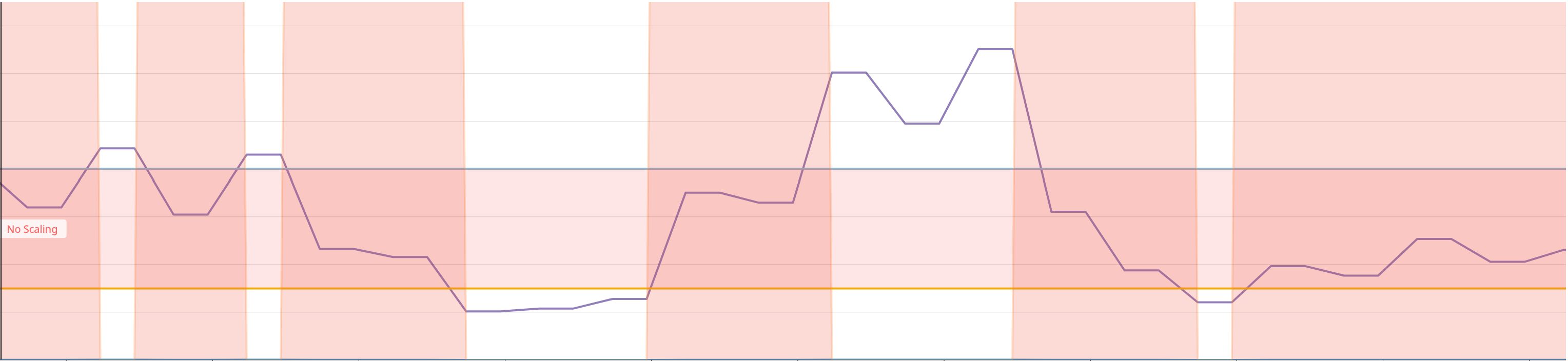
Starting with the watermarks, the value of the metric collected (watermarkpodautoscaler.wpa_controller_value) from Datadog in purple when between the bounds (watermarkpodautoscaler.wpa_controller_low_watermark and watermarkpodautoscaler.wpa_controller_high_watermark) will instruct the controller not to trigger a scaling event. They are specified as Quantities, so you can use m | "" | k | M | G | T | P | E to easily represent the value you want to use.
We can use the metric watermarkpodautoscaler.wpa_controller_restricted_scaling{reason:within_bounds} to verify that it is indeed restricted. Note: the metric was multiplied by 1000 in order to make it more explicit that during this time, no scaling event could have been triggered by the controller.
- Velocity
The second set of configuration options pertains to the scaling velocity of your deployment, controlled by scaleDownLimitFactor and scaleUpLimitFactor.
These are integers between 0 and 100. They represent the maximum ratio of respectively downscaling and upscaling, given the current number of replicas.
In this case, should we have 10 replicas and a recommended number of replicas at 14 (see the Algorithm section for more details on the recommendation) with a scaleUpFactor of 30 (%), we would be capped at 13 replicas.
In the following graph, we can see that the suggested number of replicas (in purple), represented by the metric watermarkpodautoscaler.wpa_controller_replicas_scaling_proposal is too high compared to the current number of replicas. This will trigger the upscale capping logic, which can be monitored using the metric watermarkpodautoscaler.wpa_controller_restricted_scaling{reason:upscale_capping} (Note: Same as above, the metric was multiplied to make it more explicit). Thus, the effective number of replicas watermarkpodautoscaler.wpa_controller_replicas_scaling_effective will scale up, but according to the scaleUpLimitFactor.

In this similar example, we avoid downscaling too much, and we can use the same set of metrics to guarantee that we only scale down by a reasonable number of replicas.

It is important to note that we always make conservative scaling decisions.
- With a scaleUpLimitFactor of 29%: if we have 10 replicas and are recommended 13, we will upscale to 12.
- With a scaleDownLimitFactor of 29%: if we have 10 replicas and are recommended 7, we will downscale to 8.
- The minimum number of replicas we can recommend to add or remove is one (not zero). This is to avoid edge scenarios when using a small number of replicas.
- Note that the options minReplicas and maxReplicas take precedence. Refer to the Precedence section.
- Cooldown periods
Finally, the last options available are downscaleForbiddenWindowSeconds and upscaleForbiddenWindowSeconds . These represent how much time (in seconds) after a scaling event to wait before scaling down and scaling up, respectively. We only keep the last scaling event, and we do not compare the upscaleForbiddenWindowSeconds to the last time we only upscaled.
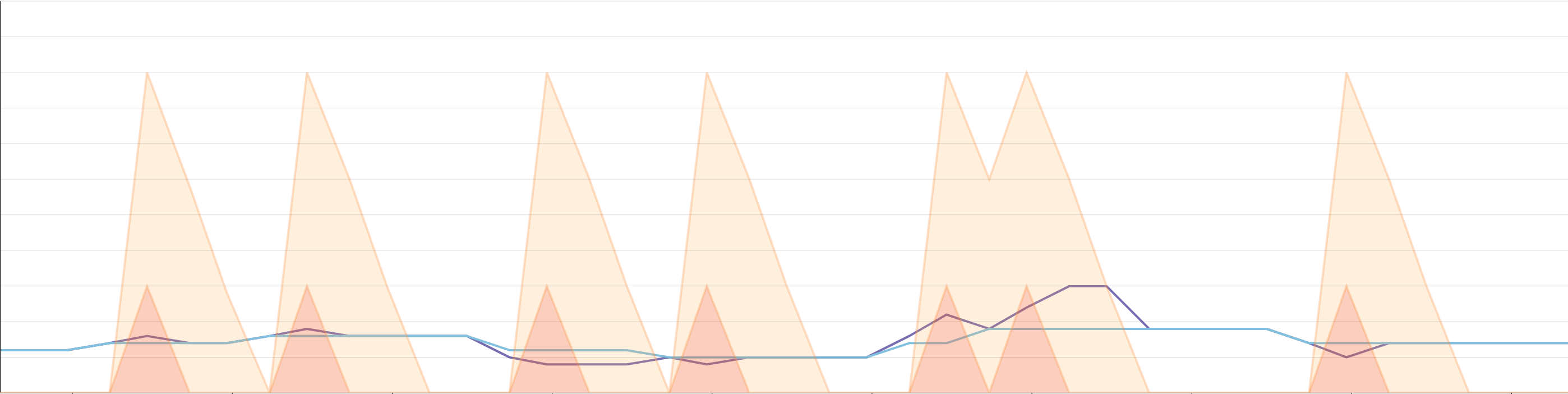
In the following example, we can see that the recommended number of replicas is ignored if we are in a cooldown period. The downscale cooldown period can be visualized with watermarkpodautoscaler.wpa_controller_transition_countdown{transition:downscale}, and is represented in yellow on the graph below. We can see that it is significantly higher than the upscale cooldown period (transition:upscale) in orange on our graph. Once we are recommended to scale, we will only scale if the appropriate cooldown window is over. This will reset both countdowns.
In order to avoid scaling from bursts you can use the following features: downscaleDelayBelowWatermarkSeconds and/or upscaleDelayAboveWatermarkSeconds. These options are specified as integers. The metric(s) have to remain above or under its/their respective watermark for the configured duration.
You can keep track of how much time is left in the status of the WPA:
  - lastTransitionTime: "2022-11-15T02:02:09Z"
    message: Allow downscaling if the value stays under the Watermark
    reason: Value below Low Watermark
    status: "False"
    type: BelowLowWatermark
Or in the logs of the controller:
{"level":"info","ts":1668481092517.446,"logger":"controllers.WatermarkPodAutoscaler","msg":"Will not scale: value has not been out of bounds for long enough","watermarkpodautoscaler":"datadog/example-watermarkpodautoscaler","wpa_name":"example-watermarkpodautoscaler","wpa_namespace":"datadog","time_left":3209}
Note: If you are using multiple metrics with this feature, the above/below condition is considered using the OR of the metrics.
For example, suppose you have a 60 second upscaleDelay with two metrics, M1 and M2. If M1 stays above its high watermark for 40 seconds [t0; t40], and the M2 one goes above its high watermark for 30 seconds, overlapping with M1 during its last 10 seconds, [t30; t60], this validates the upscaleDelay condition and allows for an upscaling event.
As we retrieve the value of the external metric, we will first compare it to the sum highWatermark + highTolerance and to the difference lowWatermark - lowTolerance (the values of highTolerance and lowTolerance are computed by multiplying the watermarks by tolerance).
If we are outside of the bounds, we compute the recommended number of replicas. We then compare this value to the current number of replicas to potentially cap the recommended number of replicas also according to minReplicas and maxReplicas.
Finally, we look at if we are allowed to scale, given the downscaleForbiddenWindowSeconds and upscaleForbiddenWindowSeconds.
- Pod Lifecycle
In order to have more granular control over the conditions under which a target can be scaled, you can use the following features:
- minAvailableReplicaPercentage: Indicates the minimum percentage of replicas that need to be available in order for the controller to autoscale the target. For instance, if set at 50 and less than half of the pods behind the target are in an Available state, the target will not be scaled by the controller.
-
readinessDelaySeconds: Specifies how much time replicas need to be running for, prior to be taken into account in the scaling decisions. -
Simulation
If all the conditions are met, the controller will scale the targeted object in scaleTargetRef to the recommended number of replicas only if the dryRun flag is not set to true. It will indicate this by logging:
{"level":"info","ts":1566327479.866722,"logger":"wpa_controller","msg":"DryRun mode: scaling change was inhibited currentReplicas:8 desiredReplicas:12"}
Limitations
- Only officially supports one metric per WPA. While the logic supports multiple metrics and applies the greatest recommendation of all metrics, the status needs some refactoring to reflect this insight.
- Does not take CPU into account to normalize the number of replicas.
Troubleshooting
On the Datadog Cluster Agent side
The Cluster Agent is running an informer against the WPA resources, and similar to the HPA, upon creation/update/deletion will parse the spec to query the metric from Datadog.
The Cluster Agent doesn't run the WPA listener by default. To enable WPA in the Cluster Agent, set the environment variable DD_EXTERNAL_METRICS_PROVIDER_WPA_CONTROLLER=true and update the ClusterRole assigned to the Cluster Agent Service Account to have access to WatermarkPodAutoscaler objects:
[...]
- apiGroups: ["datadoghq.com"]
  resources:
  - watermarkpodautoscalers
  verbs:
  - get
  - list
  - watch
[...]
Note: To enable WPA in the Cluster Agent using the datadog helm chart, set clusterAgent.metricsProvider.wpaController to `
Extension points exported contracts — how you extend this code
Core symbols most depended-on inside this repo
Shape
Languages
Modules by API surface
Used by 1 indexed graphs manifest dependencies, hub-wide
For agents
$ claude mcp add watermarkpodautoscaler \
  -- python -m otcore.mcp_server <graph>