github.com/Crypto-Spartan/unifi-search-tool @v2.3.3
Chat with this repoWhat it actually does AI analysis from the code graph — generated when you open this
README
As of 24 July 2024, I have lost access to the large, 100+ site Unifi Controller that I have been using to test this tool. If you have a Unifi controller with a large number of sites (e.g. 50+), and you're willing to provide me with a read-only account on your Unifi Controller, please contact me @ info@cryptospartan.net, messsage me on Discord (username is cryptospartan), tweet at me or DM me on twitter (@CryptoSpartanTv), or open up an issue in this repository. If I don't gain access to another Unifi Controller, I plan to stop development of this tool.
Unifi Search Tool - Download Here
Does your unifi controller have lots of sites? Do you frequently have equipment returned from those sites and you can't remember where it's adopted in the controller? Enter Unifi Search Tool.
This tool was designed to allow searching a MAC address from a Unifi device across all of the different sites in a Unifi controller. Currently, the search feature in Unifi only works within a site, there's no way to search across multiple sites.
How to Use
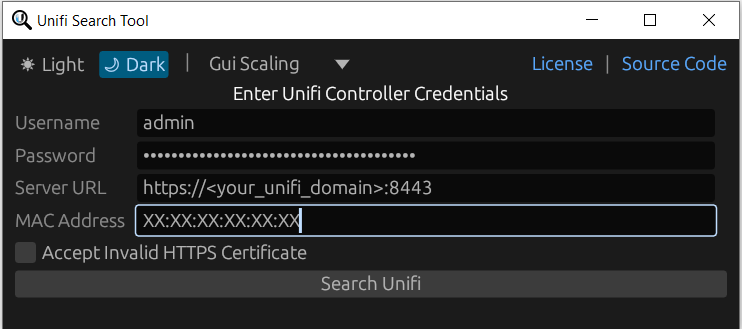
-
Enter your username & password for your Unifi Controller
-
Enter your Unifi Controller domain/IP. You must include the proper http:// or https:// with the appropriate port number at the end, unless it runs on 80/443. (You will see this in the address bar of your browser when you open up your Unifi Controller.)
-
Enter the MAC Address of the device you're searching for
-
Click search
-
Profit
The tool will tell you which site in the controller that the device was adopted to. If it hasn't been adopted, the tool will tell you that the device could not be found.
Build From Source
[!IMPORTANT] Rust nightly compiler is required
-brightgreen.svg)
-
Download the Zip of the source files and extract it
-
Open up a terminal in the directory
-
Run
cargo build --releasein the terminal -
Go to the
target/releasedirectory to find the unifi-search-tool.exe file
If you would like to optimize the binary for size
- Install the appropriate toolchain and the rust-src component
$ rustup toolchain install nightly
$ rustup component add rust-src --toolchain nightly
- Find your host's target triple
$ rustc -vV
...
host: x86_64-unknown-linux-gnu
- Run the build command
# Use that target triple when building with build-std.
# Add the =std,panic_abort to the option to make panic = "abort" Cargo.toml option work.
# See: https://github.com/rust-lang/wg-cargo-std-aware/issues/56
$ cargo +nightly build -Z build-std=std,panic_abort -Z build-std-features=panic_immediate_abort --target x86_64-unknown-linux-gnu --release
- see https://github.com/johnthagen/min-sized-rust for more details
Star History
<img alt="Star History Chart" src="https://api.star-history.com/svg?repos=crypto-spartan/unifi-search-tool&type=Date" />
Core symbols most depended-on inside this repo
Shape
Languages
Modules by API surface
For agents
$ claude mcp add unifi-search-tool \
  -- python -m otcore.mcp_server <graph>