github.com/CrazyTim/spin-wheel @5.0.2
Chat with this repoWhat it actually does AI analysis from the code graph — generated when you open this
README
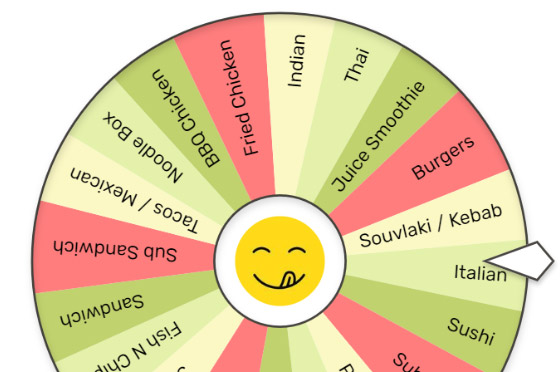
Spin Wheel



An easy to use, themeable component for randomising choices and prizes.
Features
- Vanilla JavaScript (ES6).
- No dependencies.
- Simple, easy to use API.
- Spin by applying momentum and drag, or animate to a specific angle with easing.
- Interactable with click-drag or touch-flick.
- Responsive layout (resizes automatically to fit it's container).
- Easily themeable:
- Give items their own color and weight.
- Rotate labels and change alignment.
- Draw images on items, the wheel, and the foreground.
- Apply repeating colour sets.
- Callbacks for events like
onSpinandonCurrentIndexChange. - Clockwise and anti-clockwise spinning.
Examples
- Basic ESM
- Basic IIFE
- Basic Vue
- Spin to a specific item
- Multiple Wheels
- Themes
- Playground (for testing and troubleshooting)
Installation
ESM
import {Wheel} from 'https://cdn.jsdelivr.net/npm/spin-wheel@5.0.2/dist/spin-wheel-esm.js';
IIFE
<script src="https://cdn.jsdelivr.net/npm/spin-wheel@5.0.2/dist/spin-wheel-iife.js"></script>
Local
npm install spin-wheel
How to make your own wheel
// 1. Configure the wheel's properties:
const props = {
  items: [
    {
      label: 'one',
    },
    {
      label: 'two',
    },
    {
      label: 'three',
    },
  ]
}

// 2. Decide where you want it to go:
const container = document.querySelector('.wheel-container');

// 3. Create the wheel in the container and initialise it with the props:
const wheel = new Wheel(container, props);
How to spin the wheel
For multiplayer games or awarding prizes with actual value, the best way is to call Wheel.spinToItem(). The wheel will spin for a certain duration, and once finished the pointer will be pointing at the specified item. You should always calculate the winning item on the back-end, for example:
const winningItemIndex = await fetchWinningItemIndex();
const duration = 4000;
const easing = easing.cubicOut;
wheel.spinToItem(winningItemIndex, duration, true, 2, 1, easing)
If precision is not important, you can use Wheel.spin() to immediately start spinning the wheel at a certain speed, which will be reduced over time according to Wheel.rotationResistance. You can also set Wheel.isInteractive = true to allow the user to spin the wheel themselves by dragging or flicking.
How to draw the pointer
The wheel doesn't have a built-in pointer, instead you set Wheel.pointerAngle and draw the pointer yourself. This is because there are many ways you might want the pointer to appear and behave, for example you might want to animate it.
Your options for drawing the pointer are:
- Overlay an image using
Wheel.overlayImage - Overlay something using the DOM
Images and fonts
Images are passed as instances of HTMLImageElement and should be pre-loaded, otherwise there will be an initial delay (or flicker) while the browser downloads them. Fonts should also be pre-loaded for the same reason. See the code behind the themes example for an example of how to pre-load images and fonts.
Configuration
Everything is easy to configure. The wheel is responsive and resizes automatically to fit it's container, so when the size of the container changes you don't have to worry about updating fiddly things like widths and font sizes. For that reason, some numeric properties are expressed as percentages, while others are expressed as pixels.
-
Percentage properties are a percent of the container size. For example, a
Wheel.radiusof0.9means the wheel will fill90%of the container. -
Pixel properties are relative to a container size of
500px. For example, aWheel.LineWidthof1will be exactly1pxwhen the container size is500px.
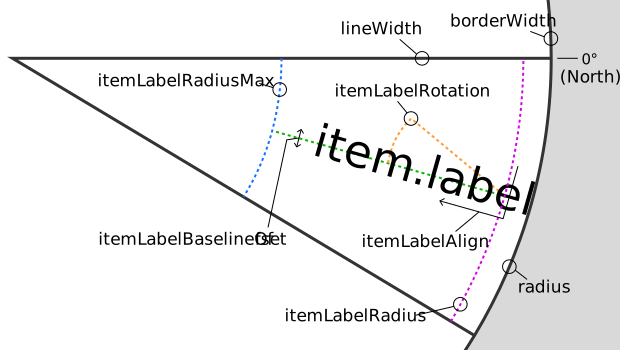
Labels are also simple to configure because the font size is calculated automatically. You can optionally set Wheel.itemLabelFontSizeMax (in pixels), but otherwise the largest item label will be sized to fit between Wheel.itemLabelRadius (percent) and Wheel.itemLabelRadiusMax (percent).
Here's a handy diagram:
Methods for Wheel
| Method | Description |
|---|---|
constructor(container, props = {}) |
Create the wheel inside a container Element and initialise it with props. |
container must be an Element.
props must be an Object or null.
init(props = {}) | Initialise all properties.
If a value is not provided for a property then it will be given a default value.
resize() | [Legacy] Re-calculate and redraw the wheel. Only needed in certain scenarios for older browsers that don't support ResizeObserver.
remove() | Remove the wheel from the DOM and unregister event handlers.
spin(rotationSpeed = 0) | Spin the wheel by setting rotationSpeed. The wheel will immediately start spinning, and slow down over time depending on the value of rotationResistance.
A positive number will spin clockwise, a negative number will spin anti-clockwise.
spinTo(rotation = 0, duration = 0, easingFunction = null) | Spin the wheel to a particular rotation.
The animation will occur over the provided duration (milliseconds).
The animation can be adjusted by providing an optional easingFunction which accepts a single parameter n, where n is between 0 and 1 inclusive.
If no easing function is provided, the default easeSinOut will be used.
For example easing functions see easing-utils.
spinToItem(itemIndex = 0, duration = 0, spinToCenter = true, numberOfRevolutions = 1, direction = 1, easingFunction = null) | Spin the wheel to a particular item.
The animation will occur over the provided duration (milliseconds).
If spinToCenter is true, the wheel will spin to the center of the item, otherwise the wheel will spin to a random angle inside the item.
numberOfRevolutions controls how many times the wheel will rotate a full 360 degrees before resting on the item.
direction can be 1 (clockwise) or -1 (anti-clockwise)
The animation can be adjusted by providing an optional easingFunction which accepts a single parameter n, where n is between 0 and 1 inclusive.
If no easing function is provided, the default easeSinOut will be used.
For example easing functions see easing-utils.
stop() | Immediately stop the wheel from spinning, regardless of which method was used to spin it.
getCurrentIndex() | Get the index of the item that the Pointer is pointing at.
An item is considered "current" if pointerAngle is between it's start angle (inclusive) and it's end angle (exclusive).
Properties for Wheel
Note: setting a property to undefined will reset it to the default value.
| Name | Default Value | Description |
|---|---|---|
borderColor |
'#000' |
The CSS color for the line around the circumference of the wheel. |
borderWidth |
0 |
The width (in pixels) of the line around the circumference of the wheel. |
debug |
false |
If debugging info will be shown. |
This is helpful when positioning labels.
image | null | The HTMLImageElement to draw on the wheel and rotate with the wheel.
It will be centered and scaled to fit Wheel.radius.
isInteractive | true | If the user will be allowed to spin the wheel using click-drag/touch-flick.
User interaction will only be detected within the bounds of Wheel.radius.
itemBackgroundColors | ['#fff'] | The CSS colors to use as a repeating pattern for the background colors of all items.
Overridden by Item.backgroundColor.
Example: ['#fff','#000'].
itemLabelAlign | 'right' | The alignment of all item labels.
Possible values: 'left','center','right'.
itemLabelBaselineOffset | 0 | The offset of the baseline (or line height) of all item labels (as a percent of the label's height).
itemLabelColors | ['#000'] | The CSS colors to use as a repeating pattern for the colors of all item labels.
Overridden by Item.labelColor.
Example: ['#fff','#000'].
itemLabelFont | 'sans-serif' | The font familiy to use for all item labels.
Example: 'Helvetica, sans-serif'.
itemLabelFontSizeMax | 100 | The maximum font size (in pixels) for all item labels.
itemLabelRadius | 0.85 | The point along the wheel's radius (as a percent, starting from the center) to start drawing all item labels.
itemLabelRadiusMax | 0.2 | The point along the wheel's radius (as a percent, starting from the center) to limit the maximum width of all item labels.
itemLabelRotation | 0 | The rotation of all item labels.
Use this in combination with itemLabelAlign to flip the labels 180°.
itemLabelStrokeColor | '#fff' | The CSS color of the stroke applied to the outside of the label text.
itemLabelStrokeWidth | 0 | The width of the stroke applied to the outside of the label text.
items | [] | The items (or slices, wedges, segments) shown on the wheel.
Setting this property will re-create all of the items on the wheel based on the objects provided.
Accessing this property lets you change individual items. For example you could change the background color of an item.
lineColor | '#000' | The CSS color of the lines between the items.
lineWidth | 1 | The width (in pixels) of the lines between the items.
offset | {x: 0, y: 0} | The offset of the wheel from the center of it's container (as a percent of the wheel's diameter).
onCurrentIndexChange | null | The callback for the onCurrentIndexChange event.
onRest | null | The callback for the onRest event.
onSpin | null | The callback for the onSpin event.
overlayImage | null | The HTMLImageElement to draw over the top of the wheel.
It will be centered and scaled to fit the container's smallest dimension.
Use this to draw decorations around the wheel, such as a stand or pointer.
pixelRatio | 0 | The pixel ratio (as a percent) used to draw the wheel.
Higher values will produce a sharper image at the cost of performance, but the sharpness depends on the current display device.
A value of 0 will use the pixel ratio of the current display device (see devicePixelRatio).
pointerAngle | 0 | The angle of the Pointer which will be used to determine the currentIndex (or the "winning" item).
radius | 0.95 | The radius of the wheel (as a percent of the container's smallest dimension).
rotation | 0 | The rotation (angle in degrees) of the wheel.
The first item will be drawn clockwise from this point.
rotationResistance | -35 | The amount that rotationSpeed will be reduced by every second until the wheel stops spinning.
Set to 0 to spin the wheel infinitely.
rotationSpeed | 0 | [Readonly] How fast (angle in d
Core symbols most depended-on inside this repo
Shape
Languages
Modules by API surface
For agents
$ claude mcp add spin-wheel \
  -- python -m otcore.mcp_server <graph>