github.com/CollatzConjecture/nestjs-clean-architecture @main
Chat with this repoBrowse by type
What it actually does AI analysis from the code graph — generated when you open this
README
NestJS Clean Architecture with DDD, CQRS & Event Sourcing
This is an advanced boilerplate project implementing Domain-Driven Design (DDD), Clean Architecture, CQRS (Command Query Responsibility Segregation), Event Sourcing and MongoDB with NestJS. It provides a robust foundation for building scalable and maintainable enterprise-level applications with proper separation of concerns and clean dependency direction.
If you want more documentation about NestJS, click here Nest
📝 Note: This version uses MongoDB with Mongoose. If you prefer the PostgreSQL version with TypeORM, you can find it at the original repository: https://github.com/CollatzConjecture/nestjs-clean-architecture-postgres
A quick introduction to clean architecture
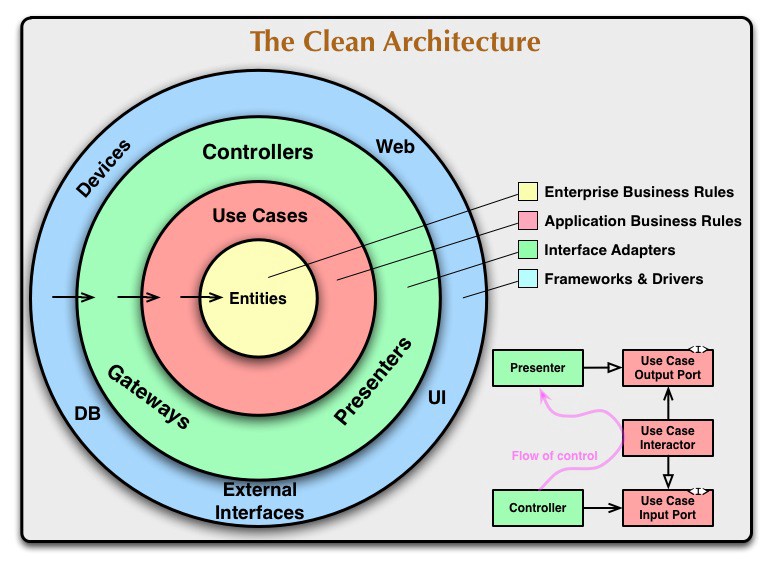
🚀 Features
Core Architecture
- Clean Architecture: Enforces strict separation of concerns with proper dependency direction (Infrastructure → Application → Domain).
- Domain-Driven Design (DDD): Pure business logic encapsulated in Domain Services, accessed through Repository Interfaces.
- CQRS: Segregates read (Queries) and write (Commands) operations for optimized performance and scalability.
- Event Sourcing: Uses an event-driven approach with sagas for orchestrating complex business processes.
- Repository Pattern: Clean interfaces defined in Domain layer, implemented in Infrastructure layer.
- Dependency Inversion: Domain layer depends only on abstractions, never on concrete implementations.
Proper Layer Separation
- Domain Layer: Pure business logic, domain entities without framework dependencies, repository interfaces
- Application Layer: Business orchestration, application services, CQRS coordination, framework-agnostic services
- API Layer: HTTP controllers, DTOs, request/response handling, framework-specific HTTP concerns
- Infrastructure Layer: Database implementations, external API calls, concrete repository classes, global services
Security & Authentication
- JWT Authentication: Implements secure, token-based authentication with refresh token rotation.
- Google OAuth2 Integration: Secure third-party authentication with Google accounts, including CSRF protection.
- Role-Based Access Control (RBAC): Complete implementation with protected routes and role-based guards.
- Secure Password Storage: Hashes passwords using
bcryptwith salt rounds. - Sensitive Data Encryption: Encrypts sensitive fields (e.g., user emails) at rest in the database using AES-256-CBC.
- Blind Indexing: Allows for securely querying encrypted data without decrypting it first.
- CSRF Protection: OAuth flows protected against Cross-Site Request Forgery attacks using state parameters.
Infrastructure & Operations
- MongoDB Integration: Utilizes Mongoose for structured data modeling with a NoSQL database.
- Containerized Environment: Full Docker and Docker Compose setup for development and production.
- Health Checks: Provides application health monitoring endpoints via Terminus.
- Structured Logging: Advanced logging system with business-context awareness and dependency injection.
- Application Metrics: Exposes performance metrics for Prometheus.
- Data Visualization: Comes with a pre-configured Grafana dashboard for visualizing metrics.
- Request Throttling: Built-in rate limiting to prevent abuse and ensure API stability.
Testing
- Unit & Integration Tests: A suite of tests for domain, application, and infrastructure layers.
- E2E Tests: End-to-end tests to ensure API functionality from request to response.
- High Test Coverage: Configured to report and maintain high code coverage.
- Mocking: Clear patterns for mocking database and service dependencies.
Getting Started
git clone https://github.com/CollatzConjecture/nestjs-clean-architecture
cd nestjs-clean-architecture
📁 Project Structure
.
├── doc/
│   ├── common.http              # Common API requests
│   └── users.http               # User-specific API requests
├── src/
│   ├── api/                     # API Layer (HTTP Controllers & DTOs)
│   │   ├── controllers/
│   │   │   └── *.controller.ts  # HTTP endpoints (auth, profile, hello)
│   │   ├── dto/
│   │   │   ├── auth/            # Authentication DTOs
│   │   │   │   └── *.dto.ts     # Login & register DTOs
│   │   │   └── *.dto.ts         # Profile management DTOs
│   │   └── api.module.ts        # API module configuration
│   ├── application/             # Application Layer (Business Orchestration)
│   │   ├── __test__/
│   │   │   └── *.spec.ts        # Application layer tests
│   │   ├── auth/
│   │   │   ├── command/         # Auth commands & handlers
│   │   │   │   ├── *.command.ts # Create/delete auth user commands
│   │   │   │   └── handler/
│   │   │   │       └── *.handler.ts # Command handlers
│   │   │   ├── events/          # Auth domain events
│   │   │   │   └── *.event.ts   # User created/deleted events
│   │   │   ├── sagas/
│   │   │   │   └── *.saga.ts    # Registration flow orchestration
│   │   │   ├── decorators/
│   │   │   │   └── *.decorator.ts # Custom decorators (roles)
│   │   │   ├── guards/
│   │   │   │   └── *.guard.ts   # Authentication & authorization guards
│   │   │   ├── *.strategy.ts    # Auth strategies (JWT, local, Google OAuth)
│   │   │   └── auth.module.ts   # Auth module configuration
│   │   ├── decorators/
│   │   │   └── *.decorator.ts   # Global decorators (current user)
│   │   ├── interfaces/
│   │   │   └── *.interface.ts   # Application interfaces
│   │   ├── interceptors/
│   │   │   └── *.interceptor.ts # Request logging interceptors
│   │   ├── middlewere/
│   │   │   └── *.middleware.ts  # HTTP middleware (logging)
│   │   ├── services/
│   │   │   └── *.service.ts     # Application services (auth, profile, logger)
│   │   ├── profile/
│   │   │   ├── command/         # Profile commands & handlers
│   │   │   │   ├── *.command.ts # Profile commands
│   │   │   │   └── handler/
│   │   │   │       └── *.handler.ts # Command handlers
│   │   │   ├── events/          # Profile domain events
│   │   │   │   └── *.event.ts   # Profile events
│   │   │   └── profile.module.ts # Profile module configuration
│   │   └── application.module.ts # Application module aggregator
│   ├── domain/                  # Domain Layer (Pure Business Logic)
│   │   ├── __test__/
│   │   │   └── *.spec.ts        # Domain layer tests
│   │   ├── aggregates/          # Domain aggregates
│   │   ├── entities/
│   │   │   ├── *.ts             # Pure domain entities (Auth, Profile)
│   │   │   └── enums/           # Domain enums
│   │   │       └── *.enum.ts    # Role enums, etc.
│   │   ├── interfaces/
│   │   │   └── repositories/    # Repository contracts defined by domain
│   │   │       └── *.interface.ts # Repository interfaces
│   │   └── services/
│   │       └── *.service.ts     # Pure business logic services
│   ├── infrastructure/          # Infrastructure Layer (External Concerns)
│   │   ├── database/
│   │   │   ├── database.module.ts    # Database configuration
│   │   │   └── database.providers.ts # Database providers
│   │   ├── health/
│   │   │   └── *.check.ts       # Health check configurations
│   │   ├── logger/
│   │   │   └── logger.module.ts # Global logger module
│   │   ├── models/
│   │   │   ├── *.model.ts       # MongoDB models (auth, profile)
│   │   │   └── index.ts         # Model exports
│   │   └── repository/
│   │       └── *.repository.ts  # Repository implementations
│   ├── main.ts                  # Application entry point
│   ├── app.module.ts           # Root application module
│   └── constants.ts            # Application constants
├── test/
│   ├── *.e2e-spec.ts           # End-to-end tests
│   ├── jest-e2e.json           # E2E test configuration
│   └── setup-e2e.ts            # E2E test setup
├── prometheus/
│   └── prometheus.yml          # Prometheus configuration
├── docker-compose*.yml         # Docker Compose configurations (dev, prod)
└── Dockerfile                  # Container definition
🏗️ Architecture Overview
Layer Architecture
This project follows a strict 4-layer architecture:
- API Layer (
src/api/): HTTP controllers, DTOs, and request/response handling - Application Layer (
src/application/): Business orchestration, CQRS coordination, and application services - Domain Layer (
src/domain/): Pure business logic, entities, and domain services - Infrastructure Layer (
src/infrastructure/): Database, external services, and technical implementations
Module Structure
- ApiModule: Aggregates all HTTP controllers and imports ApplicationModule
- ApplicationModule: Central orchestrator that imports and exports feature modules
- AuthModule: Self-contained authentication feature with all its dependencies
- ProfileModule: Self-contained profile management feature with all its dependencies
- LoggerModule: Global infrastructure service for application-wide logging
CQRS Implementation
- Commands: Handle write operations (Create, Update, Delete). Located in
src/application/*/command. - Queries: Handle read operations (Find, Get). Located in
src/application/*/query. - Handlers: Process commands and queries separately with proper business-context logging.
- Events: Publish domain events for side effects and inter-module communication.
Event-Driven Flow
- User Registration:
API Controller → Application Service → Domain Service (validation) →
   RegisterCommand → CreateAuthUser → AuthUserCreated Event →
   RegistrationSaga → CreateProfile → ProfileCreated
- Authentication:
API Controller → Application Service → Domain Service (email validation) →
   LoginCommand → ValidateUser → JWT Token Generation
- Google OAuth Flow:
/auth/google → Google OAuth → /auth/google/redirect →
   Domain Service (validation) → FindOrCreateUser → JWT Token Generation
- Error Handling:
ProfileCreationFailed Event → RegistrationSaga →
   DeleteAuthUser (Compensating Transaction)
Dependency Injection & Module Boundaries
- Feature Modules: Each feature (Auth, Profile) manages its own dependencies
- Domain Services: Injected via factories to maintain Clean Architecture principles
- Repository Pattern: Interfaces defined in domain, implementations in infrastructure
- Global Services: Logger provided globally via
@Global()decorator
📋 Prerequisites
- Node.js 20+
- Docker and Docker Compose
- MongoDB (included in Docker Compose)
- Google OAuth2 credentials (for Google login functionality)
🐳 Running with Docker Compose
The project is configured to run seamlessly with Docker. Use the pnpm scripts from package.json for convenience.
# Build and start containers in detached mode for development
$ pnpm run docker:dev

# Build and start containers for production
$ pnpm run docker:prod

# View logs for the API service
$ pnpm run docker:logs

# Stop all running containers
$ pnpm run docker:down

# Restart the development environment
$ pnpm run docker:restart
🌐 Service Access
- Application: http://localhost:4000
- API Documentation (Swagger): http://localhost:4000/api
- MongoDB: localhost:27017
- Prometheus: http://localhost:9090
- Grafana: http://localhost:3000 (admin/admin)
📦 Installation
$ pnpm install
🚀 Running the Application
# Development
$ pnpm run start

# Watch mode (recommended for development)
$ pnpm run start:dev

# Production mode
$ pnpm run start:prod

# Debug mode
$ pnpm run start:debug
🧪 Testing
# Unit tests
$ pnpm run test

# E2E tests
$ pnpm run test:e2e

# Test coverage
$ pnpm run test:cov

# Watch mode
$ pnpm run test:watch
🧹 Linting
# Check code style
$ pnpm run lint

# Auto-fix issues where possible
$ pnpm run lint:fix
🧪 API Testing
You can import this Postman collection to test the API endpoints.
The collection includes:
- Authentication endpoints: Register, login, logout, Google OAuth
- Profile management: Create, read, update profile data
- Protected routes: Examples with JWT token authentication
- Admin endpoints: Role-based access control examples
- Environment variables: Pre-configured for localhost development
Using the Postman Collection
- Import the collection: Download and import
NestJS CA-DDD.postman_collection.jsoninto Postman - Set environment variables: Configure the following variables in Postman:
localhost:http://localhost(or your host)port:4000(or your configured port)Authorization:Bearer <your-jwt-token>(set after login)- Test the flow:
- Start with user registration
- Login to get JWT token
- Use the token for protected endpoints
🔐 API Endpoints
Authentication
POST /auth/register       # User registration
POST /auth/login          # User login
POST /auth/logout         # User logout (Protected)
POST /auth/refresh-token  # Token refresh (Protected)
GET  /auth/google         # Initiate Google OAuth login
GET  /auth/google/redirect # Google OAuth callback
GET  /auth/:id            # Get user by auth ID (Protected)
DELETE /auth/:id          # Delete user by auth ID (Protected)
Profile Management (Protected)
```http GET /profile/all # Get all user profiles (Admin only) GET /profile/admins # Get all admin users (Admin only) GET /p
Extension points exported contracts — how you extend this code
browse all types & interfaces →
Core symbols most depended-on inside this repo
Shape
Languages
Modules by API surface
Datastores touched
For agents
$ claude mcp add nestjs-clean-architecture \
  -- python -m otcore.mcp_server <graph>