github.com/Cheney-36/lerobot @main
Chat with this repoBrowse by type
What it actually does AI analysis from the code graph — generated when you open this
README
<img alt="LeRobot, Hugging Face Robotics Library" src="https://github.com/Cheney-36/lerobot/raw/main/media/lerobot-logo-thumbnail.png" style="max-width: 100%;">







Hot new tutorial: Getting started with real-world robots
<img src="https://github.com/Cheney-36/lerobot/raw/main/media/tutorial/koch_v1_1_leader_follower.webp?raw=true" alt="Koch v1.1 leader and follower arms" title="Koch v1.1 leader and follower arms" width="50%">
We just dropped an in-depth tutorial on how to build your own robot!
Teach it new skills by showing it a few moves with just a laptop.
Then watch your homemade robot act autonomously 🤯
For more info, see our thread on X or our tutorial page.
LeRobot: State-of-the-art AI for real-world robotics
🤗 LeRobot aims to provide models, datasets, and tools for real-world robotics in PyTorch. The goal is to lower the barrier to entry to robotics so that everyone can contribute and benefit from sharing datasets and pretrained models.
🤗 LeRobot contains state-of-the-art approaches that have been shown to transfer to the real-world with a focus on imitation learning and reinforcement learning.
🤗 LeRobot already provides a set of pretrained models, datasets with human collected demonstrations, and simulation environments to get started without assembling a robot. In the coming weeks, the plan is to add more and more support for real-world robotics on the most affordable and capable robots out there.
🤗 LeRobot hosts pretrained models and datasets on this Hugging Face community page: huggingface.co/lerobot
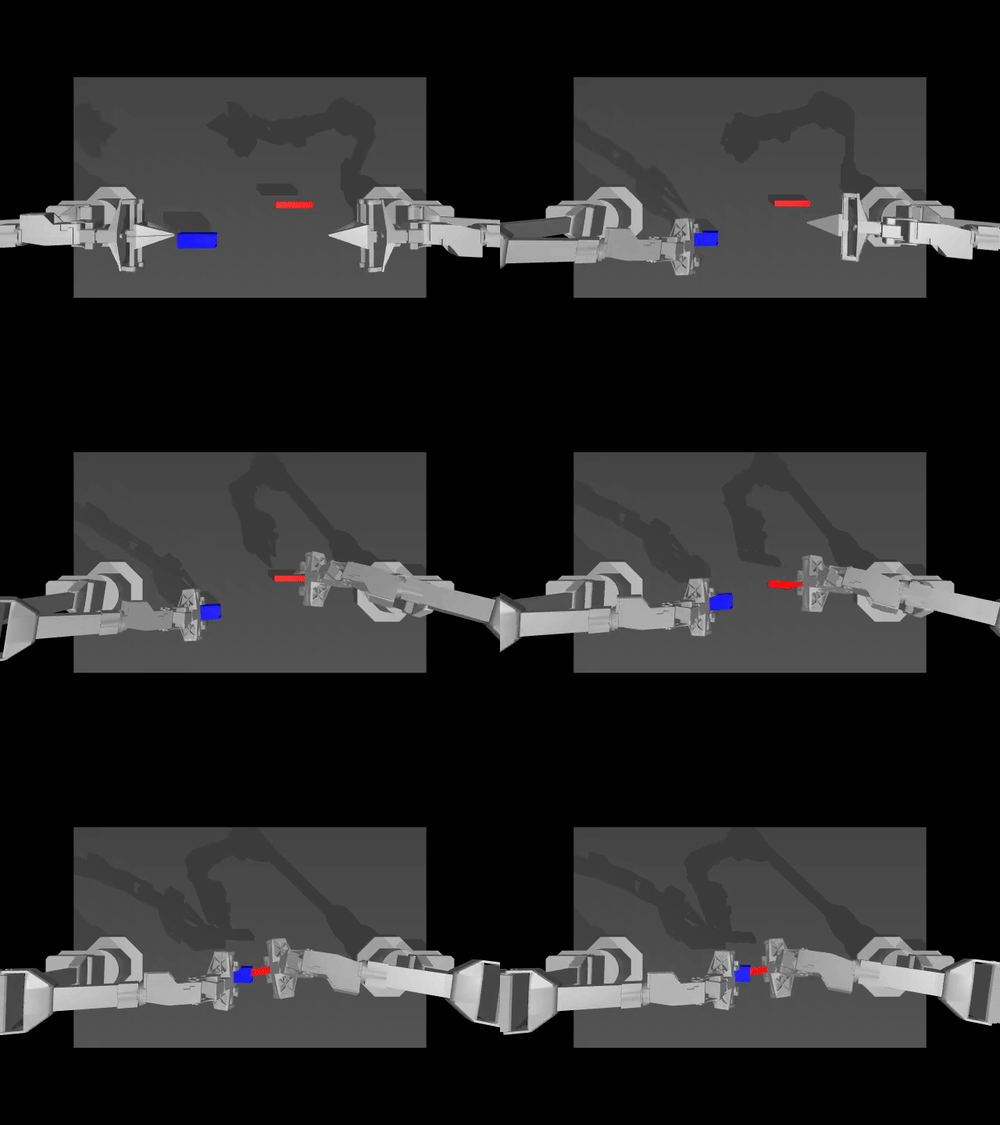
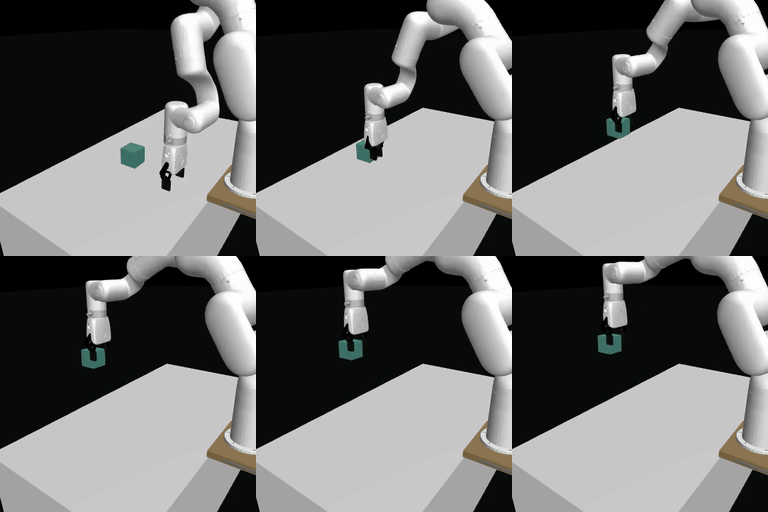
Examples of pretrained models on simulation environments
 |
 |
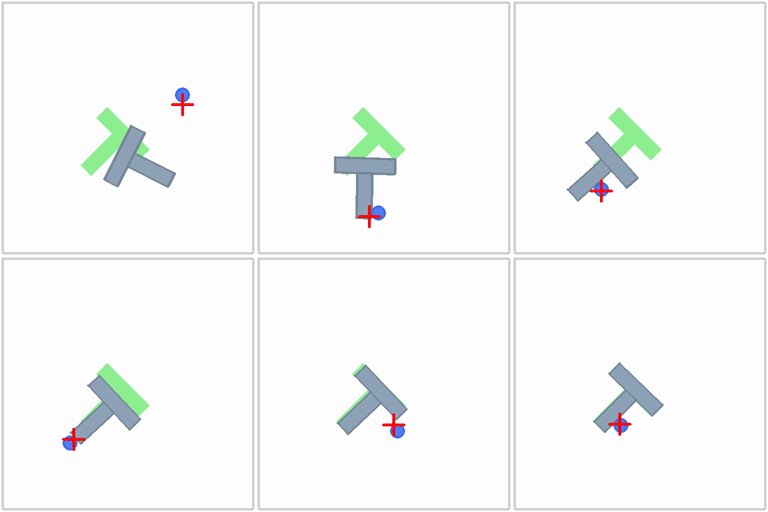 |
| ACT policy on ALOHA env | TDMPC policy on SimXArm env | Diffusion policy on PushT env |
Acknowledgment
- Thanks to Tony Zaho, Zipeng Fu and colleagues for open sourcing ACT policy, ALOHA environments and datasets. Ours are adapted from ALOHA and Mobile ALOHA.
- Thanks to Cheng Chi, Zhenjia Xu and colleagues for open sourcing Diffusion policy, Pusht environment and datasets, as well as UMI datasets. Ours are adapted from Diffusion Policy and UMI Gripper.
- Thanks to Nicklas Hansen, Yunhai Feng and colleagues for open sourcing TDMPC policy, Simxarm environments and datasets. Ours are adapted from TDMPC and FOWM.
- Thanks to Antonio Loquercio and Ashish Kumar for their early support.
- Thanks to Seungjae (Jay) Lee, Mahi Shafiullah and colleagues for open sourcing VQ-BeT policy and helping us adapt the codebase to our repository. The policy is adapted from VQ-BeT repo.
Installation
Download our source code:
git clone https://github.com/Cheney-36/lerobot.git
cd lerobot
Create a virtual environment with Python 3.10 and activate it, e.g. with miniconda:
conda create -y -n lerobot python=3.10
conda activate lerobot
Install 🤗 LeRobot:
pip install -e .
NOTE: Depending on your platform, If you encounter any build errors during this step you may need to install
cmakeandbuild-essentialfor building some of our dependencies. On linux:sudo apt-get install cmake build-essential
For simulations, 🤗 LeRobot comes with gymnasium environments that can be installed as extras: - aloha - xarm - pusht
For instance, to install 🤗 LeRobot with aloha and pusht, use:
pip install -e ".[aloha, pusht]"
To use Weights and Biases for experiment tracking, log in with
wandb login
(note: you will also need to enable WandB in the configuration. See below.)
Building a custom robot
If you want to use Gello to build your own robot, please refer to this tutorial

Walkthrough
.
├── examples             # contains demonstration examples, start here to learn about LeRobot
|   └── advanced         # contains even more examples for those who have mastered the basics
├── lerobot
|   ├── configs          # contains hydra yaml files with all options that you can override in the command line
|   |   ├── default.yaml   # selected by default, it loads pusht environment and diffusion policy
|   |   ├── env            # various sim environments and their datasets: aloha.yaml, pusht.yaml, xarm.yaml
|   |   └── policy         # various policies: act.yaml, diffusion.yaml, tdmpc.yaml
|   ├── common           # contains classes and utilities
|   |   ├── datasets       # various datasets of human demonstrations: aloha, pusht, xarm
|   |   ├── envs           # various sim environments: aloha, pusht, xarm
|   |   ├── policies       # various policies: act, diffusion, tdmpc
|   |   ├── robot_devices  # various real devices: dynamixel motors, opencv cameras, koch robots
|   |   └── utils          # various utilities
|   └── scripts          # contains functions to execute via command line
|       ├── eval.py                 # load policy and evaluate it on an environment
|       ├── train.py                # train a policy via imitation learning and/or reinforcement learning
|       ├── control_robot.py        # teleoperate a real robot, record data, run a policy
|       ├── push_dataset_to_hub.py  # convert your dataset into LeRobot dataset format and upload it to the Hugging Face hub
|       └── visualize_dataset.py    # load a dataset and render its demonstrations
├── outputs               # contains results of scripts execution: logs, videos, model checkpoints
└── tests                 # contains pytest utilities for continuous integration
Visualize datasets
Check out example 1 that illustrates how to use our dataset class which automatically download data from the Hugging Face hub.
You can also locally visualize episodes from a dataset on the hub by executing our script from the command line:
python lerobot/scripts/visualize_dataset.py \
    --repo-id lerobot/pusht \
    --episode-index 0
or from a dataset in a local folder with the root DATA_DIR environment variable (in the following case the dataset will be searched for in ./my_local_data_dir/lerobot/pusht)
DATA_DIR='./my_local_data_dir' python lerobot/scripts/visualize_dataset.py \
    --repo-id lerobot/pusht \
    --episode-index 0
It will open rerun.io and display the camera streams, robot states and actions, like this:
https://github-production-user-asset-6210df.s3.amazonaws.com/4681518/328035972-fd46b787-b532-47e2-bb6f-fd536a55a7ed.mov?X-Amz-Algorithm=AWS4-HMAC-SHA256&X-Amz-Credential=AKIAVCODYLSA53PQK4ZA%2F20240505%2Fus-east-1%2Fs3%2Faws4_request&X-Amz-Date=20240505T172924Z&X-Amz-Expires=300&X-Amz-Signature=d680b26c532eeaf80740f08af3320d22ad0b8a4e4da1bcc4f33142c15b509eda&X-Amz-SignedHeaders=host&actor_id=24889239&key_id=0&repo_id=748713144
Our script can also visualize datasets stored on a distant server. See python lerobot/scripts/visualize_dataset.py --help for more instructions.
The LeRobotDataset format
A dataset in LeRobotDataset format is very simple to use. It can be loaded from a repository on the Hugging Face hub or a local folder simply with e.g. dataset = LeRobotDataset("lerobot/aloha_static_coffee") and can be indexed into like any Hugging Face and PyTorch dataset. For instance dataset[0] will retrieve a single temporal frame from the dataset containing observation(s) and an action as PyTorch tensors ready to be fed to a model.
A specificity of LeRobotDataset is that, rather than retrieving a single frame by its index, we can retrieve several frames based on their temporal relationship with the indexed frame, by setting delta_timestamps to a list of relative times with respect to the indexed frame. For example, with delta_timestamps = {"observation.image": [-1, -0.5, -0.2, 0]} one can retrieve, for a given index, 4 frames: 3 "previous" frames 1 second, 0.5 seconds, and 0.2 seconds before the indexed frame, and the indexed frame itself (corresponding to the 0 entry). See example 1_load_lerobot_dataset.py for more details on delta_timestamps.
Under the hood, the LeRobotDataset format makes use of several ways to serialize data which can be useful to understand if you plan to work more closely with this format. We tried to make a flexible yet simple dataset format that would cover most type of features and specificities present in reinforcement learning and robotics, in simulation and in real-world, with a focus on cameras and robot states but easily extended to other types of sensory inputs as long as they can be represented by a tensor.
Here are the important details and internal structure organization of a typical LeRobotDataset instantiated with dataset = LeRobotDataset("lerobot/aloha_static_coffee"). The exact features will change from dataset to dataset but not the main aspects:
dataset attributes:
  ├ hf_dataset: a Hugging Face dataset (backed by Arrow/parquet). Typical features example:
  │  ├ observation.images.cam_high (VideoFrame):
  │  │   VideoFrame = {'path': path to a mp4 video, 'timestamp' (float32): timestamp in the video}
  │  ├ observation.state (list of float32): position of an arm joints (for instance)
  │  ... (more observations)
  │  ├ action (list of float32): goal position of an arm joints (for instance)
  │  ├ episode_index (int64): index of the episode for this sample
  │  ├ frame_index (int64): index of the frame for this sample in the episode ; starts at 0 for each episode
  │  ├ timestamp (float32): timestamp in the episode
  │  ├ next.done (bool): indicates the end of en episode ; True for the last frame in each episode
  │  └ index (int64): general index in the whole dataset
  ├ episode_data_index: contains 2 tensors with the start and end indices of each episode
  │  ├ from (1D int64 tensor): first frame index for each episode — shape (num episodes,) starts with 0
  │  └ to: (1D int64 tensor): last frame index for each episode — shape (num episodes,)
  ├ stats: a dictionary of statistics (max, mean, min, std) for each feature in the dataset, for instance
  │  ├ observation.images.cam_high: {'max': tensor with same number of dimensions (e.g. `(c, 1, 1)` for images, `(c,)` for states), etc.}
  │  ...
  ├ info: a dictionary of metadata on the dataset
  │  ├ codebase_version (str): this is to keep track of the codebase version the dataset was created with
  │  ├ fps (float): frame per second the dataset is recorded/synchronized to
  │  ├ video (bool): indicates if frames are encoded in mp4 video files to save space or stored as png files
  │  └ encoding (dict): if video, this documents the main options that were used with ffmpeg to encode the videos
  ├ videos_dir (Path): where the mp4 videos or png images are stored/accessed
  └ camera_keys (list of string): the keys to access camera features in the item returned by the dataset (e.g. `["observation.images.cam_high", ...]`)
A LeRobotDataset is serialised using several widespread file formats for each of its parts, namely:
- hf_dataset stored using Hugging Face datasets library serialization to parquet
- videos are sto
Core symbols most depended-on inside this repo
Shape
Languages
Modules by API surface
For agents
$ claude mcp add lerobot \
  -- python -m otcore.mcp_server <graph>