github.com/CatMuse/HiNote @0.5.7
Chat with this repoWhat it actually does AI analysis from the code graph — generated when you open this
README
<h1>HiNote - 高亮文本添加评论</h1>
<img src="https://img.shields.io/github/downloads/CatMuse/HiNote/total" alt="GitHub Downloads (all assets, all releases)" />
<img src="https://img.shields.io/github/v/release/CatMuse/HiNote" alt="GitHub release (latest by date)" />
<img src="https://img.shields.io/github/last-commit/CatMuse/HiNote" alt="GitHub last commit" />
<img src="https://img.shields.io/github/issues/CatMuse/HiNote" alt="GitHub issues" />
<img src="https://img.shields.io/github/stars/CatMuse/HiNote?style=social" alt="GitHub stars" />
简体中文 | English
这款由 AI 编程的 Obsidian 插件能够自动提取笔记中的高亮文本,支持用户添加评论、生成 AI 评论及与高亮文本进行对话。用户可以使用多种格式进行文本高亮,并将其导出为知识卡片图片或全新笔记,同时在主视图中享受更多扩展功能。
本插件由 AI 辅助开发,目前处于 Beta 测试阶段,建议谨慎使用并及时备份数据。
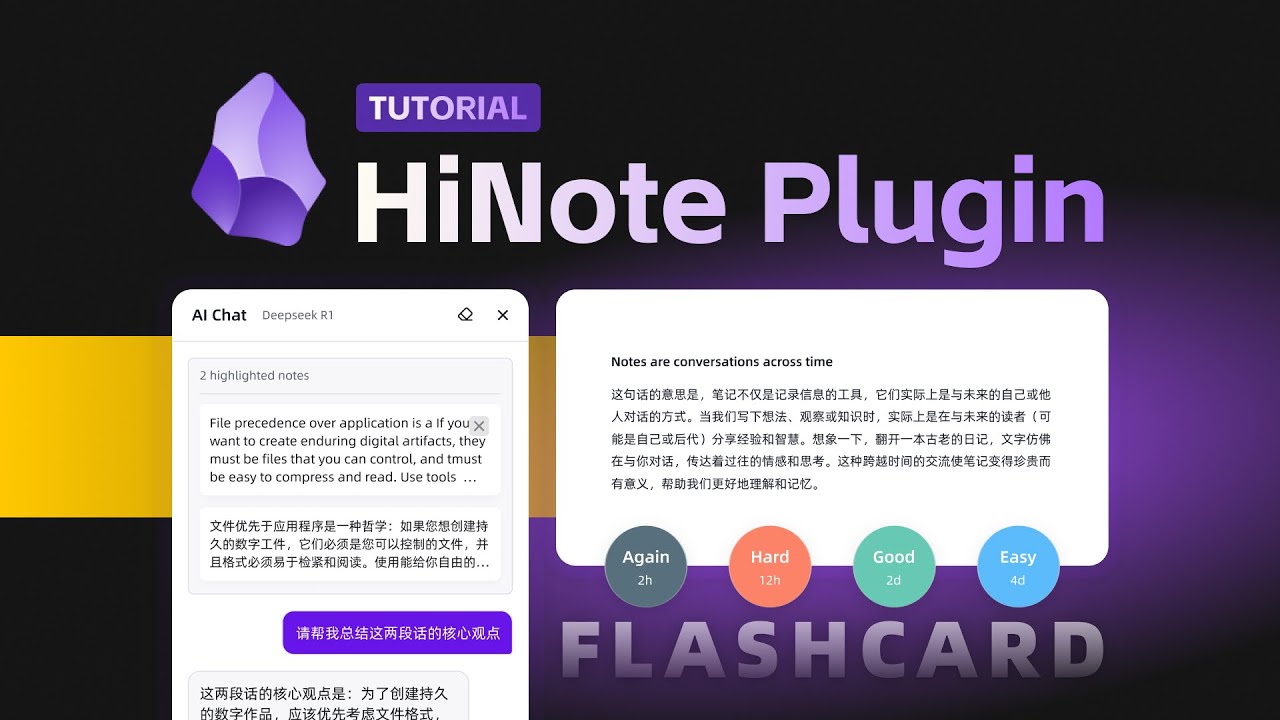
👇🏻 点击图片查看视频教程
✨ 核心特性
🎯 自动提取多种格式的高亮文本 | 📝 为高亮添加评论和笔记 | 🤖 AI 辅助评论和智能对话 | 📸 导出为精美知识卡片 | 📝 生成关联源笔记的新笔记 | 🧠 间隔重复学习系统(Pro)
💡升级到 Pro 版 可解锁基于 FSRS 算法的闪卡系统,高效记忆你的高亮内容
高亮文本获取
当打开包含高亮文本的笔记时,侧边栏会自动获取高亮文本以卡片的样式展示。支持以下三种格式的高亮标记:==、<mark>、<span>。同时支持设置正则表达式来自定义获取格式。

高亮评论
高亮评论功能让你能够快速与高亮文本进行对话,防止灵感稍纵即逝。只需点击编辑区的 Widgets 或直接在选中的高亮卡片上点击添加评论按钮,即可打开评论输入框。
笔记评论功能让你可以不依赖于任何高亮文本为整个文件添加你的思考。点击搜索栏右侧添加文件评论即可在高亮列表最顶部打开评论输入框。
所有评论和高亮数据都会保存在你自己知识库根目录的
.hinote文件夹中,数据完全由你自行掌控。
导出为图片
导出你的高亮文本和评论,创建设计精美的知识卡片,便于分享。

导出为笔记
将你的全部高亮文本和评论导出为一篇新的笔记,笔记采用 Callout 格式展示,并且每一个高亮和评论都可以通过块引用(Block ID)关联到源笔记(需在设置菜单配置包含 highlightBlockRef 的导出模板)。

主视图的扩展功能
将右侧侧边栏窗口拖动到主视图,可以解锁更多功能,例如:包含高亮文本的笔记列表、所有高亮卡片以及 HiCard。
- 笔记列表:显示知识库中所有包含高亮卡片的笔记,并显示高亮数量;
- 全部高亮:展示知识库中所有高亮卡片,让你更专注地查看高亮知识;
- HiCard:实现了将你的高亮文本和评论生成 FlashCard 功能,辅助你记忆学习(Pro 功能)

AI 评论
AI 可以有效辅助你进行思考,并将生成的内容以评论的形式添加到高亮卡片中。
首先,你需要在插件的设置菜单中配置 AI 服务商、API Key 和模型。目前支持的服务商包括 OpenAI、Gemini、Anthropic、Deepseek、SiliconFlow 和 Ollama。
接下来,配置你自定义的 Prompt。在这里,你可以使用两个字段来获取高亮文本和评论内容:{{highlight}} 和 {{comment}}。
最后,你可以在高亮卡片右上角的 AI 按钮中使用你自定义的 Prompt 了。或者在批注的输入框中输入任意自定义的 Prompt 后,直接点击 Tab 键来触发 AI 服务。

Pro 功能
HiNote 提供额外的付费高级功能,以增强你的笔记和学习体验:
闪卡系统
HiNote 的专业版中提供了闪卡功能。这个高级的间隔重复系统帮助你更有效地记忆你的高亮内容:
- 只需一键将你的高亮内容转换为闪卡
- 利用 FSRS(间隔重复调度器)算法以实现最佳学习效率
- 自定义复习计划以适应你的学习风格
要访问这些高级功能,你需要 立即升级到 Pro 版。


支持
如果你觉得这个插件很有用,你也可以支持插件的开发:
- 在 Ko-fi 上买我一杯咖啡
- 给项目点个 ⭐ 星,以表达你的支持!
许可证
此插件采用 MIT 许可证发布。基本功能是免费和开源的,而一些高级功能需要专业许可证。
Extension points exported contracts — how you extend this code
AIServiceSettings (Interface)Core symbols most depended-on inside this repo
tShape
Languages
Modules by API surface
For agents
$ claude mcp add HiNote \
  -- python -m otcore.mcp_server <graph>