github.com/CaioQuirinoMedeiros/react-native-currency-input @v1.1.1
Chat with this repoWhat it actually does AI analysis from the code graph — generated when you open this
README
React Native Currency Input







A simple currency input component for both iOS and Android.
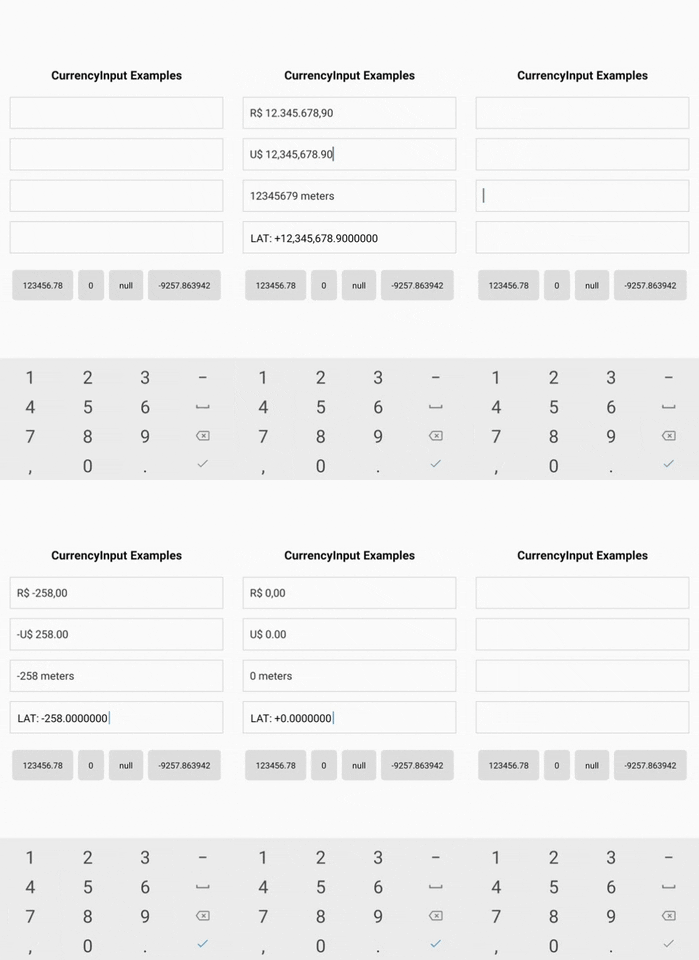
The goal of react-native-currency-input is to offer a simple and effective way to handle number inputs with custom format, usually a currency input, but it can be used for any number input case.
- Features
- Installation
- Basic Usage
- Advanced Usage
- Using custom TextInput
- Props
- Example
- FakeCurrencyInput
- FakeCurrencyInput Usage
- FakeCurrencyInput Props
formatNumberformatNumberOptions
Features
- A simple and practical component for number inputs
- It's just a
<TextInput/>component, so you can use its props and it's easy to customize - Handle any number format with these powerful props:
precision,delimiter,separator,prefixandsuffix. - It handles negative values and you can choose the position of the sign with the
signPosition. - Set minimun and maximum values with
minValueandmaxValue. - Use React Native ES6 and React Hooks
BONUS
<FakeCurrencyInput />: A fake input that hides the real TextInput in order to get rid of the flickering issueformatNumber(): A function that formats number
Installation
npm install react-native-currency-input
or
yarn add react-native-currency-input
Basic Usage
import CurrencyInput from 'react-native-currency-input';

function MyComponent() {
  const [value, setValue] = React.useState(2310.458); // can also be null

  return <CurrencyInput value={value} onChangeValue={setValue} />;
}
Advanced Usage
import CurrencyInput from 'react-native-currency-input';

function MyComponent() {
  const [value, setValue] = React.useState(2310.458);

  return (
    <CurrencyInput
      value={value}
      onChangeValue={setValue}
      prefix="R$"
      delimiter="."
      separator=","
      precision={2}
      minValue={0}
      showPositiveSign
      onChangeText={(formattedValue) => {
        console.log(formattedValue); // R$ +2.310,46
      }}
    />
  );
}
Using custom TextInput
import CurrencyInput from 'react-native-currency-input';
import { Input } from 'native-base';

function MyComponent() {
  const [value, setValue] = React.useState(2310.458);

  return (
    <CurrencyInput
      value={value}
      onChangeValue={setValue}
      renderTextInput={textInputProps => <Input {...textInputProps} variant='filled' />}
      renderText
      prefix="R$"
      delimiter="."
      separator=","
      precision={2}
    />
  );
}
Props
| Prop | Type | Default | Description |
|---|---|---|---|
| ...TextInputProps | Inherit all props of TextInput. |
||
value |
number | The value for controlled input. REQUIRED | |
onChangeValue |
function | Callback that is called when the input's value changes. REQUIRED | |
prefix |
string | Character to be prefixed on the value. | |
suffix* |
string | Character to be suffixed on the value. | |
delimiter |
string | , | Character for thousands delimiter. |
separator |
string | . | Decimal separator character. |
precision |
number | 2 | Decimal precision. |
maxValue |
number | Max value allowed. Might cause unexpected behavior if you pass a value higher than the one defined here. |
|
minValue |
number | Min value allowed. Might cause unexpected behavior if you pass a value lower than the one defined here. |
|
signPosition |
string | "afterPrefix" | Where the negative/positive sign (+/-) should be placed. |
showPositiveSign |
boolean | false | Set this to true to show the + character on positive values. |
onChangeText |
function | Callback that is called when the input's text changes. IMPORTANT: This does not control the input value, you must use onChangeValue. |
|
renderTextInput |
function | Use a custom TextInput component. |
* IMPORTANT: Be aware that using the suffix implies setting the selection property of the TextInput internally. You can override the selection, but that will cause behavior problems on the component
Tip: If you don't want negative values, just use minValue={0}.
Example
See EXAMPLE
git clone https://github.com/caioquirinomedeiros/react-native-currency-input.git
cd react-native-currency-input/example
yarn
yarn android / yarn ios
FakeCurrencyInput
This component hides the TextInput and use a Text on its place, so you'll lost the cursor, but will get rid of the flickering issue. To replace the cursor it's used a pipe character (|) that will be always at the end of the text. It also have a wrapper View with position "relative" on which the TextInput is stretched over.
- Pros
- No flickering issue as a controlled input component
- The cursor is locked at the end, avoiding the user to mess up with the mask
- Cons
- Lost of selection functionality. The user will still be able to copy/paste, but with a bad experience
- The cursor is locked at the end...
FakeCurrencyInput Usage
import { FakeCurrencyInput } from 'react-native-currency-input';

function MyComponent() {
  const [value, setValue] = React.useState(0); // can also be null

  return (
    <FakeCurrencyInput
      value={value}
      onChangeValue={setValue}
      prefix="$"
      delimiter=","
      separator="."
      precision={2}
      onChangeText={(formattedValue) => {
        // ...
      }}
    />
  );
}
FakeCurrencyInput Props
It includes the same props of the CurrencyInput with the additional of the following:
| Prop | Type | Default | Description |
|---|---|---|---|
| ...CurrencuInputProps | Inherit all props of CurrencyInput. |
||
containerStyle |
style prop | Style for the container View that wraps the Text. | |
caretColor |
string | #6495ed | Color of the caret. Same as caretStyle.color. |
caretStyle |
style prop | Style for the caret text component. |
formatNumber(value, options)
import { formatNumber } from 'react-native-currency-input';

const value = -2375923.3;

const formattedValue = formatNumber(value, {
  separator: ',',
  prefix: 'R$ ',
  precision: 2,
  delimiter: '.',
  signPosition: 'beforePrefix',
});

console.log(formattedValue); // -R$ 2.375.923,30
options (optional)
| Name | Type | Default | Description |
|---|---|---|---|
prefix |
string | Character to be prefixed on the value. | |
suffix |
string | Character to be suffixed on the value. | |
delimiter |
string | , | Character for thousands delimiter. |
separator |
string | . | Decimal separator character. |
precision |
number | 2 | Decimal precision. |
ignoreNegative |
boolean | false | Set this to true to disable negative values. |
signPosition |
string | "afterPrefix" | Where the negative/positive sign (+/-) should be placed. |
showPositiveSign |
boolean | false | Set this to true to show the + character on positive values. |
Contributing
See the contributing guide to learn how to contribute to the repository and the development workflow.
License
react-native-currency-input is released under the MIT license. See LICENSE for details.
Any question or support will welcome.
Extension points exported contracts — how you extend this code
FormatNumberOptions (Interface)Core symbols most depended-on inside this repo
addSignPrefixAndSuffixShape
Languages
Modules by API surface
For agents
$ claude mcp add react-native-currency-input \
  -- python -m otcore.mcp_server <graph>