github.com/CYFARE/HellFire @v154.0a1
Chat with this repoWhat it actually does AI analysis from the code graph — generated when you open this
README




HellFire, named after the HellFire Air-To-Surface missile, is a Firefox build optimized for absolute performance. It's a direct compilation of Firefox, emphasizing maximum performance without any source, configuration, or visual modifications.
Releases
We provide x86_64 builds for both GNU/Linux.
- x86_64 GNU/Linux: Releases
Note: Windows builds failing consistently. Microsoft Windows has been the single most bugged and worst system for developers and it's users. Due to consistent issues exclusive to Windows, Microsoft Windows is removed from support completely, with immediate effect.
As Linus Torvalds said to NVIDIA once, I say to Microsoft - --- YOU MICROSOFT
Benchmarks
Higher score = Faster browser. Hellfire 144 outperforms Firefox mainline and Ungoogled Chromium.
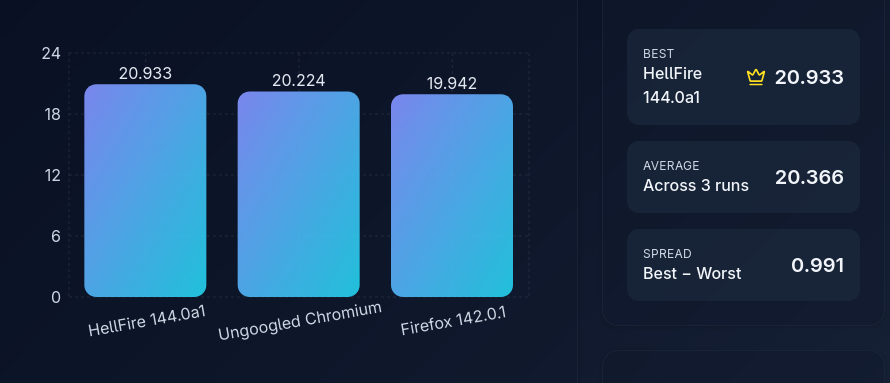
| Benchmark | HellFire 144.0a1 | Ungoogled Chromium | Firefox 142.0.1 | |-----------------|------------------|--------------------|-----------------| | Speedometer 3.1 | 20.9327 | 20.2244 | 19.9420 |
You don't need to have a shady easter-egg inside forked sources.. just download & use HellFire :)
Compile Time Optimizations
HellFire offers the following optimizations over regular Firefox or Nighly build:
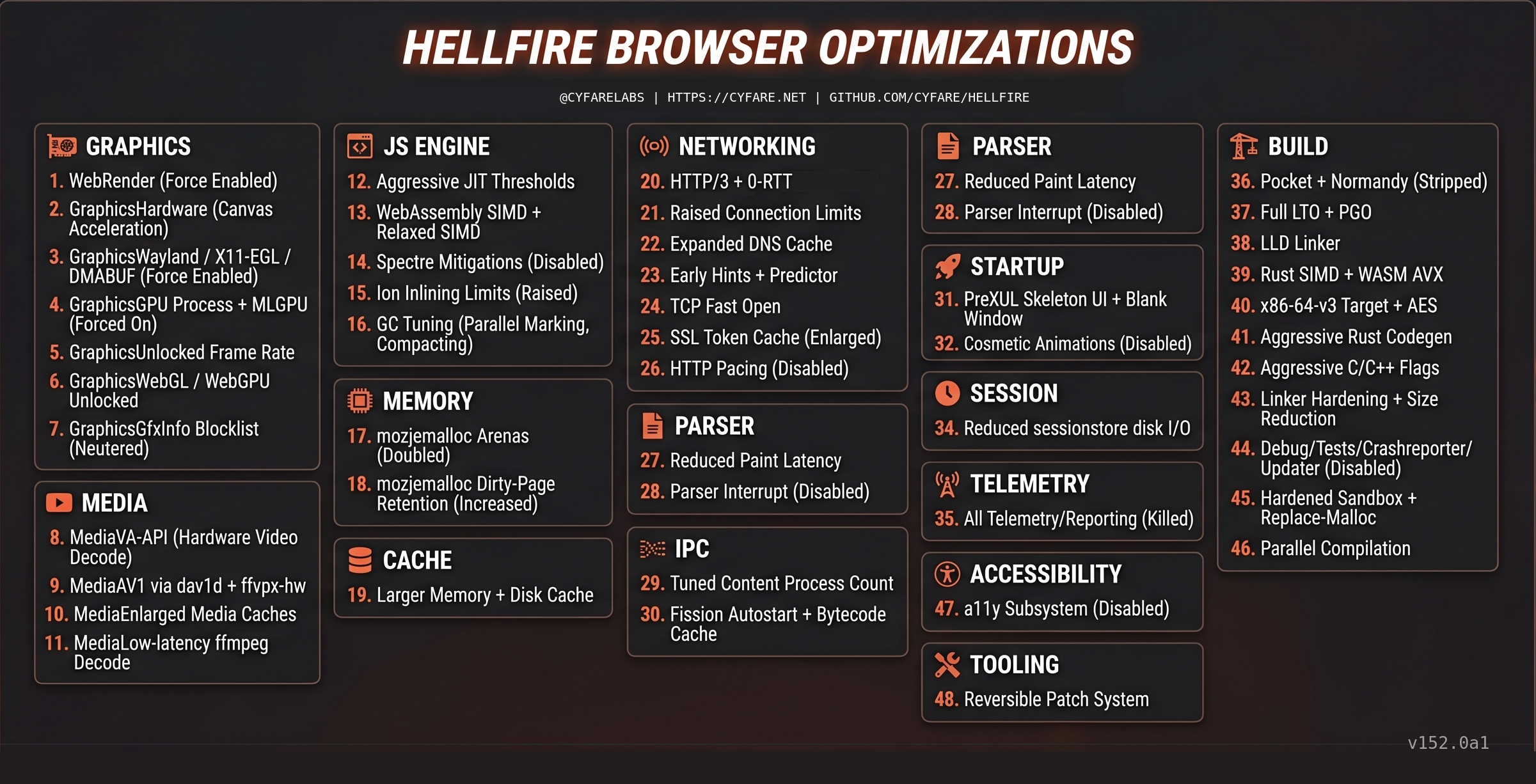
For more details, explore our Mozconfigs and hellfire_patcher:
To build your own version, follow the Firefox Build Guide. Ensure you copy the desired mozconfig to mozilla-unified and rename it to mozconfig, run chmod +x hellfire_patcher.sh && ./hellfire_patcher.sh --apply before running ./mach build.
For custom builds like 'hardened', 'Insecure' or mixed flag builds, please contact via: security@cyfare.net
Install & Update HellFire
Stay updated with the latest versions and installer on our Releases page.
For GNU/Linux, follow the below process:
Package Installation
sudo apt-get update && sudo apt-get install -y python3 python3-tk python3-requests python3-pil
Run the installer using:
python3 hellfire_installer.py
Legacy installer (incase of issues):
1) Download preferred 7z package of HellFire from releases (7z packages are offered starting from v127.0a1).
2) Download hellfire_installer.sh script from older releases
3) cd ~/ && cd Downloads && sudo chmod +x hellfire_installer.sh && ./hellfire_installer.sh
If you're using Ubuntu or Ubuntu based OS like Zorin/Mint etc., then check your application menu & HellFire shortcut will be there. You can also run HellFire from terminal using: hellfire command. You can pipe hellfire through proxychains for using with proxies or tor using: proxychains hellfire
For updating to new version on GNU/Linux, just follow same steps & installer script will update your hellfire browser without editing your bookmarks, extensions or settings :)
Self Compile
Download the mozconfig for your preferred HellFire build from HellFire MozConfigs, rename it to 'mozconfig', place it under mozilla-unified, and begin your build.
Support
Enjoying HellFire's performance boost? Consider supporting us via UPI (India only). Please add a note for 'HellFire Support' when donating. Thank you for your support!
For UPI details, contact us via the email provided below.
Ethics
For insights into our project's ethos, please read our Ethics Statement.
Core symbols most depended-on inside this repo
_themeShape
Languages
Modules by API surface
For agents
$ claude mcp add HellFire \
  -- python -m otcore.mcp_server <graph>