github.com/CDCgov/prime-simplereport @0.0.test
Chat with this repoWhat it actually does AI analysis from the code graph — generated when you open this
README
Simple Report
https://simplereport.gov/
Table of Contents
Setup
- Install Docker and docker-compose
- You can install docker hub directly: https://hub.docker.com/. This is the preferred solution and should come with docker-compose
- Alternatively, you can install docker and run it as a daemon:
brew install docker docker-compose.
Backend
There are two major pieces:
- a Java Spring Boot application
- a postgresql database
To run the service, you need a JDK and some way of running postgresql (most people choose to use Docker, but you can also just run it as a service on your development box.) To test the full authentication/authorization/user-management integration, you will also need Okta credentials, but that is not necessary most of the time.
Backend-Setup
If Java isn't installed on a Mac you can get it from brew:
brew tap adoptopenjdk/openjdk
brew cask install adoptopenjdk11
brew install gradle
Another option (also compatible with Linux) is to install with jabba, the Java version manager:
curl -sL https://github.com/shyiko/jabba/raw/master/install.sh | bash && . ~/.jabba/jabba.sh
jabba install adopt@1.11-0
jabba use adopt@1.11
Running with docker:
cd backend- Run
docker-compose up --build - view site at http://localhost:8080
Running spring app locally and db in docker
cd backend- Run
docker-compose up -d db - Run
gradle bootRun --args='--spring.profiles.active=dev' - view site at http://localhost:8080
Running spring app locally and db in docker on port 5433
cd backend- Run
docker-compose --env-file .env.development up db - Run
SR_DB_PORT=5433 gradle bootRun --args='--spring.profiles.active=dev' - view site at http://localhost:8080
Running the app with Make
For development, it may be more convenient to start the front and backends simultaneously. This can be done by running the following command in the root directory of the project:
make # "make start" if you're nasty
This will start up both servers in "watch" mode, so that changes to the source code result in an immediate rebuild.
Updating user role
By default the local test user is an organization admin role. If you need to change this value to test out other permissions.
It can be set in application-local.yaml. If you have not created one run:
bash
touch backend/src/main/resources/application-local.yaml
Organization roles
Organization roles can be set by adding the following to application-local.yaml:
simple-report:
  demo-users:
    default-user:
      authorization:
        granted-roles: ADMIN
current role types are ADMIN, USER, and ENTRY_ONLY. You can check backend/src/main/java/gov/cdc/usds/simplereport/config/authorization/OrganizationRole.java for a list of available roles
ADMIN - an organization admin with full access to their organization
USER - a site user the has access to everything in their organization but the gear icon
ENTRY_ONLY - a site user that only has access to the Conduct Test tab
Site roles
You can make the default user a site admin by adding the following to application-local.yaml:
simple-report:
  site-admin-emails:
    - bob@sample.com
Site admins can access the /admin paths and site admin APIs
Restart & Clean
When there are DB schema changes the backend may throw an error and fail to start.
Restarting the docker way:
- run
cd backend - Bring down the service by running
docker-compose down - Wipe the db by running
docker system prune && docker images prune && docker volume prune - Restart the service
docker-compose up --build
Restarting the SQL way:
- run
db-setup/nuke-db.sh - restart the spring app
gradle bootRun --args='--spring.profiles.active=dev'
API Testing
Go to localhost:8080 to see interact with the graphql api. You would need to point the api endpoint to the backend at: http://localhost:8080/graphql This gives you a preview to query/mutate the local database.
Tests
All the tests can be run with gradle test. Make sure that you do not have SPRING_PROFILES_ACTIVE set in your shell environment.
Running a single test with a full stacktrace can be accomplished by supping the path to gradle test. Example
gradle test --tests gov.cdc.usds.simplereport.api.QueueManagementTest.updateItemInQueue --stacktrace
E2E Tests
E2E/Integration tests are available using Nightwatch.js.
Run them with the following commands while the app (both front and backends) is already running:
cd frontend
yarn e2e
Local Settings
to edit Spring boot settings for your local set up you must first create a application-local.yaml
(note this file is git ignored):
bash
touch backend/src/main/resources/application-local.yaml
Useful local settings
- make the default user an admin
simple-report:
  site-admin-emails:
    - bob@sample.com
- make SQL pretty
spring:
  jpa:
    properties:
      hibernate:
        format_sql: true
- enable the patient links QR code feature flag
simple-report:
  feature-flags:
    patient-links: true
SchemaSpy
http://schemaspy.org/
cd backend
docker-compose up db
docker-compose up --build schemaspy
# to run on a different port than 8081
SR_SCHEMASPY_PORT=8082 docker-compose up --build schemaspy
visit http://localhost:8081
Twilio
Twilio's Java SDK auto-configures based on two environment variables: TWILIO_ACCOUNT_SID and TWILIO_AUTH_TOKEN. SMS is also disabled by default, and can be enabled in application.yml:
twilio:
  enabled: true
  from-number: +13214560987
These can also be set by environment variable if desired.
Frontend
The frontend is a React app. The app uses Apollo to manage the graphql API. For styling the app leverages the U.S. Web Design System (USWDS)
Frontend-Setup
- Install nvm
- (optional) Install react developer tools extensions
- Install yarn
cd frontend && nvm use && yarn installyarn start- view site at http://localhost:3000
- Note: frontend need the backend to be running to work
Linters
This project uses eslint and prettier as frontend linters, and spotless and google-java-format for the backend. GitHub Actions is configured to run these linters on every pull request, so you must resolve all mismatches/errors prior to merging. There are a few ways to manage this:
- Run
yarn lint:writein thefrontend/dir, and./gradlew spotlessApplyin thebackend/dir, before every commit - Enable the optional pre-commit hook by running
yarn installin the root dir - Add extensions to your code editor that runs the linters for you on save, e.g. prettier-vscode, vscode-eslint, vscode-google-java-format
Deploy
Cloud Environments
| Type | Frontend | API | Deployment |
|---|---|---|---|
| Prod | /app/static/commit.txt | /api/actuator/info | Release |
| Demo | /app/static/commit.txt | /api/actuator/info | Release & Action |
| Training | /app/static/commit.txt | /api/actuator/info | Release & Action |
| Staging | /app/static/commit.txt | /api/actuator/info | Action & Daily cron |
| Dev | /app/static/commit.txt | /api/actuator/info | Push to main |
| Test | /app/static/commit.txt | /api/actuator/info | Action |
| Pentest | /app/static/commit.txt | /api/actuator/info | Release & Action |
Deploy With Release
Navigate to New Release Form pag
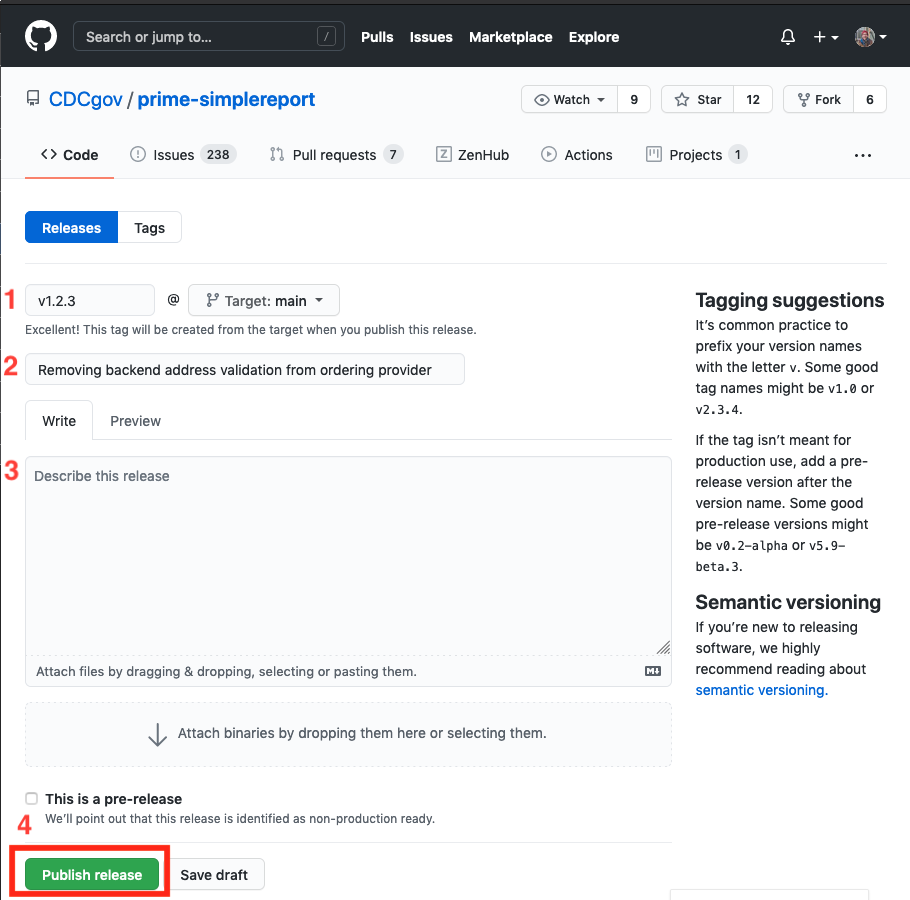
- Add a version tag. If the release was
v1then this release should bev2 - Add a release title summarizing the changes
- If applicable describe some of the changes in detail in the description
- Click publish release
- Post a link to the release in #shared-cdc-prime-simplereport-engineering. Example:
Deploying prod https://github.com/CDCgov/prime-simplereport/releases/tag/0.test - Verify the changes are live by ensuring the deployed commit hash matches the commit hash on the release. This is done my going to
/app/static/commit.txtand/api/actuator/info
Deploy With Action
Navigate to the Github Actions Tab
 1. Select the environment you want to deploy to from the workflows list on the left. In this case we are selecting the
 test environment
2. Click the "Run workflow" button
3. Select the branch you want to deploy. In this case we are deploying the latest commit on main
4. Click the green "Run workflow" button.
5. After the workflow is completed you can verify the changes are live by Checking the deployed commit hash. This is done my going to /app/static/commit.txt and /api/actuator/info
Extension points exported contracts — how you extend this code
OrganizationScoped (Interface)Core symbols most depended-on inside this repo
saveShape
Languages
Modules by API surface
Datastores touched
For agents
$ claude mcp add prime-simplereport \
  -- python -m otcore.mcp_server <graph>