github.com/C3H3-AI/hacs-vision @v6.4.0
Chat with this repoWhat it actually does AI analysis from the code graph — generated when you open this
README
HACS Vision


当前版本: v6.4.0 | 最低 HA 版本: 2024.1.0 Current version: v6.4.0 | Minimum HA: 2024.1.0 Aktuelle Version: v6.4.0 | Minimale HA-Version: 2024.1.0
⚠️ 前置条件 / Prerequisite / Voraussetzung: 必须先安装并配置好 HACS / HACS must be installed and configured / HACS muss installiert und konfiguriert sein.
简介 / Introduction
HACS Vision 是 HACS 的现代化可视化面板,内置商店界面。让你像逛应用商店一样直观地浏览、安装、更新和管理 Home Assistant 集成、插件和主题。支持直接在面板中配置任意 HA 集成(config flow / options flow),并自动显示中文本地化翻译。
HACS Vision is a modern visual panel for HACS with a built-in storefront. Browse, install, update, and manage Home Assistant integrations, plugins, and themes like an app store. Configure any HA integration (config flow / options flow) directly in-panel, with automatic Chinese localization support.
HACS Vision ist ein modernes visuelles Panel für HACS mit integrierter Shop-Oberfläche. Durchsuchen, installieren, aktualisieren und verwalten Sie Home-Assistant-Integrationen, Plugins und Themes wie in einem App Store. Konfigurieren Sie jede HA-Integration (Config Flow / Options Flow) direkt im Panel – mit automatischer deutscher Lokalisierung.
功能特性 / Features
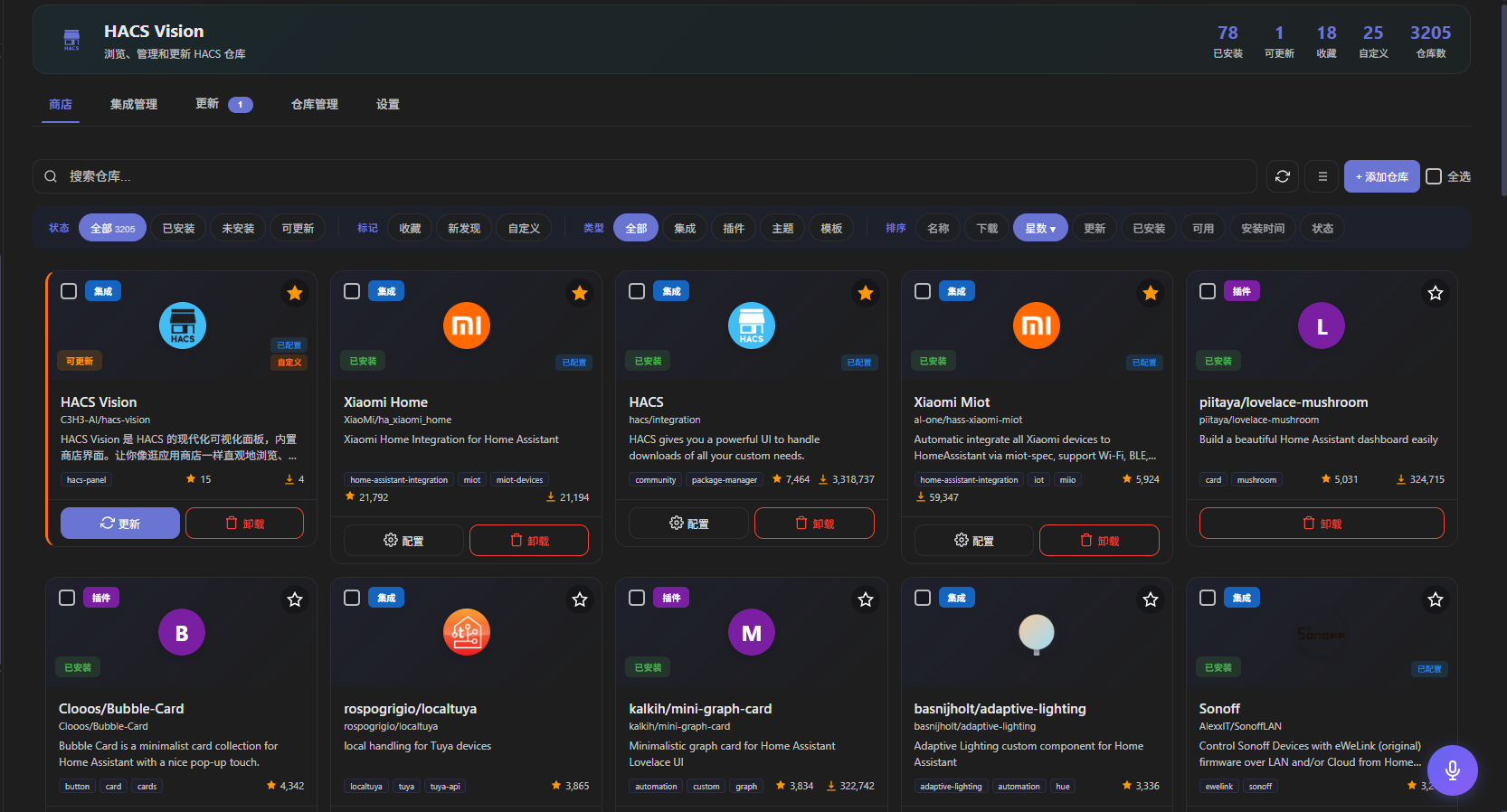
- 🛒 商店浏览 — 搜索、分类筛选、多维度排序、收藏仓库。支持卡片/列表双视图,筛选+排序合并为一行,提升空间利用率。支持按收藏过滤。版本选择器点击可见各版本更新内容
- ⭐ 仓库点赞(Star) — 本地收藏与 GitHub Star 独立管理,互不干扰。支持一键 Star/Unstar
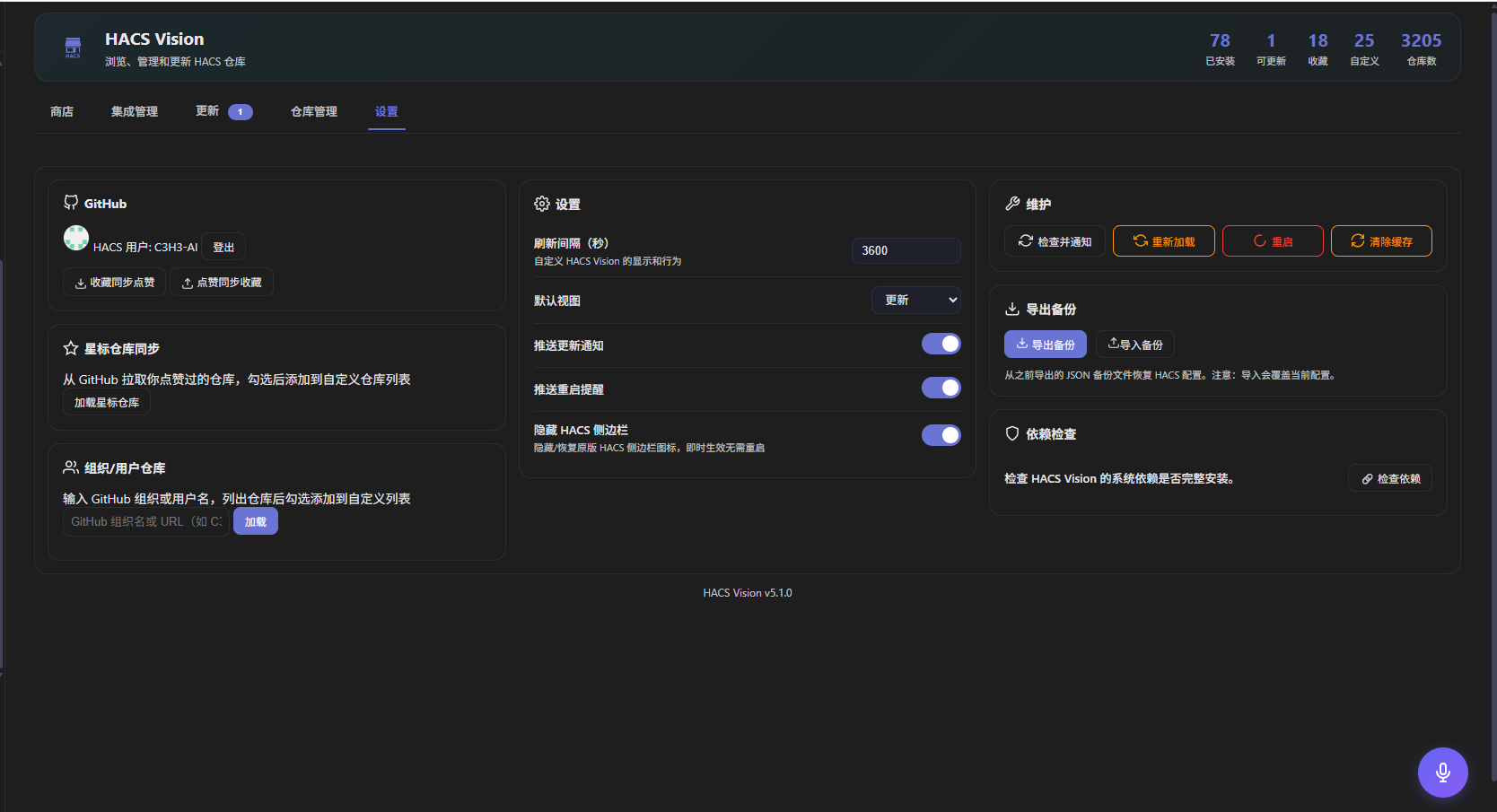
- 🔑 GitHub 登录认证 — 设置页自主输入 Token,独立存储,自动登录恢复
- 📦 仓库批量添加 — 支持输入 GitHub 组织/用户 URL,列出所有仓库供勾选批量添加
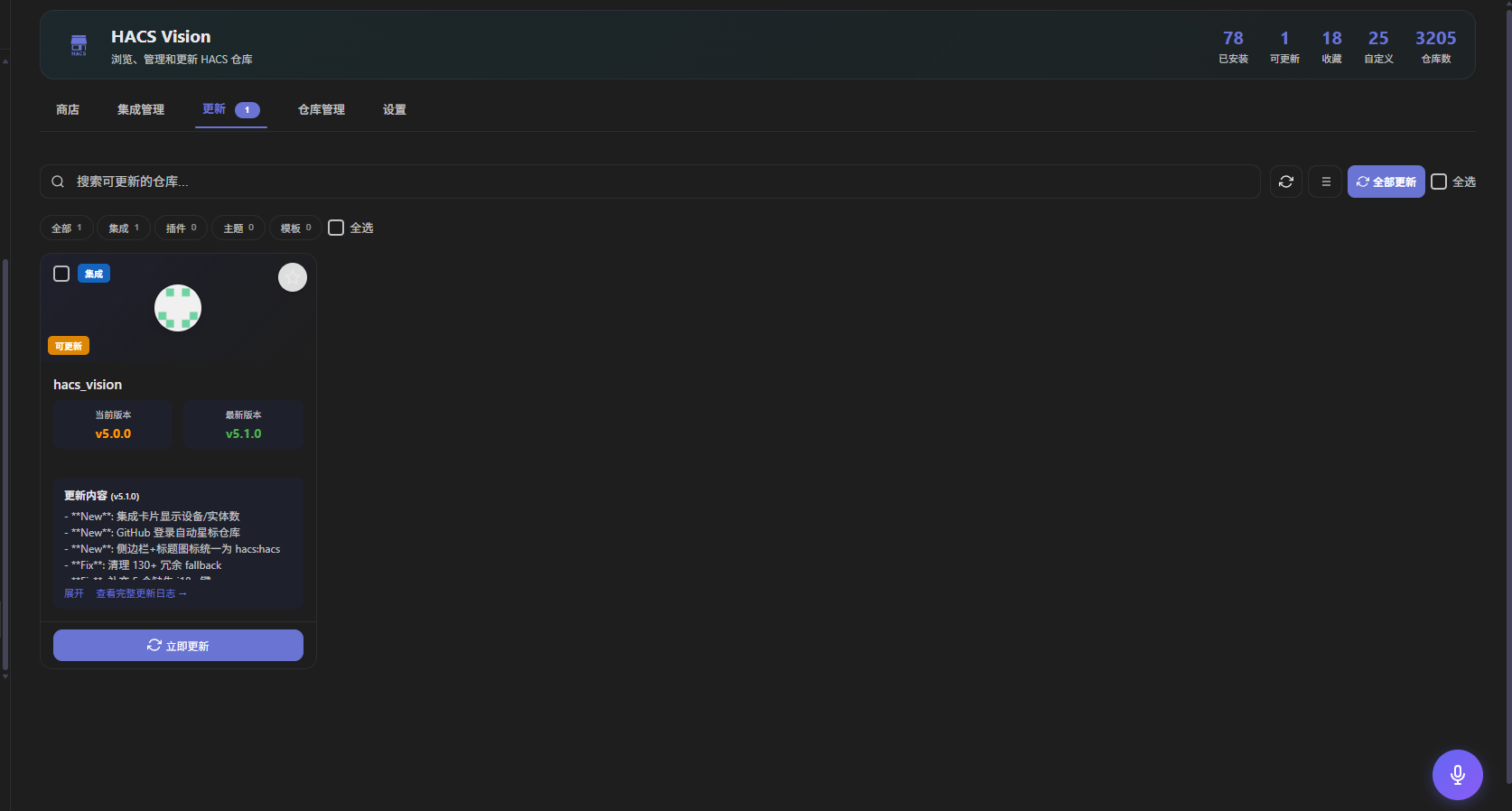
- 🔄 更新管理 — 一览所有待更新仓库,支持单个或批量更新,带进度追踪。支持忽略不需要更新的仓库
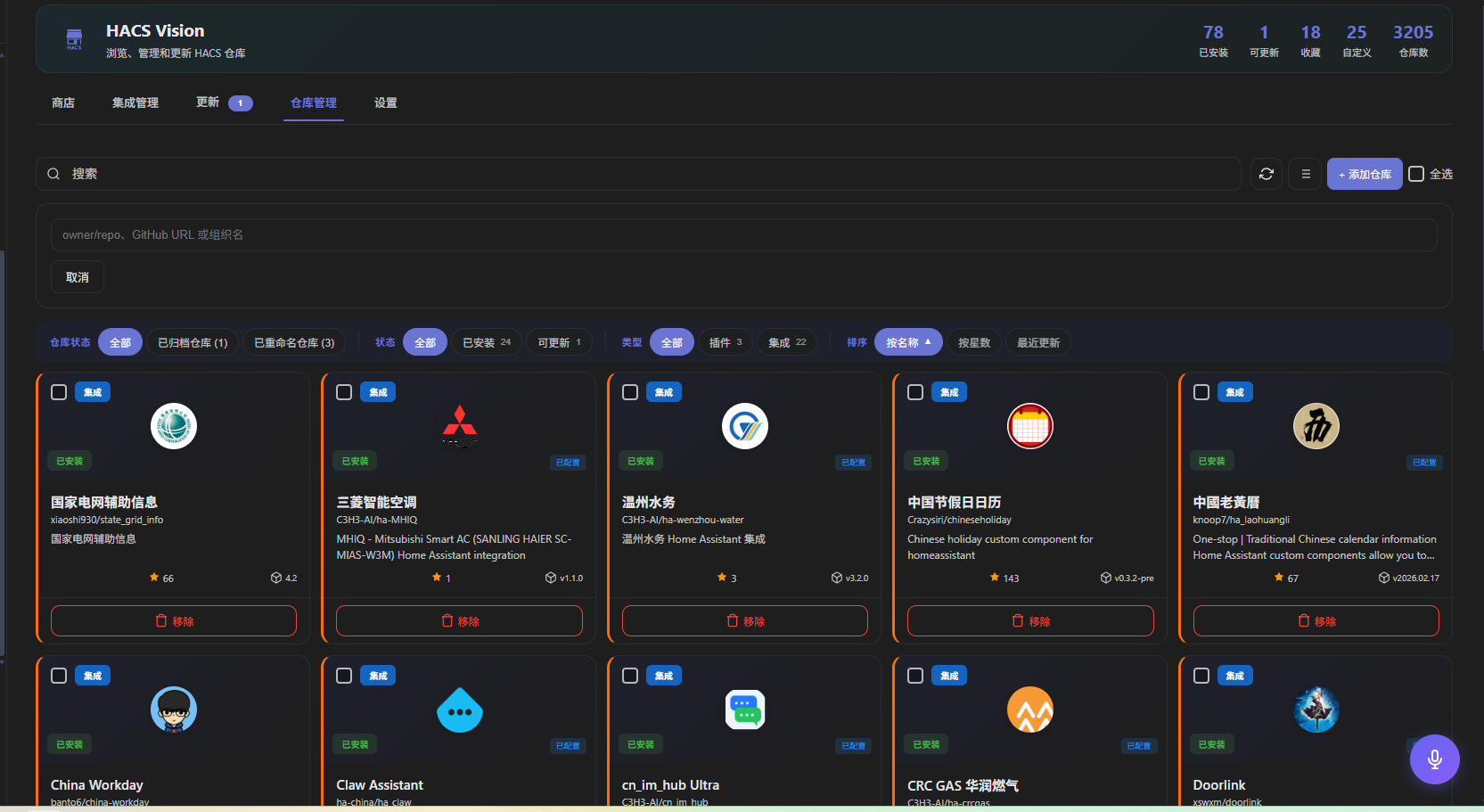
- 📦 仓库管理 — 管理已安装仓库、查看版本历史、重新下载(修复安装)或移除(删除下载文件,不影响已添加的 HA 配置条目)。支持状态/类型/仓库三维筛选+排序
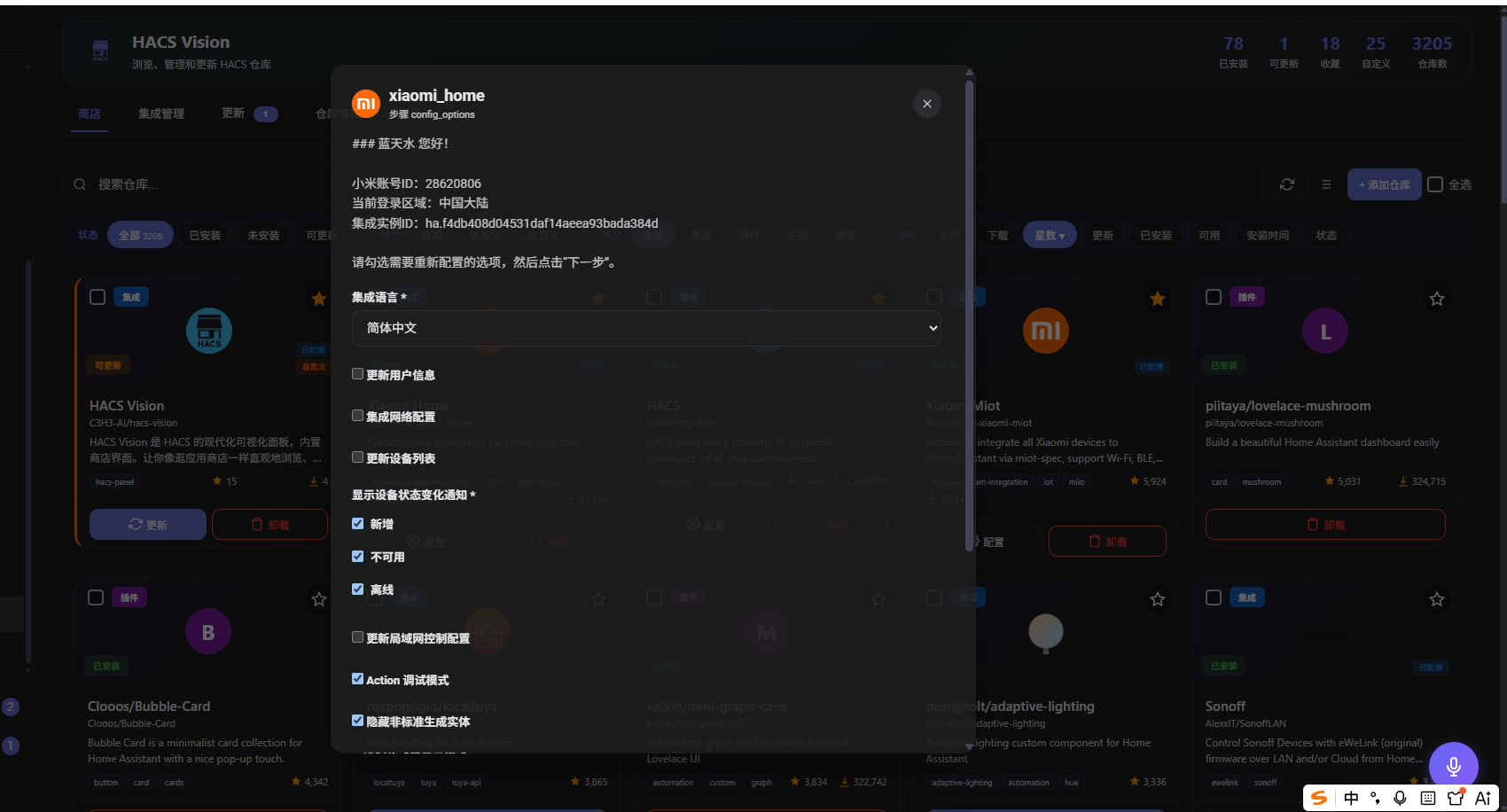
- ⚙️ 集成配置 — 直接在面板中配置任意 HA 已安装集成的 Options Flow(如 xiaomi_home、xiaomi_miot、haier 等),自动加载中文本地化翻译
- 🔌 添加集成 — 从面板直接发起 HA 集成的新建 Config Flow
- 📊 状态统计 — 实时展示已安装/可更新/收藏数量
- 🔔 通知系统 — 有新更新时自动通知,缓存策略优化
- 📱 响应式设计 — 桌面端和移动端均优化,触控目标 44px 规范
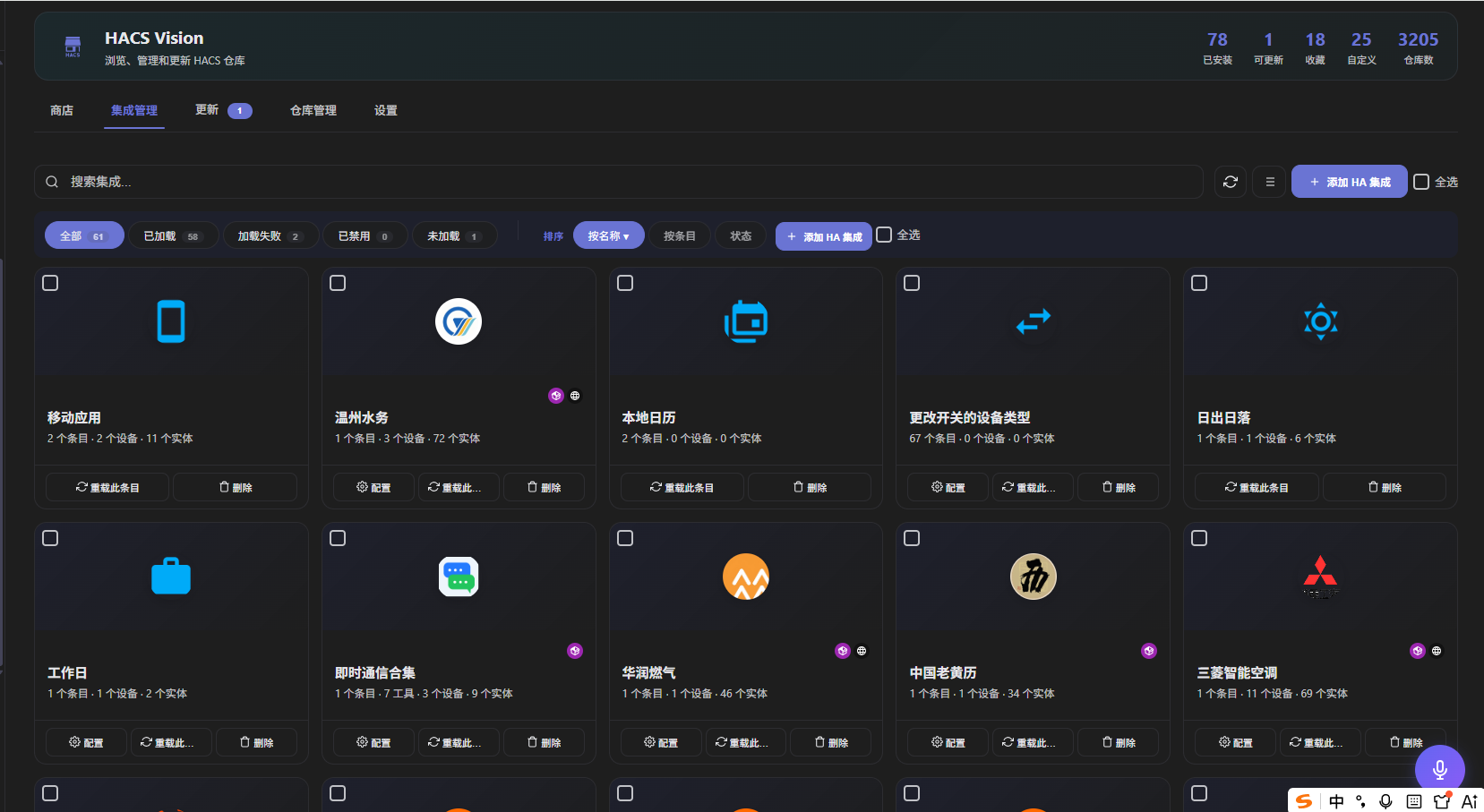
- 🧩 集成管理视图 — 卡片网格展示所有已安装集成(含 HACS 安装的仓库),中文搜索、状态筛选、集成类型分组
- 🔍 设备与实体下钻 — 集成卡片点击展开 → 按区域分组的设备列表 → 实体实时状态与属性
- 🎮 实体一键控制 — 开关、灯、锁、窗帘、风扇等常见域直接在面板中控制
- 🏷️ 中文名翻译 — HA 官方 + 自定义集成自动显示中文名称(从 brands 或 manifest 读取)
- 🎨 品牌图标 — CDN → 本地自定义图标 → 首字母 fallback 三级加载
- 🔗 EntityRefFinder — 查找 HA 中所有对指定 entity_id 的引用(自动化、脚本、场景、面板),支持一键替换
- 🔄 重新下载 — 已安装仓库支持一键重新下载(先卸载再重装),用于修复损坏的安装
- ⛔ 忽略仓库 — 将仓库加入忽略列表,不再出现在搜索结果和更新提醒中
- 🖼️ 集成配置页内嵌 — 集成管理视图点击卡片,弹窗内 iframe 加载 HA 原生配置页,双击全屏,关闭即回
- 🧩 配置流表单渲染 — 下拉选择改为单选按钮 + 下一步按钮,配置操作更直观
-
🤖 自动更新 — 后台定时检测并自动安装仓库更新,支持白名单管理、可调检测频率(1h/3h/6h/12h/24h)、更新通知、仓库级开关
-
🛒 Store Browsing — Search, category filter, multi-dimensional sorting, favorites. Card/list dual views, merged filter+sort row for better space utilization. Filter by favorites
- ⭐ Repository Star — Local favorites and GitHub Stars managed independently. One-click Star/Unstar
- 🔑 GitHub Login — Input Token in settings, standalone storage, auto-login recovery
- 📦 Batch Add Repos — Input GitHub org/user URL to list all repos for batch multi-select add
- 🔄 Update Management — View all pending updates with progress tracking, batch or single update. Ignore repos you don't want to see
- 📦 Repo Management — Manage installed repos, version history, redownload (fix broken installs), or remove. Status/type/repo triple filter + sort
- ⚙️ Integration Config — Configure any installed HA integration's Options Flow directly in-panel (e.g. xiaomi_home, xiaomi_miot, haier, etc.), with automatic Chinese localization
- 🔌 Add Integration — Start HA integration Config Flow directly from the panel
- 📊 Stats — Real-time installed/updateable/favorite counts
- 🔔 Notifications — Auto-notify on available updates with optimized caching
- 📱 Responsive — Desktop and mobile optimized, 44px touch targets
- 🧩 Integration Management View — Card grid of all installed integrations with Chinese search, status filter, category grouping
- 🔍 Device & Entity Drill-down — Click integration card → device list grouped by area → entity real-time state & attributes
- 🎮 One-Click Entity Control — Toggle switches, lights, locks, covers, fans directly from panel
- 🏷️ Chinese Name Translation — Auto-display Chinese names for official & custom integrations (from brands or manifest)
- 🎨 Brand Icons — CDN → local custom icon → first-letter fallback, three-level loading
- 🔗 EntityRefFinder — Find all references to an entity_id across HA (automations, scripts, scenes, dashboards), with one-click replace
- 🔄 Redownload — One-click redownload for installed repos (uninstall + reinstall), useful for fixing broken installations
- ⛔ Ignore Repo — Add repos to ignore list, hide from search results and update notifications
- 🖼️ Config Page Embed — Click integration card to open HA native config page in iframe modal, double-click to fullscreen, close to return
- 🧩 Config Flow Form — Dropdown select rendered as radio buttons with next-step button, more intuitive configuration
-
🤖 Auto Update — Scheduled background updates with whitelist management, configurable intervals (1h/3h/6h/12h/24h), update notifications, per-repo toggle
-
🛒 Shop-Durchsuchen — Suche, Kategorie-Filter, mehrdimensionale Sortierung, Favoriten. Karten-/Listenansicht, Filter+Sortierung in einer Zeile. Filterung nach Favoriten. Versionsauswahl mit Changelog-Vorschau
- ⭐ Repository-Star — Lokale Favoriten und GitHub-Stars unabhängig voneinander. Ein-Klick Star/Unstar
- 🔑 GitHub-Anmeldung — Eigenständige Token-Eingabe in den Einstellungen, getrennter Speicher, automatische Login-Wiederherstellung
- 📦 Batch-Repo-Hinzufügen — GitHub-Organisations-/Benutzer-URL eingeben, alle Repositorys auflisten und per Auswahlbox hinzufügen
- 🔄 Update-Verwaltung — Alle ausstehenden Updates mit Fortschrittsverfolgung, einzeln oder stapelweise. Ignorieren unerwünschter Repositorys
- 📦 Repo-Verwaltung — Verwaltung installierter Repos, Versionshistorie, erneuter Download (fehlerhafte Installationen reparieren) oder entfernen. Status/Typ/Repo-Dreifachfilter + Sortierung
- ⚙️ Integrationskonfiguration — Options Flow jeder installierten HA-Integration direkt im Panel konfigurieren (z. B. xiaomi_home, xiaomi_miot, haier), mit automatischer deutscher Lokalisierung
- 🔌 Integration hinzufügen — HA-Config-Flow direkt aus dem Panel starten
- 📊 Statistiken — Echtzeit-Anzeige von installierten/aktualisierbaren/Favoriten-Zahlen
- 🔔 Benachrichtigungen — Automatische Benachrichtigung bei verfügbaren Updates, optimiertes Caching
- 📱 Responsives Design — Für Desktop und Mobil optimiert, 44px Touch-Ziele
- 🧩 Integrationsverwaltung — Kartenraster aller installierten Integrationen mit deutscher Suche, Statusfilter, Kategoriegruppierung
- 🔍 Geräte- & Entität-Drilldown — Integrationskarte klicken → nach Bereich gruppierte Geräteliste → Echtzeit-Entitätsstatus & -Attribute
- 🎮 Ein-Klick-Entitätssteuerung — Schalter, Lampen, Schlösser, Jalousien, Lüfter direkt im Panel steuern
- 🏷️ Deutsche Namensübersetzung — Automatische Anzeige deutscher Namen für offizielle & benutzerdefinierte Integrationen
- 🎨 Symbole — CDN → lokales Symbol → Erstbuchstabe-Fallback, dreistufiges Laden
- 🔗 EntityRefFinder — Alle Verweise auf eine Entity-ID in HA finden (Automationen, Skripte, Szenen, Dashboards), mit Ein-Klick-Ersetzung
- 🔄 Erneuter Download — Ein-Klick-Neuinstallation für installierte Repos (Deinstallation + Neuinstallation) zur Reparatur defekter Installationen
- ⛔ Repo ignorieren — Repositorys zur Ignorierliste hinzufügen, aus Suchergebnissen und Update-Benachrichtigungen ausblenden
- 🖼️ Konfigurationsseite einbetten — Integrationskarte klicken, um native HA-Konfigurationsseite im Iframe-Modal zu öffnen, Doppelklick für Vollbild
- 🧩 Config-Flow-Formular — Dropdown-Menü als Radio-Buttons mit Weiter-Button dargestellt, intuitivere Konfiguration
- 🤖 Automatische Updates — Geplante Hintergrundupdates mit Whitelist, konfigurierbare Intervalle (1h/3h/6h/12h/24h), Update-Benachrichtigungen, Pro-Repo-Schalter
截图 / Screenshots / Screenshots
| Store | Detail | Config Flow |
|---|---|---|
 |
 |
 |
| Management | Updates | Settings |
 |
 |
 |
| Integrations | Integration Config | |
 |
 |
安装方法 / Installation / Installation
通过 HACS 安装(推荐) / Via HACS (Recommended) / Über HACS installieren (Empfohlen)
- 确保已安装 HACS
- 进入 HACS → 集成 → 右上角菜单 → 自定义仓库
- 添加仓库 URL:
https://github.com/C3H3-AI/hacs-vision - 类别:集成
- 点击 安装
-
重启 Home Assistant
-
Ensure HACS is installed
- Go to HACS → Integrations → Custom repositories (top-right menu)
- Add repository URL:
https://github.com/C3H3-AI/hacs-vision - Category: Integration
- Click Install
-
Restart Home Assistant
-
Stellen Sie sicher, dass HACS installiert ist
- Gehen Sie zu HACS → Integrationen → Benutzerdefinierte Repositorys (Menü oben rechts)
- Fügen Sie die Repository-URL hinzu:
https://github.com/C3H3-AI/hacs-vision - Kategorie: Integration
- Klicken Sie auf Installieren
- Home Assistant neu starten
手动安装 / Manual Installation / Manuelle Installation
- 下载最新 Release
- 将
custom_components/hacs_vision目录复制到 HA 的custom_components/目录 -
重启 Home Assistant
-
Download the latest Release
- Copy
custom_components/hacs_visionto HA'scustom_components/directory -
Restart Home Assistant
-
Laden Sie die neueste Version herunter
- Kopieren Sie das Verzeichnis
custom_components/hacs_visionin dascustom_components/-Verzeichnis von HA - Starten Sie Home Assistant neu
配置说明 / Configuration / Konfiguration
- 进入 设置 → 设备与服务 → 添加集成
- 搜索 HACS Vision
- 点击 提交(无需额外配置)
-
面板将出现在侧边栏
-
Go to Settings → Devices & Services → Add Integration
- Search for HACS Vision
- Click Submit (no extra config needed)
-
The panel will appear in the sidebar
-
Gehen Sie zu Einstellungen → Geräte & Dienste → Integration hinzufügen
- Suchen Sie nach HACS Vision
- Klicken Sie auf Absenden (keine zusätzliche Konfiguration erforderlich)
- Das Panel erscheint in der Seitenleiste
使用指南 / Usage / Verwendung
🛒 商店 / Store / Shop
浏览所有可用的 HACS 仓库。使用搜索栏和筛选标签(状态/标签/类型/排序合并为一行)快速定位。点击爱心图标收藏。支持重新下载和忽略操作,卡片视图和列表视图可切换。
Browse all available HACS repositories. Filter with search bar and merged filter chips (status/tags/type/sort in one row). Click heart to favorite. Redownload and ignore operations available. Toggle between card and list views.
Durchsuchen Sie alle verfügbaren HACS-Repositorys. Filtern Sie mit der Suchleiste und den kombinierten Filter-Chips (Status/Tags/Typ/Sortierung in einer Zeile). Klicken Sie auf das Herz-Symbol, um Favoriten zu setzen. Erneuter Download und Ignorieren möglich. Zwischen Karten- und Listenansicht umschaltbar.
🔄 更新 / Updates / Aktualisierungen
查看所有可更新的仓库。使用全部更新一键升级,或勾选特定仓库后更新已选。支持批量移除操作。
View all repositories with pending updates. Use Update All to upgrade everything, or Update Selected for specific repos. Batch removal supported.
Zeigt alle Repositorys mit ausstehenden Updates an. Verwenden Sie Alle aktualisieren für ein Upgrade aller Repositorys oder Auswahl aktualisieren für bestimmte. Stapelverarbeitung unterstützt.
📦 仓库管理 / Management / Verwaltung
管理已安装的仓库。支持状态(已安装/可更新/未安装)、类型(集成/插件/主题)、仓库(全部/已归档/重命名/已忽略)三维筛选+排序。支持批量操作(批量移除)。已归档和重命名仓库使用卡片展示,操作按钮在卡片底部。
Manage installed repos with status (installed/updatable/not installed), type (integration/plugin/theme), and repo (all/archived/renamed/ignored) triple filters + sort. Batch operations supported. Archived and renamed repos shown as cards with action buttons at bottom.
Core symbols most depended-on inside this repo
Shape
Languages
Modules by API surface
For agents
$ claude mcp add hacs-vision \
  -- python -m otcore.mcp_server <graph>