github.com/BedrockStreaming/GithubTeamReviewer @v1.5.0
Chat with this repoWhat it actually does AI analysis from the code graph — generated when you open this
README
Github Team Reviewer 
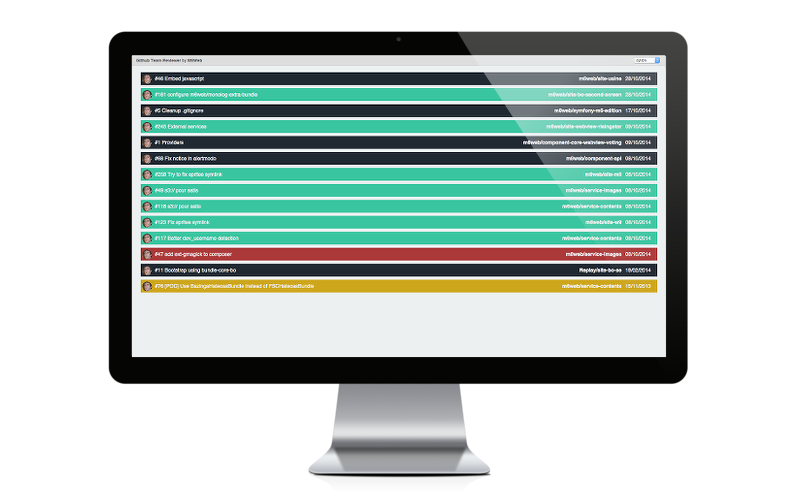
A monitoring tool that allows you to quickly view all Github pull requests of your teams and their statuses.
View the demo site for a real example.
Installation
Clone the project
$ git clone https://github.com/M6Web/GithubTeamReviewer.git
$ cd GithubTeamReviewer
Install dependencies
$ npm install -g bower gulp
$ npm install
$ bower install
Configuration
Please configure a new config/config.json file from config/config.json.dist.
Options :
- refreshInterval : time between 2 dashboard updates (be careful with low interval because you can reach API rate limit quickly),
- teams : list of teams, keys are teams names and you can define these properties for each :
- members : an array of Github usernames (optional, default get all members),
- projects : an array of Github repository's names (optional, default get all repositories),
- org : an array of Github organizations,
- apiUrl : url of your Github API (optional, default is
https://api.github.com), - descendingOrder : allow to change ordering of pull requests (optional, default is
true). - labels : display labels of pull requests (optional, default is
false). - milestones : display milestones of pull requests (optional, default is
false). - reviews : display reviews of pull requests, and allow to highlight reviews of a particular user (optional, default is
false). - token : authorization token for API calls (optional, it can allow access to more repos and increase API rate limit) NB: if a token is set, OAuth will be ignored for the team
- oauthAppClientId : clientId of the OAuth app the team depends on (optional)
- githubOAuth : OAuth config (optional)
- gatekeeperBaseUrl : url to Gatekeeper (see OAuth section)
- apps : list of the apps you use to auth
- url : base url of GitHub (should be https://github.com or the base url of your GitHub enterprise)
- clientId : clientId of the app
Run the server
After configuration, you have to build the code and launch the server.
$ gulp serve:dist
It will automatically open the dashboard in your browser.
OAuth
To use GTR with GitHub OAuth you must : * Register a new application on GitHub (in Settings > Applications) * Install Gatekeeper and launch it * Set your "gatekeeperBaseUrl" and type in your app data (clientId and GitHub URL) in config/config.json (example in config.json.dist) * Don't forget to link the OAuth app to the teams thanks to the oauthAppClientId property
Then, you should see the Auth button in the upper-right corner of the app !
Use
Use directly the page path in order to select a team.
http://gtr-url/index.html#/myTeam
Colors show the PR statuses : * black when there is no test * yellow when the tests are running * red when tests fail * green when tests are successful
Installation for dev
Clone and init the project
$ git clone https://github.com/M6Web/GithubTeamReviewer.git
Install Vagrant and configure Vagrantfile :
$ cp Vagrantfile.dist Vagrantfile
Note : configure your own Vagrantfile and provisionning if necessary.
$ vagrant up
$ vagrant provision # because of npm issue on the first vagrant up
$ vagrant ssh
$ cd /vagrant
Install dependencies
$ sudo npm install --no-bin-links
$ bower install
Configure your application via config/config.json.
Run the server
$ gulp serve
You can now access the application at http://localhost:9000.
Tests
Test the unbuilt code :
$ gulp test
Test the build :
$ gulp test:dist
Credits
Developed by the Cytron Team of M6 Web.
License
Github Team Reviewer is licensed under the MIT license.
Core symbols most depended-on inside this repo
requestShape
Languages
Modules by API surface
For agents
$ claude mcp add GithubTeamReviewer \
  -- python -m otcore.mcp_server <graph>