github.com/AttoJS/vue-request @v2.0.4
Chat with this repoWhat it actually does AI analysis from the code graph — generated when you open this
README
English | 简体中文

VueRequest
⚡️ This is a library that can easily help you manage request states, supporting common features such as SWR, polling, error retry, caching, and pagination, etc.







Why VueRequest
In past projects, we were often troubled by the repetitive implementation of loading state management, request throttling and debouncing, API data caching, pagination, etc. Every time we started a new project, we had to handle these issues manually, which was a repetitive task that also required ensuring team consistency.
VueRequest is designed to provide developers with a convenient and fast way to manage API states. By simply configuring it, you can eliminate the tedious tasks and focus on core development.
Features
- 🌈 Support Vue 2 & 3
- 🚀 All data is reactive
- 🔄 Interval polling
- 🤖 Automatic error retry
- 🗄 Built-in cache
- 💧 Throttle and Debounce
- ⚙️ Powerful pagination extension and load more extensions
- 📠 Written in TypeScript
- ⚡️ Compatible with Vite
- 🍃 Lightweight
- 📦 Out of the box
Documentation
Install
You can install VueRequest with NPM, YARN, or a <script> via unpkg.com
NPM
npm install vue-request
# or
yarn add vue-request
# or
pnpm install vue-request
CDN
For production environments, we recommend linking to a specific version and build file to avoid unexpected breaking changes caused by new versions.
<script src="https://unpkg.com/vue-request/dist/vue-request.min.js"></script>
Once you add it to your page, you can access our exported methods in window.VueRequest.
Usage
<template>


loading...


failed to fetch


Hey! {{ data }}


</template>

<script lang="ts" setup>
const { data, loading, error } = useRequest(service);
</script>
In this example, useRequest receives a service function. service is an asynchronous request function, which means you can use axios to retrieve data and return a Promise. More specific details can be found in the documentation.
The useRequest function also returns three values: data, loading, and error. While the request is still in progress, data will be set to undefined and loading will be true. Once the request is completed, data and error will be set based on the result, and the page will be rendered accordingly. This is because data, loading, and error are Reactivity(Refs) in Vue, and their values will be updated based on the request status and result.
Some of the coolest features:
VueRequest provides many features, such as error retry, caching, pagination, throttling, debouncing, and more. Here are two particularly cool features:
1.Refresh On Focus
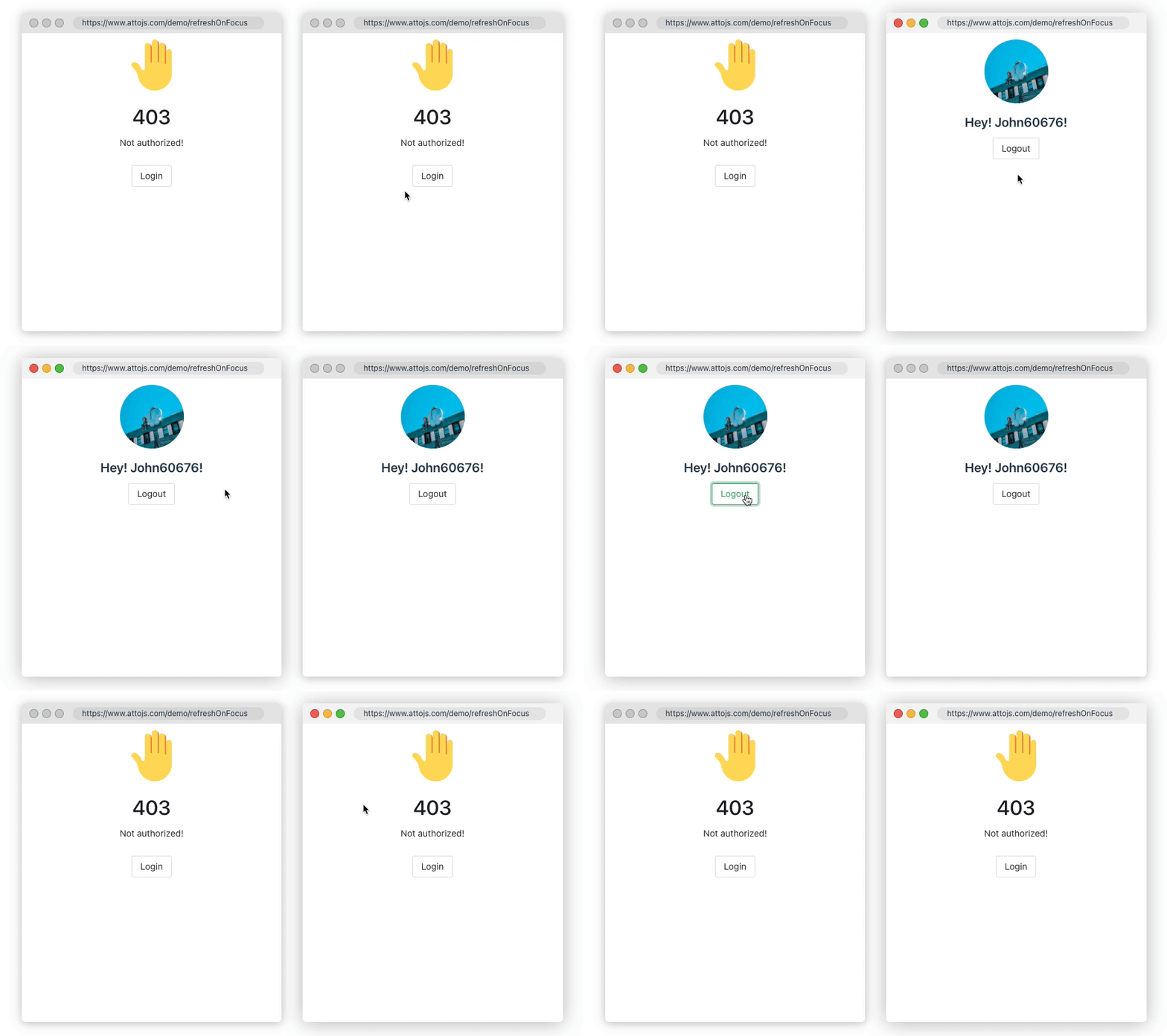
Sometimes, you need to ensure data consistency across multiple browser windows or synchronize page data to the latest state when a user's computer resumes from sleep mode. Using refreshOnWindowFocus can save you a lot of logic code. Click here to go to the document
const { data, error, run } = useRequest(getUserInfo, {
  refreshOnWindowFocus: true,
  refocusTimespan: 1000, // refresh interval 1s
});
2.Polling Data
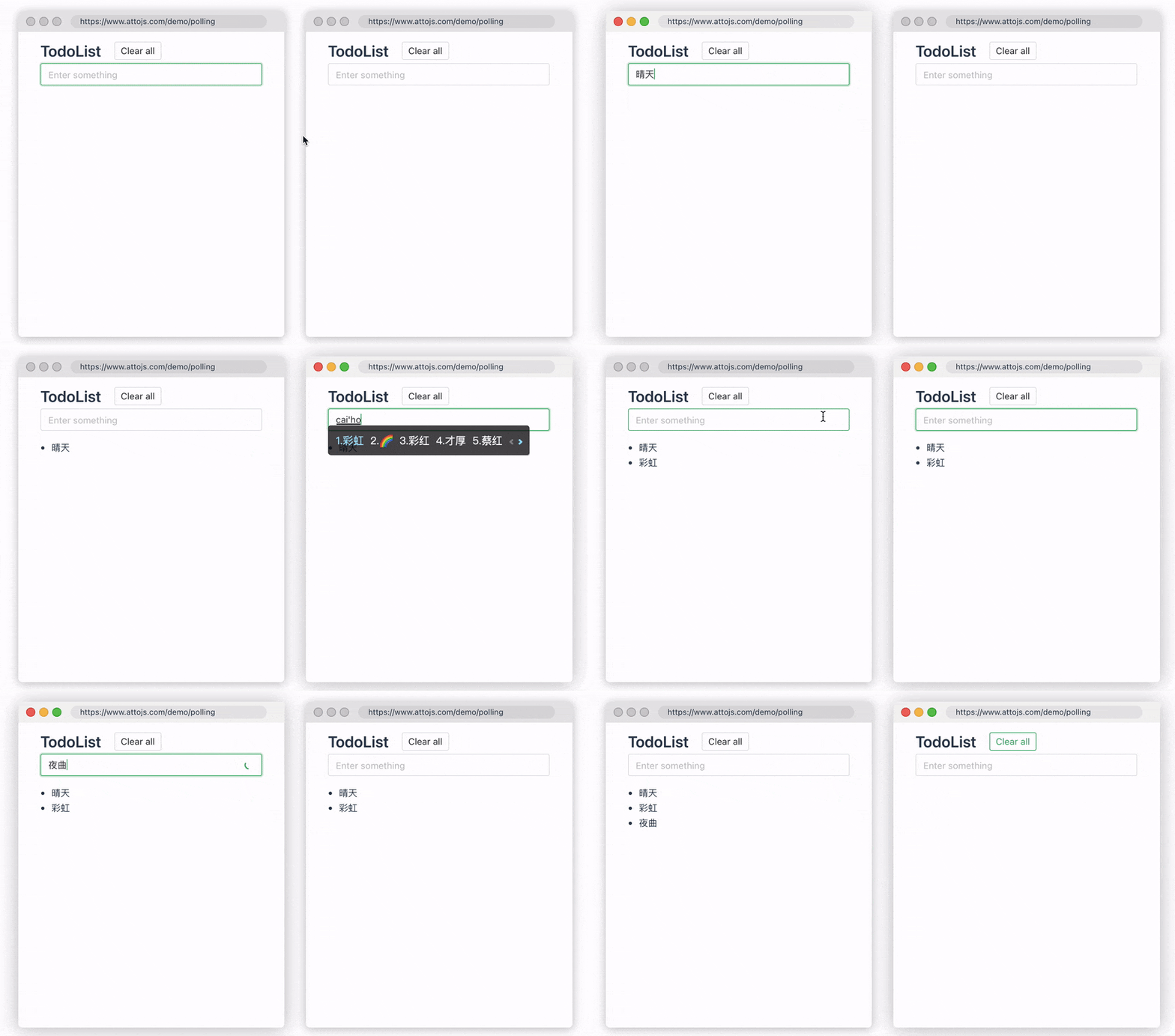
Sometimes, you need to ensure data synchronization across multiple devices. In this case, you can use pollingInterval provided by us to periodically re-request the API, ensuring data consistency across multiple devices. When a user modifies the data, the changes will be synced in real-time between two windows. Click here to go to the document
const { data, error, run } = useRequest(getUserInfo, {
  pollingInterval: 1000, // polling interval 1s
});
Thanks
Thank them for inspiring us.
License
MIT License © 2020-present AttoJS
Extension points exported contracts — how you extend this code
PaginationType (Interface)Core symbols most depended-on inside this repo
useRequestShape
Languages
Modules by API surface
Used by 2 indexed graphs manifest dependencies, hub-wide
For agents
$ claude mcp add vue-request \
  -- python -m otcore.mcp_server <graph>