github.com/AmirTugi/tea-school @v1.5.0
Chat with this repoWhat it actually does AI analysis from the code graph — generated when you open this
README
Tea-School
Simplified HTML + CSS --> PDF Generator for Nodejs
Basically just a method combining PugJS, Node-Sass, and Puppeteer.
Read More
Read more about the package in my medium post
Install
Using npm
> npm install tea-school
Using yarn
> yarn add tea-school
What Do We Have Here?
The library doesn't really do anything special.
It just combines 3 libraries for:
* Generating HTML in run-time (PugJS)
* Generating CSS (Using Sass) in run-time (Node-Sass)
* Generating a PDF from HTML (Puppeteer)
Usage
We will generate the following PDF:
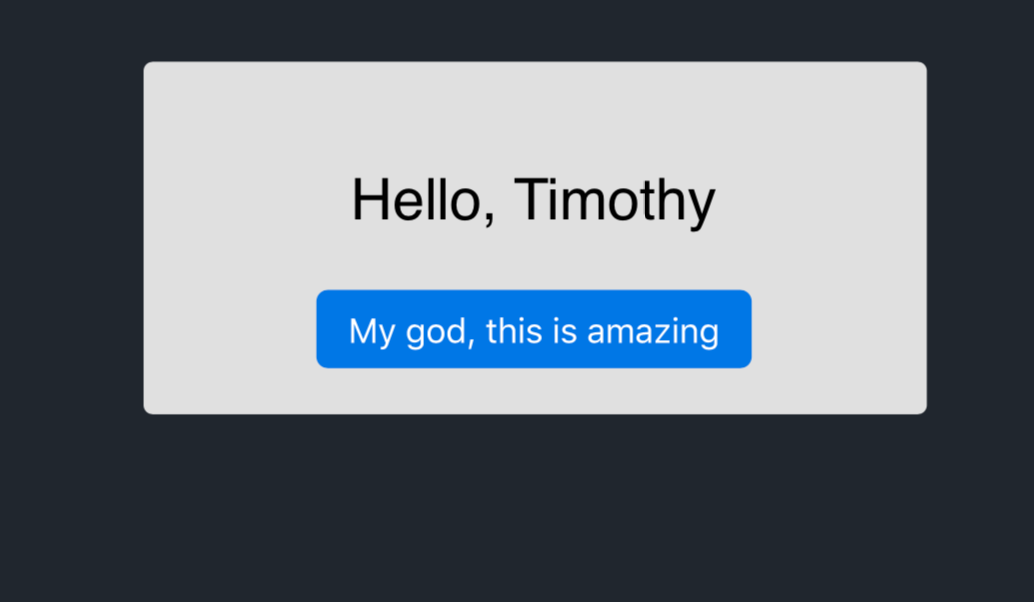
For further inspection look at the examples folder
*The example will be in TypeScript, but can work in JavaScript in a matter of removing just a few words.
import {GeneratePdfOptions, generatePdf} from 'tea-school';
import * as path from 'path';

const options: GeneratePdfOptions = {
    htmlTemplatePath: path.resolve(__dirname, 'pdf-template.pug'),

    // Here you put an object according to https://github.com/sass/node-sass#options
    styleOptions: {
        file: path.resolve(__dirname, 'pdf-template.scss')
    },

    // Here you put an object according to https://pugjs.org/api/reference.html#options
    // You can add any additional key to be used as a variable in the template.
    htmlTemplateOptions: {
        contextRelatedVar: 'Timothy'
    },

    // Here you put an object according to https://github.com/GoogleChrome/puppeteer/blob/v1.18.1/docs/api.md#pagepdfoptions
    pdfOptions: {
        // Ignore `path` to get the PDF as buffer only
        path: 'pdf-file.pdf',
        format: 'A4',
        printBackground: true
    }
}

(async () => {
    const pdfBuffer: Buffer = await generatePdf(options);
})();
template.pug
// Use !{var} to use unescaped conent
style(type="text/css") !{compiledStyle}

div#banner-message
    p Hello, #{name}
    button My god, this is amazing
template.scss
$blue: #0084ff;
$blue-darker: darken($blue, 5);

body {
  background: #20262E;
  padding: 20px;
  font-family: Helvetica;
}

#banner-message {
  background: #e0e0e0;
  border-radius: 4px;
  padding: 20px;
  font-size: 25px;
  text-align: center;
  transition: all 0.2s;
  margin: 0 auto;
  width: 300px;

  button {
    background: $blue-darker;
    border: none;
    border-radius: 5px;
    padding: 8px 14px;
    font-size: 15px;
    color: #fff;
  }
}
Running the examples in the package
> npm run example

// OR

> npm run example:invoice
The examples run using ts-node to run without compiling the tests to JavaScript first.
Important
The key compiledStyle is reserved on the Pug options for the compiled style to be attached to the html.
Please do not use this key (or use at your own risk)
Extension points exported contracts — how you extend this code
GeneratePdfOptions (Interface)Core symbols most depended-on inside this repo
generatePdfShape
Languages
Modules by API surface
For agents
$ claude mcp add tea-school \
  -- python -m otcore.mcp_server <graph>