github.com/Amazingwujun/mqttx @v1.2.2
Chat with this repoWhat it actually does AI analysis from the code graph — generated when you open this
README
MQTTX Project


中文 | English
- 1 Introduction
- 2 Architecture
- 3 Containerized Deployment
- 4 Function description
- 5 The Developer says
- 6 Schedule
1 Introduction
Mqttx is developed based on MQTT v3.1.1 protocol
and aims to provide Mqtt broker with easy to use and superior performance.
1.1 Quick start
-
Packing
-
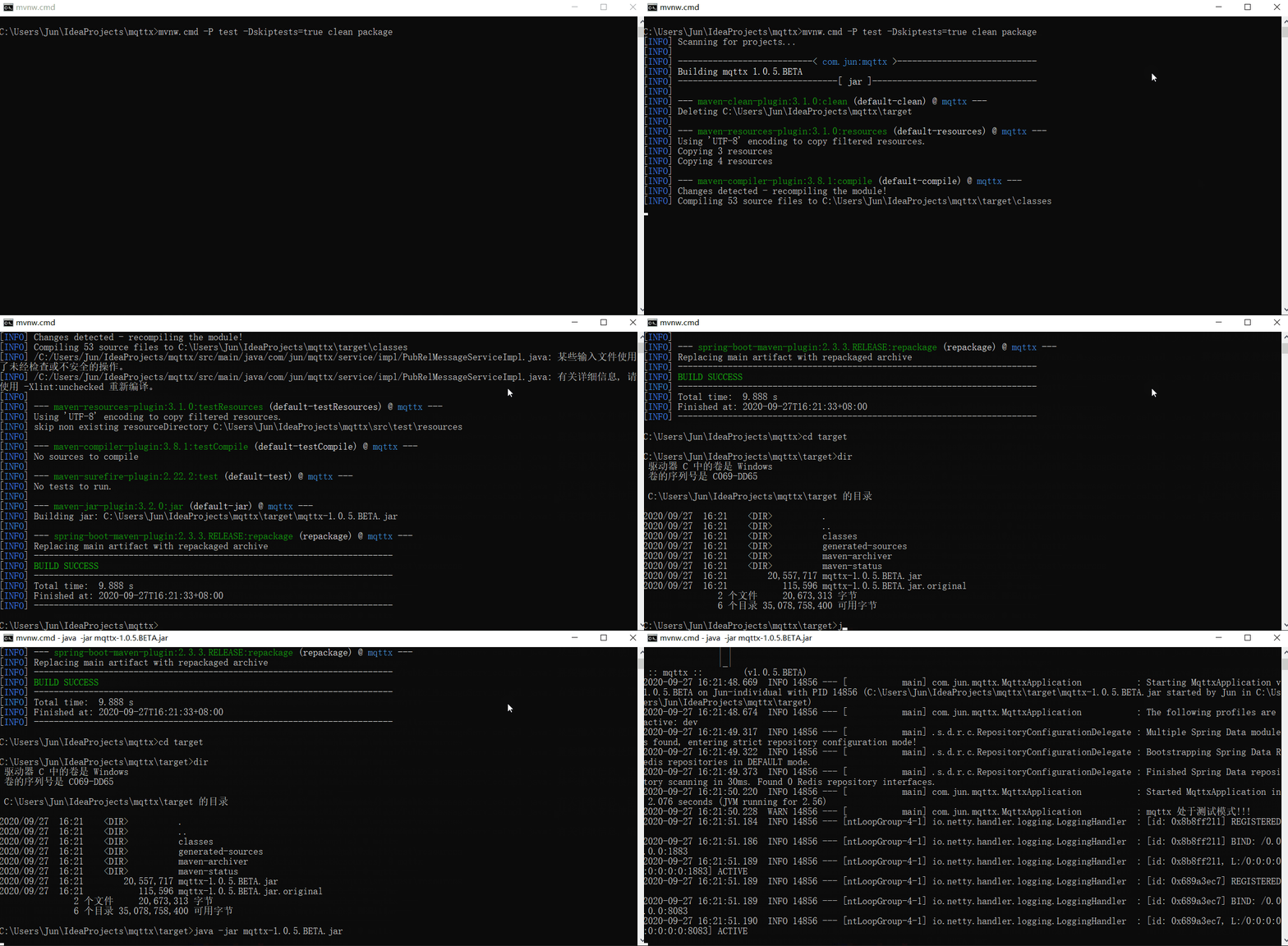
Test mode: run
mvnw -P test -DskipTests=true clean package -
Development mode:
- Start the
redisinstance - Run
mvnw -P dev -DskipTests=true clean package
- Start the
-
Run
-
Run the command:
java -jar mqttx-1.0.5.BETA.jar
Quick start-test mode Legend:
-
Test mode
- The cluster function is forcibly closed
- The message is stored in memory instead of
redis
-
Development mode
- The message will be persisted to
redis, the default connection islocalhost:6376without password
- The message will be persisted to
The so-called test mode and development mode are just for students to quickly start projects and test function
tests. After being familiar with the project, students can modify 6.1 Configuration Item
to turn on or off the functions provided by mqttx.
mqttxrelies onredisto achieve message persistence, clustering and other functions. It can also be implemented using other middleware (mysql,mongodb,kafka, etc.), whilespringboothasspring-boot-starter -***and other pluggable components, convenient for everyone to modify the default implementation
1.2 Project dependencies
- [x] redis: cluster message, message persistence
- [x] kafka: Bridge message support
other instructions:
- The project uses lombok, please install the corresponding plug-in to use ide
It is recommended to use Intellij IDEA for development tools :blush:
Example:
ideaneeds to install the plug-inLombok,settings> Build,Execution, Deployment> Compiler> Annotation Processorto enableEnable annotation processing
1.3 Online Examples
A singleton service of mqttx is deployed in the cloud for functional testing:
- Does not support ssl
- Websocket is turned on, it can pass the http://tools.emqx.io/ test, only need to modify the domain name
to:
119.45.158.51(port and address remain unchanged) - Support shared subscription function
- Deployment version
v1.0.5.BETA

2 Architecture
mqttx supports client authentication and topic publish/subscribe authentication functions. If you need to use it
together, the recommended architecture is as follows:
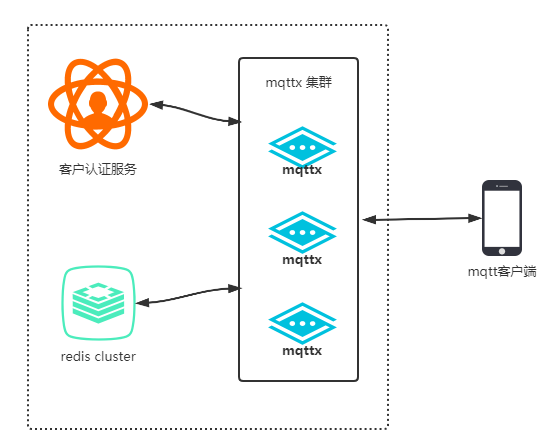
Customer authentication services are implemented by users themselves
Internal realization framework relationship (only key items are listed):
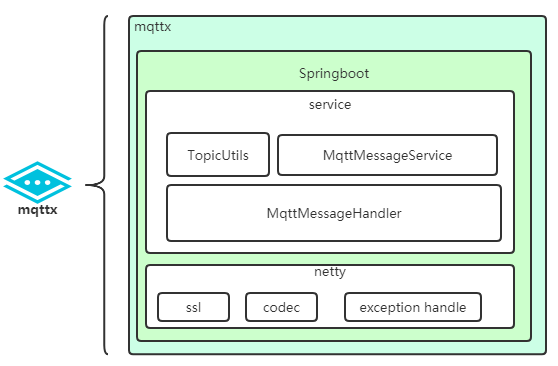
2.1 Directory structure
├─java
│  └─com
│      └─jun
│          └─mqttx
│              ├─broker         # mqtt protocol implementation and processing package
│              │  ├─codec       # codec
│              │  └─handler     # Message processor (pub, sub, connn, etc)
│              ├─config         # configuration, mainly bean declaration
│              ├─constants      # constant
│              ├─consumer       # cluster message consumer
│              ├─entity         # entity class
│              ├─exception      # Exception class
│              ├─service        # Business service (user authentication, message storage, etc.) interface
│              │  └─impl        # default implementation
│              └─utils          # Tools
└─resources                     # Resource file (application.yml is in this folder)
    └─tls                       # ca storage address
3 Containerized deployment
In order to facilitate the rapid deployment of the project, the introduction of docker
- Before performing local deployment, you need to download docker first.
- The port mapping (
1883, 8083) is dead written in the docker-compose file. If you modify the port configuration ofmqttx, you should also modify it indocker-compose.yml
- Package the project as target/*.jar through the packaging function provided by the IDE
- Enter the directory at the same level of
dockerfileand executedocker build -t mqttx:v1.0.4.RELEASE . - Execute
docker-compose up
4 Function description
4.1 qos support
| qos0 | qos1 | qos2 |
|---|---|---|
| Support | Support | Support |
In order to support qos1 and qos2, redis is introduced as the persistence layer. This part has been encapsulated as an
interface, which can be replaced by itself (for example, using mysql).
4.2 topicFilter support
- Support multi-level wildcard
#and single-level wildcard+ - Topics ending with
/are not supported, such asa/b/, please change toa/b. - For other rules, seemqtt v3.1.1 4.7 Topic Names and Topic Filters
mqttx only verifies the subscription topicFilter. The publish topic is not checked for validity. You can enable 4.5 topic security support to limit the topics that the client can publish .
For example:
| topicFilter | match topics |
|---|---|
| /a/b/+ | /a/b/abc, /a/b/test |
| a/b/# | a/b, a/b/abc, a/b/c/def |
| a/+/b/# | a/nani/b/abc |
| /+/a/b/+/c | /aaa/a/b/test/c |
The verification tool class is: com.jun.mqttx.utils.TopicUtils
4.3 Cluster Support
The project introduced redis pub/sub to distribute messages to support the cluster function. If you need to modify it
to kafka or other mq, you need to modify the configuration class ClusterConfig and replace the implementation
class InternalMessageServiceImpl.
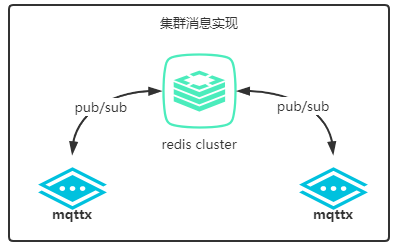
mqttx.cluster.enable: function switch, defaultfalse
Versions prior to
v1.0.5.RELEASEhave bugs in cluster message processing and cannot be used.
4.4 ssl support
To enable ssl, you should first have ca (self-signed or purchased), and then modify several configurations in
the application.yml file:
mqttx.ssl.enable: function switch, defaultfalse, and control bothwebsocketandsocketmqttx.ssl.key-store-location: certificate address, based onclasspathmqttx.ssl.key-store-password: certificate passwordmqttx.ssl.key-store-type: keystore type, such asPKCS12mqttx.ssl.client-auth: Whether the server needs to verify the client certificate, the default isfalse
The
mqttx.keystorein theresources/tlsdirectory is for testing only, password:123456.Certificate loading tool class:
com/jun/mqttx/utils/SslUtils.java
4.5 topic Security Support
In order to restrict client subscriptions to topic, add topic subscription & publishing authentication mechanism:
mqttx.enable-topic-sub-pub-secure: function switch, defaultfalse- The interface
AuhenticationServiceneeds to be implemented when using it. The returned object of this interface containsauthorizedSub, authorizedPubto store the list oftopicthat the client is authorized to subscribe and publish. - The broker verifies the client permissions during message subscription and publishing
Supported theme types:
- [x] Normal theme
- [x] Shared topic
- [x] System theme
4.6 Shared theme support
Shared subscription is the content stipulated by the mqtt5 protocol, and many mqs (such as kafka) have been
implemented.
mqttx.share-topic.enable: function switch, defaulttrue- Format:
$share/{ShareName}/{filter},$shareis the prefix,ShareNameis the shared subscription name, andfilteris the non-shared subscription topic filter. - Currently supports three rules:
hash,random, andround
The following image shows the difference between shared themes and regular themes:
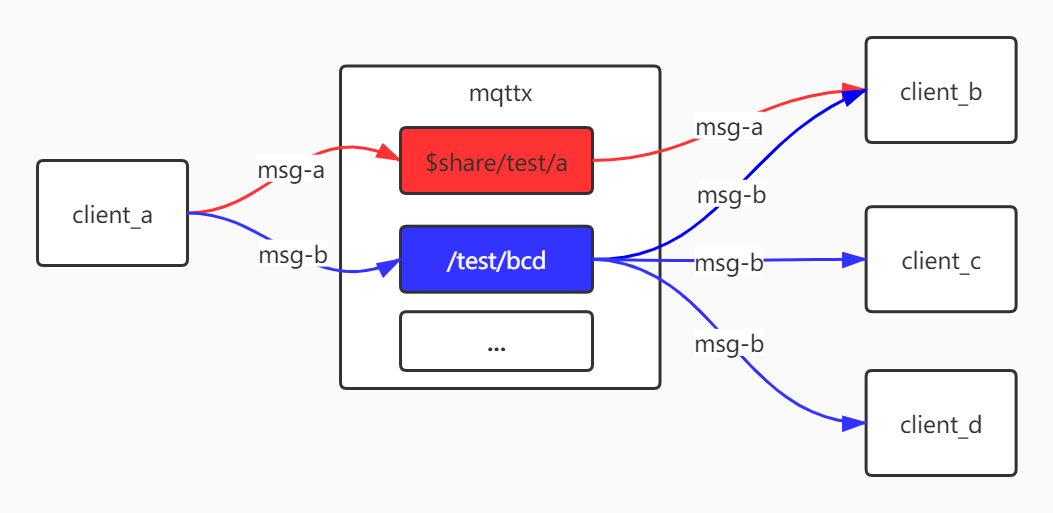
msg-a message distribution strategy depends on the configuration item mqttx.share-topic.share-sub-strategy
You can cooperate with the session of cleanSession = 1. After the client sharing the topic disconnects, the server
will remove the subscription, so that the message of the shared topic will only be distributed to online clients.
CleanSession Introduction: mqtt3.1.1 protocol stipulates that when cleanSession = 1, all states (excluding
retained messages) associated with the session will be deleted after the connection is disconnected (mqtt5 added The
session timeout setting, interested students can find out). After mqttx v1.0.5.BETA version (included), the session
messages of cleanSession = 1 are stored in memory, which has extremely high performance.
If CleanSession is set to 1, the Client and Server MUST discard any previous Session and start a new one. This Session lasts as long as the Network Connection. State data associated with this Session MUST NOT be reused in any subsequent Session [MQTT-3.1.2-6].
The Session state in the Client consists of:
-QoS 1 and QoS 2 messages which have been sent to the Server, but have not been completely acknowledged. -QoS 2 messages which have been received from the Server, but have not been completely acknowledged.
The Session state in the Server consists of:
- The existence of a Session, even if the rest of the Session state is empty.
- The Client’s subscriptions.
- QoS 1 and QoS 2 messages which have been sent to the Client, but have not been completely acknowledged.
- QoS 1 and QoS 2 messages pending transmission to the Client.
- QoS 2 messages which have been received from the Client, but have not been completely acknowledged.
- Optionally, QoS 0 messages pending transmission to the Client.
4.7 websocket support
supported
4.8 System Theme
The client can obtain the broker status by subscribing to system topics. Currently, the system supports the following topics:
| topic | repeat | comment |
|---|---|---|
$SYS/broker/status |
false |
Clients subscribing to this topic will periodically (mqttx.sys-topic.interval) receive the status of the broker, which covers the status values of all topics below. |
**
Note: After the client connection is disconnected, the subscription is cancelled** |
| $SYS/broker/activeConnectCount | true | Immediately return the current number of active connections |
| $SYS/broker/time | true | Return the current timestamp immediately |
| $SYS/broker/version | true | Return to broker version immediately |
repeat:
repeat = false: Only subscribe once, the broker will publish data to this topic regularly.repeat = true: subscribe once, the broker publishes once, and can subscribe multiple times.Note:
- topic security mechanism will also affect the client's subscription to system topics, and unauthorized clients will not be able to subscribe to system topics
- System topic subscription will not be persistent
The response object format is json string:
{
"activeConnectCount": 2,
"timestamp": "2020-09-18 15:13:46",
"version": "1.0.5.ALPHA"
}
| field | Description |
|---|---|
ActiveConnectCount |
Current number of active connections |
timestamp |
Timestamp; (yyyy-MM-dd HH:mm:ss) |
version |
mqttx version |
4.9 Message Bridge Support
Support message middleware:
- [x] kafka
The message bridging function can conveniently connect to the middle of the message queue.
mqttx.message-bridge.enable: enable message bridge functionmqttx.bridge-topics: Topics that need to bridge messages
After mqttx receives the message from the client publishing, it first judges whether the bridging function is
enabled, and then judges whether the subject is the subject that needs to be bridged, and finally publishes the message
to MQ.
Only supports one-way bridge: device(client) => mqttx => MQ
5 The developer says
- In the cluster state, consider the function of integrating service registration, which is convenient for managing the
cluster state. You may use
consul. Do or not see my later thoughts.
Actually I want to introduce
SpringCloud, but I feel thatspringcloudis a bit heavy, so I might open a branch to implement it.
- bu
Extension points exported contracts — how you extend this code
MqttMessageHandler (Interface)Core symbols most depended-on inside this repo
getShape
Languages
Modules by API surface
For agents
$ claude mcp add mqttx \
  -- python -m otcore.mcp_server <graph>