github.com/Alphanimble/htmlstream @main
Chat with this repoBrowse by type
What it actually does AI analysis from the code graph — generated when you open this
README
StreamHtml
A streaming-optimized HTML renderer for AI responses — the HTML counterpart to Streamdown.
AI models excel at writing HTML. It's more expressive than markdown: metric dashboards, comparison grids, styled diffs, rich tables, badges, and custom layouts — all in one stream. StreamHtml renders that HTML safely while it streams, handling incomplete tags gracefully.
Install
npm install @alphanimble/streamhtml
Demo
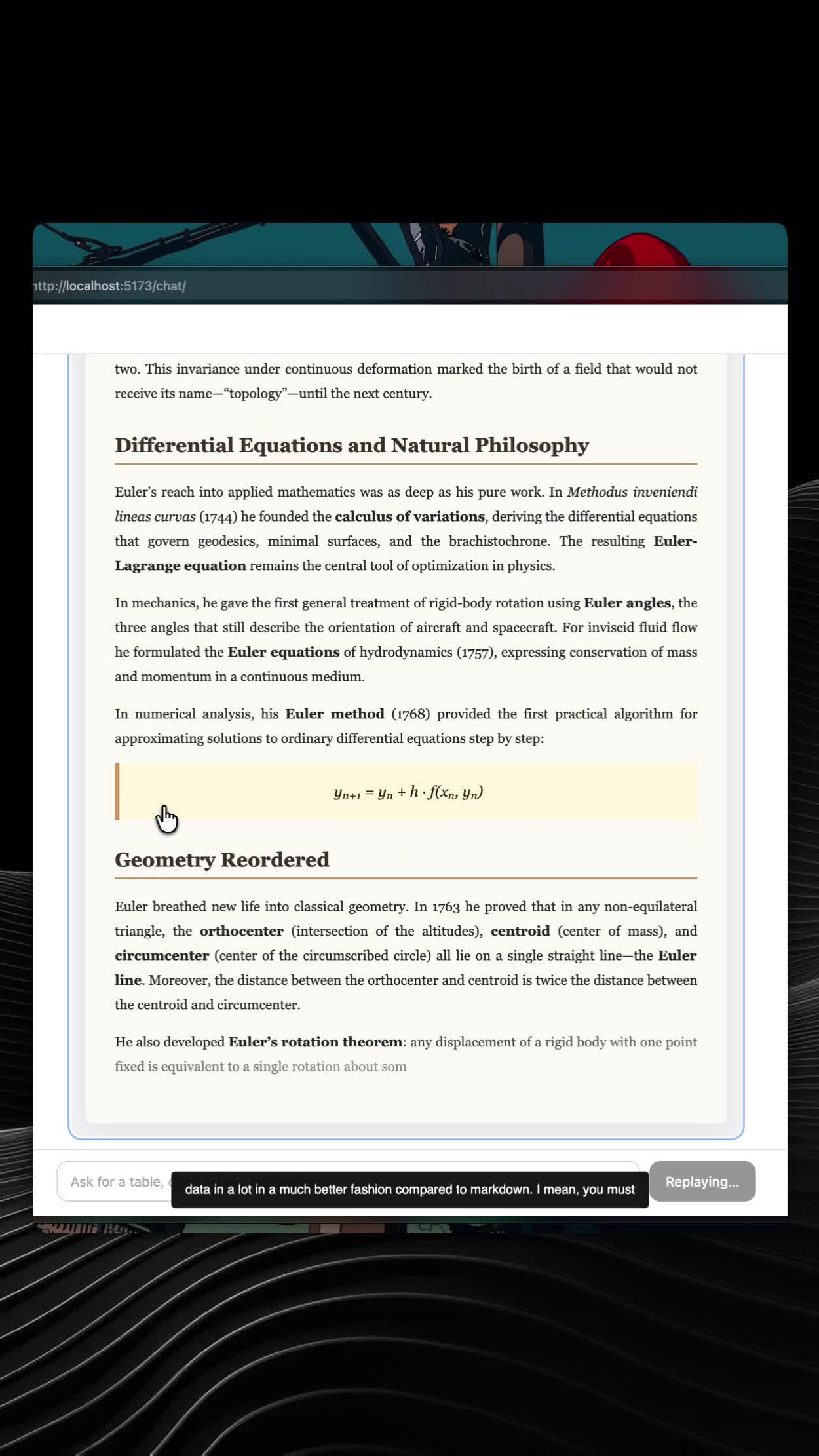
Screen recording of the included chat demo (npm run chat) streaming a live OpenRouter response as HTML.
GitHub READMEs do not render <iframe> or <video> embeds (sanitized HTML only). Use the thumbnail below — click to watch on Streamable:
Direct link: youtube
What you're seeing in the recording:
- Incremental HTML repair — incomplete tags and unclosed elements are handled as tokens arrive, without layout jumps
- Live DOM patching — text and table rows append in place instead of replacing the whole message on every chunk
- Reasoning panel — model thinking tokens stream in a collapsible block before HTML content starts
- Streaming caret — a smooth block cursor tracks the active text insertion point (only while characters are landing)
- Text fade-in — each new chunk of streamed text fades from half-opacity to full
- Stable blocks — completed sections freeze so earlier content doesn't re-render during the stream
- Sanitized output — DOMPurify strips unsafe markup before anything hits the DOM
Features
- Streaming-first — Strips incomplete tags, auto-closes open elements, splits stable/live blocks
- Incremental DOM patching — Appends text and table rows without full re-renders
- Reasoning tokens — Optional collapsible thinking block separate from HTML content
- Streaming caret — Smooth block cursor that follows live text insertion
- Performance — Memoizes completed blocks so they never re-render during streaming
- Security — DOMPurify sanitization with secure defaults (no scripts, no event handlers)
- Drop-in React component — Works with AI SDK, any chat UI, or plain streaming text
- Headless core — Use
rehtml()without React for Node or other frameworks - Raw-text aware — Respects
<pre>,<code>, etc. where<is literal
Requires React 18+ (and react-dom in browser apps). Import the base styles once:
import "@alphanimble/streamhtml/styles.css";
Quick start
import { StreamHtml } from "@alphanimble/streamhtml";
import "@alphanimble/streamhtml/styles.css";

function Message({ content, isStreaming }: { content: string; isStreaming: boolean }) {
  return (
    <StreamHtml isStreaming={isStreaming}>
      {content}
    </StreamHtml>
  );
}
With reasoning tokens
<StreamHtml
  isStreaming={isStreaming}
  reasoning={reasoningText}
  thinkingLabel="Thinking"
>
  {htmlContent}
</StreamHtml>
With AI SDK
import { useChat } from "@ai-sdk/react";
import { StreamHtml } from "@alphanimble/streamhtml";
import "@alphanimble/streamhtml/styles.css";

export function Chat() {
  const { messages, status } = useChat();

  return (


      {messages.map((message) => (


          {message.parts.map((part, i) =>
            part.type === "text" ? (
              <StreamHtml
                key={i}
                isStreaming={
                  status === "streaming" &&
                  message.id === messages.at(-1)?.id
                }
              >
                {part.text}
              </StreamHtml>
            ) : null,
          )}


      ))}


  );
}
How it works
StreamHtml runs a repair pipeline on every chunk:
- Strip incomplete tags — `
bold→bold3. **Split blocks** — Completed top-level blocks are frozen; only the tail re-renders
4. **Patch incrementally** — Plain text and table rows append to the live DOM
5. **Sanitize** — DOMPurify removes XSS vectors beforedangerouslySetInnerHTML`
Streaming input          Repair                 Render
─────────────────       ──────────             ──────────


A


B      stable: [

A

]  memoized ✓


C                  live:

C

      re-renders each chunk
API
<StreamHtml />
| Prop | Type | Default | Description |
|---|---|---|---|
children |
string |
"" |
HTML content to render |
reasoning |
string |
"" |
Plain-text reasoning / thinking tokens |
isStreaming |
boolean |
false |
Shows caret, marks streaming state |
caret |
boolean |
isStreaming |
Toggle streaming caret |
repair |
boolean |
true |
Run incomplete HTML repair |
sanitize |
boolean |
true |
DOMPurify sanitization |
memoizeBlocks |
boolean |
true |
Freeze completed blocks |
sanitizeConfig |
Config |
— | DOMPurify config override |
thinkingLabel |
string |
"Thinking" |
Label for reasoning panel |
className |
string |
— | Root element class |
rehtml(input, options?)
Headless repair function for non-React use:
import { rehtml } from "@alphanimble/streamhtml";

const { html, stable, live, hadIncompleteTag } = rehtml(partialHtml);
sanitizeHtml(html, config?)
import { sanitizeHtml, configureSanitizer } from "@alphanimble/streamhtml";

configureSanitizer({ ALLOWED_TAGS: ["div", "p", "span", "table", ...] });
const safe = sanitizeHtml(untrustedHtml);
Prompting tips
Tell your model to output semantic HTML with CSS classes:
142ms


avg latency


<table class="rt">
  <thead><tr><th>Endpoint</th><th>Status</th></tr></thead>
  <tbody>...</tbody>
</table>


<strong>Note:</strong> ...
Define component styles in your app — StreamHtml ships minimal base styles for tables, code, and typography.
Development
git clone <your-repo-url>
cd htmlstream
npm install
npm test
npm run build
Demos
Gallery (static examples):
npm run demo
Chat (live OpenRouter streaming):
cp .env.example .env
# Add your OPENROUTER_API_KEY and optional MODEL_NAME
npm run chat
The chat demo streams HTML from OpenRouter and persists sessions locally in .chat-sessions/ (gitignored).
License
MIT — see LICENSE.
Extension points exported contracts — how you extend this code
browse all types & interfaces →
Core symbols most depended-on inside this repo
Shape
Languages
Modules by API surface
For agents
$ claude mcp add htmlstream \
  -- python -m otcore.mcp_server <graph>