github.com/AlexandrErohin/home-assistant-flightradar24 @v1.34.2
Chat with this repoWhat it actually does AI analysis from the code graph — generated when you open this
README
Flightradar24 integration for Home Assistant















📡 Overview
The Flightradar24 integration brings real-time aviation tracking into Home Assistant.
Track flights above your location, monitor airports, follow specific aircraft worldwide, and trigger powerful automations based on live flight events.
✅ No Flightradar24 subscription required
✨ Features
- 🌍 Track flights currently in your area
- ✈️ Follow aircraft anywhere in the world
- 🛬 Monitor airport arrivals and departures
- 🔔 Create flight-based notifications and automations
- 📊 View airport delay and cancellation statistics
- 🗺️ Add live flight maps to Home Assistant dashboards
- 📱 Track flights as Home Assistant
device_tracker - 🔥 Monitor the top 10 most tracked flights on Flightradar24
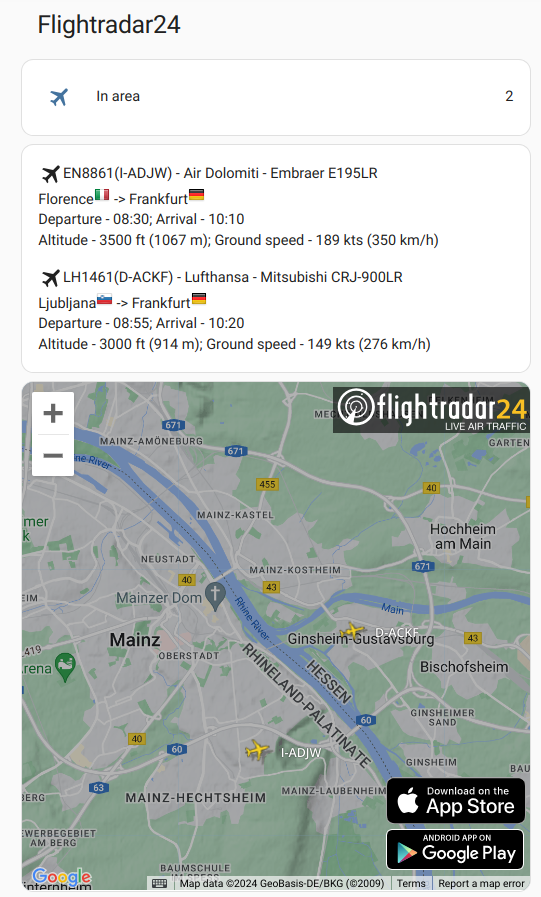
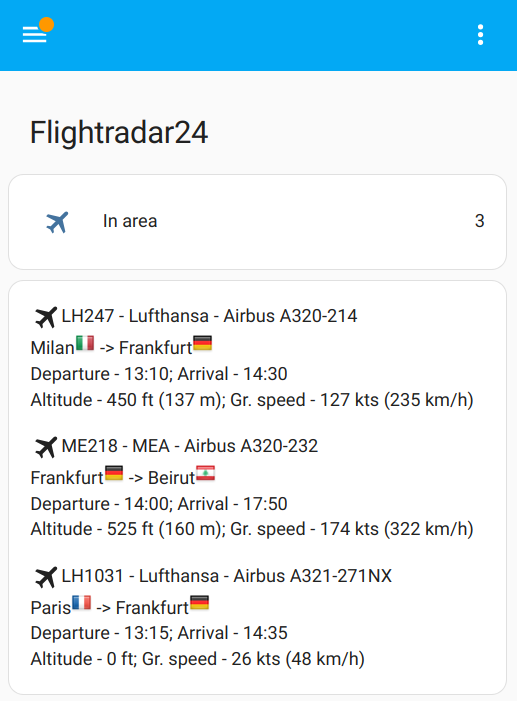
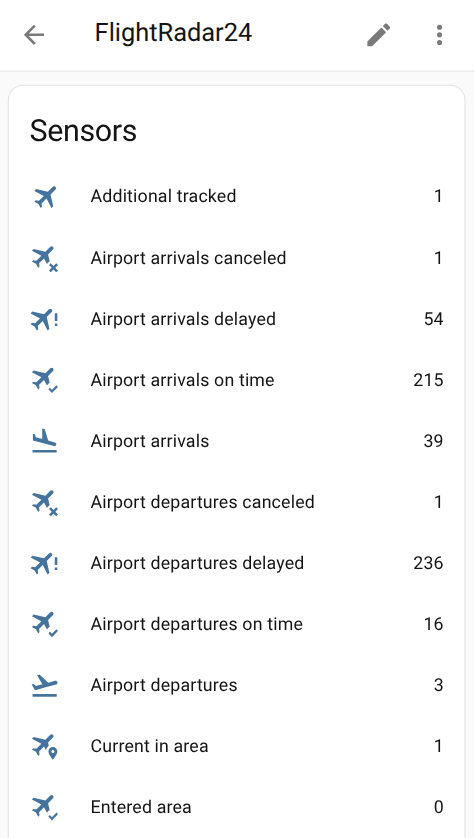
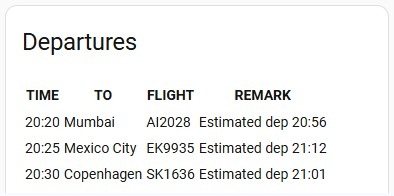
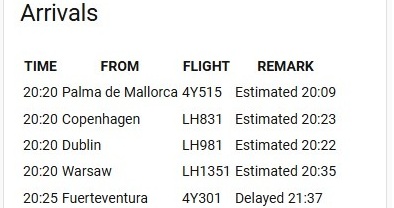
It allows you: 1. Know how many flights in your area right now, or just have entered or exited it. And get list of flights with full information by every relevant flight for the sensor 2. Track a particular plane or planes no matter where it currently is, even if it is a scheduled flight 3. Monitor daily statistics (like on time/delayed/canceled flights) of the selected airport 4. Get top 10 most tracked flights on FlightRadar24 5. Create notifications (example - Get a notification when a flight enters or exits your area, Get a notification when a tracked scheduled flight takes off) 6. Create automations (example - Automatically track a flight by your needs) 7. Add flights table for your area to your Home Assistant dashboard by Lovelace Card) 8. Add departures/arrivals boards of the selected airport to your Home Assistant dashboard by Lovelace Airport Card) 9. Track your flight as Device Tracker 10. Get info for last flights which were in your area or get info about latest exited flight by creating Last Flights History Sensor
🚀 Installation
HACS (Recommended)
- Install HACS
- Open HACS
- Search for
Flightradar24 - Click Download
- Restart Home Assistant
One-click install

Manual Installation
- Locate the
custom_componentsdirectory in your Home Assistant configuration directory. It may need to be created. - Copy the
custom_components/flightradar24directory into thecustom_componentsdirectory. - Restart Home Assistant.
Configuration
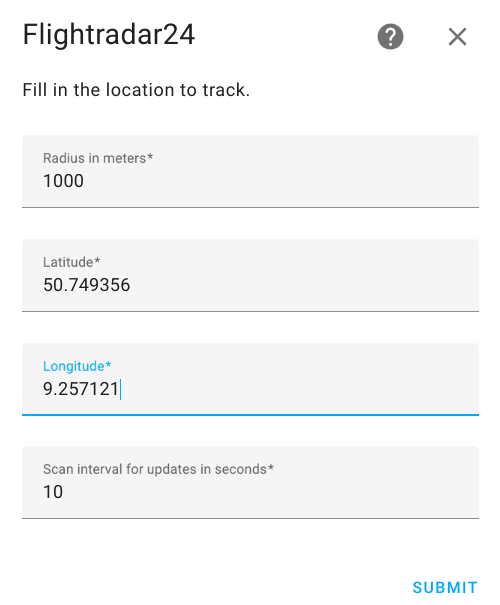
Flightradar24 is configured via the GUI. See the HA docs for more details.
The default data is preset already
- Go to the Settings->Devices & services.
- Click on
+ ADD INTEGRATION, search forFlightradar24. - You may change the default values for Radius, Latitude and Longitude
- Click
SUBMIT
Edit Configuration
You may edit configuration data like: 1. Latitude and longitude of your point 2. Radius of your zone 3. Scan interval for updates in seconds 4. The minimum and maximum altitudes in foots between which the aircraft will be tracked 5. Enable/Disable top 10 most tracked flights on FlightRadar24 6. Enable/Disable device_tracker for flights 7. Optional: Username and password if you have FlightRadar24 subscription 8. Enable/Disable Enable auto-cleanup of landed tracked flights. That automatically removes flights from the "Additional tracked" list once they arrive at the gate 10. Map Tracker Naming Style. - Callsign Only (e.g., KLM1412) - Default - Callsign + Route (e.g., KLM1412 (CDG - AMS)) - Registration + Route (e.g., PH-BXE (CDG - AMS))
To do that:
- Go to the Settings->Devices & services.
- Search for
Flightradar24, and click on it. - Click on
CONFIGURE -
Edit the options you need and click
SUBMIT -
Restart Home Assistant
⚙️ Configuration
The integration is fully configured through the Home Assistant UI.
Initial Setup
- Open:
Settings → Devices & Services
- Click:
+ ADD INTEGRATION
- Search for:
Flightradar24
- Configure:
- Latitude
- Longitude
-
Radius
-
Click
SUBMIT
Configuration Options
You can configure:
| Option | Description |
|---|---|
| Radius | Flight detection radius |
| Coordinates | Monitoring location |
| Scan interval | Update frequency |
| Altitude filters | Minimum & maximum altitude |
| Most tracked flights | Enable/disable top 10 tracking |
| Device tracker | Enable aircraft tracking entity |
| FR24 credentials | Optional premium login |
| Auto cleanup | Remove landed tracked flights |
| Naming style | Customize map tracker names |
🧩 Components
Events
| Event | Description |
|---|---|
flightradar24_entry |
Flight entered your area |
flightradar24_exit |
Flight exited your area |
flightradar24_area_landed |
Aircraft landed nearby |
flightradar24_area_took_off |
Aircraft took off nearby |
flightradar24_tracked_took_off |
Tracked aircraft departed |
flightradar24_tracked_landed |
Tracked aircraft landed |
flightradar24_tracked_arrived_gate |
Flight arrived at gate |
flightradar24_tracked_left_gate |
Flight left gate |
Sensors
| Area tracking | Description |
|---|---|
Current in area |
Flight entered your area |
Entered area |
Flights that just have exited your area |
Exited area |
Flights that just have entered your area |
Additional tracked |
Your additional tracked outside your area |
Most tracked |
Most tracked flights on FlightRadar24. You may disable it via configuration |
| Airport tracking | Description |
|---|---|
Airport arrivals |
List of current arrival flights for the selected airport |
Airport departures |
List of current departure flights for the selected airport |
Airport arrivals on time |
Amount of arrivals on time for the selected airport today |
Airport arrivals delayed |
Amount of delayed arrivals for the selected airport today |
Airport arrivals delay average |
Disruption arrivals index for the selected airport today |
Airport arrivals delay index |
Amount of canceled arrivals for the selected airport today |
Airport arrivals canceled |
Amount of canceled arrivals for the selected airport today |
Airport departures on time |
Amount of departures on time for the selected airport today |
Airport departures delayed |
Amount of delayed departures for the selected airport today |
Airport departures delay average |
Average departures delay for the selected airport today |
Airport departures delay index |
Disruption departures index for the selected airport today |
Airport departures canceled |
Amount of canceled departures for the selected airport today |
Other
| Other tracking | Description |
|---|---|
Most tracked flights |
The most tracked flights |
⚠️ IMPORTANT NOTE ON ENTITY IDs & TRANSLATIONS ⚠️
Home Assistant automatically generates the underlyingentity_idfor your sensors based on your system's default language at the time of installation. For example,sensor.flightradar24_current_in_areamight automatically becomesensor.flightradar24_bereich_betretenon a German system.Before copying and pasting any YAML or Lovelace code from this README, please verify your exact entity IDs by navigating to Settings -> Devices & Services -> Entities and update the code examples to match your localized IDs!
Home Assistant may translate entity IDs based on your system language.
Example:
sensor.flightradar24_current_in_area
might become:
sensor.flightradar24_bereich_betreten
Always verify your entity IDs here:
Settings → Devices & Services → Entities
before copying YAML examples.
Device Tracker
You may be interested to add a live flight as device_tracker with the flight information to a person in HA.
To use it - you need to activate this feature in Edit Configuration.
When it is enabled - this integration creates device_tracker with static name device_tracker.flightradar24 and
this device_tracker updates when there is a live flight in the additional tracked list.
It works ONLY with one live flight from the additional tracked list at a time!
Configuration
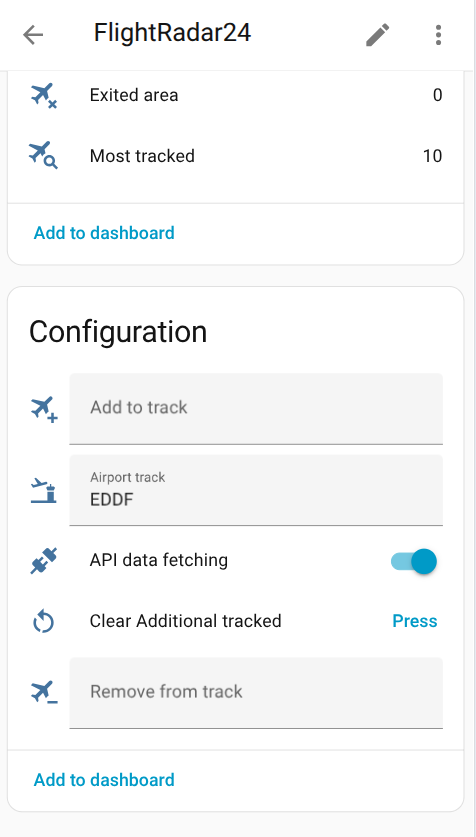
- Add to track - Pass flight number or call sign or aircraft registration number to track flight outside your area. It adds flight to Additional tracked sensor
- Remove from track - Pass flight number or call sign or aircraft registration number to remove a flight from Additional tracked sensor
- Airport track - Pass IATA or ICAO airport code to start receiving data in Airport sensors. To stop receiving airport data just pass an empty string
- API data fetching - you may disable FlightRadar API calls when not needed to prevent unnecessary API calls and save bandwidth and server load.
- Clear Additional tracked - Clear all flights in Additional tracked sensor
Sensors (Current in area, Entered area, Exited area, Additional tracked) shows how many flights in the given area, additional tracked, just have entered or exited it. All these sensors have attribute flights with list of flight object contained a full information by every relevant flight for the sensor
Sensor Most tracked has attribute flights with list of most tracked object
Sensors Airport arrivals and Airport departures have attribute flights with list of the next 50 [airport flights]
Core symbols most depended-on inside this repo
Shape
Languages
Modules by API surface
For agents
$ claude mcp add home-assistant-flightradar24 \
  -- python -m otcore.mcp_server <graph>