github.com/AikidoSec/safe-chain @1.5.12
Chat with this repoWhat it actually does AI analysis from the code graph — generated when you open this
README
Aikido Safe Chain


- ✅ Block malware on developer laptops and CI/CD
- ✅ Supports npm and PyPI more package managers coming
- ✅ Blocks packages newer than 48 hours without breaking your build
- ✅ Tokenless, free, no build data shared
Need protection beyond npm & PyPI?
Aikido Device Protection builds on Safe Chain, extending package and extension security across more ecosystems: npm, PyPI, VS Code, Open VSX - (Cursor, Windsurf, Kiro, Vs Codium, ...), Maven, NuGet, Chrome extensions, Go, Skills.sh AI skills, Ruby, Rust, and more.
Get centralized policy management, request-and-approval workflows, and visibility across every developer workstation in your org. Powered by the same Aikido Intel feed. Deploy it manually or manage it through your MDM tool (Jamf, Fleet, or Iru).
Aikido Safe Chain supports the following package managers:
- 📦 npm
- 📦 npx
- 📦 yarn
- 📦 pnpm
- 📦 pnpx
- 📦 rush
- 📦 rushx
- 📦 bun
- 📦 bunx
- 📦 pip
- 📦 pip3
- 📦 uv
- 📦 poetry
- 📦 uvx
- 📦 pipx
- 📦 pdm
Usage
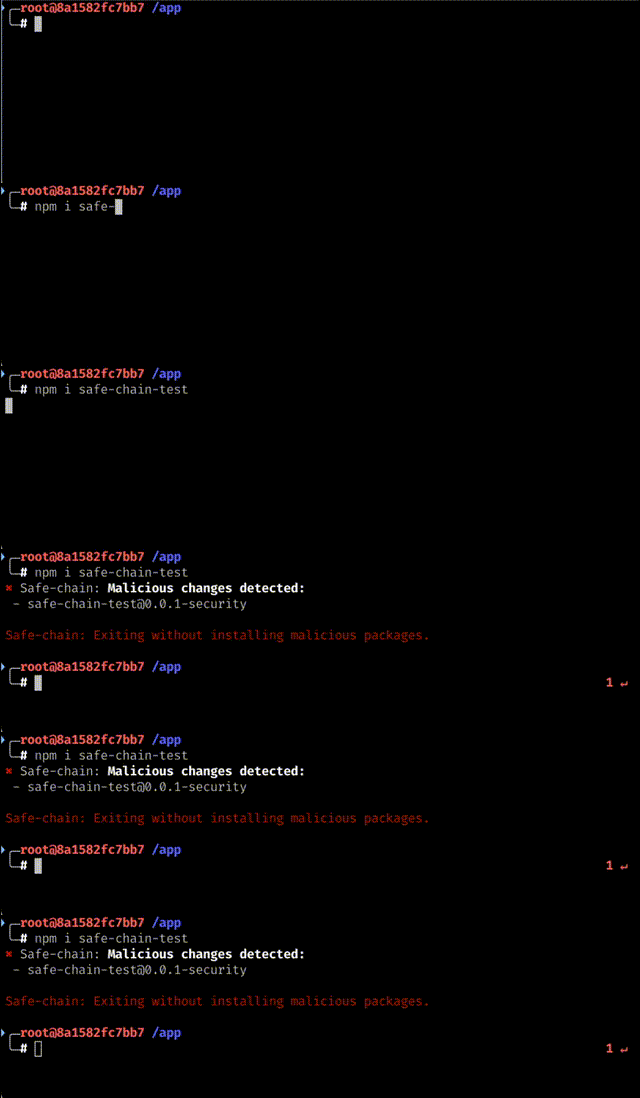
Installation
Installing the Aikido Safe Chain is easy with our one-line installer.
Unix/Linux/macOS
curl -fsSL https://github.com/AikidoSec/safe-chain/releases/download/1.5.10/install-safe-chain.sh | sh
Windows (PowerShell)
iex (iwr "https://github.com/AikidoSec/safe-chain/releases/download/1.5.10/install-safe-chain.ps1" -UseBasicParsing)
The install commands above always reference a specific release. To install a different version, replace the version with your desired version number. All available versions are on the releases page.
Download integrity
The install scripts are served from a versioned release URL (releases/download/1.5.10/...). GitHub releases are immutable — once an artifact is published at a versioned URL it cannot be modified or replaced, so the file you download is guaranteed to be exactly what was released.
Verify the installation
- ❗Restart your terminal to start using the Aikido Safe Chain.
-
This step is crucial as it ensures that the shell aliases for npm, npx, yarn, pnpm, pnpx, rush, rushx, bun, bunx, pip, pip3, poetry, uv, uvx, pipx and pdm are loaded correctly. If you do not restart your terminal, the aliases will not be available.
-
Verify the installation by running the verification command:
```shell npm safe-chain-verify pnpm safe-chain-verify pip safe-chain-verify uv safe-chain-verify
# Any other supported package manager: {packagemanager} safe-chain-verify ```
-
The output should display "OK: Safe-chain works!" confirming that Aikido Safe Chain is properly installed and running.
-
(Optional) Test malware blocking by attempting to install a test package:
For JavaScript/Node.js:
shell
   npm install safe-chain-test
For Python:
shell
   pip3 install safe-chain-pi-test
- The output should show that Aikido Safe Chain is blocking the installation of these test packages as they are flagged as malware.
When running npm, npx, yarn, pnpm, pnpx, rush, rushx, bun, bunx, pip, pip3, uv, uvx, poetry, pipx and pdm commands, the Aikido Safe Chain will automatically check for malware in the packages you are trying to install. It also intercepts Python module invocations for pip when available (e.g., python -m pip install ..., python3 -m pip download ...). If any malware is detected, it will prompt you to exit the command.
You can check the installed version by running:
safe-chain --version
How it works
Malware Blocking
The Aikido Safe Chain works by running a lightweight proxy server that intercepts package downloads from the npm registry and PyPI. When you run npm, npx, yarn, pnpm, pnpx, rush, rushx, bun, bunx, pip, pip3, uv, uvx, poetry, pipx or pdm commands, all package downloads are routed through this local proxy, which verifies packages in real-time against Aikido Intel - Open Sources Threat Intelligence. If malware is detected in any package (including deep dependencies), the proxy blocks the download before the malicious code reaches your machine.
Minimum package age
Safe Chain applies minimum package age checks to supported ecosystems.
Current enforcement differs by ecosystem:
- npm-based package managers:
- during normal package resolution, Safe Chain suppresses versions that are newer than the configured minimum age from the package metadata returned by the registry
- for direct package download requests that bypass that metadata flow, Safe Chain can block the request itself using a cached list of newly released packages
- Python package managers:
- during package resolution, Safe Chain suppresses too-young files and releases from PyPI metadata responses
- for direct package download requests that bypass that metadata flow, Safe Chain can block the request itself using a cached list of newly released packages
By default, the minimum package age is 48 hours. This provides an additional security layer during the critical period when newly published packages are most vulnerable to containing undetected threats. You can configure this threshold or bypass this protection entirely - see the Minimum Package Age Configuration section below.
Shell Integration
The Aikido Safe Chain integrates with your shell to provide a seamless experience when using npm, npx, yarn, pnpm, pnpx, rush, rushx, bun, bunx, and Python package managers (pip, uv, uvx, poetry, pipx, pdm). It sets up aliases for these commands so that they are wrapped by the Aikido Safe Chain commands, which manage the proxy server before executing the original commands. We currently support:
- ✅ Bash
- ✅ Zsh
- ✅ Fish
- ✅ PowerShell
- ✅ PowerShell Core
More information about the shell integration can be found in the shell integration documentation.
Uninstallation
To uninstall the Aikido Safe Chain, use our one-line uninstaller:
Unix/Linux/macOS
curl -fsSL https://github.com/AikidoSec/safe-chain/releases/download/1.5.10/uninstall-safe-chain.sh | sh
Windows (PowerShell)
iex (iwr "https://github.com/AikidoSec/safe-chain/releases/download/1.5.10/uninstall-safe-chain.ps1" -UseBasicParsing)
❗Restart your terminal after uninstalling to ensure all aliases are removed.
Configuration
Logging
You can control the output from Aikido Safe Chain using the --safe-chain-logging flag or the SAFE_CHAIN_LOGGING environment variable.
Configuration Options
You can set the logging level through multiple sources (in order of priority):
- CLI Argument (highest priority):
-
--safe-chain-logging=silent- Suppresses all Aikido Safe Chain output except when malware is blocked. The package manager output is written to stdout as normal, and Safe Chain only writes a short message if it has blocked malware and causes the process to exit.shell npm install express --safe-chain-logging=silent -
--safe-chain-logging=verbose- Enables detailed diagnostic output from Aikido Safe Chain. Useful for troubleshooting issues or understanding what Safe Chain is doing behind the scenes.shell npm install express --safe-chain-logging=verbose -
Environment Variable:
shell
   export SAFE_CHAIN_LOGGING=verbose
   npm install express
Valid values: silent, normal, verbose
This is useful for setting a default logging level for all package manager commands in your terminal session or CI/CD environment.
File Logging
You can mirror Aikido Safe Chain output to a log file using the --safe-chain-log-file flag or the SAFE_CHAIN_LOG_FILE environment variable. File logging is disabled by default and enabled when a path is set. The file format (--safe-chain-log-file-format) and verbosity (--safe-chain-log-file-verbosity) are controlled independently from the terminal output.
Configuration Options
Set through any of these (in order of priority):
- CLI Argument (highest priority):
shell
   npm install express \
     --safe-chain-log-file=~/safe-chain.log \
     --safe-chain-log-file-format=plain \
     --safe-chain-log-file-verbosity=normal
- Environment Variable:
shell
   export SAFE_CHAIN_LOG_FILE=~/safe-chain.log
   export SAFE_CHAIN_LOG_FILE_FORMAT=plain
   export SAFE_CHAIN_LOG_FILE_VERBOSITY=normal
- Config File (
~/.safe-chain/config.json):
json
   {
     "logFile": "~/safe-chain.log",
     "logFileFormat": "plain",
     "logFileVerbosity": "normal"
   }
logFileFormat — json (default) or plain.
logFileVerbosity — silent, normal, or verbose (default). Independent from --safe-chain-logging.
Minimum Package Age
You can configure how long packages must exist before Safe Chain allows their installation. By default, packages must be at least 48 hours old before they can be installed.
For npm-based package managers, this check currently has two enforcement modes:
- Safe Chain suppresses too-young versions from package metadata during normal dependency resolution.
- Safe Chain blocks direct package download requests when they are matched against the cached newly released packages list.
For Python package managers, this check currently has two enforcement modes:
- Safe Chain suppresses too-young files and releases from PyPI metadata during dependency resolution.
- Safe Chain blocks direct package download requests when they are matched against the cached newly released packages list.
Configuration Options
You can set the minimum package age through multiple sources (in order of priority):
- CLI Argument (highest priority):
shell
   npm install express --safe-chain-minimum-package-age-hours=48
- Environment Variable:
shell
   export SAFE_CHAIN_MINIMUM_PACKAGE_AGE_HOURS=48
   npm install express
- Config File (
~/.safe-chain/config.json):
json
   {
     "minimumPackageAgeHours": 48
   }
Excluding Packages
Exclude trusted packages from minimum age filtering via environment variable or config file (both are merged). Use @scope/* to trust all packages from an organization:
export SAFE_CHAIN_MINIMUM_PACKAGE_AGE_EXCLUSIONS="@aikidosec/*"
{
  "npm": {
    "minimumPackageAgeExclusions": ["@aikidosec/*"]
  },
  "pip": {
    "minimumPackageAgeExclusions": ["requests"]
  }
}
Custom Registries
Configure Safe Chain to scan packages from custom or private registries.
Supported ecosystems:
- Node.js
- Python
Configuration Options
You can set custom registries through environment variable or config file. Both sources are merged together.
- Environment Variable (comma-separated):
shell
   export SAFE_CHAIN_NPM_CUSTOM_REGISTRIES="npm.company.com,registry.internal.net"
   export SAFE_CHAIN_PIP_CUSTOM_REGISTRIES="pip.company.com,registry.internal.net"
- Config File (
~/.safe-chain/config.json):
json
   {
     "npm": {
       "customRegistries": ["npm.company.com", "registry.internal.net"]
     },
     "pip": {
       "customRegistries": ["pip.company.com", "registry.internal.net"]
     }
   }
PYPI Configuration File
If you rely on a pip.conf file for pip configuration you must point pip at it explicitly via the PIP_CONFIG_FILE environment variable so Safe Chain can merge it.
Safe Chain runs pip behind its MITM proxy and writes a temporary pip configuration file to inject its certificate and proxy settings. When PIP_CONFIG_FILE is set, Safe Chain merges its settings into a copy of your file (your original file is never modified) so your index-url, credentials, and other options are preserved. When PIP_CONFIG_FILE is not set, pip's user-level config (e.g. ~/.config/pip/pip.conf) might be overridden by Safe Chain's temporary file and your settings will not be picked up.
Malware List Base URL
Configure Safe Chain to fetch malware databases and new packages lists from a custom mirror URL. This allows you to host your own copy of the Aikido malware database.
Configuration Options
You can set the malware list base URL through multiple sources (in order of priority):
- CLI Argument (highest priority):
shell
   npm install express --safe-chain-malware-list-base-url=https://your-mirror.com
- Environment Variable:
shell
   export SAFE_CHAIN_MALWARE_LIST_BASE_URL=https://your-mirror.com
   npm install express
- Config File (
~/.safe-chain/config.json):
json
   {
     "malwareListBaseUrl": "https://your-mirror.com"
   }
The base URL should point to a server that mirrors the structure of https://malware-list.aikido.dev/, including the following paths:
- /malware_predictions.json (JavaScript ecosystem malware database)
- /malware_pypi.json (Python ecosystem malware database)
- /releases/npm.json (JavaScript new packages list)
- /releases/pypi.json (Python new packages
Core symbols most depended-on inside this repo
runCommandShape
Languages
Modules by API surface
For agents
$ claude mcp add safe-chain \
  -- python -m otcore.mcp_server <graph>