github.com/Actinarium/Rhythm @v0.9.6
Chat with this repoWhat it actually does AI analysis from the code graph — generated when you open this
README
Rhythm 



Rhythm is a design overlay engine for Android.
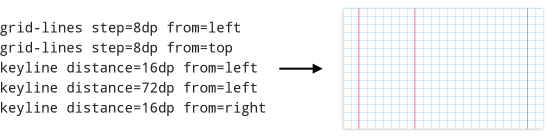
With Rhythm you can easily render grids, keylines, other Material Design cues and even custom elements within your app, helping you to build perfect layouts. Define overlay configurations using simple expression language, and Rhythm will convert them into Drawables¹, which you can then set as view backgrounds, foregrounds, draw to bitmaps etc:
[New!] Material Cue
Material Cue is a standalone keyline app built on Rhythm. If you need to verify your layout but don’t want the trouble of setting up another library in your project, Material Cue is perfect for you.
Give it a try:

Learn more about the differences between Rhythm and Material Cue.
Unstable API disclaimer
Until Rhythm hits version 1.0, its public API is not finalized yet. This means anything can still change in a backwards incompatible fashion. You should consider this when depending on Rhythm 0.* in your projects, especially if you’re planning to extend Rhythm or actively use its Java API. Make sure you can allocate the time to study the new docs and update your code, otherwise consider staying with the older version.
You can use Rhythm to inflate configuration into RhythmOverlay objects with fair confidence though: its syntax is guaranteed not to break with the future versions of Rhythm.
Migrating to 0.9.6
The biggest change in 0.9.6 is that Rhythm has been split in two separate libraries (see the next paragraph).
Given the opportunity, the whole package structure has been refactored for flatter and simpler hierarchy — make sure you fix your imports.
Additionally, a few of default layer settings have been changed (e.g. default grid color and keyline thickness). However, with the new magic variables mechanism you can define your own defaults in a centralized way.
Quick setup
Starting with 0.9.6, Rhythm is packaged as two separate artifacts: * Rhythm Core — contains core rendering framework for turning human readable config into Drawable objects¹. You then manage those Drawables yourself. * Rhythm Control — provides a mechanism to assign many overlays to many views and switch them on the go using the Rhythm Control notification.
Tip: Get inspired by the sample app and then explore its [source][samplesrc].
Rhythm Core
-
Add Gradle dependency:
compile 'com.actinarium.rhythm:rhythm:0.9.6'For alternative setup (JAR, Maven) see Bintray page. -
Create a raw file in your app’s
/src/res/rawfolder, e.g./src/res/raw/overlays, with content like this:
``` # Standard 8dp grid grid-lines step=8dp from=top grid-lines step=8dp from=left
# Typography grid w/keylines grid-lines step=4dp from=top keyline distance=16dp from=left keyline distance=16dp from=right keyline distance=72dp from=left ```
Overlays are separated by empty newline. Lines starting with # are optional overlay titles. There can also be comments and variables.
Take a look at the [sample config file][sampleconfig] for a more complex and documented example. For full docs see the wiki.
- In your code, inflate this file into a list of overlay objects, wrap them with RhythmDrawables, and assign to views as required:
```java // Create a new pre-configured inflater instance RhythmOverlayInflater inflater = RhythmOverlayInflater.createDefault(context);
// Inflate the config List overlays = inflater.inflate(R.raw.overlays);
// Inject the typography overlay (2nd in list) into a RhythmDrawable Drawable overlayDrawable = new RhythmDrawable(overlays.get(1));
// And assign it to the view view.setBackground(overlayDrawable); ```
- Later you can replace the overlay in that drawable:
((RhythmDrawable) view.getBackground()).setOverlay(overlays.get(0));
or disable it:
((RhythmDrawable) view.getBackground()).setOverlay(null);
Rhythm Control
This module is discontinued in favor of Material Cue app and will not receive new functionality.
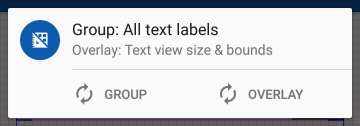
If you want to switch overlays for the views in your app at runtime, you can setup Rhythm Control. This module allows to define groups with many views and overlays attached to them, and then separately control which overlay is displayed over all views in a particular group. This can be done with a Rhythm Control notification², where you can cycle through the groups (1 › 2 › 3 › … › last › 1) and current group’s overlays (1 › 2 › 3 › … › last › no overlay › 1):
-
Set up Rhythm Core: add a dependency and compose a configuration sheet.
-
Add another dependency for Rhythm Control:
compile 'com.actinarium.rhythm:rhythm-control:0.9.6'For alternative setup (JAR, Maven) see Bintray page. -
Implement
RhythmControl.Hostin your Application class (create one if it doesn’t exist yet):
```java public class MyApplication extends Application implements RhythmControl.Host {
   private RhythmControl mRhythmControl;

   @Override
   public void onCreate() {
       super.onCreate();
       mRhythmControl = new RhythmControl(this);

       /* Rest of OnCreate() code */
   }

   @Override
   public RhythmControl getRhythmControl() {
       return mRhythmControl;
   }
} ```
- In your
Application.onCreate()method set up Rhythm groups:
```java // Create an inflater and inflate overlays from your configuration sheet RhythmOverlayInflater inflater = RhythmOverlayInflater.createDefault(this); List overlays = inflater.inflate(R.raw.overlays);
// Create the groups. Each group will be given an index starting from 0 RhythmGroup mainGroup = mRhythmControl.makeGroup("A group with index 0"); RhythmGroup secondaryGroup = mRhythmControl.makeGroup("Another group with index 1"); RhythmGroup anotherGroup = mRhythmControl.makeGroup("Group with index 2");
// Assign overlays to groups mainGroup.addOverlay(overlays.get(0)); // add only one secondaryGroup.addOverlays(overlays); // add all anotherGroup.addOverlays(overlays.subList(0, 2)); // add first two
// Finally, display the notification with notification ID unique across your app // (to avoid conflicts with other notifications) mRhythmControl.showQuickControl(RHYTHM_NOTIFICATION_ID); ```
-
Finally, integrate Rhythm groups into your layouts.
There are two ways to do this: -
Decorate existing views programmatically, e.g. in your
Activity.onCreate()methods:```java // Retrieve Rhythm Control from application class: RhythmControl rhythmControl = ((RhythmControl.Host) getApplication()).getRhythmControl();
// Decorate backgrounds of given views (draws overlay over existing background but under content) // Works with any views rhythmControl.getGroup(0).decorate(view1, view2, view3 /, ... /);
// Decorate foregrounds of given views - will draw overlay over content // Works with FrameLayouts and its subclasses (e.g. CardView) only rhythmControl.getGroup(1).decorateForeground(card1, frame2, card3 /, ... /); ```
-
Wrap pieces of your layouts with
RhythmFrameLayoutconnected to appropriate groups:```xml
<LinearLayout ... />```
Protip: you can use RhythmFrameLayout on its own, without setting up Rhythm control or groups. Omit the app:rhythmGroup attribute or set it to app:rhythmGroup="noGroup", and set overlays to it programmatically:
// By default, RhythmFrameLayout doesn't have a RhythmDrawable object, so inject a new one
rhythmFrameLayout.setRhythmDrawable(new RhythmDrawable(rhythmOverlay));

// After that you can change overlays in that drawable
rhythmFrameLayout.getRhythmDrawable().setOverlay(anotherOverlay);
Further reading
- Documentation (wiki)
- [Rhythm Core javadoc][javadoc-core]
- [Rhythm Control javadoc][javadoc-control]
A personal appeal
If you like what I’m doing, please consider supporting my efforts.
I quit my full-time job so that I could focus on building useful, time-saving libraries and apps. I’ve already made a few, and I have more in mind, including free and open-source apps, an ultimate charting library for Android, tutorials and samples, and more. But as much as I’d love to give it all away for free, I also need to make a living.
Without your support, in a few months I’ll have to return to workforce, meaning I won’t be able to work on my projects anymore.
Here’s what you can do to help:
- Check out Material Cue, a keyline app I built with Rhythm.
- Buy a perpetual premium unlock for Material Cue with one of pay-what-you-want options.
At the moment all of its features are available for free, but I'm planning to add some paid functionality for greater convenience. - Gift me a game from my [wishlist on Steam][steam] to cheer me up.
It’s Steam Summer Sale now, a perfect time to buy games on discount! - Spread the word: tell your fellow developers about Rhythm, Material Cue, and my other projects.
- Add me on [Google+][gplus] and/or [Twitter][twitter] to be the first to know about my upcoming projects and apps.
- I’m also looking into other donation options: Paypal, Google Wallet, Flattr, Gratipay, Patreon — tell me what’s better.
- If you or your company are interested in sponsoring my development efforts, please contact me directly at actinate@gmail.com.
- Need a hand with making your app more Material? I guess I could allocate some time to freelance work — contact me to discuss the options.
Any bit counts, and whatever you choose to do, thank you a lot!
License
The library is licensed under Apache 2.0 License, meaning that you can freely use it in any of your projects.
Copyright (C) 2016 Actinarium

Licensed under the Apache License, Version 2.0 (the "License");
you may not use this file except in compliance with the License.
You may obtain a copy of the License at

    http://www.apache.org/licenses/LICENSE-2.0

Unless required by applicable law or agreed to in writing, software
distributed under the License is distributed on an "AS IS" BASIS,
WITHOUT WARRANTIES OR CONDITIONS OF ANY KIND, either express or implied.
See the License for the specific language governing permissions and
limitations under the License.
Android, Google Play and the Google Play logo are trademarks of Google Inc.
¹ — Said so for simplicity. In fact, Rhythm inflates overlay config into RhythmOverlay objects, which then can be injected into one or many RhythmDrawables, which are, yeah, Drawables. Since it's not 1.0 yet, this may also change.
² — Rhythm Control notification is pretty useless on pre-4.1 (API 15 and below) because of lack of notification actions. The groups and RhythmFrameLayouts can still be controlled programmatically though.
Extension points exported contracts — how you extend this code
RhythmSpecLayer (Interface)Core symbols most depended-on inside this repo
setColorShape
Languages
Modules by API surface
For agents
$ claude mcp add Rhythm \
  -- python -m otcore.mcp_server <graph>