hub / github.com/AchetaGames/Epic-Asset-Manager
github.com/AchetaGames/Epic-Asset-Manager @v3.9.4
Chat with this repo
1,271 symbols
2,509 edges
69 files
55 documented · 4%
What it actually does AI analysis from the code graph — generated when you open this
loading…
README
<a href="https://discord.gg/dumxVnYe6n">
    <img alt="Discord" src="https://img.shields.io/discord/332629362094374913">
</a>
<a href="https://github.com/AchetaGames/Epic-Asset-Manager/actions/workflows/release.yml">
    <img alt="Build Status" src="https://github.com/AchetaGames/Epic-Asset-Manager/actions/workflows/release.yml/badge.svg">
</a>
<a href="https://flathub.org/apps/details/io.github.achetagames.epic_asset_manager">
    <img alt="Flathub" src="https://img.shields.io/flathub/v/io.github.achetagames.epic_asset_manager">
</a>
Epic Asset Manager
An unofficial client to install Unreal Engine, download and manage purchased assets, projects, plugins and games from the Epic Games Store.
Features
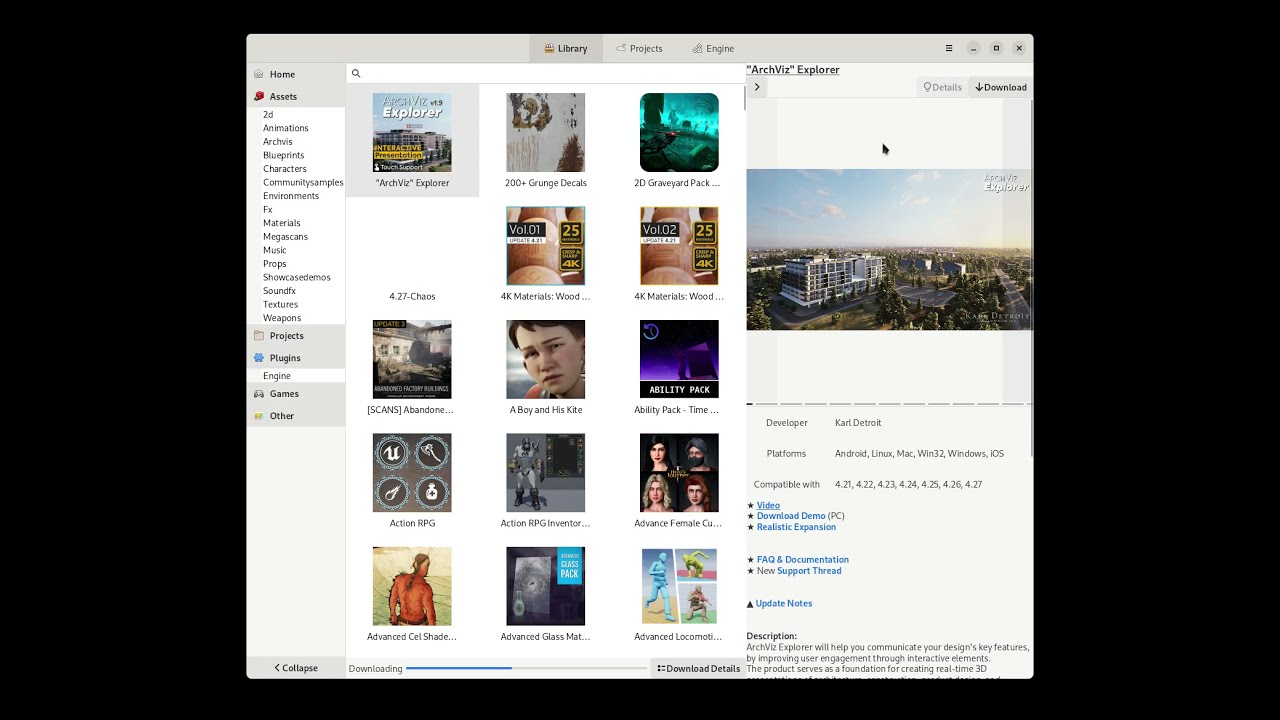
- Asset Library Management - Browse, search, and filter your Epic Games Store assets
- Download Progress Indicators - Real-time progress bars on asset tiles showing download percentage and speed
- Create Project - Create new Unreal Engine projects directly from downloaded asset templates
- Add to Project - Add assets to existing Unreal Engine projects with one click
- Engine Management - Install and manage multiple Unreal Engine versions
- Project Browser - View and launch your Unreal Engine projects
- Dark Theme - Epic Games Launcher-inspired dark theme with square corners
- Marketplace Integration - Quick access to the Unreal Engine Marketplace
Screenshots
Main View

Asset Library with Details Panel

Download Progress on Asset Tiles

Create Project Dialog

Add to Project Dialog

Install
Flatpak (recommended)
Install the package from Flathub
Arch Linux
Use the AUR package
Run
Flatpak
flatpak run io.github.achetagames.epic_asset_manager
Source build
Open from your favorite application tray or run the following in a terminal
epic_asset_manager
Building
See Building
Debugging
Log output is controlled by the EAM_LOG environment variable using env_logger syntax. The default is warn,epic_asset_manager=debug which shows only application logs.
# Default (app logs only)
flatpak run io.github.achetagames.epic_asset_manager

# Include egs-api HTTP debug output
EAM_LOG="warn,epic_asset_manager=debug,egs_api=debug" flatpak run io.github.achetagames.epic_asset_manager

# Full trace (all crates)
EAM_LOG=trace flatpak run io.github.achetagames.epic_asset_manager
Note: RUST_LOG is intentionally ignored to avoid noise from the Flatpak development environment.
Action video
Extension points exported contracts — how you extend this code
Refresh (Interface)(no doc) [4 implementers]
src/ui/widgets/logged_in/refresh.rs
Search (Interface)
(no doc) [2 implementers]
src/tools/asset_info.rs
Update (Interface)
(no doc) [1 implementers]
src/ui/update.rs
Or (Interface)
(no doc) [2 implementers]
src/tools/or.rs
ButtonEpic (Interface)
(no doc) [1 implementers]
src/ui/widgets/button_cust.rs
ProgressIconExt (Interface)
(no doc) [1 implementers]
src/ui/widgets/progress_icon.rs
Asset (Interface)
(no doc) [1 implementers]
src/ui/widgets/download_manager/asset.rs
Core symbols most depended-on inside this repo
namecalled by 87
src/models/log_data.rs
remove
called by 50
src/ui/widgets/preferences/mod.rs
set_property
called by 49
src/ui/widgets/download_manager/mod.rs
selected
called by 29
src/ui/widgets/logged_in/engines/mod.rs
get_item
called by 26
src/ui/widgets/download_manager/mod.rs
add_info_row
called by 25
src/ui/widgets/logged_in/library/asset_detail.rs
now
called by 20
src/tools/auth.rs
set_property
called by 20
src/ui/widgets/logged_in/library/asset.rs
Shape
Languages
Rust100%
Modules by API surface
src/ui/widgets/logged_in/library/mod.rs56 symbols
src/models/engine_data.rs46 symbols
src/ui/widgets/download_manager/asset.rs44 symbols
src/ui/widgets/logged_in/fab/mod.rs42 symbols
src/ui/widgets/download_manager/download_item.rs39 symbols
src/ui/widgets/logged_in/library/asset_detail.rs38 symbols
src/ui/widgets/preferences/mod.rs36 symbols
src/ui/widgets/logged_in/engines/mod.rs31 symbols
src/ui/widgets/logged_in/mod.rs30 symbols
src/ui/widgets/download_manager/mod.rs30 symbols
src/ui/widgets/download_manager/docker.rs30 symbols
src/models/asset_data.rs30 symbols
For agents
$ claude mcp add Epic-Asset-Manager \
  -- python -m otcore.mcp_server <graph>