github.com/86maid/ddddocr @v6.0.6
Chat with this repoWhat it actually does AI analysis from the code graph — generated when you open this
README
Introduction
ddddocr rust version.
ocr_api_server rust version.
Binary version, CAPTCHA recognition, does not depend on opencv library, cross-platform operation.
a simple OCR API server, very easy to deploy.




An easy-to-use general-purpose verification code recognition rust library
· Report a Bug · Suggest New Features
Table of Contents
- Introduction
- Table of Contents
- Environment Support
- Installation steps
- If you don't want to build from source code, here is a compiled binary version.
- You can also use the configured Github Action for building.
- User Documentation
- OCR Recognition
- Object Detection
- Slider Matching
- OCR Probability Output
- Custom OCR Training Model Import
- ocr_api_server example
- Running method
- Running Examples
- API Documentation
- API test examples, see the
test_api.pyfile for complete tests - MCP Protocol Support
- Difficult and complicated cases
Environment Support
| System | CPU | GPU | Remarks |
|---|---|---|---|
| Windows 64-bit | √ | ? | Some versions of Windows require installing vc runtime library |
| Windows 32-bit | √ | ? | Static linking is not supported. Some versions of Windows require installing vc runtime library |
| Linux 64 / ARM64 | √ | ? | May need to upgrade the glibc version, upgrade glibc version |
| Linux 64 / MUSL | √ | ? | No glibc required, statically linked |
| Linux 32 | × | ? | |
| Macos X64 | √ | ? | M1/M2/M3 ... Chip reference #67 |
Installation steps
lib.rs implements ddddocr.
main.rs implements ocr_api_server.
model directory is the model and character set.
Depend on this library ddddocr = {git = "https://github.com/86maid/ddddocr.git", branch = "master"}
Enable cuda feature ddddocr = { git = "https://github.com/86maid/ddddocr.git", branch = "master", features = ["cuda"] }
Supports static and dynamic linking, uses static linking by default, and will automatically download the link library during construction. Please set up the proxy. The cuda feature does not support static linking (it will download the dynamic link library itself).
If you have more questions, please jump to the Troubleshooting section.
If you don't want to build from source code, here is a compiled binary version.
You can also use the configured Github Action for building.
User Documentation
OCR Recognition
Content Recognition
Mainly used to recognize single-line text, which occupies the main part of the image, such as common alphanumeric verification codes. This project can handle Chinese, English (with random case or by setting the range to specify case), numbers, and certain special characters.
let image = std::fs::read("target.png").unwrap();
let mut ocr = ddddocr::ddddocr_classification().unwrap();
let res = ocr.classification(image).unwrap();
println!("{:?}", res);
Old Model
let image = std::fs::read("target.png").unwrap();
let mut ocr = ddddocr::ddddocr_classification_old().unwrap();
let res = ocr.classification(image).unwrap();
println!("{:?}", res);
Supports recognizing transparent black PNG format images using the png_fix parameter
classification_with_png_fix(image, true);
Color Filter
Supports the following preset colors: red, blue, green, yellow, orange, purple, cyan, black, white, gray.
let ddddocr = ddddocr_classification().unwrap();

// Keep only green
println!(
    "{}",
    ddddocr
    .classification_with_filter(include_bytes!("../image/4.png"), "green")
    .unwrap()
);

// Only keep red and green
println!(
    "{}",
    ddddocr
    .classification_with_filter(include_bytes!("../image/4.png"), ["red", "green"])
    .unwrap()
);

// HSV range, each element is a (min_hsv, max_hsv) tuple.
println!(
    "{}",
    ddddocr
    .classification_with_filter(
        include_bytes!("../image/4.png"),
        [((40, 50, 50), (80, 255, 255))]
    )
    .unwrap()
);
Reference Example Image


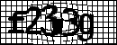
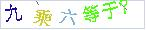
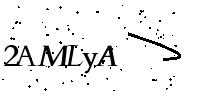



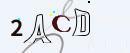



Object Detection
let image = std::fs::read("target.png").unwrap();
let mut det = ddddocr::ddddocr_detection().unwrap();
let res = det.detection(image).unwrap();
println!("{:?}", res);
Reference Example Image
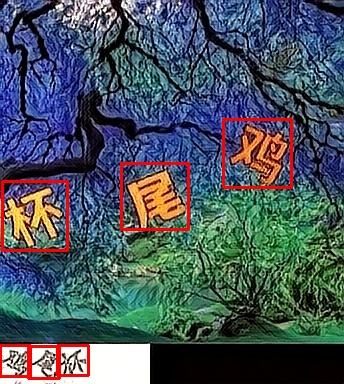
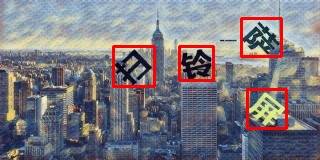
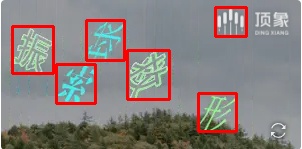
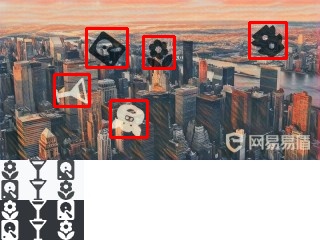
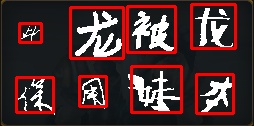
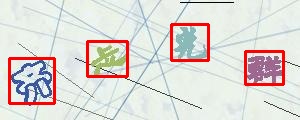
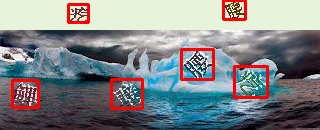
The above are just the click verification code images I can currently find, and I have done a simple test.
Slider Matching
The algorithm is not implemented with a deep neural network.
Algorithm 1
The small slider is a separate PNG image with a transparent background, as shown below:

Then the background has a small slider slot, as shown below:
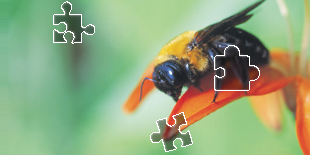
let target_bytes = std::fs::read("target.png").unwrap();
let background_bytes = std::fs::read("background.png").unwrap();
let res = ddddocr::slide_match(target_bytes, background_bytes).unwrap();
println!("{:?}", res);
If the small image does not have too much background, you can use simple_slide_match, usually in jpg or bmp format.
let target_bytes = std::fs::read("target.png").unwrap();
let background_bytes = std::fs::read("background.png").unwrap();
let res = ddddocr::simple_slide_match(target_bytes, background_bytes).unwrap();
println!("{:?}", res);
Algorithm 2
One image is the original image with a pit, as shown below:

One image is the original image, as shown below:

let target_bytes = std::fs::read("target.png").unwrap();
let background_bytes = std::fs::read("background.png").unwrap();
let res = ddddocr::slide_comparison(target_bytes, background_bytes).unwrap();
println!("{:?}", res);
OCR Probability Output
In order to provide more flexible control and range limitation of OCR results, the project supports range limitation of OCR results.
You can return the probability of the full character table by calling classification_probability.
Of course, you can also limit the returned results by setting the output character range through set_ranges.
| Parameter Value | Meaning |
|---|---|
| 0 | Pure integer 0-9 |
| 1 | Pure lowercase letters a-z |
| 2 | Pure uppercase letters A-Z |
| 3 | Lowercase letters a-z + Uppercase letters A-Z |
| 4 | Lowercase letters a-z + Integers 0-9 |
| 5 | Uppercase letters A-Z + Integers 0-9 |
| 6 | Lowercase letters a-z + Uppercase letters A-Z + Integers 0-9 |
| 7 | Default character library - Lowercase letters a-z - Uppercase letters A-Z - Integers 0-9 |
If the value is of type string, please pass in a piece of text that does not contain spaces, where each character is a candidate word, for example: "0123456789+-x/="
let image = std::fs::read("image.png").unwrap();
let mut ocr = ddddocr::ddddocr_classification().unwrap();

// The number 3 corresponds to the enumeration CharsetRange::LowercaseUppercase, no need to write the enumeration
// ocr.set_ranges(3);

// Set the global character set
ocr.set_ranges("0123456789+-x/=");

// Or, the character set for single recognition
// ocr.classification_probability_with_ranges(image, "0123456789+-x/=");

let result = ocr.classification_probability(image).unwrap();

println!("Recognition result: {}", result.get_text());
println!("Recognition confidence: {}", result.get_confidence());

// Oh, it seems there's a bit too much data, be careful of freezing!
println!("Probability: {}", result.json());
Custom OCR Training Model Import
Supports importing custom models trained with dddd_trainer.
use ddddocr::*;

let mut ocr = Ddddocr::with_model_charset(
"myproject_0.984375_139_13000_2022-02-26-15-34-13.onnx",
"charsets.json",
)
.unwrap();
let image_bytes = std::fs::read("888e28774f815b01e871d474e5c84ff2.jpg").unwrap();
let res = ocr.classification(&image_bytes).unwrap();
println!("{:?}", res);
ocr_api_server example
Running method
```sh Usage: ddddocr.exe [OPTIONS]
Options: --address
Listening address. [default: 0.0.0.0:8000] --mcp mcp protocol support, mutually exclusive with only_mcp. --only-mcp Only enable mcp protocol, do not enable normal routing, mutually exclusive with mcp. --ocr Enable content recognition, mutually exclusive with old. --old Enable the old version of model content recognition, which is mutually exclusive with OCR. --det Enable object detection. --slide Enable slider and pit recognition. --ocr-charset-rangeExtension points exported contracts — how you extend this code
MapJson (Interface)Core symbols most depended-on inside this repo
read_imageShape
Languages
Modules by API surface
For agents
$ claude mcp add ddddocr \
  -- python -m otcore.mcp_server <graph>