github.com/4xmen/x-ui @0.5.4
Chat with this repoWhat it actually does AI analysis from the code graph — generated when you open this
README
x-ui
Disclaimer: This project is only for personal learning and communication, please do not use it for illegal purposes, please do not use it in a production environment
xray panel supporting multi-protocol, Multi-lang (English,Chinese), IP Restrication Per Inbound
| Features | Enable? |
|---|---|
| Multi-lang | :heavy_check_mark: |
| IP Restriction | :heavy_check_mark: |
| Inbound Multi User | :heavy_check_mark: |
| Multi User Traffic & expire day | :heavy_check_mark: |
If you think this project is helpful to you, you may wish to give a :star2:
Features
- System Status Monitoring
- Support multi-user multi-protocol, web page visualization operation
- Supported protocols: vmess, vless, trojan, shadowsocks, dokodemo-door, socks, http
- Support for configuring more transport configurations
- Traffic statistics, limit traffic, limit expiration time
- Customizable xray configuration templates
- Support https access panel (self-provided domain name + ssl certificate)
- Support one-click SSL certificate application and automatic renewal
- For more advanced configuration items, please refer to the panel
Enable IP Restrictions Per Inbound
!!! NO NEED TO DO THIS IF YOU HAVE FRESH INSTALL
1 - open panel settings and tab xray related settings find "api": and put bellow code just before it :
```json
"log": {
"loglevel": "warning",
"access": "./access.log"
},
- change access log path as you want
2 - add **IP limit and Unique Email** for inbound(vmess & vless)
# Enable Multi User Traffic & Exprire Day

`!!! NO NEED TO DO THIS IF YOU HAVE FRESH INSTALL`
**for enable traffic for users you should do :**
find this in config :
``` json
"policy": {
"system": {
and add this just after "policy": { :
    "levels": {
      "0": {
        "statsUserUplink": true,
        "statsUserDownlink": true
      }
    },
the final output is like :
  "policy": {
    "levels": {
      "0": {
        "statsUserUplink": true,
        "statsUserDownlink": true
      }
    },

    "system": {
      "statsInboundDownlink": true,
      "statsInboundUplink": true
    }
  },
  "routing": {
restart panel
Install & Upgrade
bash <(curl -Ls https://raw.githubusercontent.com/4xmen/x-ui/master/install.sh)
Manual install & upgrade
- First download the latest compressed package from https://github.com/4xmen/x-ui/releases , generally choose Architecture
amd64 - Then upload the compressed package to the server's
/root/directory androotrootlog in to the server with user
If your server cpu architecture is not
amd64replace another architecture
cd /root/
rm x-ui/ /usr/local/x-ui/ /usr/bin/x-ui -rf
tar zxvf x-ui-linux-amd64.tar.gz
chmod +x x-ui/x-ui x-ui/bin/xray-linux-* x-ui/x-ui.sh
cp x-ui/x-ui.sh /usr/bin/x-ui
cp -f x-ui/x-ui.service /etc/systemd/system/
mv x-ui/ /usr/local/
systemctl daemon-reload
systemctl enable x-ui
systemctl restart x-ui
Install using docker
This docker tutorial and docker image are provided by 4xmen
- install docker
curl -fsSL https://get.docker.com | sh
- install x-ui
mkdir x-ui && cd x-ui
docker run -itd --network=host \
    -v $PWD/db/:/etc/x-ui/ \
    -v $PWD/cert/:/root/cert/ \
    --name x-ui --restart=unless-stopped \
    4xmen/x-ui:latest
Build your own image
docker build -t x-ui .
SSL certificate application
This feature and tutorial are provided by FranzKafkaYu
The script has a built-in SSL certificate application function. To use this script to apply for a certificate, the following conditions must be met:
- Know the Cloudflare registered email
- Know the Cloudflare Global API Key
- The domain name has been resolved to the current server through cloudflare
How to get the Cloudflare Global API Key:


When using, just enter email, domain, API KEY and the schematic diagram is as follows:

Precautions:
- The script uses DNS API for certificate request
- By default, Let'sEncrypt is used as the CA party
- The certificate installation directory is the /root/cert directory
- The certificates applied for by this script are all generic domain name certificates
Tg robot use (under development, temporarily unavailable)
This feature and tutorial are provided by FranzKafkaYu
X-UI supports daily traffic notification, panel login reminder and other functions through the Tg robot. To use the Tg robot, you need to apply for the specific application tutorial. You can refer to the blog Set the robot-related parameters in the panel background, including:
- Tg Robot Token
- Tg Robot ChatId
- Tg robot cycle runtime, in crontab syntax
Reference syntax:
- 30 * * * * * //Notify at the 30s of each point
- @hourly // hourly notification
- @daily // Daily notification (00:00 in the morning)
- @every 8h // notify every 8 hours
-
TG notification content:
-
Node traffic usage
- Panel login reminder
- Node expiration reminder
- Traffic warning reminder
More features are planned...
suggestion system
- CentOS 7+
- Ubuntu 16+
- Debian 8+
common problem
Migrating from v2-ui
First install the latest version of x-ui on the server where v2-ui is installed, and then use the following command to migrate, which will migrate the native v2-ui All inbound account data to x-ui,Panel settings and username passwords are not migrated
Please
Close v2-uiandrestart x-ui, otherwise the inbound of v2-ui will cause aport conflict with the inbound of x-ui
x-ui v2-ui
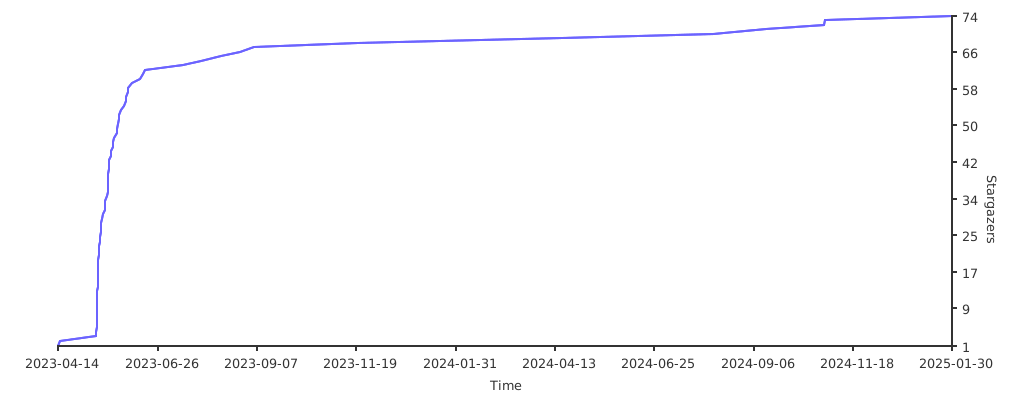
Stargazers over time