github.com/4IceG/luci-app-modemband @1.0.31-r20260215
Chat with this repoBrowse by type
What it actually does AI analysis from the code graph — generated when you open this
README
luci-app-modemband




Luci-app-modemband is a My GUI for https://eko.one.pl/?p=openwrt-modemband. A program to set LTE/5G bands for selected 4G/5G modems.
 What You Should Know /
  Co powinieneś wiedzieć
My package will not work if you are using ModemManager.
Preferred version OpenWrt >= 21.02.Mój pakiet nie będzie działać jeżeli uzywasz ModemManager-a.
Preferowana wersja OpenWrt >= 21.02.
Supported devices:
Pokaż | Show me
- BroadMobi BM806U
- Dell DW5821e Snapdragon X20 LTE (Foxconn T77W968)
- Fibocom FM350-GL
- Fibocom L850-GL
- Fibocom L850-GL in mbim mode
- Fibocom L860-GL
- HP lt4112 (Huawei ME906E)
- HP lt4220 (Foxconn T77W676)
- HP lt4220 (Foxconn T77W676) in mbim mode
- Huawei (various models) in serial mode
  - Huawei E3272/E3372/E3276
  - Huawei ME906E
  - Huawei ME906s
  - Huawei ME909s-120
  - Huawei ME909s-821
  - Huawei ME909s-821a
  - Huawei ME909u-521
- Quectel EC20
- Quectel EC25
- Quectel EG06-E
- Quectel EG18-EA
- Quectel EM12-G
- Quectel EM160R-GL
- Quectel EP06-E
- Quectel RG500Q-EA
- Quectel RG502Q-EA
- Quectel RM500Q-GL
- Quectel RM500U-CNV
- Quectel RM502Q-AE
- Quectel RM502Q-GL
- Quectel RM505Q-AE
- Quectel RM520N-GL
- Sierra Wireless EM7455/MC7455/DW5811e
- SIMCOM SIM8200EA-M2
- Telit LM940
- Telit LN940 (Foxconn T77W676)
- Telit LN940 (Foxconn T77W676) in mbim mode
- Telit LN960 (Foxconn T77W968)
- Telit LN960
- Yuge CLM920 NC_5
- ZTE MF286 (router)
- ZTE MF286A (router)
- ZTE MF286D (router)
- ZTE MF286R (router)
- ZTE MF289R (router)
New modem support / Dodanie wsparcia dla nowego modemu
Do you have another type of modem? Would you like to add support for it? Send PR/mail with description: - exact name of modem and ew version number - VID and PID identifier on the USB bus - serial port used for communication with the modem ("diagnostic") - AT command to read the set bands together with an example result - an AT command to set specific bands - a list of all bands that can be set on the modem
Installation / Instalacja
Pokaż | Show me
Package dependencies for conventional modems.
Modem drivers are required for proper operation.
opkg install kmod-usb-serial kmod-usb-serial-option sms-tool
The sms-tool package is available in the OpenWrt Master repository.
Step 1a. Install sms-tool from Master (Only the current snapshot image).
opkg update
opkg install sms-tool
Step 1b. Download the sms-tool package and install manualy (For older stable version images).
#### To install the sms-tool package, we need to know the architecture name for router.
Pokaż jak znaleźć architekturę routera | Show how to find a router architecture.
For example, we are looking for sms-tool for Zbtlink router ZBT-WE3526.
#### Step 1.
We go to the page and enter the name of our router.
https://firmware-selector.openwrt.org/
#### Step 2.
Click on the folder icon and go to the image download page.
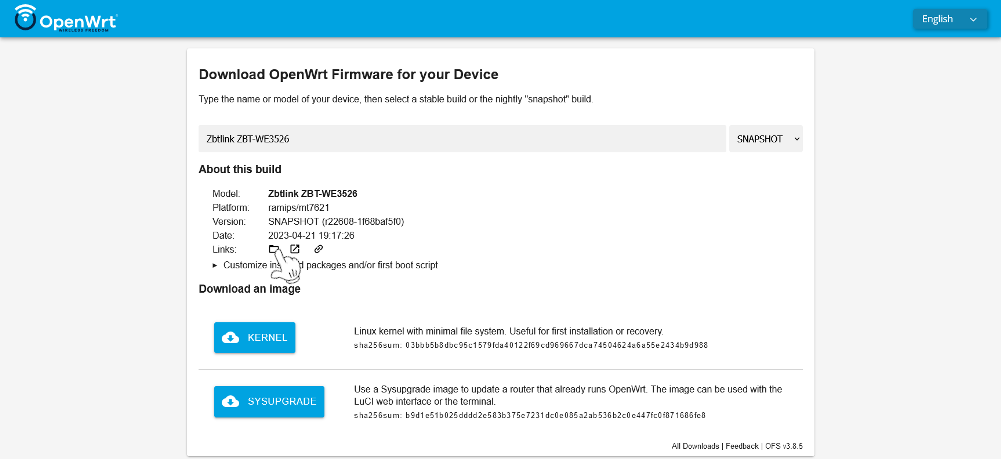
It should take us to a page
https://downloads.openwrt.org/snapshots/targets/ramips/mt7621/
#### Step 3.
Then go into the "packages" folder at the bottom of the page.
https://downloads.openwrt.org/snapshots/targets/ramips/mt7621/packages/We check what the architecture name is for our router. All packets have names ending in mipsel_24kc.ipk, so the architecture we are looking for is mipsel_24kc.
Example of sms-tool installation using the command line.
In the link below, replace
*architecture*with the architecture of your router, e.g. arm_cortex-a7_neon-vfpv4, mipsel_24kc.
wget https://downloads.openwrt.org/snapshots/packages/*architecture*/packages/sms-tool_2022-03-21-f07699ab-1_*architecture*.ipk -O /tmp/sms-tool_2022-03-21.ipk
opkg install /tmp/sms-tool_2022-03-21.ipk
Another way is to download the package manually.
To do this, we go to the page.
https://downloads.openwrt.org/snapshots/packages/We choose our architecture, e.g. arm_cortex-a7_neon-vfpv4, mipsel_24kc.
https://downloads.openwrt.org/snapshots/packages/mipsel_24kc/Go to the "packages" folder.
https://downloads.openwrt.org/snapshots/packages/mipsel_24kc/packages/Looking for "sms-tool_2022-03-21". We can use search by using Ctr + F and typing "sms-tool". Save the package to your computer for further installation on the router.
Step 2. Add my repository (https://github.com/4IceG/Modem-extras) to the image and follow the commands.
opkg update
opkg install luci-app-modemband
For images downloaded from eko.one.pl. Installation procedure is similar, only there is no need to manually download the sms-tool package.
User compilation / Kompilacja przez użytkownika
Pokaż | Show me
#The package can be added to Openwrt sources in two ways:

cd feeds/luci/applications/
git clone https://github.com/4IceG/luci-app-modemband.git
cd ../../..
./scripts/feeds update -a; ./scripts/feeds install -a
make menuconfig

or e.g.

cd packages/
git clone https://github.com/4IceG/luci-app-modemband.git
git pull
make package/symlinks
make menuconfig

You may need to correct the file paths and the number of folders to look like this:
feeds/luci/applications/luci-app-modemband/Makefile
or
packages/luci-app-modemband/Makefile

Then you can compile the packages one by one, an example command:
make V=s -j1 feeds/luci/applications/luci-app-modemband/compile
Preview / Podgląd
"Preferred LTE bands" window / Okno "Preferowane pasma LTE":


"Preferred 5G SA bands" window / Okno "Preferowane pasma 5G SA":

"Preferred 5G NSA bands" window / Okno "Preferowane pasma 5G NSA":

"Configuration" window / Okno "Konfiguracji":

"Modem settings template" window / Okno "Szablon ustawień modemu":

Thanks to / Podziękowania dla
Core symbols most depended-on inside this repo
Shape
Languages
Modules by API surface
For agents
$ claude mcp add luci-app-modemband \
  -- python -m otcore.mcp_server <graph>