github.com/1771-Technologies/lytenyte @v2.1.2
Chat with this repoWhat it actually does AI analysis from the code graph — generated when you open this
README
<img width="360" alt="Logo of LyteNyte Grid" src="https://xwhoymbxqtnizjadugph.supabase.co/storage/v1/object/public/images/github-lytenyte-light.svg"/>
The Fastest React Data Grid On The Modern Web
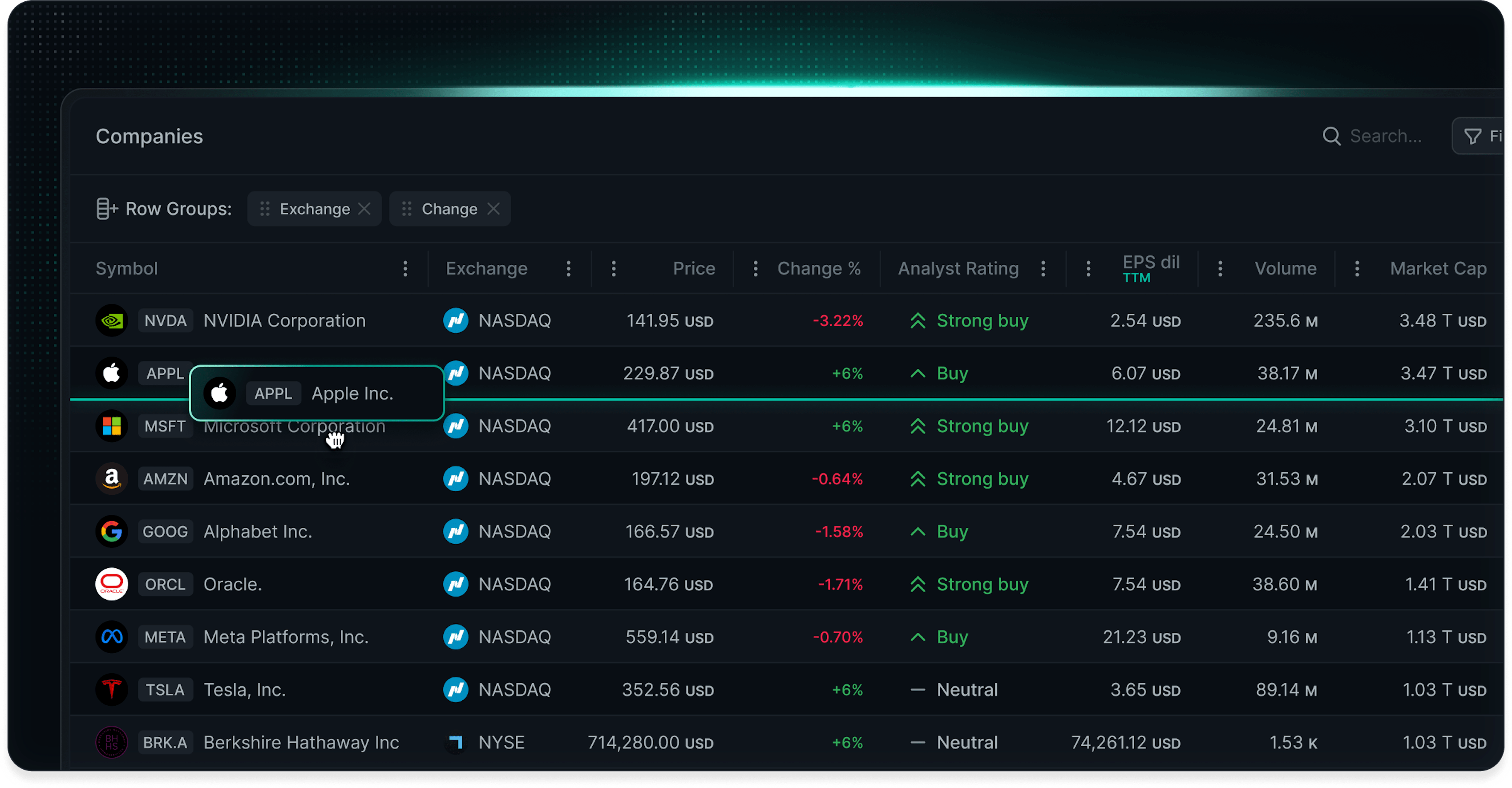
LyteNyte Grid is a ~40 KB, zero-dependency React data grid engineered for high performance and enterprise-scale datasets. It can handle 10,000 updates/sec and render millions of rows. No wrappers. No heavy abstractions.
Choose between headless components or a pre-styled grid out of the box, and ship faster with a declarative API that is purpose-built for React.
Start with LyteNyte Grid Core (free and open source). Upgrade to LyteNyte Grid PRO for advanced enterprise features and support.









Website — Documentation — Demo — Pricing — EULA
LyteNyte Editions
LyteNyte Grid is available in two editions:
-
LyteNyte Grid Core: Free, open-source edition for building high-performance data tables. Includes sorting, filtering, editing, row selection, detail views, and more. Also includes advanced features such as aggregation, row grouping, and cell range selection, often locked behind paywalls in other grids.
-
LyteNyte Grid PRO: Commercial edition that extends Core with powerful enterprise features, including server-side data loading, pivoting, tree data, component managers, and advanced filtering. Build custom menus, popovers, expressions, and workflow-driven UIs with ease.
AI-Enhanced Workflows
LyteNyte Grid AI Skills are structured context files for Claude Code, Windsurf, Cursor, and other AI coding agents. Skills provide agents with accurate, curated context for LyteNyte Grid, allowing them to generate complex grid implementations with greater speed and reliability.
Instead of building the grid manually, developers can describe the desired result and let the agent generate the implementation.
Install LyteNyte Grid AI Skills
npx skills add 1771-Technologies/lytenyte
Once installed, the Skill activates automatically whenever you work on a LyteNyte Grid task. No special prompting is needed. Skills are actively maintained by the 1771 Technologies team and versioned alongside each LyteNyte Grid release.
See our AI Skills Overview guide to learn more.
Features
⚛️ Reactive Architecture
| Feature | Core | PRO |
|---|---|---|
| Declarative Prop Configuration | ✅ | ✅ |
| Controlled or Uncontrolled State | ✅ | ✅ |
| React Compiler Support | ✅ | ✅ |
| Headless Components | ✅ | ✅ |
🤖 AI Enhanced Workflows
| Feature | Core | PRO |
|---|---|---|
| AI Skills | ✅ | ✅ |
🔌 API Extensions
| Feature | Core | PRO |
|---|---|---|
| Imperative Method Extensions | ✅ | ✅ |
| Column Extensions | ✅ | ✅ |
🚀 Virtualization
| Feature | Core | PRO |
|---|---|---|
| Row Virtualization | ✅ | ✅ |
| Column Virtualization | ✅ | ✅ |
🎨 Styling & Theming
| Feature | Core | PRO |
|---|---|---|
| Unstyled Support | ✅ | ✅ |
| Styled Themes | ✅ | ✅ |
| ↳ Prebuilt Themes | ✅ | ✅ |
| ↳ Tailwind | ✅ | ✅ |
| ↳ CSS Modules | ✅ | ✅ |
| ↳ CSS-in-JS | ✅ | ✅ |
📋 Rows
| Feature | Core | PRO |
|---|---|---|
| Basic Row Operations | ✅ | ✅ |
| ↳ Row Pinning | ✅ | ✅ |
| ↳ Row Spanning | ✅ | ✅ |
| Row Height | ✅ | ✅ |
| ↳ Variable Row Height | ✅ | ✅ |
| ↳ Fixed Row Height | ✅ | ✅ |
| ↳ Fill Row Height | ✅ | ✅ |
| Full Width Rows | ✅ | ✅ |
| Row Dragging / Reordering | ✅ | ✅ |
| ↳ Single Row Dragging | ✅ | ✅ |
| ↳ Multi-Row Dragging | ✅ | ✅ |
| ↳ Grid to Grid Dragging | ✅ | ✅ |
| ↳ External Drop Zone Dragging | ✅ | ✅ |
📊 Columns
| Feature | Core | PRO |
|---|---|---|
| Basic Column Operations | ✅ | ✅ |
| ↳ Column Resizing | ✅ | ✅ |
| ↳ Column Pinning | ✅ | ✅ |
| ↳ Column Spanning | ✅ | ✅ |
| ↳ Column Reordering | ✅ | ✅ |
| ↳ Column Grouping | ✅ | ✅ |
| ↳ Column Visibility | ✅ | ✅ |
| Column Autosizing | ✅ | ✅ |
| ↳ Cell Autosizing | ✅ | ✅ |
| ↳ Header Autosizing | ✅ | ✅ |
| ↳ Double Click Resizing | ✅ | ✅ |
| Custom Header Render | ✅ | ✅ |
| Column Floating Header | ✅ | ✅ |
| Dynamic Field Computation | ✅ | ✅ |
| Marker Column | ✅ | ✅ |
🔲 Cells
| Feature | Core | PRO |
|---|---|---|
| Cell Rendering | ✅ | ✅ |
| Cell Diff Flashing | ✅ | ✅ |
| Cell Tooltips & Popovers | ✅ | ✅ |
🔀 Sorting
| Feature | Core | PRO |
|---|---|---|
| Single Column Sort | ✅ | ✅ |
| Multi Column Sort | ✅ | ✅ |
| Custom Dynamic Sort | ✅ | ✅ |
☑️ Se
Extension points exported contracts — how you extend this code
Core symbols most depended-on inside this repo
Shape
Languages
Modules by API surface
For agents
$ claude mcp add lytenyte \
  -- python -m otcore.mcp_server <graph>