github.com/bwt-dev/bwt @v0.2.4
Chat with this repoWhat it actually does AI analysis from the code graph — generated when you open this
README
Bitcoin Wallet Tracker









bwt is a lightweight wallet descriptor/xpub tracker and query engine for Bitcoin, implemented in Rust.
🔸 Personal wallet indexer (EPS-like)
🔸 Descriptor-based tracking
🔸 Electrum RPC server (also available as a plugin!)
🔸 Developer-friendly, modern HTTP REST API
🔸 Real-time updates with Server-Sent-Events or Web Hooks
Support development: ⛓️ on-chain or ⚡ lightning via BTCPay
- Intro
- Setting up bwt
- Installation
- Electrum-only server
- Pruning
- Real-time indexing
- Advanced options
- Electrum plugin 💥
- Manual Electrum setup
- HTTP API
- Wallets
- Transactions
- Addresses
- Outputs
- Blocks
- Mempool & Fees
- Server-Sent Events 🌟
- Miscellaneous
- Web Hooks
- Developing 👩💻
- Reproducible builds
- Thanks
Intro
bwt is a lightweight and performant descriptor-based wallet indexer backed by a bitcoin full node, using a model similar to that of Electrum Personal Server.
It can serve as a personal alternative to public Electrum servers or power bitcoin apps such as wallet backends, payment processors and more.
It uses bitcoind to keep track of your wallet addresses (derived from your xpub(s)) and builds an index of their history that can be queried using the Electrum RPC protocol or using bwt's custom designed HTTP API.
Real-time updates are available through Server-Sent events (a streaming long-lived HTTP connection), or using Web Hooks push updates (an HTTP request sent to your URL with the event).
The index is currently managed in-memory and does not get persisted (this is expected to change), but building it is pretty fast: bwt can index thousands of transactions in under a second.
TL;DR: EPS + Rust + Modern HTTP API
Setting up bwt
Get yourself a synced Bitcoin Core node (v0.19 is recommended, v0.17 is sufficient. txindex is not required, pruning is supported)
and install bwt using one of the methods below.
Installation
💥 Electrum desktop users can also install bwt as an Electrum plugin, which provides a GUI and doesn't require the standalone server installation described below.
Signed pre-built binaries
Available for download on the releases page (Linux, Mac, Windows and ARMv7/v8).
The releases are signed by Nadav Ivgi (@shesek). The public key can be verified on the PGP WoT, github, twitter, keybase, hacker news and this video presentation (bottom of slide).
# Download (change x86_64-linux to your platform)
$ wget https://github.com/bwt-dev/bwt/releases/download/v0.2.4/bwt-0.2.4-x86_64-linux.tar.gz

# Fetch public key
$ gpg --keyserver keyserver.ubuntu.com --recv-keys FCF19B67866562F08A43AAD681F6104CD0F150FC

# Verify signature
$ wget -qO - https://github.com/bwt-dev/bwt/releases/download/v0.2.4/SHA256SUMS.asc \
  | gpg --decrypt - | grep ' bwt-0.2.4-x86_64-linux.tar.gz$' | sha256sum -c -

$ tar zxvf bwt-0.2.4-x86_64-linux.tar.gz
$ ./bwt-0.1.5-x86_64-linux/bwt --xpub <xpub> ...
The signature verification should show Good signature from "Nadav Ivgi <nadav@shesek.info>" ... Primary key fingerprint: FCF1 9B67 ... and bwt-0.2.4-x86_64-linux.tar.gz: OK.
The builds are reproducible and can be verified against Travis CI. See more details here.
From source
Install Rust and:
$ sudo apt install build-essential
$ git clone https://github.com/bwt-dev/bwt && cd bwt
$ cargo build --release
$ ./target/release/bwt --xpub <xpub> ...
Or using the crates.io package:
$ cargo install bwt
$ bwt --xpub <xpub>
(Make sure ~/.cargo/bin is in your PATH)
With Docker
Assuming your bitcoin datadir is at ~/.bitcoin,
$ docker run -it --net host -v ~/.bitcoin:/bitcoin:ro shesek/bwt --xpub <xpub> ...
(Mounting the bitcoin datadir is not necessary if you're not using the cookie file.)
Running bwt
bwt --xpub <xpub> should be sufficient to get you rolling.
You can configure the --network (defaults to bitcoin),
your --bitcoind-url (defaults to http://127.0.0.1:<default-rpc-port>),
--bitcoind-dir (defaults to ~/.bitcoin) and
--bitcoind-auth <user:pass> (defaults to using the cookie file from bitcoind-dir).
You can set multiple --xpubs to track. This also supports ypubs and zpubs.
To set an explicit script type, use --xpub <xpub>:<type>, where type is one of wpkh, shwpkh or pkh.
You can also track output script descriptors using --descriptor. For example, --descriptor 'wpkh(<xpub>/0/*)'.
Standalone addresses can be tracked with --address <address> or --addresses-file <path>.
To speed up rescanning for historical transactions, you can provide the wallet creation date with --rescan-since <timestmap>.
The timestamp can be a YYYY-MM-DD formatted string or 'now' to disable rescanning and watch for new
transactions only (for newly created wallets).
Setting this is highly recommended.
By default, the Electrum server will be bound on port 50001/60001/60401 (according to the network)
and the HTTP server will be bound on port 3060. This can be controlled with --electrum-addr
and --http-addr.
⚠️ Both the HTTP API server and the Electrum server are unauthenticated and unencrypted by default. If you're exposing them over the internet, they should be put behind a secure transport like an SSH tunnel, a VPN, or a Tor hidden service.
Authentication (but not encryption) can be enabled by following the instructions here.
You may set -v to increase verbosity or -vv to increase it more.
See --help for the full list of options.
Configuration file
Configuration options can be set under ~/bwt.env as environment variables in the dotenv format.
Options that accept multiple values (DESCRIPTORS, XPUBS, ADDRESSES and WEBHOOKS_URLs)
can be provided as a ;-separated list, or using wildcard XPUB_*/DESC_*/ADDRESS_* variables.
For example:
NETWORK=regtest
GAP_LIMIT=20
RESCAN_SINCE=2020-01-01
XPUBS='<xpub1>;<xpub2>'
DESCRIPTORS=pkh(<xpub>/0/*)
XPUB_BOB=<xpub3>
XPUB_ALICE=<xpub4>
Setting the environment variables directly is also supported.
Electrum-only server
If you're only interested in a standalone Electrum server, you may disable the HTTP API server
by downloading the electrum_only pre-built binary,
using the shesek/bwt:electrum docker image
or building bwt with --no-default-features --features cli,electrum.
This removes several large dependencies and disables the track-spends database index
(which is not needed for the electrum server).
(Also see the Electrum plugin.)
Pruning
You can use bwt with pruning, but a pruned node is only able to scan the recent blocks it still has available for transactions related to your wallet. This means that the --rescan-since date has to be within the range of non-pruned blocks, or set to 'now'. This makes pruned nodes primarily suitable for tracking newly created wallets.
There is, however, an opportunity to scan for your wallet's full history during the initial sync of your node, as the blocks will get scanned before getting pruned. You'll need to set --no-wait-sync to import the addresses without waiting for bitcoind to finish syncing first and make sure bwt runs before the earliest block containing a wallet transaction gets processed.
You can use --prune-until <target> to automatically prune the chain up to the given target (height, unix timestamp or YYYY-MM-DD formatted date). This requires configuring bitcoind with prune=1 to allow manual pruning via the RPC.
To connect Electrum, you will need to configure it with --skipmerklecheck to tolerate missing SPV proofs (they will be unavailable for transactions in pruned blocks).
If you're running Electrum with
--skipmerklecheck, you may also configure bwt with--electrum-skip-merkleto save some resources by not generating SPV proofs even when it's possible. Both of these settings are automatically enabled when using the Electrum plugin.
Bitcoin Core multi-wallet
If you're using multi-wallet,
you can specify which wallet to use with --bitcoind-wallet <name> (or -w <name>).
Using a separate wallet for bwt is recommended. You can set
-w bwt --create-wallet-if-missing to have bwt create one for you.
Note that EPS and bwt should not be run on the same bitcoind wallet with the same xpub, they will conflict.
Advanced options
Real-time indexing
By default, bwt will query bitcoind for new blocks/transactions every 5 seconds.
This can be adjusted with --poll-interval <seconds>.
To get real real-time updates, you may configure your bitcoind node to send a POST /sync request to the bwt
http server whenever a new block or wallet transaction is found, using the walletnotify and blocknotify options.
Example bitcoind configuration:
walletnotify=curl -X POST http://localhost:3060/sync
blocknotify=curl -X POST http://localhost:3060/sync
After verifying this works, you may increase your --interval-poll to avoid unnecessary indexing and reduce cpu usage.
If you're using the electrum-only mode without the http server, you may instead configure bwt to bind
on a unix socket using --unix-listener-path <path> and open a connection to it initiate an indexer sync.
For example, start with --unix-listener-path /home/satoshi/bwt-sync-socket and configure your bitcoind with:
walletnotify=nc -U /home/satoshi/bwt-sync-socket
blocknotify=nc -U /home/satoshi/bwt-sync-socket
If nc is not available, you can also use socat - UNIX-CONNECT:/home/satoshi/bwt-sync-socket.
If you're using docker, you can bind the socket on a directory mounted from the host to make it available outside the container.
For example, --unix-listener-path /bitcoin/bwt-socket.
Gap limit
You may configure the gap limit with --gap--limit <N> (defaults to 20).
The gap limit sets the maximum number of consecutive unused addresses to be imported before assuming there are no more used addresses to be discovered.
You can import larger batches with a higher gap during the initial sync using --initial-import-size <N> (defaults to 350).
Higher value means less rescans. Should be increased for large wallets.
Scriptable transaction broadcast
You may set a custom command for broadcasting transactions via --tx-broadcast-cmd <cmd>. The string {tx_hex} will be replaced with the hex-encoded transaction.
The command will be used in place of broadcasting transactions using the full node, which may provide better privacy in some circumstances.
For example, to broadcast transactions over Tor using the blockstream.info onion service, you can use:
--tx-broadcast-cmd '[ $(curl -s -x socks5h://localhost:9050 http://explorerzydxu5ecjrkwceayqybizmpjjznk5izmitf2modhcusuqlid.onion/api/tx -d {tx_hex} -o /dev/stderr -w "%{http_code}" -H "User-Agent: curl/7.$(shuf -n1 -e 47 58 64 68).0") -eq 200 ]'
(Replace port 9050 with 9150 if you're using the Tor browser bundle.)
Electrum plugin
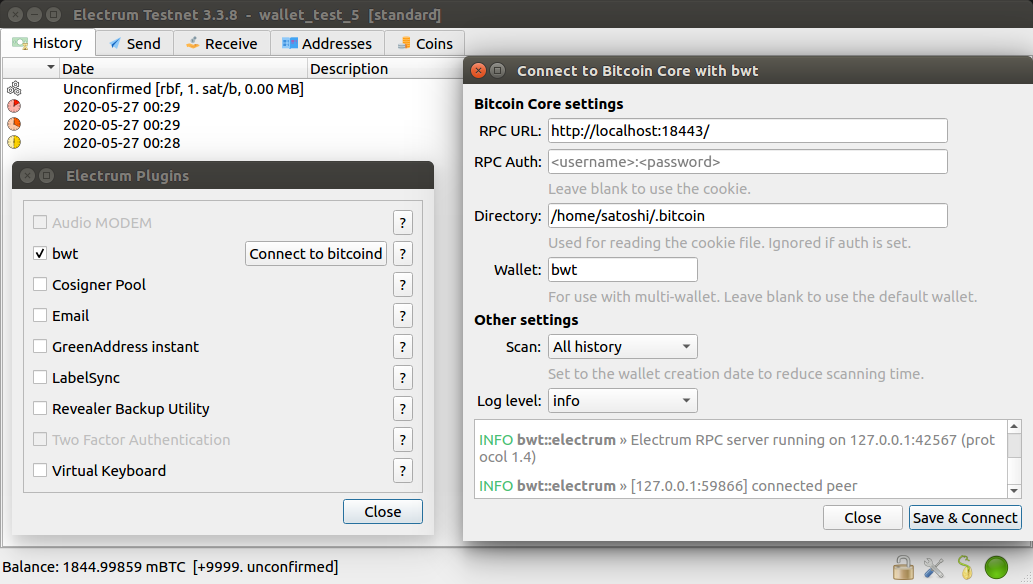
You can setup bwt as an Electrum plugin, which allows connecting Electrum to a Bitcoin Core full node backend by running an embedded Electrum server within the Electrum wallet itself.
See https://github.com/bwt-dev/bwt-electrum-plugin for more details and installation instructions.
Manual Electrum setup (without the plugin)
Setup the bwt server, then start Electrum with:
$ electrum --skipmerklecheck --oneserver --server 127.0.0.1:50001:t
Alternatively, you can also set 127.0.0.1:50001:t as your server using the server selection GUI
(note the :t, which disables TLS). Note, however, that it is not possible to configure oneserver
and skipmerklecheck using the GUI.
Note that setting
--skipmerklechecki