github.com/bridgecrewio/checkov @3.3.6
Chat with this repoWhat it actually does AI analysis from the code graph — generated when you open this
README











Checkov is a static code analysis tool for infrastructure as code (IaC) and also a software composition analysis (SCA) tool for images and open source packages.
It scans cloud infrastructure provisioned using Terraform, Terraform plan, Cloudformation, AWS SAM, Kubernetes, Helm charts, Kustomize, Dockerfile, Serverless, Bicep, OpenAPI, ARM Templates, or OpenTofu and detects security and compliance misconfigurations using graph-based scanning.
It performs Software Composition Analysis (SCA) scanning which is a scan of open source packages and images for Common Vulnerabilities and Exposures (CVEs).
Checkov also powers Prisma Cloud Application Security, the developer-first platform that codifies and streamlines cloud security throughout the development lifecycle. Prisma Cloud identifies, fixes, and prevents misconfigurations in cloud resources and infrastructure-as-code files.


Table of contents
## Features
- Over 1000 built-in policies cover security and compliance best practices for AWS, Azure and Google Cloud.
- Scans Terraform, Terraform Plan, Terraform JSON, CloudFormation, AWS SAM, Kubernetes, Helm, Kustomize, Dockerfile, Serverless framework, Ansible, Bicep, ARM, and OpenTofu template files.
- Scans Argo Workflows, Azure Pipelines, BitBucket Pipelines, Circle CI Pipelines, GitHub Actions and GitLab CI workflow files
- Supports Context-awareness policies based on in-memory graph-based scanning.
- Supports Python format for attribute policies and YAML format for both attribute and composite policies.
- Detects AWS credentials in EC2 Userdata, Lambda environment variables and Terraform providers.
- Identifies secrets using regular expressions, keywords, and entropy based detection.
- Evaluates Terraform Provider settings to regulate the creation, management, and updates of IaaS, PaaS or SaaS managed through Terraform.
- Policies support evaluation of variables to their optional default value.
- Supports in-line suppression of accepted risks or false-positives to reduce recurring scan failures. Also supports global skip from using CLI.
- Output currently available as CLI, CycloneDX, JSON, JUnit XML, CSV, SARIF and github markdown and link to remediation guides.
Screenshots
Scan results in CLI

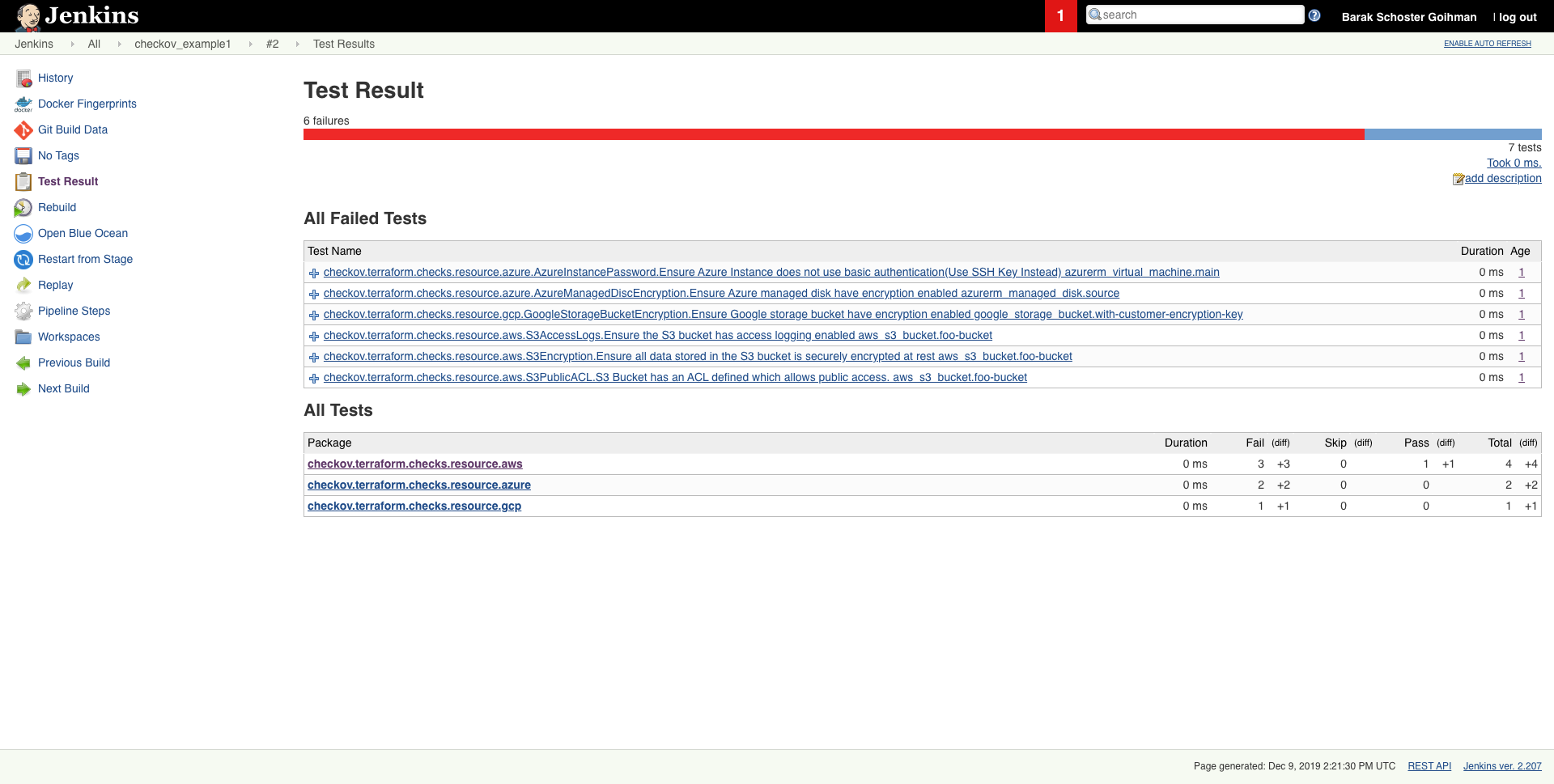
Scheduled scan result in Jenkins
Getting started
Requirements
- Python >= 3.9, <=3.12
- Terraform >= 0.12
Installation
To install pip follow the official docs
pip3 install checkov
Certain environments (e.g., Debian 12) may require you to install Checkov in a virtual environment
# Create and activate a virtual environment
python3 -m venv /path/to/venv/checkov
cd /path/to/venv/checkov
source ./bin/activate

# Install Checkov with pip
pip install checkov

# Optional: Create a symlink for easy access
sudo ln -s /path/to/venv/checkov/bin/checkov /usr/local/bin/checkov
or with Homebrew (macOS or Linux)
brew install checkov
Enabling bash autocomplete
source <(register-python-argcomplete checkov)
Upgrade
if you installed checkov with pip3
pip3 install -U checkov
or with Homebrew
brew upgrade checkov
Configure an input folder or file
checkov --directory /user/path/to/iac/code
Or a specific file or files
checkov --file /user/tf/example.tf
Or
checkov -f /user/cloudformation/example1.yml -f /user/cloudformation/example2.yml
Or a terraform plan file in json format
terraform init
terraform plan -out tf.plan
terraform show -json tf.plan  > tf.json
checkov -f tf.json
Note: terraform show output file tf.json will be a single line.
For that reason all findings will be reported line number 0 by Checkov
check: CKV_AWS_21: "Ensure all data stored in the S3 bucket have versioning enabled"
    FAILED for resource: aws_s3_bucket.customer
    File: /tf/tf.json:0-0
    Guide: https://docs.prismacloud.io/en/enterprise-edition/policy-reference/aws-policies/s3-policies/s3-16-enable-versioning
  ```

If you have installed `jq` you can convert json file into multiple lines with the following command:
```sh
terraform show -json tf.plan | jq '.' > tf.json
Scan result would be much user friendly.
checkov -f tf.json
Check: CKV_AWS_21: "Ensure all data stored in the S3 bucket have versioning enabled"
    FAILED for resource: aws_s3_bucket.customer
    File: /tf/tf1.json:224-268
    Guide: https://docs.prismacloud.io/en/enterprise-edition/policy-reference/aws-policies/s3-policies/s3-16-enable-versioning

        225 |               "values": {
        226 |                 "acceleration_status": "",
        227 |                 "acl": "private",
        228 |                 "arn": "arn:aws:s3:::mybucket",
Alternatively, specify the repo root of the hcl files used to generate the plan file, using the --repo-root-for-plan-enrichment flag, to enrich the output with the appropriate file path, line numbers, and codeblock of the resource(s). An added benefit is that check suppressions will be handled accordingly.
checkov -f tf.json --repo-root-for-plan-enrichment /user/path/to/iac/code
Scan result sample (CLI)
Passed Checks: 1, Failed Checks: 1, Suppressed Checks: 0
Check: "Ensure all data stored in the S3 bucket is securely encrypted at rest"
/main.tf:
     Passed for resource: aws_s3_bucket.template_bucket
Check: "Ensure all data stored in the S3 bucket is securely encrypted at rest"
/../regionStack/main.tf:
     Failed for resource: aws_s3_bucket.sls_deployment_bucket_name
Start using Checkov by reading the Getting Started page.
Using Docker
docker pull bridgecrew/checkov
docker run --tty --rm --volume /user/tf:/tf --workdir /tf bridgecrew/checkov --directory /tf
Note: if you are using Python 3.6(Default version in Ubuntu 18.04) checkov will not work, and it will fail with ModuleNotFoundError: No module named 'dataclasses' error message. In this case, you can use the docker version instead.
Note that there are certain cases where redirecting docker run --tty output to a file - for example, if you want to save the Checkov JUnit output to a file - will cause extra control characters to be printed. This can break file parsing. If you encounter this, remove the --tty flag.
The --workdir /tf flag is optional to change the working directory to the mounted volume. If you are using the SARIF output -o sarif this will output the results.sarif file to the mounted volume (/user/tf in the example above). If you do not include that flag, the working directory will be "/".
Running or skipping checks
By using command line flags, you can specify to run only named checks (allow list) or run all checks except those listed (deny list). If you are using the platform integration via API key, you can also specify a severity threshold to skip and / or include. Moreover, as json files can't contain comments, one can pass regex pattern to skip json file secret scan.
See the docs for more detailed information about how these flags work together.
Examples
Allow only the two specified checks to run:
checkov --directory . --check CKV_AWS_20,CKV_AWS_57
Run all checks except the one specified:
checkov -d . --skip-check CKV_AWS_20
Run all checks except checks with specified patterns:
checkov -d . --skip-check CKV_AWS*
Run all checks that are MEDIUM severity or higher (requires API key):
checkov -d . --check MEDIUM --bc-api-key ...
Run all checks that are MEDIUM severity or higher, as well as check CKV_123 (assume this is a LOW severity check):
checkov -d . --check MEDIUM,CKV_123 --bc-api-key ...
Skip all checks that are MEDIUM severity or lower:
checkov -d . --skip-check MEDIUM --bc-api-key ...
Skip all checks that are MEDIUM severity or lower, as well as check CKV_789 (assume this is a high severity check):
checkov -d . --skip-check MEDIUM,CKV_789 --bc-api-key ...
Run all checks that are MEDIUM severity or higher, but skip check CKV_123 (assume this is a medium or higher severity check):
checkov -d . --check MEDIUM --skip-check CKV_123 --bc-api-key ...
Run check CKV_789, but skip it if it is a medium severity (the --check logic is always applied before --skip-check)
checkov -d . --skip-check MEDIUM --check CKV_789 --bc-api-key ...
For Kubernetes workloads, you can also use allow/deny namespaces. For example, do not report any results for the kube-system namespace:
checkov -d . --skip-check kube-system
Run a scan of a container image. First pull or build the image then refer to it by the hash, ID, or name:tag:
checkov --framework sca_image --docker-image sha256:1234example --dockerfile-path /Users/path/to/Dockerfile --repo-id ... --bc-api-key ...

checkov --docker-image <image-name>:tag --dockerfile-path /User/path/to/Dockerfile --repo-id ... --bc-api-key ...
You can use --image flag also to scan container image instead of --docker-image for shortener:
checkov --image <image-name>:tag --dockerfile-path /User/path/to/Dockerfile --repo-id ... --bc-api-key ...
Run an SCA scan of packages in
Core symbols most depended-on inside this repo
getShape
Languages
Modules by API surface
Dependencies from manifests, versioned
Datastores touched
For agents
$ claude mcp add checkov \
  -- python -m otcore.mcp_server <graph>